⚡️Cyber Monday deals are live! View Deals
Search  for anything...

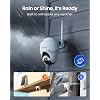
REOLINK Security Camera Wireless Outdoor, Pan Tilt Solar Powered, 5MP 2K+ Color Night Vision, 2.4/5GHz WiFi, Works with Smart Home for Surveillance, Home Hub Compatible, Argus PT + Solar Panel

  • Based on 9,972 reviews
Condition: New
Checking for the best price...
$109.99 Why this price?
Cyber Monday Deal · 8% off was $119.99

Buy Now, Pay Later


As low as $18.33 / mo
  • – 6-month term
  • – No impact on credit
  • – Instant approval decision
  • – Secure and straightforward checkout

Ready to go? Add this product to your cart and select a plan during checkout.

Payment plans are offered through our trusted finance partners Klarna, Affirm, Afterpay, Apple Pay, and PayTomorrow. No-credit-needed leasing options through Acima may also be available at checkout.

Learn more about financing & leasing here.

Selected Option

Free shipping on this product

This item is eligible for return within 30 days of receipt

To qualify for a full refund, items must be returned in their original, unused condition. If an item is returned in a used, damaged, or materially different state, you may be granted a partial refund.

To initiate a return, please visit our Returns Center.

View our full returns policy here.


Availability: 20 left in stock
Fulfilled by Amazon

Arrives Wednesday, Dec 3
Order within 7 hours and 44 minutes
Available payment plans shown during checkout

Protection Plan Protect Your Purchase
Checking for protection plans...

Style: 5MP


Features

  • 100% Wire-Free and Solar Powered: Argus PT runs on 2.4/5 GHz WiFi and stays fully-charged with Reolink Solar Panel which realize 100% wire-free security. With high-capacity battery, long-lasting power per charge and no worry about weather.
  • Tilt & Pan and Stunning Night Vision: Argus PT can turn its head 355 horizontally and 140 vertically, which shows you everything in 5MP HD, you can see clearer night vision up to 33ft even at poor light.
  • Real Smart Home Security Camera: Adopt more sensitive digital PIR motion sensor, support smart human/vehicle detection and instant alerts, event recording to micro SD card for later playback and download.
  • Quick and Easy Setup: Easily mounted and installed both indoors and outdoors. With weatherproof certification, it never quits no matter in heavy rain or extreme sun. Scan the QR code with free Reolink App to get started.
  • Truly Risk-free Purchase: Videos can be securely stored locally on an SD card (up to 128GB, not included). which you can access and playback anytime and anywhere via Reolink APP/Client. 2-Year Warranty ensures this will quickly become your favorite no-risk purchase. Listen and talk interactively with your beloved ones, ward off would-be burglars when off-site.

Recommended Uses For Product: Outdoor Security


Brand: REOLINK


Model Name: Argus PT


Connectivity Technology: Wireless


Special Feature: Time-Lapse


Indoor/Outdoor Usage: Outdoor


Compatible Devices: Desktop


Power Source: Solar Powered


Connectivity Protocol: Wi-Fi


Controller Type: SmartThings


Mounting Type: Wall Mount


Video Capture Resolution: 5 MP


Color: (1) White


Number of Items: 1


Included Components: Camera, Solar Panel, Bracket


Number of Channels: 1


Wireless Communication Technology: Wi-Fi


Form Factor: Dome


Effective Video Resolution: 1080 Pixels


Viewing Angle: 360 Degrees


Installation Type: Screw In


Night Vision Range: 10 Meters


Frame Rate: 15 frames per second


Voltage: 5 Volts (DC)


Wattage: 5 watts


Item dimensions L x W x H: 8.53 x 6.25 x 7.78 inches


Water Resistance Level: Water Repellent


Batteries Required?: Yes


Flash Memory Type: Micro SD


Item Weight: 1.65 Pounds


Video encoding: H.265


Shape: Dome


Focus Type: Auto Focus


Field Of View: 110 Degrees


Low light technology: Infrared Light


Zoom Type: Digital Zoom


Zoom Ratio: 6


Alert Type: Motion Only


Room Type: Garage, Kitchen, Living Room, Hallway


Light Source Type: Infrared


Video Capture Format: MP4


Specific Uses For Product: Outside


Unit Count: 1.0 Count


Photo Sensor Technology: CMOS


Effective Still Resolution: 5 MP


International Protection Rating: IP65


Control Method: App


Flash Memory Supported Size Maximum: 512 GB


Product Grade: Residential


Product Dimensions: 8.53 x 6.25 x 7.78 inches


Item Weight: 1.65 pounds


Item model number: REOLINK Argus PT+SP


Batteries: 1 Lithium Ion batteries required. (included)


Date First Available: August 7, 2019


Manufacturer: Reolink Digital


Country of Origin: Vietnam


Frequently asked questions

If you place your order now, the estimated arrival date for this product is: Wednesday, Dec 3

Yes, absolutely! You may return this product for a full refund within 30 days of receiving it.

To initiate a return, please visit our Returns Center.

View our full returns policy here.

  • Klarna Financing
  • Affirm Pay in 4
  • Affirm Financing
  • Afterpay Financing
  • PayTomorrow Financing
  • Financing through Apple Pay
Leasing options through Acima may also be available during checkout.

Learn more about financing & leasing here.

Top Amazon Reviews

  • UPDATE The best camera we've bought so far and we have several different brands !
Style: 5MP
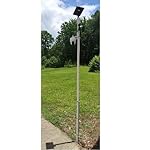
UPDATE: I had recently got a new router, a Netgear Nighthawk and was having a problem getting the Reolink cameras connected back again but after much research......SUCCESS! I found a solution that worked for me, hopefully this info might help others too. After researching even more online I found a suggestion to try creating a guest wifi network on your router. So I gave it a try and it WORKED to get my 3 Reolink Argus PT cameras connected to me new router. Now while I feel like it wasn't necessary in my case to give the guest wifi network a password without any special characters I did it anyhow and used just numbers and letters (the cameras had connected to my old router with a special character in that password) Another point to remember is I think you need to have your phone on the same network when adding the cameras. Just checked and it seems you need to make sure your phone is connected to the guest network when wanting to access the Reolink cameras you connected thru the guest network. (now I have other brand cameras that I connect to the main network that I can still access when on the guest network but an indoor Reolink camera I have E1 that I was able to connect to the main network I can't access thru the guest network like the other brands. Now I did try seeing if I could switch the cameras back to the main wifi but it didn't work and I have to remove and reinstall the camera I tried it on and add it again to the guest wifi network to access it again. Well, I guess having to switch networks when wanting to go from the outside Reolinks to the inside Reolink is better than buying a new router or new cameras and I am simply thankful I could get them to finally reconnect as I was beginning to think I'd have to replace them with other brands of cameras. Original review: This is Karen's husband writing this review as I am the "tech guy" in our home. I am VERY pleased with how the camera is performing so far, so the 4.2 out of 5 rating seems well deserved. I admit I had some reservations when I read some of the reviews that were negative, in my opinion some may have been because of an individually defective product and some may have been due to lack of detailed enough directions. When I was first trying to connect the camera to our WIFI it wouldn't connect, then I realized I forgot to type in our WIFI password, DUH ! After I added the password it connected immediately. The camera is roughly about 85 feet from our WIFI router and goes thru 2 walls and still has kept connected very well. Also, we have Amazon Alexa and at first could not get Alexa to recognize the camera, so I did an online search for help and found a page on the Reolink support site with the steps needed to connect to Alexa, after reading that page I saw there was a step I didn't know about, once I followed those steps Alexa connected very well ! We can view the live camera feed from our smartphone app, from our "Echo Shows" via voice command, and even on our tv screens with Amazon Firestick (we have other brands of security cameras we view thru the Firestick also) so I can use a voice command and see different cameras on the screens including the Reolink camera, and I did not have to download anything to the Firestick, simply enable Alexa according to the directions on the help page I mentioned. I already had security cameras looking from our home outward, I wanted a wireless solar PTZ camera I could mount away from the house that I could turn to look at the house as well as turn to view other areas of our property not covered by the cameras we already had. So I mounted the camera on a thick (schedule 40) PVC pipe and mounted the solar panel on the very top of the pole, I used 3 hose clamps to fasten the PVC pipe to a 4 foot metal fence post I hammered into the ground, so far it seems to working very well. I will upload a picture of it. I do a lot of research before buying tech stuff, and it would be difficult to find ANY product that is perfect or that you might wish had more or better features, but for the features you get with this camera (including solar powered, PTZ capability, Alexa connectivity) I really can't complain for the price paid. Note: Remember this is not a commercial grade professional system, but commercial grade features likely cost much higher commercial grade prices, so again, for the price paid I really can't complain, I feel this camera does really pretty good for it's price level ! ... show more
Reviewed in the United States on July 11, 2020 by Gary and Karen Leight Gary and Karen Leight

  • No subscription! Works well.
Style: 5MP
Here are my thoughts on this; I've never owned a security camera and have now installed 2 of these and 2 wired ones: - INSTALL: Relatively easy to install. I got hung up on a few things with it and found the instructions to be a bit lacking but there is info online from other users that I found and were helpful along with some trial and error. Easy to take down as well; just slide the lever on the top and give the camera little twist to unholster it. - WIRELESS Wi-Fi: You want to be close to a router but not so close that you are causing interference. A strong signal is best! You can run this without wi-fi but you can't remotely view and would need to pull the SD card to review recordings. - COVERAGE: I think it says 140 degrees. That seems about right. It records best when something passes across and down in the viewing area rather than straight at the camera and higher isn’t necessarily better. 7’-10’ seems about the right height to get good decent coverage below and out from the camera. - RECORD to MICRO-SD CARD: Uses a Class 10 micro-SD card. 32GB or a larger one but it needs to be formatted to FAT32 which you can do through the app/client when it's installed in the camera. There is an option to purchase a cloud subscription. Recordings last for up to 30 seconds when motion is detected. Once full, you can elect to overwrite the recordings. You can select what you want it to record (person, motion, vehicle) - DETECTION/PIR: It attempts to detect the type of motion recorded. It’s ok, but not great. I didn’t really play with the things like specifying the size of the type of motion so for me to truly give an opinion. Out of the box settings it’s ok. It doesn’t have the pet detection which is in beta testing on the wired ones I have. You can select with motion you want to review when in playback and there’s a little icon on the playback square to help. It’s not perfect and I find trying to find a specific even to be time consuming. You can reduce the number of recordings you have to go through by focusing more on the area you need and not getting every car that passes by and by changing the PIR sensitivity. A faster speed option would be nice. - SIREN: There’s a siren and a pre-warning to go off (or not) between your chosen hours. You can select the siren for person, motion, vehicle or a combo. - SOUND: Record with sound and has a 2-way talk which I don’t use. - PUSH NOTIFICATIONS: Ok, these are annoying AND you may have to get a new email address since the popular ones won’t allow access from 3rd parties like Reolink. I signed up for an email specifically for the camera system through Outlook which allows 3rd party, but I rarely use it as it seemed to run out of space and frankly the push and notifications are very annoying after a while. - NIGHT VIEW: Decent. The more lit up the area is the better the night vision. You can also select color at night or grayscale (auto when night falls and day begins goes back to color). - PICTURE: Pretty good IMO, nighttime can be pixelated. Video runs best with a good internet connection; otherwise, you can get stuttering and stopping. - CHARGING: With the solar panel in a full sun (possible sun, we all know how MI is in the winter) it charges to 100%. The charge drains depending on your use and how much it records. With clouds, it doesn't charge as well, but still charges. You can unhook it and charge it via USB (cord included). A full charge and some solar panel charging should keep your camera running well for quite a while and there's a battery indicator on the app/client so you can see if it's getting low. - SOLAR PANEL CORD: Don’t recall but it says 13'. One camera is plenty long but for the other I bought a different brand extension cord that is working well since my sunny spot wasn't in a convenient location to the camera. I’m using this without issues > Sumind 2 Pack Micro USB Extension Cable 10ft/ 3m Male to Female Extender Cord VIEWING: Can view, review and change settings through both an app and a desktop "client". Both seem to work well enough and since I’ve never used another surveillance app, I have nothing to compare. I would like to see the ability to view in a faster mode with the wireless like I can with my wired ones. It does have a preview square which shows you what set it off, but I’d like to be able to make that bigger for faster scrolling if looking for some specific event. When in playback mode, it will play the next video on that same day automatically. On the app you can View upright or horizontal. Horizontal has a bigger viewing are of the video on your phone, but controls are not visible. - PAN/TILT: remotely move the camera viewing area (doesn't follow the motion). This is handy when you need to adjust the view when setting up without getting on the ladder over and over or you want to look around in the event of activity outside your house. - OTHER STUFF: There are a few other settings like changing the resolution and flicker rate but those are more tweaks to help you get the most out of the camera for your specific set up. ... show more
Reviewed in the United States on November 23, 2022 by DAVID W. DYSERT

Can't find a product?

Find it on Amazon first, then paste the link below.
Checking for best price...