




Buy Now, Pay Later
- – 4-month term
- – No impact on credit to apply
- – Instant approval decision
- – Secure and straightforward checkout
Ready to go? Add this product to your cart and select a plan during checkout.
Payment plans are offered through our trusted finance partners Klarna, Affirm, Afterpay, Zip, Apple Pay, and Google Pay. No-credit-needed leasing options through Acima may also be available at checkout.
Learn more about financing & leasing here.
Selected Option
FREE 30-day refund/replacement
To qualify for a full refund, items must be returned in their original, unused condition. If an item is returned in a used, damaged, or materially different state, you may be granted a partial refund.
To initiate a return, please visit our Returns Center.
View our full returns policy here.


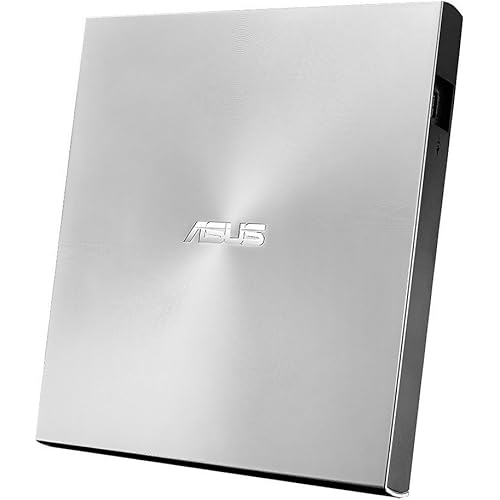
Size: 5.6" x 5.6" x 0.7"
Features
- Plug & Play External CD DVD ROM DriveThis ORIGBELIE external cd/dvd drive for Macbook does not need to install additional drivers, just plug the USB A/USB C data cable into the computer, insert the CD/DVD, and then the external cd/dvd drive for laptop will automatically recognize it, use appropriate software to read and burn your CDs or DVDs. Easy to use!
- USB 3.0 High-Speed External CD DVD DriveThe external cd/dvd drive for PC uses high-speed USB 3.0 technology, which provides higher data transfer rates up to 5 Gigabits/S (625MB/S). It is approximately 10 times faster than USB 2.0. Meanwhile, the external cd/dvd drive for Mac delivers up to 8x DVD read/write speeds and up to 24x CD read/write speeds, faster than you might expect. This is a powerful and fast external cd/dvd player / reader / writer / rewriter / burner / ripper / recorder.
- Wide Compatibility CD DVD Reader & BurnerThe external disc drive supports CDR/RW, CD-ROM, DVDR/RW, DVDR DL, DVD-ROM, DVD-RAM, VCD and SVCD. This USB cd/dvd drive supports different devices such as Macbook, iMac, Mac, Notebook, Desktop, PC and Laptop etc. It's compatible with Windows 11/10/8/7/XP , Vista 7/8, Linux, Mac OS. (Car, TV, Tablet, Phone, Projector, PS 4/5, Xbox, Switch, Chrome OS, Ubuntu system and Blu-ray disk are not supported;Windows 11 requires media player and network.)
- 2 in 1 USB C&A Data CableThe built-in data cable (on the back of the dvd drive) with USB 3.0 type-A and type-C connectors, make it easier to plug the cd drive into different laptop and PC without any adapters. And no worries about losing data cables. We also considerately equipped with a power supply cable, so that some computers with insufficient power supply do not have to worry about not being able to use it. It makes ORIGBELIE external cd drive compatible with most computers, old and new.
- RGB LED Color Gradient Light External DVD DriveThis cd rom external drive for laptop is equipped with the latest RGB LED lights. Cool RGB LED indicator light that can cycle and gradually change colors. It makes an ordinary external usb cd/dvd drive cool and fashionable.
- Worry-Free WarrantyWhat You Get: ORIGBELIE External CD/DVD Drive *1, USB A to Mini USB Power Supply Cable*1, External Disk Drive Storage Bag*1, User Manual*1, ORIGBELIE worry-free 24-month warranty, and 7-day/24-h friendly customer service. If you have any problems, we will 100% solve them.
Description
ORIGBELIE focuses on the external CD/DVD drive, you can find us all over the world. Our external CD/DVD drives don't just read/burn CDs DVDs for your computer, they offer the tech experience you want with zero restrictions. ORIGBELIE is dedicated to solving the problem of customers' anxiety being unable to read/burn CDs, DVDs, USB flash and SD/TF cards, whether they're on the go or using their computers daily. We felt immensely proud when a recent customer told us that they had been using our product for five years without any issues. Every ORIGBELIE external CD/DVD drive has passed RoHS CE FCC UKCA certification and we have received countless positive reviews from our customers regarding our support and assistance. Abandoning optical drives allows computer manufacturers to create thinner and more compact laptops. Most of the new notebooks on the market now do not built-in CD-ROM drive, and some only have a limited number of USB ports. In order to make laptops thinner and have higher transmission speeds, some even only have Type C ports. But we may have a large collection of 90s CDs, and we want to put them in a laptop to feel the nostalgia or insert a DVD collection to watch movies. Or, you may just need a CD/DVD drive for emergencies, such as data transfer, system backup, etc. Fortunately, We have already done all the work for you. This multi-function 2 in 1 USB A/USB C data cable external USB 3.0 disc drive that we launched is not only a CD/DVD reader, but also it has the function of CD/DVD burner. This will allow you to have more budget to buy the latest laptops that are comfortable, smooth, and have powerful processors and graphics cards. THESE THINGS YOU NEED TO KNOW BEFORE BUYING - This dvd rw drive can only start its job after it is connected to a laptop or a desktop, so it is not compatible with TVs, cars, trucks, projectors, tablets, iPads, phones, PS4/5, Xbox, Nintendo Switch, surface (some models), etc. In addition, it is compatible with Windows11/10/8/7/XP/Vista, Mac OS and Linux. Not compatible with Chrome OS, Ubuntu system and Blu-ray disc. With this USB external CD/DVD RW Drive, you can read movies DVDs, play music CDs, burn and rip discs, copy photos, install software/games/system, backup data and more. And just slips easily into your travel bag, perfect companion for DVD lovers, using everywhere. It come with the latest RGB LED color gradient indicator light. Cool RGB LED indicator light that can cycle and gradually change colors. Its dynamic changes make you feel happy and make your usb disk drive full of technology. Equipped with USB-C and USB-A connectors make it easier to connect to more laptops and desktop computers, no USB hub/adapter required. Plug and Play. New upgraded DVD loader with faster speed, low impedance & anti-interference ability, bring you a fast and more smooth experience. You need to ensure that there is a program or app on your laptop for playing DVD. Windows 11, unlike some of its predecessors, no longer ships with a built-in DVD player. If you haven’t ripped your music CDs to audio files on your computer yet, it’s not too late. All it takes is a ORIGBELIE CD drive and a bit of time. When you’re done, your physical music collection will become your digital music collection, You can then listen to that music on your computer or copy it over to your smartphone. There are even many services that will let you store that music online and stream it from anywhere! You’ve put a lot of work into creating your computer files, so you’ll want to remember to back them up. If you back up your computer files, if your computer is damaged or loses data, you’ll have a copy safely tucked away. When software comes on a CD or DVD and you want to install it on a laptop, you may can’t just pop open the disc drive or slide a disc into a slot, like you would on a computer with an optical drive. Generally speaking, the latest laptops forgoes the optical drive to keep it thin and small. Play a DVD movie on PC Play a CD on laptop Back Up Computer Files to CD/DVD Install Software (If PC Lacks an Optical Drive) 1.The dvd drive should be connected with USB port on laptop rather than connect with USB HUB. In addition, please connect the item with USB port behind of computer host if you use a desktop. 2.Ensure CDs is placed well and not scratched. The raised fixing post in the middle of the CD drive tray has three spring buckles. You need to gently press the CD disc into the spring buckles to secure the disc. 3.Make sure your computer's CD/DVD driver is intact before using an external optical drive. The computer operating system comes with a CD/DVD driver. If the program is damaged or removed, the CD/DVD driver needs to be updated or reinstalled. 4.Setting the DVD Region to USA on the "DVD RW Drive" - Properties - click Hardware Tab - click Properties button - then choose country Region (USA is 1) and click OK to apply. Note: You are only allowed to change the region code 4-5 times. 5.It's better to use the 5V charger/power bank to increase the power if your devices don't have enough power to support the external drive. 6.Insert the external optical drive into the computer. After the Windows system recognizes the optical drive, the "DVD RW Drive" icon will be displayed. The Mac OS computer will not display the device icon until the disc is placed in the optical drive and the disc is read successfully. 7.WINDOWS 11 needs a media player (such as VLC ) and a network connection. 8.Computers often do not natively support DVD movie playing, so a third-party media player (such as VLC) must be downloaded and installed to watch DVDs using this CD/DVD player. You can download and install a playing/burning software you like. You can also refer to the following software: DVD player software: Any Media Player, Any DVD; Burning software for Windows operating systems: InfraRecorder, Ones, Express Disc Burner; Burning software for Mac OS: Burn for mac; Burning software for Linux OS/Unix OS: K3b (KDE Burn Baby Burn) 9.Because the video formats of most computers and mobile phones are not compatible with DVD, you need third-party software to convert the file format to a format that can be displayed on the disc, otherwise, even if you burn the file to a disc, it will not work. 10.The Mac OS system comes with a burning function: Connect the optical drive and put the disc into it - click "File" on the top menu bar - click on the new "Burn Folder" - drag the files to be burned into the "Burn Folder" - click "Burn to Disc" - and then You can eject the disc. But one thing to note is that Mac OS computers can only burn blank discs, and a disc can only be burned once. 11.For the Mac OS, you need to eject the disc through the Mac OS command. At this time, pressing the eject key of the external optical drive will not work. Please check if your computer is recognizes to the optical drive (if your computer recognizes the optical drive, you can see the icon of "DVD RW Drive" in your computer's "My Computer". The Mac OS computer will not display the device icon until the disc is placed in the optical drive and the disc is read successfully. ). If the optical drive is not recognized by the computer, the following are suggestions for solutions. *Method 1:Check external connections. 1. Use the Type A and Type C cables on the back of the machine to connect the laptop. (The cable comes with the package is only for current transmission, not for data transmission.) 2. Connect the machine to other USB ports. *Method 2: Update or reinstall the driver. Drivers for your CD, DVD drive is included within the Operating System and hence does not require you to install a specific driver. Uninstalling the driver and restarting the computer will reinstall the driver which will resolve most issues related to the device driver. *Method 3: Run the Hardware and Devices troubleshooter.(Windows 7, Windows 8, Windows 8.1 and Windows 10) You can run the Windows Hardware and Devices troubleshooter which is built-in to Microsoft Windows. The Hardware and Devices troubleshooter is available in Microsoft Windows 7, Windows 8/8.1 & Windows 10 only. If the optical drive is recognized by the computer, the product problem you encounter may be caused by the following two reasons: 1. The power supply of the product is insufficient - Please use a 5V charger / power bank supply to supplement it. (Note: For the Apple computers, you need to connect the external CD/DVD drive to the computer first, and then connect the supplementary power supply to the external CD/DVD drive, otherwise the Apple computer will not recognize the external CD/DVD drive.) 2. WINDOWS 11 needs a media player (such as VLC ) and a network connection.
Special Feature: CD&DVD Burner, CD&DVD Reader, Plug & Play, Portable, Quiet
Hardware Interface: USB 3.0, USB 3.0 Type A, USB 3.0 Type C
Brand: ORIGBELIE
Optical Storage Write Speed: Max 24xCD / 8xDVD
Optical Storage Read Speed: Max 24xCD / 8xDVD
Additional Features: CD&DVD Burner, CD&DVD Reader, Plug & Play, Portable, Quiet
Hardware Interface: USB 3.0, USB 3.0 Type A, USB 3.0 Type C
Optical Storage Write Speed: Max 24xCD / 8xDVD
Optical Storage Read Speed: Max 24xCD / 8xDVD
Hardware Platform: Laptop, Mac, PC
Cache Memory Installed Size: 2 MB
Compatible Devices: Desktop, Laptop
Hard Disk Interface: USB 3.0
Connectivity Technology: USB
Data Transfer Rate: 5 gigabits_per_second
Form Factor: Laptop
Media Speed: 24x(CD)/8x(DVD) gigabits_per_second
Specific Uses For Product: Business, Personal, multimedia
Operating System: Linux, Mac OS, Windows
Read Speed: 300 megabytes_per_second
Brand: ORIGBELIE
Model Number: TP620
Customer Package Type: Standard Packaging
Manufacturer: ORIGBELIE
Built-In Media: Disk Drive Storage Bag * 1, External CD/DVD Drive * 1, USB A to Mini USB Power Supply Cable * 1, User Manual * 1
Item Weight: 10.88 ounces
Model Name: TP620
Mfr Part Number: TP620
Unit Count: 1 Count
Warranty Description: 1 year manufacturer
Enclosure Material: Acrylonitrile Butadiene Styrene (ABS)
Item Dimensions L x W x H: 5.6"L x 5.6"W x 0.7"H
Item Highlight: USB 3.0 CD ROM DVD +/-RW Player Burner Reader Writer for MacBook Laptop iMac Desktop PC Windows 11/10/8/7/XP Linux Mac OS
Color: Black
Frequently asked questions
To initiate a return, please visit our Returns Center.
View our full returns policy here.
- Klarna Financing
- Affirm Pay in 4
- Affirm Financing
- Afterpay Financing
- Zip Pay in 4
- Financing through Apple Pay
- Financing through Google Pay
Learn more about financing & leasing here.




Top Amazon Reviews


