Search  for anything...

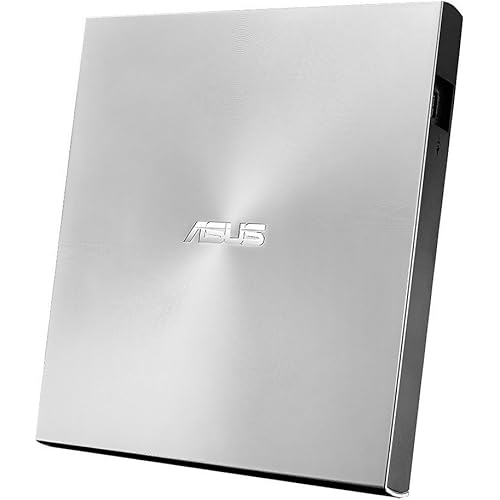
External CD/DVD Drive for Laptop, Portable CD DVD Player, USB 3.0 A, Black

  • Based on 58,356 reviews
Condition: New
Checking for the best price...
$13.99 Why this price?
Save $5.99 was $19.98

Buy Now, Pay Later


As low as $3 / mo
  • – 4-month term
  • – No impact on credit to apply
  • – Instant approval decision
  • – Secure and straightforward checkout

Ready to go? Add this product to your cart and select a plan during checkout.

Payment plans are offered through our trusted finance partners Klarna, Affirm, Afterpay, Zip, Apple Pay, and Google Pay. No-credit-needed leasing options through Acima may also be available at checkout.

Learn more about financing & leasing here.

Selected Option

Free shipping on this product

FREE 30-day refund/replacement

To qualify for a full refund, items must be returned in their original, unused condition. If an item is returned in a used, damaged, or materially different state, you may be granted a partial refund.

To initiate a return, please visit our Returns Center.

View our full returns policy here.


Availability: In Stock.
Fulfilled by Amazon

Arrives Wednesday, Oct 14
Order within 5 hours and 1 minute
Available payment plans shown during checkout

Protection Plan Protect Your Purchase
Checking for protection plans...

Color: Black


Capacity: Small


Features

  • High Writing and Reading SpeedMax 8x DVDR Write Speed and Max 24x CD Write Speed provide high writing and reading speed.
  • Wide CompatibleThis external dvd cd drive is compatible with Windows 98 / SE / ME / XP / Vista / Windows /10/8/7, Mac OS (8.6 to 10.14). And perfect for PC, Laptop, Comprehensive Computer, Internal PC hard disk reader. NOT COMPATIBLE with chromebook, blue-ray disks, cars, mobile phones, iPhones, iPads, Tablet, projectors, or TVs.
  • Plug and Play TechnologyPowered by USB port so just plug it into your USB port and the DVD driver will be detected. Dont need to install software to set up driver.
  • Advanced USB 3.0 Technology USB 3.0 provides fast data transfer speed and stable performance to record CD/ music/ videos/ install software or create CD/DVD backup disc (also compatible with USB 2.0).
  • Ingenious Design This ultra-slim CD/DVD player for laptops equipped with an eject button so that you needn't worry about your disc getting stuck inside this external CD/DVD drive. Besides, the copper mesh technology of this external component, you can be rest assured of stable data transmission.

Description

This cd reader for mac is so lightweight and compact that it's convenient to be carried everywhere. The attached cable stores away neatly in a groove on the underside so there's no possibility of losing it. This usb optical drive produces almost no noise while processing discs and thus won't be disturbing. This disc reader is compatible with laptops or desktops with Windows OS, mac OS and Linux OS only. 1. Remember to set the DVD Region to United States on the player – Properties – click Hardware Tab – click Properties button – then choose country Region (US is 1) and OK to apply. Remember you can only reset the country 5 times. 2. Please directly connect it to the USB port of the computer. Connection through a USB hub or USB extension cord may affect the device’s functioning. For desktops, please connect it to the back USB port of the motherboard because of potential power issue. 3. For macbook, to eject a disc, you have to use the drop-down "eject" button on your computer under the file tab. Pushing the button on the disc drive won't do anything. Mac OS computers do not display the device icon before placing a disc into disc tray. 4. Computers does not natively support DVD movie playback, so a third-party application, such as VLC, must be downloaded and installed in order to watch DVDs using this cd/dvd player. You could download any one of a plethora of burning software utilities available on the Internet. Or try the following: No fee playing software: Any Media Player, Any DVD No fee burning software for Windows OS: InfraRecorder, Ones, Express Disc Burner No fee burning software for mac OS: Burn for mac No fee burning software for Linux OS/Unix OS: K3b (KDE Burn Baby Burn) 5. There is a basic DVD burner for Windows 10 that lets you copy files from your computer to a disc. More advanced software allows you to make discs compliant with DVD, Blu-ray, and CD and for more obscure tech like VCD players. 6. Just because you have a series of video files doesn’t mean they are compatible with DVDs. In fact, most computer and phone video formats are not compatible. So you need a third-party software to convert your file format to one that can be shown on discs. It won't work even you burn your file onto discs without converting format. USB-A Black USB-A & USB-C Black USB-A & USB-C White USB-A & USB-C With Case Set region code Windows :This PC– dvd drive- Properties – Hardware Tab – Properties button – Choose Region (US is 1) -Apply. Mac:Menu-System Preference-Language & Region - Region - Select Country - Apply Power supply failure This usb drive for laptop needs enough power supply to work, a power failure may cause a recognizing failure or reading failure. If needed keep your computer charging Hard to open the disc tray 1. Unplug the drive and plugin back it, then while the green light is flashing depressing the button will open the tray. 2. Plug a pin into the small hole on the front panel. 3. Eject from the computer. USB cable too short Use extension cord no longer than 31 inches. High-quality extension cord with braid and shielding layer is better. Shorter cable is better always. Problems about burning Use a third-party software to convert your file format to one that can be shown on discs. It won't work even you burn your file onto discs without converting format. Gotega focuses on providing people with high-quality products that facilitate life. We attach importance to user experience, and with enough patience and care, we have produced products that are popular with people. Since 2020, we have sold over 1,540,000 pieces of products. If you have any problems about Gotega's products, please let us know. We sincerely appreciate you for coming to us, which makes us continuously progress. 7*24H Online Service

Special Feature: CD Player, DVD Burner, CD Burner, DVD Player, External cd/dvd drive, Portable


Hardware Interface: USB 3.0


Brand: Gotega


Optical Storage Write Speed: Max 24xCD / 8xDVD


Optical Storage Read Speed: Max 24xCD / 8xDVD


Additional Features: CD Player, DVD Burner, CD Burner, DVD Player, External cd/dvd drive, Portable


Hardware Interface: USB 3.0


Optical Storage Write Speed: Max 24xCD / 8xDVD


Optical Storage Read Speed: Max 24xCD / 8xDVD


Hardware Platform: Laptop, MacBook, Desktop, PC


Cache Memory Installed Size: 2


Compatible Devices: Desktop, Laptop, Mac, PC, Windows


Hard Disk Interface: USB 3.0


Hard Disk Rotational Speed: 10


Connectivity Technology: USB


Data Transfer Rate: 5 gigabits_per_second


Form Factor: External DVD Drive DVD\+/-RW Drive


Hard Disk Form Factor: 10 inches


Media Speed: Max 24xCD / 8xDVD


Specific Uses For Product: Gaming, Multimedia, Personal


Operating System: Windows XP/ 2003/ 2000/ Vista/ 7/ 8/ 10, All version Mac OS, Linux


Read Speed: 5 gigabytes_per_second


Enclosure Material: Plastic


Item Dimensions L x W x H: 6.5"L x 6.5"W x 1"H


Item Highlight: CD ROM burner compatible with Laptop Desktop PC Windows Linux OS Apple Mac record music videos install software backup


Color: Black


Brand: Gotega


Model Number: External DVD Drive


Customer Package Type: Standard Packaging


UPC: 659499202848


Number of Packs: 1


Manufacturer: Gotega


Hard Disk Description: External DVD CD Drive


Built-In Media: Gotega Optical Drive, Manual


Item Type Name: External DVD Drive


Model Name: External DVD Drive


Mfr Part Number: External DVD CD Drive


Unit Count: 1 Count


Warranty Description: Not


Frequently asked questions

If you place your order now, the estimated arrival date for this product is: Wednesday, Oct 14

Yes, absolutely! You may return this product for a full refund within 30 days of receiving it.

To initiate a return, please visit our Returns Center.

View our full returns policy here.

  • Klarna Financing
  • Affirm Pay in 4
  • Affirm Financing
  • Afterpay Financing
  • Zip Pay in 4
  • Financing through Apple Pay
  • Financing through Google Pay
Leasing options through Acima may also be available during checkout.

Learn more about financing & leasing here.

Top Amazon Reviews


  • Stop debating and buy this one.
Color: Black Capacity: Small
I spent hours deliberating over all the choices Amazon had to offer. I'm not cheap, but I'm disabled and on a very limited budget, so I was leaning towards the low end of products to stay in my budget. I finally decided to try this product due to the 5 star reviews it got. Right out of the box, feels sturdy and well made. Virtually no setup, plug in the USB cable, and start doing whatever it is you want to do. The reason I needed a burner is most of my old copied music CD's were deteriorating, and I wanted to make new copies to keep in my truck. I was astonished at the speed this drive copied and burned my new CD's. I reproduced 9 albums in a little over 45 minutes. I am more than satisfied with those results. Also during the copy/burn process, I did not hesitate to abuse the drive a bit. Nothing violent, just average bumping, tapping, lifting and turning it, and not a glitch whatsoever, that is until I turned it upside down...It didn't like that...but picked up right where it left off, and had absolutely no effect on the quality of the burns. I also checked all of them and listened to 3 to their full length, and they all sound perfect. There are a couple of "Cons", but they are more than justified for the price and are easily accepted, or worked around. The first one is the "attached" USB cable, I would prefer it to be detachable, so it could be replaced if something happened to the original, but when I considered the fact that it is conveniently stored right on the unit for easy storage, transport, and protection, I decided to cross the "damage cable thing" bridge when I get to it, and move on. The second "Con" is that they don't include any software to actually use it other than Windows Media Player for playing music. So, I did my usual research and found "Express Burn" by NCH Software. It did a great job and very easy to use at an also unbeatable price...FREE! There may be others out there, and of course you could pay to get some premium features, but this program will copy files, create back-ups and copies of your music collection, as well as create bootable CD's to repair your Windows build if need be, without making an additional investment. To close this "novel" (which I almost never write reviews) I will just say I highly recommend this drive, and paired up with the free software you can't go wrong! ... show more
Reviewed in the United States on August 8, 2023 by David

  • Great product
Color: Black Capacity: Small
Love this product, this is the second one I have bought and will definitely buy again.
Reviewed in the United States on August 23, 2026 by Shellie

  • A Good Drive For The Money With A Few Shortcomings.
Color: Black Capacity: Small
Let me start by saying this should really be a 3 1/2 star rating, and if the drive writes as slowly as it reads I'd drop it to 3 stars. So first the good stuff: Drive is well packaged by the manufacturer and includes an instruction card that is actually useful and readable if you really need one. Plug and play worked perfect right out of the box on both Windows 10 Pro and Windows 11 Pro. Drive has an eject button (something ridiculously missing on other drives of this type) and even an emergency eject mechanism so kudos there as well. Drive played both music CDs and DVD movies quickly using VLC Media Player but getting them recognized was a bit of a jump through hoops situation (more on that below). Generous warranty (IF the manufacturer actually honors it). The not so good stuff: The drive is made of a cheap plastic and does not feel solid or well made. Instead of a drop in tray this drive uses the lower quality and less reliable snap-in type and you have to be very careful here because if you exert too much pressure I believe the tray will either break off or at the very least come out of it's sliders. You have to force the cable into a very narrow slot in the bottom to get the drive to sit flat (and believe me you want to to sit flat or the laser does NOT read the disc). Cable is EXTREMELY short. Even when using a laptop you have to have enough space right next to the laptop for the cable to reach. And you can't actually use it if your laptop is on your lap (Hence the name laptop). Could not use on either of my Desktop PCs, even the short tower without having to spend additional money for an extension cable. Reading data from a Disc is EXTREMELY SLOW. Insert a Disc and the drive spins up and makes noise fairly quick, then just seems to hang there for a LONG time like it's having trouble reading. At times the drive would disappear from the list of drives and then reappear after a LONG wait. Then it would be 7 - 10 minutes for the disc contents to finally show up. Click on what you want and the long process starts all over again before the content opens. Reading music CDs and DVDs was quicker but Windows Media Player and Movies and TV both reported "No data found on disc" errors and showed 0 Bytes. I had to install VLC Media Player for the disc to be recognized and played. Even then I did not get the usual popup asking me what I wanted to do with the disc. I had to go into the list of drives, right click this drive and then select the "Open With" option form the context menu and choose VLC Media Player to get them to play (Choosing either Windows Media Player or Movies and TV here still yielded the same errors mentioned above). Right-clicking the drive in the drive list gives an option to "Eject" but this simply ejects the disc from the drive, not the drive from the PC. And......... There is no option to "Safely Remove Drive" so make sure there is no disc in the drive before you disconnect it. Overall Impressions: Drive is okay for the price when it comes to reading discs as long as you have a LOT of patience and a little experience with how drives work on Windows. I have not tried writing any discs yet, but if the write times are as poor as the read times I don't think this drive would be worth the price even on sale. ... show more
Reviewed in the United States on August 26, 2024 by James R. Shunamon

  • Reliable External DVD Drive That Works Great Across Devices.
Color: Black Capacity: Small
This external DVD drive is a dependable and easy-to-use solution for anyone who still needs to read or burn CDs and DVDs. The USB 3.0 connection provides fast data transfer, and the drive was recognized quickly without requiring complicated setup. It works smoothly with Windows, Linux, and Mac devices, making it a versatile choice for different computers. The compact and lightweight design makes it easy to carry while traveling or working on the go. It feels well-built, operates quietly, and performs reliably for watching DVDs, installing software, backing up files, or burning discs. Overall, it's an excellent value and a practical accessory for laptops and desktops without built-in optical drives. ... show more
Reviewed in the United States on July 11, 2026 by ahmed rachid

  • Missing a CD drive look no further
Color: Black Capacity: Small
The Gotega External DVD Drive is a must-have accessory for anyone who needs a reliable and portable solution for playing or burning CDs and DVDs. This external drive connects easily to any computer with a USB 3.0 port and is fully compatible with both Windows and Mac operating systems. What's great about this external drive is its versatility. Not only can it read and write CDs and DVDs, but it also works with Mac books. This means you can use it to watch movies, listen to music, or install software on your MacBook Air or MacBook Pro. And because it's so lightweight and compact, you can easily take it with you wherever you go. Setting up the Gotega External DVD Drive is quick and easy. Simply plug it into your computer's USB port and you're ready to go. There's no need to install any drivers or software, which makes it an ideal choice for those who are not tech-savvy. Overall, I highly recommend the Gotega External DVD Drive to anyone who needs a reliable and portable solution for playing or burning CDs and DVDs. Its compatibility with Mac books makes it a great choice for Apple users, and its USB 3.0 connectivity ensures fast and reliable data transfer speeds. Whether you need it for work or entertainment, the Gotega External DVD Drive is a fantastic investment that you won't regret. ... show more
Reviewed in the United States on March 30, 2023 by Dabombastic1984

  • Spend your money else where.
Color: Black Capacity: Small
I cannot express the headline enough. Please just save your money and spend it elsewhere this product is a cheap waste of 20$ and Amazon does not help with refunds with this particular item. My first experience with the item was great, it worked the way it was intended to for the first 40 minutes and then never worked as easy and seamless as it should have. I purchased about 22 different DVD discs and each were brand new. About 4 seasons of Dbz, Hunger Games movie collection, and Into the Spiderverse that I had never used physically because my purchase came with a digital code. All of these brand new DVD discs that had never been used before and sealed. First day it arrived I plugged the DVD Drive in and it worked without any hassle, the green button that's suppose to open the slot would never open entirely so I had to pull it out but this wasn't a huge deal, I'd put the DVD in and the movie would shortly play via VLC on my computer. It was seamless and I was able to enjoy watching DVD"s on my computer. Than I immediately ran into issues after about 40 minutes of watching DBZ. The DVD player would close down, initially I thought it was VLC that needed an update so I proceeded to update it. Once again it was working fine, than came another crash sometime 2 hours or so into the disc. No big issue simply re-plug and back on track. After that the DVDPlayer never worked the same. After watching a movie or completing a disc I'd swap it out for another only for the DVD player to refuse to boot up. I'd press the eject button multiple times to get the light to turn on, nothing. I'd unplug and plug it back in, nothing. I'd change USB ports from Laptop to PC each being 2.0 or 3.0, nothing. I'm not sure if this is a heating issue or some kind of eject issue but after taking out a disc the DVD drive will simply refuse to work for 20-30 minutes until it once again decides to boot up again and function. This product is cheap, unreliable, and hardly functions for it's intended purpose. Save your money and buy something that's been made by a reliable company and can truly function without having so many hiccups. I'll also like to comment on something a lot of people have commented about, the cord is extremely short and the main powering unit. It's extremely hard to find where to place the dvd drive if you're using a PC and even harder pill to swallow knowing when the cord goes out so will the unit. Once again SAVE YOUR MONEY ... show more
Reviewed in the United States on December 7, 2021 by Antis Buster

  • Can't get it to work to save my life........
Color: Black Capacity: Small
Update 2 They agreed to replace. The new one came I plugged it in and it worked like it should. Update I reached out to support 7/9/25 they responded 7/22/25. That's almost two weeks to respond. Asking if cd is scratched. Really are you kidding me right now. So much for 24 hour support. What an absolute joke. This product has never worked. I bought it a while ago never got it to work thought it was user error. I finally had time to sit down and figure it out. However I wasted 2 days of my life trying to get it to work and nothing. PC knows it's there however it doesn't recognize CDs doesn't recognize DVDs I've got a media player installed and it still doesn't recognize the media. I went through the pages and pages of instructions to get this thing to work nothing. I wasted $20 and a few days of my life on this useless piece of junk. I requested support gave them my information I've not gotten a confirmation email the confirmation on the screen is in Chinese so I don't know what it said. Trust me when I say spend a couple more dollars and buy quality this thing is just the cheapest Chinese junk money can buy. By the way my real review is zero stars but you know how that goes. ... show more
Reviewed in the United States on July 8, 2025 by Pliman

  • Either Defunct or Truly Doesn't Work with Mac Beyond 10.14
Color: Black Capacity: Small
Worked once when I bought this in 2023 on an 8-yo Mac stuck at Mojave (OS 10.14, which device claims it supports up to, but does not support beyond this). I guess it's true--this doesn't work with a Mac beyond 10.14! Either that, or it just...died. I had packed it, moved, got new Mac with later OS, and attempted to use it to burn CDs from Apple Music. Disc appeared to burn, but upon playing, skipped a lot. I tried on a new disc, and burner claimed the CD had 'finished' but device did not appear to be read by computer, and eject button did not work. Unplugged, plugged back in-- a pop-up claimed I had put in a blank CD, even though I had just been told the disc trapped inside had 'finished' burning. I successfully ejected, put in a new disc, tried to burn a CD again -- this time it immediately ejected and displayed an error message indicating a hardware write error. So, eh. ... show more
Reviewed in the United States on August 9, 2026 by Geena

Can't find a product?

Find it on Amazon first, then paste the link below.
Checking for best price...