Search  for anything...

OBDLink MX+ OBD2 Bluetooth Scanner for iPhone, Android, and Windows

  • Based on 15,416 reviews
Condition: New
Checking for the best price...
$139.94 Why this price?
Save $60.05 was $199.99

Buy Now, Pay Later


As low as $23.32 / mo
  • – 6-month term
  • – No impact on credit to apply
  • – Instant approval decision
  • – Secure and straightforward checkout

Ready to go? Add this product to your cart and select a plan during checkout.

Payment plans are offered through our trusted finance partners Klarna, Affirm, Afterpay, Zip, Apple Pay, and Google Pay. No-credit-needed leasing options through Acima may also be available at checkout.

Learn more about financing & leasing here.

Free shipping on this product

FREE 30-day refund/replacement

To qualify for a full refund, items must be returned in their original, unused condition. If an item is returned in a used, damaged, or materially different state, you may be granted a partial refund.

To initiate a return, please visit our Returns Center.

View our full returns policy here.


Availability: Only 3 left in stock, order soon!
Fulfilled by Amazon

Arrives Saturday, Jul 25
Order within 3 minutes
Available payment plans shown during checkout

Protection Plan Protect Your Purchase
Checking for protection plans...

Features

  • Turn your iPhone, Android device, or Windows PC into a professional grade diagnostic scan tool.
  • Recommended adapter for FORScan, Torque, BimmerCode, Dashcommand, AlfaOBD, Carista, and more.
  • Enhanced OEM Support for Ford, GM, Mazda, Nissan/Infiniti, Toyota/Lexus/Scion, Honda, Hyundai, Kia.
  • Clear check Engine Light and get more live parameters (ABS, SRS, TPMS, etc) than other scanners.
  • Over-voltage and battery drain protection, and included firmware updates.
  • Check troubleshooting guide to confirm vehicle compatibility and features before purchase.

Description

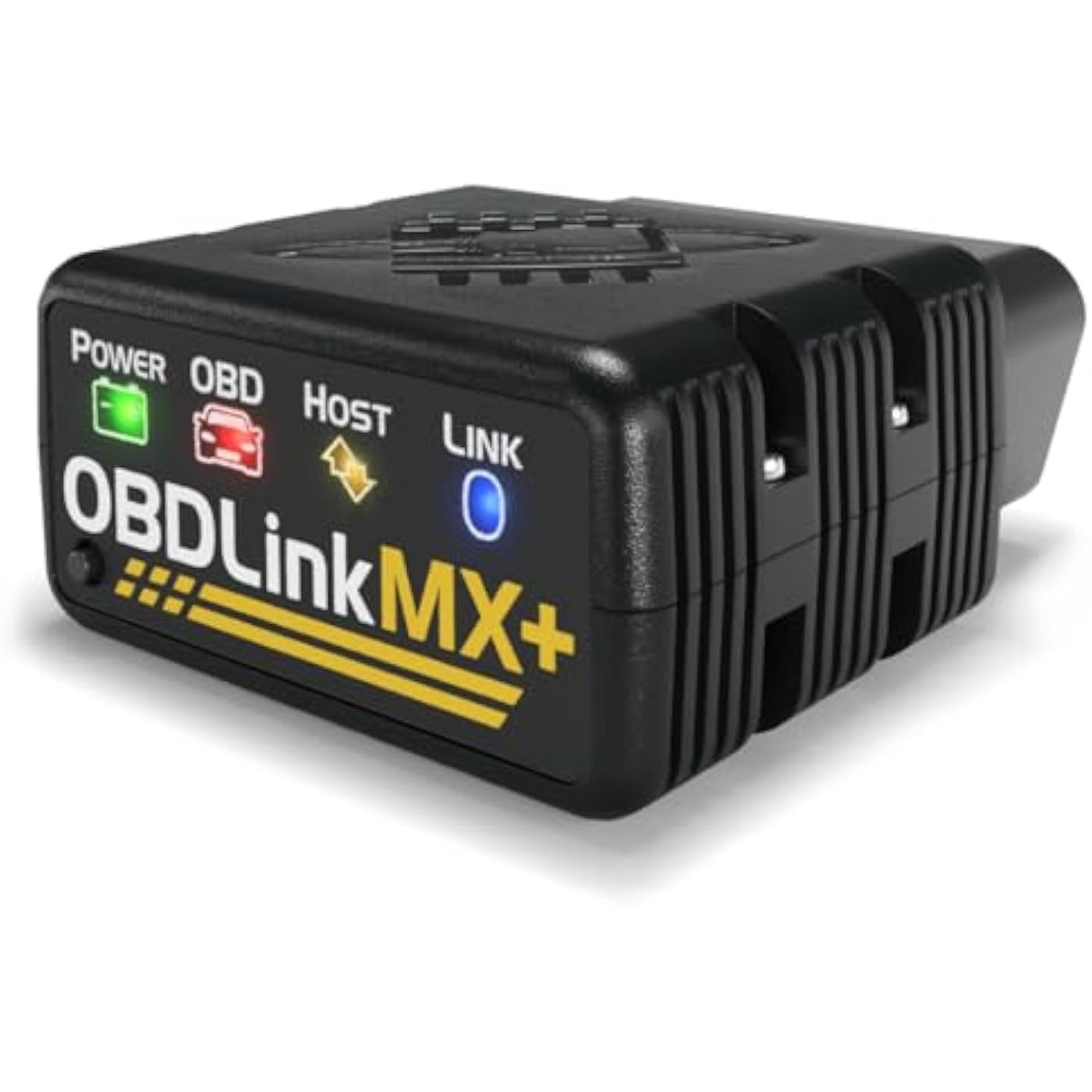
Visit the Store Visit the Store Visit the Store Visit the Store Visit the Store OBDLink MX+ is a one-of-a-kind wireless OBD adapter that transforms any iPhone, iPad, or Android device into a professional-grade diagnostic scan tool, trip computer, and real-time performance monitor capable of accessing manufacturer-specific vehicle data. The newest addition to the OBDLink family is even faster, more reliable, and more feature-rich than its predecessors. It is the only wireless iOS-compatible scan tool on the market that supports the proprietary GM-LAN and Ford MS-CAN vehicle networks, giving you access to dozens of additional ECUs and thousands of manufacturer-specific trouble codes and parameters, including ABS, SRS, TPMS, A/C, transmission temperature, and wheel speeds. While there are other solutions capable of displaying real-time data, OBDLink MX+ is optimized for maximum throughput, delivering up to four times more data samples per second than alternative options. This translates into smoother gauges and graphs, and the ability to simultaneously display multiple parameters. OBDLink MX+ incorporates unique features that make it safe to leave plugged in: hacker-proof wireless security, overvoltage/load dump protection, and ultra-low-current sleep mode. For added peace of mind, MX+ includes firmware upgrades for the lifetime of the device. Why should you choose MX+? *Check with third party app provider to confirm compatibility This pocket-size adapter won't obstruct driver legroom and features unmatched performance, intelligent sleep mode, hacker-proof security, exceptional third party app support, and no cost lifetime firmware and software updates. The included OBDLink app offers outstanding features that makes it easy to access, graph, log, and export real-time engine data. Plus, your car's data can be directly downloaded or instantaneously uploaded and shared with others using DropBox. OBDLink MX+ provides wireless connectivity for all OBD-II protocols, plus advanced automotive networks commonly used in many late-model GM, Ford, Mazda, Nissan, and Toyota vehicles. For supported GM models, you can control windows, door locks, and even remotely start your engine with the 3rd-party obdCANex Android app. OBDLink MX+ works with all 1996 and newer cars and light trucks sold in the United States (except hybrid or electric vehicles). The OBDLink proprietary connection algorithm enables MX+ to connect to more makes and models than any other scan tool. It also supports EOBD, JOBD, and all other international variants of OBD-II. Read and clear codes on all OBD-compliant vehicles, NO EXCEPTIONS. OBDLink MX+'s functionality is limited only by the imagination of the programmers that write the apps. Apps that exist on the market today, can be used to: Unlike other OBD adapters, MX+ does not use an easy-to-guess PIN and requires physical access for the initial pairing. It doesn't broadcast its presence and employs strong encryption — sensible precautions to keep hackers out of your vehicle's network. OBDLink MX+ works with dozens of popular third-party apps like Torque, Dash, FORScan, DashCommand, obdCANex, and Harry's Lap Timer to unlock enhanced performance, save fuel, change vehicle settings and even control door locks and remotely start the engine on select vehicles. Note: many apps are currently available exclusively on Android; check with app provider to confirm compatibility. OBDLink MX+ supports GM-LAN and Ford-MSC proprietary vehicle networks that provide access to thousands of additional parameters that are off-limits to all other wireless OBD scanners, including BlueDriver and FIXD. With third party apps, you can enable convenience features (including remote start and door lock/unlock) and change configuration on select models. When you turn off your engine, OBDLink MX+ goes to sleep and won't drain your automobile's battery. Its sophisticated triggers will wake up MX+ when you connect via Bluetooth, unlock doors, or crank the engine. MX+ includes overvoltage/load dump protection, a feature critical for any OBD device that is designed to be powered from the vehicle's 12-volt system.

Brand: OBDLink


Power Source: Vehicle


Product Dimensions: 2.01"L x 0.91"W x 1.81"H


Operating System: iOS, Android, Windows


Automotive Fit Type: Universal Fit


Power Source: Vehicle


Operating System: iOS, Android, Windows


Automotive Fit Type: Universal Fit


Item Dimensions L x W x H: 2.01"L x 0.91"W x 1.81"H


Brand Name: OBDLink


UPC: 897155000173


Global Trade Identification Number: 73


Manufacturer: OBD Solutions, LLC


Model Number: MX201


Manufacturer Part Number: 428101


Item Type Name: OBDLink MX+ turns your iOS, Android or Windows device into a professional-grade automotive scantool and vehicle monitor


Item Weight: 28 Grams


Manufacturer Warranty Description:


Included Components: Compliance Insert, Quick Start Guide, Scanner, Warranty Card, Zipper Case


Frequently asked questions

The OBDLink MX+ is compatible with iPhone, Android, and Windows devices. It uses Bluetooth to connect and can easily link up with your smartphone or computer.

The OBDLink MX+ offers advanced features like reading and clearing check engine light codes, real-time vehicle monitoring, emission readiness for smog tests, and even advanced diagnostics for hybrid and electric vehicles. Additionally, it has the ability to turn off the 'Check Engine Light', saving you a trip to the mechanic.

Yes, the MX+ scanner is designed with user-friendliness in mind. Just plug it into the OBD2 port on your car, sync it with the OBDLink app on your device via Bluetooth, and you're ready to go. The app will guide you through the setup process.

OBDLink MX+ uses secure Bluetooth connection that requires authorization and an encryption key ensuring that no unauthorized users can connect to it. This makes it safer from hacking than many other OBD2 scanners.

Top Amazon Reviews

🚀 Abunda's Overview

This is our summary and key points to consider based on customer reviews.


The OBDLink MX+ OBD2 Bluetooth Scanner has garnered glowing reviews overall, praised for its speed, user-friendliness, and compatibility with third-party apps. It's hailed as a powerful tool for both professionals and DIY mechanics, with some users comparing its diagnostic abilities to 'peeking into the matrix' of their vehicle. Some users suggested a need for a more intuitive native app and mechanisms to read all types of codes.

Pros

  • ⚡ Surpassed expectations with exceptional speed and low latency
  • 🤝 Wide compatibility with third-party apps enhances its functionality
  • đź”§ Praised by both professional and DIY mechanics
  • đź§  Powerful diagnostic ability, providing in-depth knowledge of your vehicle's health
  • đź’ˇ Comes with useful LED lights

Cons

  • đź’° Some users found it a bit pricey, in relation to the user experience
  • 📱 Some reviewers suggested improvements for their native Android app for a more intuitive user experience

Should I Buy It?

If you're seeking a lightning-fast, compatible, and advanced automotive diagnostic tool, the OBDLink MX+ OBD2 Bluetooth Scanner is a worthy contender. While it's a bit on the higher end of the price spectrum and may need improvement in its native app's intuitiveness, its stellar performance and high praise from both professionals and DIY enthusiasts make it a good investment. Given its predominantly positive reviews, it's definitely worth considering.


  • Worth the Price
I've been using the OBDLink MX+ for monitoring and diagnosing my Toyota Aqua hybrid, and it has done exactly what I expected it to do. The adapter connects quickly, stays connected reliably, and works well with both the official OBDLink app and third-party apps. The OBDLink app provides enhanced diagnostics and manufacturer-specific support for brands such as Toyota, Lexus, and etc. making it useful for reading trouble codes, monitoring live data, and checking vehicle health. One of the reasons I chose this adapter was its compatibility with other apps, and it has worked flawlessly with Dr. Prius, Hybrid Assistant, Torque, and ELM-based applications. I was able to monitor my hybrid battery condition, check battery block voltages, temperatures, internal resistance, state of charge, and other important parameters without any issues. Overall, the device is reliable, easy to set up, and performs exactly as advertised. If you're looking for a quality OBD-II scanner, especially for hybrid vehicles, I think it's worth the price and I am very satisfied with my purchase. ... show more
Reviewed in the United States on June 4, 2026 by Nukri Tskvitaia

  • Versatile, fast connection, many App options. Versatile, fast connection, many App options.
I use the OBDLink MX+ on my iPhone, along with the OBDFusion app. I've only had if for a few weeks, but I've used it in 2 vehicles, and it never has had any issues. It was simple, quick to install and pulling it out of one vehicle and plugging into the other doesn't require any special steps once the app is set up. I do maintenance on both my vehicles, so the diagnostics and code reading have been invaluable. I've been experimenting with various gauges and PIDs in Fusion for my Cayman and Tacoma that tests the speed of the OBDLink MX+, and it hasn't lagged or lost connection. I continue to create, recreate and modify various gauges to explore its capabilities. It has been especially helpful for my Tacoma when towing our camper, as I can keep an eye on the auto transmission temperatures, trip stats other metrics. I'm satisfied it was money well spent, and I may even get another so I don't have to keep moving it back and forth. ... show more
Reviewed in the United States on June 11, 2026 Reviewed in the United States on June 11, 2026 by ScubaCarl

  • Small, simple and easy to use.
Excellent product. Saved me hundreds to diagnose and fix the issue with my car. It can clear codes but you will need a paid software to do the reinitializing and programming (some programming needs additional h/w and software). I did get paid version of alfaodb.
Reviewed in the United States on June 19, 2026 by Amazon Customer

  • Priceless
As a shade tree mechanic, This has been Great tool to have. Its been instrumental in keeping my vehickes on the road. Works with multiple vehicles & apps. New or old, diesel or gas. It's not a Snap-on code reader, but doesn't cost multiple thousands of dollars either. Worth every penny.
Reviewed in the United States on May 10, 2026 by Daytrp

  • Cool Product
I bought this [with my own money not a free on for a review] hoping I would not have to use my very expensive hand held ones anymore which are cumbersome and you always pretty much have to go to the computer to get the codes and search on the net to see what they mean, possible causes and possible fixes. I bought one on amazon similar to this one that was around $18 and had to buy a couple of apps for my phone [around 10 dollars for the apps] to be able to use it. It was OK but I wanted MORE information. I read amazon reviews and realized this was the Cadillac of them at this time [Jan 2016]. I got it in 2 days with Prime. I plugged it on my 3 vehicles and it gives us a plethora of information. We have since sold our hand held ones on craigslist since this thing works so good and gives you unbelievable amount of information. [I do have a couple of complaints, later in the review.] I have been looking for another used vehicle and this device has saved us thousands $$. Your phone is connected to the internet so it goes out and gets you a lot of extra info right away & also updates the device software if need be. It even gives you information about when was the last time someone ERASED ERROR CODES which is happening across the dealers & private sellers in the 40207 and 33186 zip codes more than you would have thought! [in DAYS:HRS:MINS and also miles]. Don't forget anyone can get a cheap code reader for less than 20 dollars and erase all codes! The serious codes that the vehicle computer reads will come back immediately if erased, others will take a day or 2 -or longer-of driving time to come back in. To late if you bought a vehicle from a private owner and it's in your name already. Its funny to see the face of people when I tell them, these are all the error codes that the vehicle is giving me, the possible causes [yes this thing does tell you that too!] and BTW someone erased the codes 3 days 22 hrs and 3 minutes ago! It will give you all recalls for the make and model has had from day one! You can ask the owner or dealer to make sure those have been addressed or not. Most will claim [dealers and private owners] that no one has erased the error codes. I say to them "well sir or madam, this is what YOUR vehicle computer is telling my device. It pretty much saying that someone came in here with a key and a code reader, plugged it in and erased the codes 3 days 22 hrs and 3 minutes ago!" When they finally fess up [not all of them do] I just ask them what were the codes that were erased [to see if it was something easy like they didn't close the fuel cap correctly or something serious like -which I got on several different vehicles without any lights on the dash-a catalytic converter, an O2 sensor or both, anti lock brake codes, steering angle sensors, low or high voltage power supply, tire pressure warning system codes, airbag malfunctions, etc]. This purchase has saved thousands on repairs on several vehicles I checked and would have bought!. Sellers were asking top dollar for these vehicles because they had “no lights on the dash” and they had done a cleaning detail on the vehicle! I even took a vehicle that I really liked to a dealership and paid for an inspection. They didn't get what I got on the code reader at first [or just didn't plug their code reader] but when I complained to the service manager, they hooked up their reader and got the same stuff [erased codes] and other malfunction codes that were not showing on the dash. BTW this device only tells you that codes were erased, it does not tell ou which ones. They refunded my inspection money because of their embarrassment. That right there paid for this device! I also have run in a couple of situations where the person selling the vehicle has advertised a higher model of the vehicle I was looking at to get more money out of it. These are vehicles in the 7k to 15k range I've been looking at [clean title only]. This has happened with private sellers who either buy the LXE [as an example] letters from ebay or a junk yard [I am guessing] and put the new letters claiming the vehicle is a higher level that it really is. The software on this device reads the vin number goes to the net and gets the EXACT model and make from the vehicle. You should see the face of people when I tell them this is a L model [the lower end one ] and not the LEX one! Some of you would say this is on the tittle, well…. Not always. I have a Honda Odyssey and the title does NOT say which model it is! I think everyone reading this knows there are lots of people who are buying vehicles at auction, cleaning them up and sell them for profit posing as regular owners. A vehicle fax can be $40/vehicle and gets expensive quick if you do several cars. [I like vehicle carfax over other because they give you a lot more information on regular service etc than their competitors]. In my area code and in the MIAMI area -which is were I have been also trying to buy a used vehicle- there are tons of people selling more than 10 vehicles a year [which are required by law to get a dealer license and do not]. When you ask them why is the vehicle not on their name, or why the have 4 vehicles for sale out of their house, or why was the title on the vehicles he/she's selling less than 3 weeks old the come with the story about them getting a better vehicle or sob storries. If you pry hard enough they'll tell you they are "wholesalers" but don't have the required licenses insurance etc and are less than reputable in the disclosure of their vehicles they're selling. Don't get me started on the habitual “private” sellers of salvage but repaired title vehicles! Use this device wisely and save yourself a lot of headaches or negotiate a better price on the used vehicle you are buying and also check your existing vehicles and telling your mechanic exactly what is going on. Be an informed consumer. I have two complaints about the device: 1- When looking this couple of months for a used vehicle in zip code areas 40207 and 33186, I usually start the vehicle with it plugged in, let it read all the codes, vin number etc, while the vehicle is warming up, then I drive the vehicle for about 15 to 20 mins to get more info on what the vehicle is doing while you drive it etc and hope that one of the erased codes pops up again. I have lost connection with my phone and the device several times while driving, where I have to stop and reconnect it and therefore lost all data that was being recorded. I thought it could be my phone connection via the Blue-tooth, so I downloaded the app on my wifes phone and the same thing happens! They are both newer iphone 6 and 6 +. Sellers are not to happy to go around and drive the vehicle again for 20 mins so I can record results again! 2-I have also had the device fall from the ODBII plug several times. This kind of sucks because you have to start the process all over again and lose all the data that was there before. I have checked about 20 vehicles in the last 3 months. I usually email myself the data while the app is running and they show the results from that email to the seller if there is something wrong since I haven't figured out how to save the data in the phone. I have resorted now to getting some blue tape and taping it around the plug and the device when its plugged in. Not something I'm happy about. Hope this helps some of you out there. ... show more
Reviewed in the United States on October 12, 2024 by Jose

  • Works well, fast real time readings, OBDLink app is very good as well, great for Minis
awesome OBD2 Dongle. pairs quickly with my droid phone and the connect is lightning fast, I'd say real time. I bought it to link up to Torque Pro app for my 2014 Mini Clubman S. but ended up using the OBDLink app instead. The OBDLink app has a great assortment of gauges and picks up all the signals and sensors on the N18 engine without setting up custom PIDS. This was a big surprise because that's why I purchased Torque Pro. However (for BMW/MINI users) some of the sensors are not readily visible to Torque Pro without adding custom PID formulas - like boost readings. Great dongle, best I've had yet. Additionally, the OBDLink app also gives a lot of BMW specific trouble codes. that was a nice surprise as well. ... show more
Reviewed in the United States on February 2, 2026 by W211Cruzer

  • Worked absolutely perfect no issue
Absolutely best invested made in a long time I was having all kinds of electrical glitches in my truck and it wouldn’t start or even agknowle my key fob or my fuse box or my security system was told I would have to take truck to dealer and pay an astronomical fee to have it fixed I heard about this item and pairing it with alpha obd and it wouldn’t start program my fobs and modules and fix my issue and no lie after truck sat up for several months with me scratching my head trying to trouble shoot I plugged the item in ran my diagnostics programmed my new tipm and my body control module as well as programmed my two new keys fobs was very easy to use and figure out great value for the money even if it was a few hundred higher it would have still be worth the cost of what I would have spent at the stealership I highly highly recommend this seller and item very happy customer I have my truck back on the road again finally ... show more
Reviewed in the United States on April 27, 2026 by Marktroy2384

  • Good obd reader
Works well, occasionally loses Bluetooth connection when power cycling the vehicle. The provided app works well, as well as 3rd party apps.
Reviewed in the United States on June 13, 2026 by Brennon D Ibert

Can't find a product?

Find it on Amazon first, then paste the link below.
Checking for best price...