




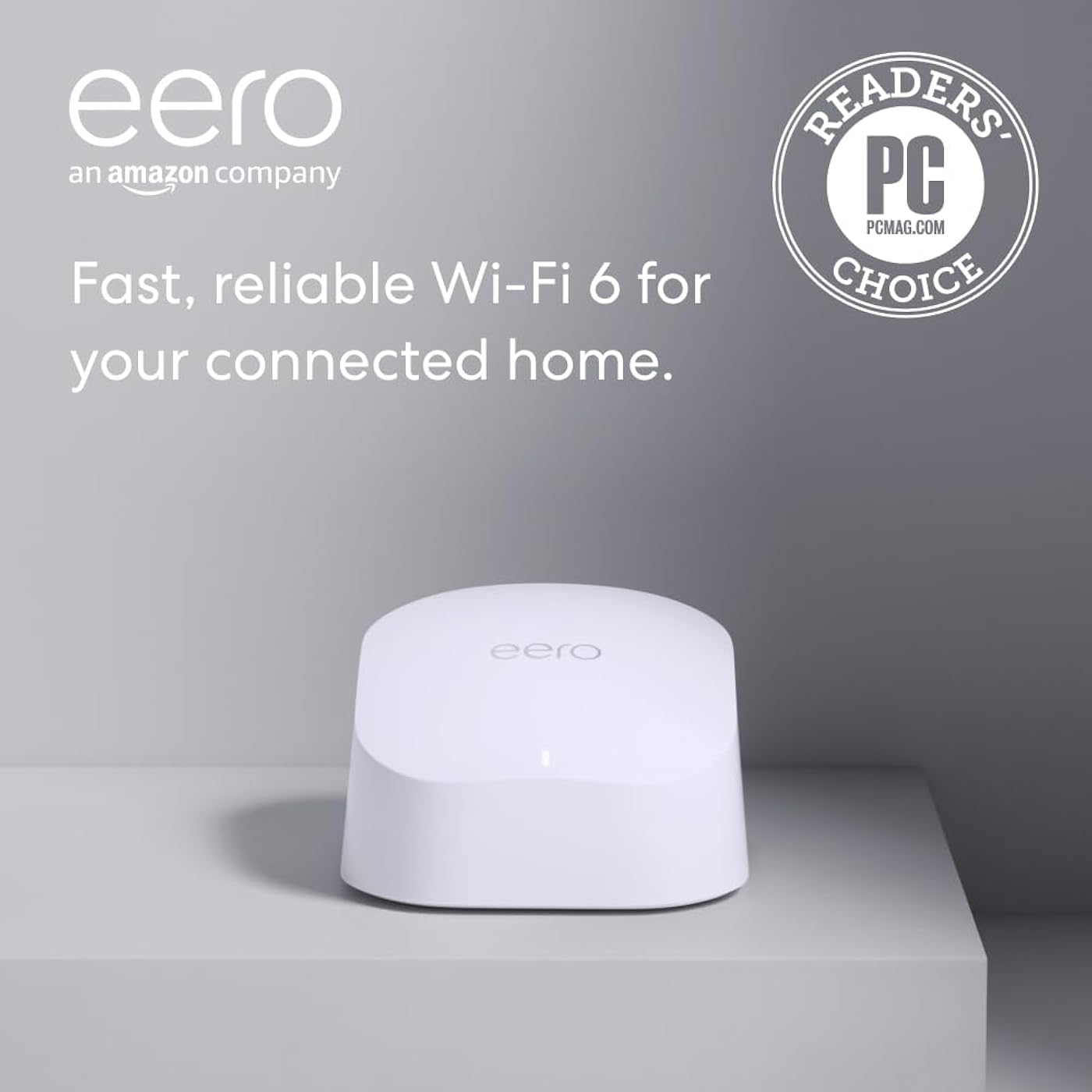
Amazon eero 6 mesh wifi router - Supports internet plans up to 900 Mbps, Coverage up to 1,500 sq. ft., Connect 75+ devices, 1-pack
Condition: New




Buy Now, Pay Later
As low as
$15.00
/ mo
Learn more
- – 6-month term
- – No impact on credit to apply
- – Instant approval decision
- – Secure and straightforward checkout
Ready to go? Add this product to your cart and select a plan during checkout.
Payment plans are offered through our trusted finance partners Klarna, Affirm, Afterpay, Zip, Apple Pay, and Google Pay. No-credit-needed leasing options through Acima may also be available at checkout.
Learn more about financing & leasing here.
Selected Option
Free shipping on this product
30-day returns
Learn more
FREE 30-day refund/replacement
To qualify for a full refund, items must be returned in their original, unused condition. If an item is returned in a used, damaged, or materially different state, you may be granted a partial refund.
To initiate a return, please visit our Returns Center.
View our full returns policy here.
Availability:
In Stock.
Arrives
Thursday, Oct 1


Size: 1 router
Configuration: without eero Plus
Features
- WHOLE-HOME WI-FI 6 COVERAGE - eero covers up to 1,500 sq. ft. with wifi (a 22 foot radius) and supports wifi speeds up to 900 Mbps.
- SAY GOODBYE TO DEAD SPOTS AND BUFFERING - Our TrueMesh technology intelligently routes traffic to reduce drop-offs so you can confidently stream 4K video, game, and video conference.
- MORE WIFI FOR MORE DEVICES - Wi-Fi 6 supports faster wifi than prior standards and permits 75+ connected devices.
- SET UP IN MINUTES - The eero app walks you through setup and allows you to manage your network from anywhere. Plus, free customer support is available 7 days a week in the US at or +.
- BUILT-IN ZIGBEE SMART HOME HUB - eero 6 connects compatible devices on your network with Alexaso theres no need to buy separate smart home hubs for each device.
- GETS BETTER OVER TIME - Automatic updates bring the latest and greatest in eero wifi while also helping to keep your network safe and secure.
- EASILY EXPAND YOUR SYSTEM - With cross-compatible hardware, you can easily add eero products as your needs change.
Features
- WHOLE-HOME WI-FI 6 COVERAGE - eero covers up to 1,500 sq. ft. with wifi and supports wifi speeds up to 900 Mbps.
- SAY GOODBYE TO DEAD SPOTS AND BUFFERING - Our TrueMesh technology intelligently routes traffic to reduce drop-offs so you can confidently stream 4K video, game, and video conference.
- MORE WIFI FOR MORE DEVICES - Wi-Fi 6 supports faster wifi than prior standards and permits 75+ connected devices.
- SET UP IN MINUTES - The eero app walk you through setup and allows you to manage your network from anywhere. Plus, free customer support is available 7 days a week.
- BUILT-IN ZIGBEE SMART HOME HUB - eero 6 connects compatible devices on your network with Alexaso theres no need to buy separate smart home hubs for each device.
- GETS BETTER OVER TIME - Automatic updates bring the latest and greatest in eero wifi while also helping to keep your network safe and secure.
- EASILY EXPAND YOUR SYSTEM - With cross-compatible hardware, you can easily add eero products as your needs change.
Frequently asked questions
If you place your order now, the estimated arrival date for this product is:
Thursday, Oct 1
Yes, absolutely! You may return this product for a full refund within 30 days of receiving it.
To initiate a return, please visit our Returns Center.
View our full returns policy here.
To initiate a return, please visit our Returns Center.
View our full returns policy here.
- Klarna Financing
- Affirm Pay in 4
- Affirm Financing
- Afterpay Financing
- Zip Pay in 4
- Financing through Apple Pay
- Financing through Google Pay
Learn more about financing & leasing here.
Similar Products




Top Amazon Reviews
Size: 1 router
Configuration: without eero Plus
My modem crashed a few months ago and Spectrum had to replace the system. I learned during that installation that I was being charged an extra $10/month for my router. Didn't realize that for 5 years, I was only "renting" my router. Which has been an absolute waste of $600. During the initial install, I was not informed of that and I have never seen an actual paper statement for my bill breaking down my plan. My first Spectrum router was very spotty towards the back of my house (1050sq ft. house) and the new router which was supposed to be an upgrade to Wi-Fi 6, was even worse. My phone would lose connection to the new router on my front porch which is 5 feet away from my router. I initially thought that all I needed was an extender and that is how the Spectrum guy and I got on the subject because I am NOT very tech savvy. I had already been looking at the Eero router and he recommended it. I found the one that is compatible to my internet plan (400Mbps) and went for it while it was on sale. This router is very well packaged. Very pretty packaging, too. OMG!! Super super easy to install. Your grandparents could install this. The only thing that I recommend is being sure of your password which you should be able to find in your providers app (at least I can with Spectrum). If you do happen to forget one digit to your password, and you accidentally change your password, you will have to reconnect each device individually. This router was compatible with my internet plan and provider. I'm very happy with the quality, signal strength, functionality. It has been very reliable for the three days that I have had it. I have not lost signal once. Not even on my front porch. My phone is now showing that I am connected to Wi-Fi 6 when before, it kept dropping it and dropping back down to 5G. Even with the 5G, it would buffer really bad. I got this on sale and I do think that the price is competitive for how well this router performs. The app is super easy to navigate and every device that is linked to your router is located in the app. You can monitor what devices are connecting to your router. I do think that this Eero router was the upgrade to my internet plan. I would recommend saving yourself the cost to "rent" your router through your service provider and upgrading to the Eero router. This will pay for itself in 6 months now that I am not "renting" my router.
...
show more
Reviewed in the United States on November 19, 2025 by Heather
Size: 1 router
Configuration: without eero Plus
I recently purchased the Eros internet extender, and I must say it lived up to its description perfectly. Setting it up was a breeze; the user-friendly instructions guided me through the process smoothly. Once connected, the extender significantly improved my Wi-Fi coverage, reaching areas of my home that were previously dead zones. Streaming shows and playing online games became much more enjoyable, with minimal lag and buffering issues. The device is sleek and compact, blending nicely with my home decor, which is an added bonus. I was particularly impressed by its stability; unlike other extenders I've tried, Eros maintains a strong connection even during peak usage times. Overall, this product delivers on its promises, enhancing my internet experience as advertised. If you’re looking for a reliable solution to boost your Wi-Fi signal throughout your home, I highly recommend the Eros internet extender based on my positive experience.
...
show more
Reviewed in the United States on June 19, 2026 by Elena and Anthony Miller
Size: 1 router
Configuration: without eero Plus
Got this eero 6 thing because our wifi kept dying when everyone was streaming in the living room, and I hate waiting for videos to buffer, lol, so I grabbed a 1-pack and started setting it up with the app. I stuck it in the living room center, near the modem, and kept the old router plugged in to test the difference. Setup was quicker than I expected, the app walked me through it, and it kept telling me the network was safe with automatic updates, which felt kind of fancy. I wandered around the house with my phone and the signal felt stronger, even in the kitchen while I was cooking, and the buffering went away. The kids could stream, my mom jumped on a Zoom call, and no one dropped frames, which was a small win. The built-in Zigbee hub stuff surprised me a little-less gadgets, I guess. I keep it on the living room shelf, easy to grab if I need to tweak anything, and it’s handy when guests come over because more devices just connect. My sister used it on her phone, and it popped onto the network instantly. I’ll probably keep using it for Netflix nights, and if the bedrooms need a boost I might move the unit closer there. It’s not perfect, but it’s simple and it works, which is kinda nice.
...
show more
Reviewed in the United States on July 1, 2026 by Sami 🛒
I needed to extend my wireless reception for my home office. This was recommended by the cable guy and was easy to install. Instead of just picking up a signal and patching it through, it creates a web in my home and extends the wi-fi not only to my office, but upstairs as well. It works with my Comcast modem and provides much greater speed and coverage in my home. It's not perfect as I still get occasional freezing when on video calls, but unless I want to move my office to the dining room this will have to do. I don't know how much this should cost, but I had a little bonus money so I spent it on this upgrade. It seems to be worth it.
...
show more
Reviewed in the United States on February 4, 2026 by MAC4Freedom
Size: 1 router
Configuration: without eero Plus
I never write reviews but have to for this. I have procrastinated upgrading my route for literally years. I was so concerned that it would be a huge headache. My router finally died so I had no choice. The Eero was said to be easiest to ser up. Of course I had my doubts since I am not overly techy. Within a short time I had it set up and all of my devices hooked into it. (Another thing I was dreading). I could not be happier with it so far.
...
show more
Reviewed in the United States on September 13, 2026 by Joni Hawkins
Size: 1 add-on extender
Configuration: without eero Plus
Amazon Eero 6 Dual-Band Mesh Wi-Fi 6 Extender We recently moved into a new home and needed wifi throughout the house. The house is super old with really thick floors and walls, and we were concerned about signal strength. We chose the Eero system for a few reasons and we've been really happy with it. One: It's incredibly easy to setup. You follow the instructions to plug in the Eero, then download and register the app on your phone, then you're done! The extenders are equally easy to use; you just plug them in and register them in the phone app. Need to plug something (like a printer) directly into the network because it doesn't have a wifi card? The Eero has a single ethernet output port on the back and you can plug a printer directly into that or (even better!) plug in a switch (we use the NetGear 8-Port Gigabit Ethernet Unmanaged Switch GS608) to the Eero and use that as an extension bridge to take on multiple ethernet lines. And I know all that might sound complicated but it is really SO EASY to set all this up. Plug-and-play! Two: It's so good at juggling network traffic. Eero maintains two networks--a 2.4 GHz and a 5 GHz--rolled up as one and manages what needs to be on the 2.4 (Echo/Alexa and most "smart" devices) and what needs to be on the 5 (everything else, like your laptops and televisions). Eero also juggles which items need to be using the main Eero device and which need to be on the extenders you may choose to scatter throughout the house. You do not have to manage ANY of that; the Eero does it all automatically and seamlessly. Three: The app is gorgeous and so easy to use. It gives you a little notification when something new joins the network and you can rename it (like "Echo-Bedroom" or "Laptop-Husband") and categorize what type the device is (Security Camera, Laptop, Tablet, and so on). You can block items from the device if you need to. You can create a special guest network and password for your guests to use. You can see your download and upload speeds in case you want to check whether you're getting what you paid for from your carrier. Four: The signal we get from the Eero is super strong! I don't regret buying the extenders, but I'm not sure we needed more than the one we put out in the (detached) garage. I would recommend buying and setting up the base Eero first and then buying the extenders later if you decide you need them. You can add the extenders at any time without disrupting the network setup--you literally just plug them in and walk away!--so there's no need to buy them upfront until you're sure you need them. ~ Ana Mardoll
...
show more
Reviewed in the United States on November 14, 2022 by Ana Mardoll
Size: 1 add-on extender
Configuration: without eero Plus
Recently bought some wifi security cameras for the house and even though the cameras claimed "extended range" i was having troubles with them connecting to the wifi in some locations. I have Xfinity net, and have NEVER had wifi issues in my home so I was reluctant on getting a mesh system considering I've never had problems before trying to connect these cameras, and not to mention mesh systems are pretty expensive. But after reading that wifi extenders kinda cause problems and downgrade speeds...then I started looking into mesh systems. Went to best buy to window shop, was looking at TP-link to keep cost low, but the best buy associate HIGHLY recommended eero. So I bought the 3pc kit since it was same price as Amazon, but then bought an extra node/extender here on amazon. With that said I LOVE how these set up, it was super easy with the app. Setting up routers back in the day use to be a pain, but these pretty much set up themselves. I haven't messed with any Settings yet but I honestly believe there's no need. The coverage is great, all my cameras connect now with full signal, all other wifi devices connected flawlessly especially when using same SSID and password...was like nothing changed other than stronger signal. My only gripe is i hate how everything as some sort of subscription now. Even these have some $9.99 a month plan for some extra features that I dont need...but i appreciate that they dont need the subscription to function, I would have returned everything instantly.
...
show more
Reviewed in the United States on May 15, 2026 by CREE
I wanted to activate Amazon Key Delivery to my garage but my ASUS WiFi router signal was a bit weak to the MyQ sensor, so I ordered the Eero router to remedy the problem. I was happy to see that a stronger signal now reaches the MyQ sensor. But soon I noticed various problems with my devices connected (both E/N and wireless) to the new router, problems I did not have with the ASUS router. Video streaming would sometimes drop out, freeze or pixelate with both E/N and WiFi connections, and it happens to both video streaming from the Internet (YouTube, Amazon Video, Disney+) and local network streaming of Xfinity cable card decoded TV channels. The problem is very intermittent and unpredictable. Audio streaming (Amazon Music Unlimited) would sometimes disconnect after a station has been running for a few hours. My first suspicion was that some component or device in my setup has gone bad, but the problems were happening across different devices. WiFi signal strength was "good" to "excellent" to the problem devices, and video breakups were occurring concurrently on two different devices while watching the same show. I spent over two months trying to isolate the problem. My home setup is a bit unusual and that made debugging the problem more complicated. Besides the usual devices such as computer, laptop, tablet, and phone, I also have the MyQ garage door opener, fire TV stick, Android TV box, Nvidia Shield and a cable card tuner/decoder that takes Xfinity cable transmission and decodes the encrypted stream into a regular video stream that all my TV's at home can watch without paying extra for Comcast set top boxes and extenders. Some are connected by E/N, others are WiFi connected. However I'm the only user of the network so at most 3 devices would be active at any one time, hardly a load on an Internet bandwidth of 80+ Mbps on Xfinity cable. So signal quality and bandwidth were eliminated as problems. I replaced E/N cables, reset all the devices, changed the location of the Eero extenders, replaced HDMI cables, switched the E/N devices to WiFi, and numerous experiments to find a common thread. None of the components seem to be the cause of the problem. Finally I had to conclude that the problem is in the Eero router. I finally called Eero product support on the phone. First level support clearly does not know enough to help. He couldn't even understand my hardware configuration, even tried to tell me that I could connect my component to the Eero E/N port the way I did because he doesn't know how E/N works. I finally insisted on talking to level 2 support. After much stalling, level 2 finally came on the phone. He insisted that the problem is either with Comcast or with one of my non-Eero components. When he found out that I have an E/N switch in my configuration (had to because this Eero router only has one port available after the other port is used to connect to the cable modem), he blamed the E/N switch as being not compatible with the Eero. I doubted his assessment but I went along with getting a recommendation from him for a compatible E/N switch. Turns out that I'm already using a TP-Link E/N switch that he recommends. I asked him to send me another Eero unit to try out in case I received a defective unit but he refuses, saying that he can't just take my word for it that the unit maybe bad. He needs definite proof and that I need to log occurrences of the video streaming problem with specific date, time and problem so he can check into an Eero log to help me fix the problem. After over 4 hours on the phone with Eero support, I decided to go along with their recommendation. To simplify problem isolation, I decided to narrow down my connectivity configuration to the minimal, in the process I removed the E/N switch, deleted the cable card decoder, and stream all contents through the Internet. Now all I have is Xfinity Internet through a cable modem connected by E/N to the Eero gateway then E/N to a LG smart TV watching YouTube TV. The problems persisted. After watching a few days of TV and logging down the date, time and problem, I wrote a lengthy email to Eero product support, asking them to look into the log and determine the problem. After not hearing back for more than a week, I finally made one other configuration change: replaced the Eero with the original Asus router. Guess what, I don't have those problems anymore. It has been a few weeks since I switched back and I'm still running trouble free. I left Amazon Music Unlimited running for over 40 straight hours and it never disconnected. I'm not having any video drop out issues anymore, and UHD movie streaming on Amazon Video no longer drops down to SD quality occasionally as it did with Eero. It's clear to me that Eero product support pays lip service to working with their customers, but once they realize that the problem is with their product, they disappear and ignore you. The impression I got is that they have all been taught to blame something else and when it's clear that the problem is in their product, they will ignore you and hope that you will go away. Either that I received a defective unit or that the product has design problems. I suspect it's the latter by the way the support team refuses to take responsibility for their problems even when it's conclusively proven to them. My recommendation is that people should not buy from a company that doesn't back their product. I sent my email to them on Jan 24, 2021, and as of today, Feb 18, I have not received so much as an acknowledgement.
...
show more
Reviewed in the United States on February 19, 2022 by rocketscientist