Search  for anything...

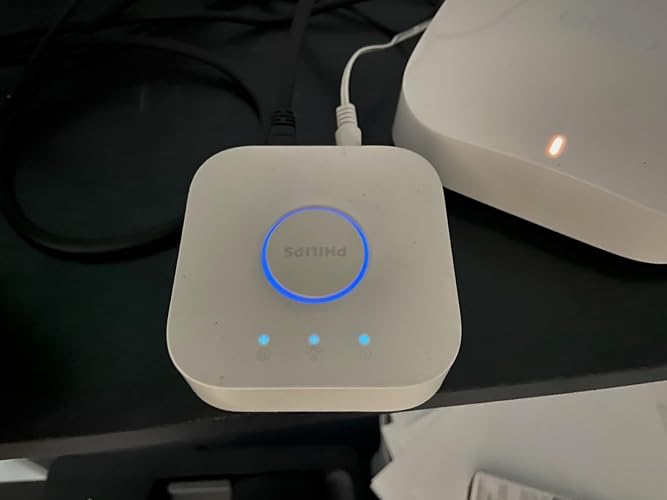
Philips Hue Bridge, Unlock the Full Potential of Hue Bridge System, Multi-Room and Out-of-Home Control, Create Automations and Zones, Smart Lighting Hub, Works with Voice and Matter-Compatible

  • Based on 11,400 reviews
Condition: New
Checking for the best price...
$41.99 Why this price?
Save $23.99 was $65.98

Buy Now, Pay Later


As low as $10 / mo
  • – 4-month term
  • – No impact on credit to apply
  • – Instant approval decision
  • – Secure and straightforward checkout

Ready to go? Add this product to your cart and select a plan during checkout.

Payment plans are offered through our trusted finance partners Klarna, Affirm, Afterpay, Zip, Apple Pay, and Google Pay. No-credit-needed leasing options through Acima may also be available at checkout.

Learn more about financing & leasing here.

Selected Option

Free shipping on this product

FREE 30-day refund/replacement

To qualify for a full refund, items must be returned in their original, unused condition. If an item is returned in a used, damaged, or materially different state, you may be granted a partial refund.

To initiate a return, please visit our Returns Center.

View our full returns policy here.


Availability: In Stock.
Fulfilled by Amazon

Arrives Monday, Aug 17
Order within 10 hours and 48 minutes
Available payment plans shown during checkout

Protection Plan Protect Your Purchase
Checking for protection plans...

Style: Bridge Only


Size: 1 Count (Pack of 1)


Features

  • WHATS IN THE BOX: Includes one Hue Bridge that unlocks the full potential of your Philips Hue system, including automations, smart control from anywhere in the world, and so much more
  • SECURE AND STABLE CONNECTION: With Zigbee advanced technology, the bridge ensures a reliable connection that won't strain your Wi-Fi, Hue lights work when your Wi-Fi is down
  • CONTROL LIGHTS FROM ANYWHERE: The Hue hub enables out-of-home control, control your lights with the Hue app anywhere you have an internet connection, with your home assistant
  • ENJOY SMART LIGHTING FOR YOUR ENTIRE HOME, INDOORS AND OUT: Add up to 50 lights and accessories to your smart lighting system, a Hue Bridge is required to control Hue outdoor lights and accessories
  • LEVEL UP YOUR MOVIES, MUSIC, AND GAMES WITH SURROUND LIGHTING: Make your lights dance, flash, dim and brighten along to your movies, TV shows, PC and music, the sync requires HDMI Sync Box
  • GET FULL SMART HOME CONTROL WITH MATTER: The PHILIPS Hue smart bridge allows you to connect your lights and accessories to other smart home devices with Matter
  • FUTURE-PROOF AND ALWAYS UP TO DATE: The PHILIPS Hue light bridge receives automatic updates, so your system is always ready for the future
  • UNIT COUNT: 1.0

Description

Unlock the full potential of your Philips Hue system with the PHILIPS Hue BridgeThe Hue Bridge unlocks the full suite of smart lighting features. Control lights while away, set automations, or connect with other smart platforms and devices like Matter and Samsung SmartThings. How to set up the bridgeSet up is simple: Connect it to power and your router. Then set it up in the Philips Hue app, where it gets updated automatically. Set it and forget it. The Bridge remembers your settings even when your power goes out, and is always up to date. Enjoy a secure and reliable connection that won't strain your Wi-FiThe Bridge uses trusted technology such as Zigbee, a mesh network that allows your lights to work even when the Wi-Fi is down. Response time is instant, so you can control your lights without any delays.Get the most out of your Hue systemThe Bridge unlocks the most unique features of Hue. Sync your lights to experience surround lighting. Add outdoor lights to your Hue system. Or feel safer with light that welcomes you at the door, or make it look like you're home when you're away.Want more advanced light control?The Bridge makes it possible to control your lights from anywhere, even away from home. Set recurring automations. Create and save custom scenes. Or use voice control. Connect your Hue lights with other smart home platforms using Matter. With the Bridge, you can do so much more with smart lighting. Upgrade your Philips Hue system with a Bridge.Key Benefits:Uses Zigbee technologyVoice controlSyncs lightsOut-of-home controlMatter-certifiedAdd up to 50 lights or accessories

Manufacturer: ‎Philips Hue


Part Number: ‎458471


Item Weight: ‎8.3 ounces


Product Dimensions: ‎1 x 3.5 x 3.5 inches


Item model number: ‎453761


Batteries: ‎4 AA batteries required.


Size: ‎1 Count (Pack of 1)


Color: ‎White Ambiance


Style: ‎Bridge Only


Material: ‎Plastic


Pattern: ‎Hue Bridge


Shape: ‎Tubular(T)


Power Source: ‎Corded Electric


Voltage: ‎240 volts


Wattage: ‎3 watts


Item Package Quantity: ‎1


Number Of Pieces: ‎1


Type of Bulb: ‎LED


Luminous Flux: ‎510 lumen


Certification: ‎Zigbee


Special Features: ‎Unlocks all Philips Hue Control Features


Usage: ‎Indoor


Included Components: ‎1 Philips Hue bridge, 1 power adapter, 1 LAN cable


Battery Cell Type: ‎Alkaline


Warranty Description: ‎2 year warranty.


Date First Available: December 22, 2015


Frequently asked questions

If you place your order now, the estimated arrival date for this product is: Monday, Aug 17

Yes, absolutely! You may return this product for a full refund within 30 days of receiving it.

To initiate a return, please visit our Returns Center.

View our full returns policy here.

  • Klarna Financing
  • Affirm Pay in 4
  • Affirm Financing
  • Afterpay Financing
  • Zip Pay in 4
  • Financing through Apple Pay
  • Financing through Google Pay
Leasing options through Acima may also be available during checkout.

Learn more about financing & leasing here.

Top Amazon Reviews


  • The Hue Bridge is what turns smart bulbs into a smart home - Sync the 2026 World Cup to your lights!
Style: Bridge Only Size: 1 Count (Pack of 1)
I've been using Philips Hue for over a decade and at this point I'm completely invested in the ecosystem. My home is divided into rooms, zones, automations, and custom scenes that I control from my phone, voice assistants, and scheduled routines. The Bridge is what makes all of that possible. Without the Hue Bridge, the bulbs are still good smart bulbs. With the Bridge, the system becomes something much bigger. You can create whole-home scenes, control multiple rooms at once, set automations, access your lights when you're away from home, integrate with other smart-home platforms, and unlock entertainment features. One of my favorite examples is Hue Sync. As I'm writing this review, I'm watching the World Cup with my living room lights synchronized to the action on screen. The lighting reacts to what's happening during the match and completely changes the atmosphere of the room. It's one of those features that sounds unnecessary until you experience it yourself. I've attached a few photos showing some of the ways I use Hue throughout my home. The colored track lighting and recessed lighting are all part of larger scenes and zones controlled through the Bridge. Being able to group lights together and manage everything from a single app is a huge part of what makes the system so enjoyable. People often hesitate because Hue costs more than many competing brands. In my experience, the reliability has justified the cost. Over roughly 13 years of ownership, I've never had to replace a Hue bulb because it failed, and I've rarely had to troubleshoot anything. The system simply works. If you're only planning to buy one or two smart bulbs, you may not immediately appreciate what the Bridge does. But if you're building a smart lighting system for an entire home, I would consider the Hue Bridge essential. It's the piece that unlocks the full Philips Hue experience. ... show more
Reviewed in the United States on June 20, 2026 by Dre Nicole

  • I didn't want this but... was necessary
Style: Bridge Only Size: 1 Count (Pack of 1)
I didn't even want to buy this since I don't have much use for colored lights in the first place, and all of my smart devices are at the switch level anyway, but... I'm also impulsive and technologically silly, so I bought it in order for a computer to interact with them for a specific reason - watching Formula One races through the MultiViewer app. (See pic) The MultiViewer app allows you to watch Formula One races beyond just a single broadcast of the race - instead of just the television broadcast you can also see multiple driver cockpit cameras, track information, position of cars on the track, the leaderboard and tire information, track violations and penalties, and even tune into specific driver radios. Basically it gives you a fully immersive racing experience outside of "just watching the race on tv". In addition to MultiViewer, there's a companion app called F1MV Lights Integration - which is awesome - and well... I simply had to have it. The companion app will take the data being pushed through MultiViewer and use it to control smart lights, so the lights reflect the race conditions such as green flags, red flags, safety cars, fastest laps, chequered flags, etc. In my picture someone had just hit the fastest lap of the race so far, usually indicated with the color purple on the leaderboard. As such the Philips lights changed to purple. The same happens for red flags, yellow flags, etc. Is it necessary? Nah... Cool as hell though? You bet. I originally tried this with the cheaper Govee lights, but although they were wi-fi capable like the Philips, they didn't have the API necessary to work correctly with the MultiViewer system. Those were returned and Philips lights were were purchased instead, and they require the hub to work with MultiViewer. It sucked that I also had to buy a hub to make it all work, but I'm silly and bought it anyway. Through the hub and the app, all it worked flawlessly and painlessly, connected easily, and does what I need it to do. All of it was generally easy to configure, and the app gives you quite a bit of control over a simple light. The lights dim from zero to 100 without issue, and the color range is everything I personally could ask for. (Although maybe others would be more demanding than myself.) All in all it was rather expensive, (compare to the Govee lights and you'll see the price difference!), but I hope that the extra expense means all of it will last a long time with no problems. They were all purpose-bought and they serve their purpose excellently. ... show more
Reviewed in the United States on September 4, 2025 by ReyAce

  • Definitely worthwhile
Style: Bridge Only Size: 1 Count (Pack of 1)
If you have Philips Hue lights (bulbs, lightstrips), then you should have this bridge. It does so much more and is so much more satisfactory than Bluetooth control alone.
Reviewed in the United States on July 2, 2026 by Stickley

  • Setup took two hours.
Style: Bridge Only Size: 1 Count (Pack of 1)
In theory this is a five minute easy setup with QR codes and your phone app. In practice? The bridge can only work on legacy 2.4GHz wifi and my phone and home system both default to 5GHz. The installation routine AND Philips help (outsourced to the Philipines) could only guess that the network was not responding to forced shift to 2.4GHz. A router override couldn't force the connection either, the bridge could not be found by the phone app. In desparation I installed the app on a second phone. Which found the bridge (with no other changes) and after fifteen more minutes everything was working well--including the phone that had been unable to fjnd the bridge. There is SOMETHING critical to the setup that Philips does not know. If I hadn't been able to verify the network was OK and I didn't make the (no reason why except experience) random choice to try another phone, I'd have never got it going. AND the app design makes it loom like all the advance features (automations) are disabled, by graying out their normal menu icons. Does it finally work? Yes. But prepare for a potentially LONG HARD INSTALLATION. Someone with wifi network experience to aid, or hired help, may be necessary. Also note that if you want DIMMING, the automated routines seem to start or stop at ~10% they do not allow for a complete fade on/off evenly. Foolishly annoying. And using the "wireless wall switch" has the same problem. ... show more
Reviewed in the United States on April 22, 2026 by Some Amazon Customer

  • A fun product - but is it worth the crazy cost for a whole system?
Style: Bridge Only Size: 1 Count (Pack of 1)
I struggled with what to include in this review as the product itself is pretty straightforward and really has no meaningful functionality to "review," per se: it either works or it doesn't. In my case, the hub worked just fine, setup was easy enough, and I haven't had any actual trouble with the hub. Since most people looking at the hub are likely considering diving into the Hue system as a whole, my review, instead, will focus on my experience with a relatively built-out Hue system after a few weeks. My current setup includes two BR-30 multicolor lights in my theater room, three of the same in my kitchen, a LightStrip with multiple extenders in the bedroom, and two A7 lightbulbs for our nightstand lamps in the bedroom. The only "smart" home product that I've owned prior to the Hue lights was two Nest thermostats and a Ring doorbell, so my experience with this category of technology is fairly limited. Overall, this lights are just fun. Adding lights to the system was straightforward, the automatic detection worked well, and it was easy to get individual lights assigned to rooms and scenes set up. The Hue app itself is fairly easy to use, though some of the UI decisions in the most recent version of the app are a little annoying (for example, having different "tabs" for individual lights and scenes). I've had some hiccups with getting individual lights to "group" together for color changes when setting up scenes, though this has been relatively rare. Setting up scenes was straightforward, though I'll admit I almost immediately deleted most of the included presets since I thought they were a bit strange. But setting up individual scenes with custom colors and brightness was a breeze. Getting used to using an app - rather than light switches - has been a bit of a challenge. This isn't a fault of the Hue system itself but is something relevant, I think, to the experience of switching to a smart lighting system. A few weeks in, I still accidentally use my light switches at times. I'm looking forward to getting some of the Hue motion sensors to see if this can make the system truly automated; I love the idea of lights turning on and off automatically based on need, and I imagine that this will improve my experience with the system immensely. For now, though, there's definitely a bit of a learning curve to getting used to using an app (and carrying a phone around) to turn your lights on rather than the much more convenient light switch. The main problem I've had thus far is having individual lights being "unreachable" for, sometimes, long periods of time. Interestingly, the lights still respond to scene changes even when they're listed as "unreachable," but I can't control "unreachable" lights individually. I haven't quite figured out what the issue with this is, and I've verified that all of the firmware for the lights and the iOS app are up-to-date. This seems to mostly happen with the bedroom lights, which are located upstairs while the hub is downstairs, and I wonder if this is part of the problem. Perhaps it'll be less of an issue as I continue to expand the system and have a stronger mesh network throughout the house. But I will say that this has been quite an annoyance that I haven't been able to sort out completely. Not enough to say that I won't continue to buy Hue lights, but certainly something to be aware of if this might be enough to cause you to think twice. Because of this issue, HomeKit integration has been spotty for me. While the Hue app will allow me to change the lights via scenes even when they're "unreachable," this isn't the case in HomeKit. As a result, I rarely use HomeKit, and frankly I just find the Hue app easier to use. Since I don't have a ton of smart products, I don't necessarily need the deep integration and automation that can be achieved with the HomeKit system. The brightness and color setting are very granular, and you can create just about any lighting situation you can imagine. You're really only limited to your creativity. For day-to-day use, most of these features are a bit unnecessary, though even at times it can be fun to use some of the different colors. The adjustable brightness and color warmth are incredibly useful on a regular basis. But I can imagine this being a very nice touch for parties or big get togethers. Overall, do I think the Hue system is work the admittedly high cost? After about $600 to be able to light three rooms, I have to say I don't think so. It's a very fun toy, and I'll continue to expand the system, but I don't see this as a huge game-changer. Maybe it's because I'm not using the system to its fullest extent (e.g., integration with a smart thermostat), but I see this as a very expensive amusement and nothing else. Hopefully the lights will last quite a while: at $30-40 for each replacement, this can very quickly become an expensive system. But for those looking for the ability to fine tune your home lighting setup and are willing to pay the high price, I would definitely recommend it, although perhaps try setting it up in just a room or two to see how it goes before you spend a ton of money for whole-house lighting. ... show more
Reviewed in the United States on September 6, 2018 by Nick Naylor

  • What a great system!
Style: Bridge Only Size: 1 Count (Pack of 1)
After trying several different smart bulb brands, I am very happy and impressed with the Hue system. Mine consists initially of the hub, three light bars, and 4 dimmable white bulbs. Make sure you set up an account with your Phillips Hue before connecting with Alexa, and I recommend using the same email address as your Alexa. If you don’t, you’ll end up with an error/failure message. (Took me a couple of tries to figure that out.) Everything was very, very easy to set up. No turning off and on light switches to make bulbs discoverable, wondering if you’re doing it at the right speed. The hub detects your lights automatically, as long as they’re switched on. Love that! I needed a smart light in an outbuilding, far from my router. The distance makes for an unstable connection with normal smart bulbs. In building my Hue network, I now have a light out in the yard that dependably goes off and on as programmed. This is the main reason for choosing Hue in the first place. Works perfectly! Automating is easy, too, and when the lights turn off and on, they fade instead of doing an abrupt on/off. Love that! You’re not limited to one light/color intensity on automation either. The lights can be set at one brightness and/or color at one time of day, then a different brightness and/or color at a different time of day. Wonderful! This system is more expensive than other smart bulbs, but definitely worth it. This is my system of choice now, and I will be expanding it as my budget allows. A++ ... show more
Reviewed in the United States on November 2, 2022 by DR

  • Lesson learned about Hardware & Software
Style: Bridge Only Size: 1 Count (Pack of 1)
If you left a one star review for the Hue Bridge Pro, hear me out. I was ready to do the same. Here’s exactly what happened and what I learned. ⸻ My Setup To give full context, here’s what I’m running: Phone and App • iPhone 16 Pro Max 256GB • Latest Hue app update as of 2/28/26 Lighting Setup, 45 Total Lights • 9 BR30 downlights • 21 A19 bulbs • 4 filament bulbs • 2 PAR38 downlights • 4 spot lights • 4 candle lights • 1 Lightstrip Plus Additional details: • All screw-in bulbs have white bases, not the older black base versions • 30 bulbs use digit codes • 15 bulbs use QR codes for setup • All but 4 filament bulbs are White and Color Ambiance • None are the Ultra-Low Dimming 2 percent models Accessories • 6 first generation switches • 4 first generation motion sensors, 2 are outdoor Network • Hue Bridge Pro connected to a TP-Link 2.5GB WiFi 7 router • Verizon Fios with 2.3GB up and down speeds Smart Home Platform • Alexa Plus • 6 third gen Echo Dots • 1 first gen Echo All bulbs and Echo devices were purchased from Amazon. Hue Bridge Pro was purchased directly from Philips Hue during release week, first week of September 2025. A second Hue Bridge Pro was purchased from Amazon on 2/4/26. ⸻ Where Things Started I migrated everything from Hue Bridge v2 to the Bridge Pro. • Full migration took about 5 hours • Removed old Hue Labs settings • Set up Motion Aware in a frequently used room Everything worked perfectly until early January 2026. Then the problems began. ⸻ The Issue Lights began randomly turning on and off throughout the day. What I tried: • Used the Clean-Up setting to reset scenes • Erased and remapped all lights • Did that three separate times • Disconnected every bulb from power during remapping Nothing fixed it. I became convinced the Bridge Pro was defective. I disconnected it and ordered a second one. ⸻ The Second Bridge Installed the second Bridge Pro on 2/4/26. • Remapped all lights again • Worked flawlessly for about 2 days • Same random on and off behavior returned At this point I assumed I somehow received two defective units. Before returning both, I reconnected my original Bridge v2 and remapped everything again. The same issue happened. That was the turning point. There was no way I had three defective bridges. ⸻ The Real Cause After hours of research, I found it. The issue was not the Hue hardware. It was Alexa Plus. A recent Alexa app and firmware update had: • Reenabled legacy routines • Reactivated routines I had disabled months or even years ago Those routines were triggering lights throughout the day. Once I deleted all Alexa routines, the problem was completely resolved. ⸻ The Lesson If your lights are behaving unpredictably: • Check Alexa routines • Check Apple Home automations • Check Google Home automations • Review firmware updates • Look for reenabled legacy routines Smart home platforms constantly update and change behavior in the background. Hardware often gets blamed first, but software is frequently the real culprit. I was ready to swear off Hue entirely. It turns out the Bridge Pro was never the issue. Hopefully this saves someone else the frustration I went through. Have a great year. ... show more
Reviewed in the United States on February 28, 2026 by Adam

  • Smart home use.
Style: Bridge Only Size: 1 Count (Pack of 1)
Versatile for a house using smart bulbs. Very durable and easy to install and use. Works very well
Reviewed in the United States on May 15, 2026 by Jorge ruiz

Can't find a product?

Find it on Amazon first, then paste the link below.
Checking for best price...