Search  for anything...
HP

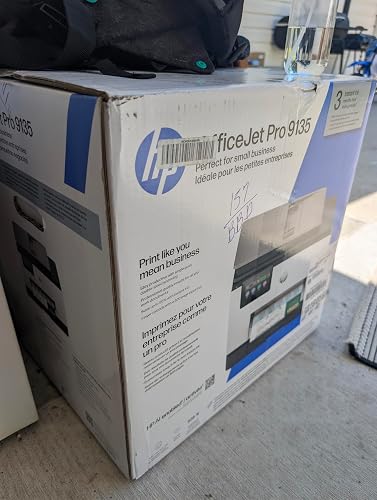
HP OfficeJet Pro 9135 Wireless All-in-One Color Inkjet Printer, Print, Scan, Copy, Fax, ADF, Duplex Print/scan, Best-for-Office, 3 Month Trial of Instant Ink Included, AI-Capable (C2WM0A)

  • Based on 54 reviews
Condition: New
Checking for the best price...
$299.99 Why this price?
Save $130.00 was $429.99

Buy Now, Pay Later


As low as $50.00 / mo
  • – 6-month term
  • – No impact on credit to apply
  • – Instant approval decision
  • – Secure and straightforward checkout

Ready to go? Add this product to your cart and select a plan during checkout.

Payment plans are offered through our trusted finance partners Klarna, Affirm, Afterpay, Zip, Apple Pay, and Google Pay. No-credit-needed leasing options through Acima may also be available at checkout.

Learn more about financing & leasing here.

Free shipping on this product

30-day refund/replacement

To qualify for a full refund, items must be returned in their original, unused condition. If an item is returned in a used, damaged, or materially different state, you may be granted a partial refund.

To initiate a return, please visit our Returns Center.

View our full returns policy here.


Availability: In Stock.
Fulfilled by Amazon

Arrives Thursday, Jul 23
Order within 16 hours and 33 minutes
Available payment plans shown during checkout

Protection Plan Protect Your Purchase
Checking for protection plans...

Features

  • FROM AMERICA'S MOST TRUSTED PRINTER BRAND The OfficeJet Pro 9135 is perfect for offices printing professional-quality color documents like presentations, brochures and flyers. Print speeds up to 25 ppm black, 20 ppm color.
  • 3 MONTH TRAIL OF INSTANT INK INCLUDED Subscribe to the Instant Ink delivery service to get ink delivered directly to your office door before you run out, and you save up to 50% on ink; after 3 months, a monthly fee applies unless cancelled
  • KEY FEATURES Fast color printing, copy, fax, auto 2-sided printing, auto document feeder with single-pass 2-sided scanning, and two 250-sheet input trays
  • 4.3-INCH TOUCHSCREEN Quickly navigate your printer with a large color touchscreen and a phone-like user interface
  • WIRELESS PRINTING Stay connected with our most reliable dual-band Wi-Fi, which automatically detects and resolves connection issues
  • HP APP Print, scan, copy, or fax right from your smartphone with the easy-to-use print app
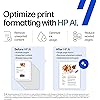
  • OPTIMIZE PRINT FORMATTING WITH HP AI Print web pages and emails with precisionno wasted pages or awkward layouts; HP AI easily removes unwanted content, so your prints are just the way you want
  • PROTECTS YOUR DATA HP Wolf Pro Security bolsters security and helps keep your network protected from cyber threats
  • SUSTAINABLE DESIGN Made with more than 40% recycled plastic content
  • This printer is intended to work only with cartridges with original HP chips or circuitry and will block cartridges using non-HP chips or circuitry. Periodic firmware updates will maintain the effectiveness of these measures.

Description

The HP OfficeJet Pro 9135 All-in-One Printer delivers fast color, fade- resistant prints, 500-sheet paper capacity, and single-pass duplex scan, copy capabilities plus fax, perfect for your office. Navigate this printer with the 4.3" color touchscreen and phone-like user interface. It includes wireless and printer security features to keep your multifunction printer up to date and secure, and is made with more than 40% recycled plastic content. Optimize print formatting with HP AI, that easily removes unwanted content from emails and web pages so your prints are just the way you want—no wasted pages or unwanted content. Subscribe to Instant Ink delivery service and get 3 months of free ink delivered directly to the door of your office. The HP OfficeJet Pro 9135 All-in-One also lets you print from anywhere with the HP app.

Brand: HP


Connectivity Technology: Apple AirPrint; Ethernet networking; Mopria; USB; Wireless (Wi-Fi); Wireless direct printing


Printing Technology: HP Thermal Inkjet


Special Feature: Wireless; Automatic document feeder; Two-sided printing; Two-sided scanning; Fax; Front USB flash drive port; Touchscreen; Smart Advance Scan See more


Color: Cement


Model Name: HP OfficeJet Pro 9135 All-in-One Printer


Printer Output: Color


Maximum Print Speed (Color): 20 ppm


Max Printspeed Monochrome: 25 ppm


Item Weight: 26.1 Pounds


Printer Type: HP Thermal Inkjet


Other Special Features of the Product: Wireless; Automatic document feeder; Two-sided printing; Two-sided scanning; Fax; Front USB flash drive port; Touchscreen; Smart Advance Scan


Printer Output Type: Color


Item Weight: 26.1 Pounds


Item Dimensions D x W x H: 15.6"D x 17.2"W x 12.53"H


Print media: Glossy photo paper, Unknown


Scanner Type: Easy slide-off glass, single-pass 2-sided ADF


Maximum Copy Speed Black and White: 23 ppm


Compatible Devices: Laptops, PC, Smartphones


Warranty Type: One-Year limited hardware warranty. For more info please visit us at support.hp.com .


Maximum Copies Per Run: Up to 99 copies


Ink Color: Black, cyan, magenta, yellow


Additional Printer Functions: All In One


Control Method: App


Compatible Cartridge: HP 936 Black Original Ink Cartridge 4S6V2LN, HP 936 Cyan Original Ink Cartridge 4S6U9LN; HP 936 Magenta Original Ink Cartridge 4S6V0LN; HP 936 Yellow Original Ink Cartridge 4S6V1LN; HP EvoMore planned to be available April 2024 HP 936e EvoMore Black Original Ink Cartridge 4S6V6LN; HP 936e EvoMore Cyan Original Ink Cartridge 4S6V3LN; HP 936e EvoMore Magenta Original Ink Cartridge 4S6V4LN; HP 936e EvoMore Yellow Original Ink Cartridge 4S6V5LN


Number of Trays: 2


Processor Count: 1


Maximum Media Size: 8.5 x 11.7 in


Maximum Sheet Capacity: 500


Paper Size: 8.5 x 11;8.27 x 11.7;8.5 x 14;7.16 x 10.12; Inches


Printer Connectivity Type: Apple AirPrint; Ethernet networking; Mopria; USB; Wireless (Wi-Fi); Wireless direct printing


Hardware Interface: Ethernet, USB


Dual-sided printing: Yes


Duplex: Automatic


Brand: HP


Model Name: HP OfficeJet Pro 9135 All-in-One Printer


Model Number: C2WM0A#B1H


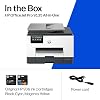
Built-In Media: HP OfficeJet 9135 All-in-One Printer; HP 936 Setup Black Ink Cartridge (~800 pages); HP 936 Setup Cyan Ink Cartridge (~420 pages); HP 936 Setup Magenta Ink Cartridge (~420 pages); HP 936 Setup Yellow Ink Cartridge (~420 pages); Regulatory Flyer; Ink Caution Flyer; Power Cord; Setup Poster; Reference Guide [For more information about fill and yield, see ]


Specific Uses For Product: Small medium business, Small work team


UPC: 199485545509


Manufacturer: HP


Warranty Description: One-Year limited hardware warranty. For more info please visit us at support.hp.com .


Item Type Name: Inkjet printers


Color Pages per Minute: 20 ppm


B&W Pages per Minute: 25 ppm


Initial Page Print Time: 11 Seconds


Color: Cement


Color Depth: 24 Bits


Maximum print Resolution Color: Up to 4800 x 1200 optimized dpi on HP Advance Photo Paper 1200 x 1200 dpi input Dots Per Inch


Maximum Print Resolution Black and White: 1200 x 1200 rendered dpi Dots Per Inch


Power Consumption: 5.58 Watts


Wattage: 5.5 watts


Maximum Copy Resolution Color: Up to 600 dpi


Maximum Copy Resolution Black and White: Up to 600 dpi


Frequently asked questions

If you place your order now, the estimated arrival date for this product is: Thursday, Jul 23

Yes, absolutely! You may return this product for a full refund within 30 days of receiving it.

To initiate a return, please visit our Returns Center.

View our full returns policy here.

  • Klarna Financing
  • Affirm Pay in 4
  • Affirm Financing
  • Afterpay Financing
  • Zip Pay in 4
  • Financing through Apple Pay
  • Financing through Google Pay
Leasing options through Acima may also be available during checkout.

Learn more about financing & leasing here.

Top Amazon Reviews


  • By far the best printer scanner fax combo By far the best printer scanner fax combo
I needed a printer for my home office. My prior printer was an Epson Eco tank and it would just stop working randomly or not print even with ink in it. So I purchased this one because I do a lot of scanning faxing and printing that needs to be double-sided. When I first did the set up it’s pretty user-friendly, but I did get stuck on the preparing set up screen where I felt like 30 minutes. It should take that long. I just powered it down and then back on again and I finish set up in a matter of seconds. The printing is strong with this one that I was shaking where I originally had it so I had to move it to a different location. I really like how small the cartridges are so they are very eco-friendly when it comes to recycling them. They’re not a lot of bulk. I like how you just simply pop it in until you feel it click it does not make a click noise, but you can feel it. The print quality is outstanding, especially if you’re printing out pictures I was actually pleasantly surprised. It was almost perfect and identical to what was on screen. If you are looking for a office printer for your home office this is definitely the one to go with. It’s big but not overly big it works just like a big office printer but this one you have at home.. ... show more
Reviewed in the United States on June 3, 2026 Reviewed in the United States on June 3, 2026 by Katie D.

  • Feature Packed Office Printer That Delivers Strong Performance
I ordered the HP OfficeJet Pro 9135 for a home office environment that needed more than a basic printer, and it has largely lived up to expectations. This is a true all-in-one machine that handles printing, scanning, copying, and faxing while offering many of the features normally found in larger office equipment. Setup was straightforward, and connecting the printer to my wireless network was easier than expected. The large color touchscreen is responsive and intuitive, making navigation simple even for users who are not particularly tech savvy. I also appreciate the dual paper trays and generous paper capacity, which reduce the need for constant refilling. Print quality is excellent for everyday business documents. Text is sharp, colors are vibrant, and presentations and reports look professional. Automatic two sided printing and single pass duplex scanning save time when working with multi page documents. The automatic document feeder is another welcome addition for anyone who regularly scans or copies larger batches of paperwork. The HP app works well and makes it easy to print or scan directly from a smartphone. Wireless performance has been reliable, and I have not experienced any connection issues during normal use. The reason I am giving this printer four stars instead of five comes down primarily to operating costs. Like many inkjet printers, replacement ink can become expensive over time, and some users may not be enthusiastic about subscription based ink programs. While the included trial is a nice bonus, ongoing ink expenses should be considered before purchasing. Overall, this is a capable and well-equipped office printer that offers strong print quality, excellent scanning features, and convenient wireless functionality. For a small business or busy home office, it provides a lot of capability in a reasonably compact package. ... show more
Reviewed in the United States on May 31, 2026 by The Last baby Boomer

  • Quick and easy setup
Other printer companies, TAKE NOTES from HP packaging. The best part about unboxing this printer is that then entire unit is housed in a plastic bag with handles inside the box, so I was able to simply lift everything out using the bag. Genius! Also, very minimal additional packaging or useless junk to throw away: 4 pieces of Styrofoam, one sheet of paper, two pieces of tape, and one twisty tie. It is almost enough for me to forgive their ink policies. (Almost!) Getting the printer set up and going took about 5 minutes. I scanned the QR code, installed the ink cartridges, installed the HP app, printed an alignment page, signed up on the app, and added my wifi password. And I was ready to print. Very easy and straightforward. I did have to spend a little time getting around the instant Ink promo offer, but it is possible to do. The printer is a little noisy (my other printers are laser) but very very quick. The quality is great. Seems like a great printer for the price. Overall, this is anl solid yes for me. ... show more
Reviewed in the United States on June 8, 2026 by Jen

  • Excellent All-in-One Printer for Home or Small Business Excellent All-in-One Printer for Home or Small Business
I recently got this HP OfficeJet Pro 9135, and I couldn't be happier with the performance. Setup was quick and straightforward, and I was printing from my phone and computer within minutes. The print quality is excellent for both color and black-and-white documents, with sharp text and vibrant colors. One of my favorite features is the automatic duplex printing and scanning, which saves a lot of time when working with multi-page documents. The touchscreen is easy to navigate, and the automatic document feeder works smoothly without paper jams. The printer is surprisingly fast, making it perfect for a home office or small business environment. Scanning, copying, and faxing are all simple and reliable. The included Instant Ink trial is a nice bonus and helps keep printing costs under control. For the price, this printer offers a great combination of speed, features, and print quality. If you're looking for a dependable all-in-one printer that can handle everyday office tasks with ease, the HP OfficeJet Pro 9135 is an outstanding choice. ... show more
Reviewed in the United States on June 7, 2026 Reviewed in the United States on June 7, 2026 by Anthony Rosso

  • Perfect Addition to My Home Office
The HP OfficeJet Pro 9135 Wireless All-in-One Color Inkjet Printer has been an excellent addition to my home office. It combines printing, scanning, copying, and faxing into one device, making it a convenient all-in-one solution for everyday work needs. I really like the wireless connectivity because it allows me to print easily from multiple devices without dealing with extra cables. The print quality is sharp for both documents and color materials, and the automatic document feeder saves a lot of time when scanning or copying multiple pages. The duplex printing and scanning features are especially useful for reducing paper usage and improving efficiency. Setup was straightforward, and the printer integrated smoothly into my workspace. As someone who works from a home office, I appreciate having a reliable machine that can handle regular printing, client paperwork, forms, and administrative tasks without constant interruptions. Overall, this printer is fast, versatile, and a great choice for anyone needing a professional-quality all-in-one printer for a home office or small business environment. ... show more
Reviewed in the United States on June 3, 2026 by AAA

  • Prints card stock and labels without jamming. Plastic trays seem fragile. Prints card stock and labels without jamming. Plastic trays seem fragile.
Make sure to remove all packing materials before turning the printer on. There is a protective foam pad on the scanner glass. (And a small cardboard insert in the lower paper tray you might miss.) Both paper trays will expand to take legal size paper (14”), or A4 paper. Plain paper only in the lower tray, the upper tray will also take envelopes and other media, such as stickers and card stock. The plastic of the trays seems very thin, so handle with care. The scanner glass measures 12.5” x 9”, so if you need to copy legal size, you’ll need to use the automatic feeder, which scans both sides at once. The Quick Start Guide is a very easy three steps. If you enroll in the 3 months of free ink, you will not be able to use non-HP ink cartridges (3rd party) in the future. This printer will work with HP cartridges that have new or remanufactured cartridges which have a reused HP chip — unless you sign up for the free 3 months of ink, which turns the printer into an HP+ printer. If you connect with internet, HP will then do security measures and block non HP cartridges that previously worked. The printer contains a non-replaceable battery. Perhaps so that when the battery dies, so does the printer? The printer comes with four “set-up” cartridges, which means there is not much ink in them. These are very easy to install by opening the front of the printer, which will bring the print head into position to install the cartridges. The power source is 100-240V, 50/60 HZ, 1200 mA, so this printer should work just about anywhere in the world. The print test page looks very crisp, although the printed page’s black is not as vivid as my old HP printer which also has original HP cartridges. The fonts are clean, although some characters mis-printed on a test page, colors are decent. I printed four pages, back to back on my old HP printer and this new one. The old printer beat the new printer by 3 seconds. I do miss the little musical song letting you know that your print job is finished. The printed sheets come out onto a little tray, which pulls out (otherwise the printed pages may fall on the floor.) This little tray may not hold a large print job. The ADF (Automatic Document Feeder) scans both side of a page at the same time - nice. Even though both sides scan at the same time, when printing, one side prints, then the printer sucks the page back into the printer, and prints the other side. The page alignment is not perfect, so the second side of my double sided test page has a long black shadow at the bottom of the page. My old HP printer did not do that, but it cut off part of the top edge. Which shows that nothing is perfect. When scanning a book on the glass document tray, the scanner lid lifts up a bit to eliminate shadows. There still is a shadow in the spine of the book, but it’s a big improvement. Text stays in focus instead of blurring. It does print on card stock without jamming. However, the card stock slips in such a way that the first edge does not print correctly. (See photo). Perhaps this is due to there not being a paper length guide in the upper tray for 11” long paper. There are adjustable paper width guides, and paper length guides for No. 10 envelopes and C5 and DL, but nothing for 11” paper or card stock. This is a failure, and I took off one star for this. I printed a sheet of 30 Avery labels, and they came out just fine, none pealed off inside the printer, because HP has redesigned the paper path to have less of a sharp bend. All in all, a good printer. And I am happy to be able to print on card stock again. ... show more
Reviewed in the United States on May 31, 2026 Reviewed in the United States on May 31, 2026 by Terrell Smith

  • A printer with a complicated setup process for my taste
Over the years, I have bought another popular brand of inkjet printer and have been quite happy with it. For some reason, I decided to give this HP printer a try. Whereas my previous brand of printers were a breeze to set up and start printing, this one, personally, I found to be a complicated equipment for a printer! I tried to install off brand cartridges and the printer just wouldn't take it. The skimpy instructions that came with the ink cartridges and YouTube videos were of little help. So, I switched to HP brand cartridges, to my great annoyance. To make things worse, one of the cartridge just wouldn't lock in - it will shoot out as soon as I let it go. After all that, when I tried to install the driver/app on my computer, the instructions informed me that I don't have an 'HP account' and I need to set one up! The last thing I was wanting was another account in yet another entity. This is when I called it quits. I boxed up the printer and papers in the box it came in. My next step in the printer set up process is to drive to a nearby computer donation facility and drop it off. Learned a valuable lesson - "Don't complicate life when simple things are working fine". No, I do not recommend this printer ... show more
Reviewed in the United States on June 3, 2026 by sam venki

  • Large, High-Quality Printer with Great Print Results, but Some Connectivity Quirks Large, High-Quality Printer with Great Print Results, but Some Connectivity Quirks
This printer was a great find overall and offers excellent print quality. One thing to note right away is that it's quite large—it takes up most of the space on top of my filing cabinet, so be sure you have adequate room for it. Setup took me about 30 minutes. Most of the process was straightforward, but I did have to do a little troubleshooting when connecting my laptop. At one point, I couldn't figure out where to find my WPS PIN, so I had to do a quick Google search to complete the setup. Once everything was connected, the printer performed well. Print quality is sharp and clean, and pages feed through smoothly. It is somewhat loud while printing, but not excessively so or enough to be bothersome. I did run into a strange issue when printing school worksheets for my children. After successfully printing two worksheets for my Pre-K child, I attempted to print additional worksheets for my second grader. The print jobs didn't appear in the queue, and nothing happened when I tried sending them again. After some online troubleshooting and restarting the printer, I still wasn't having any luck. Eventually, I tried printing a different worksheet, which worked immediately—but then all of the previous print jobs suddenly processed as well, resulting in several unnecessary pages being printed. While that was a bit frustrating and wasted some paper, the printer has otherwise performed well. The print quality is excellent, setup was manageable, and the overall experience has been positive. I'm hopeful the printing queue issue was a one-time connectivity hiccup rather than an ongoing problem. ... show more
Reviewed in the United States on June 2, 2026 Reviewed in the United States on June 2, 2026 by C. Stafford

Can't find a product?

Find it on Amazon first, then paste the link below.
Checking for best price...