Search  for anything...
HP

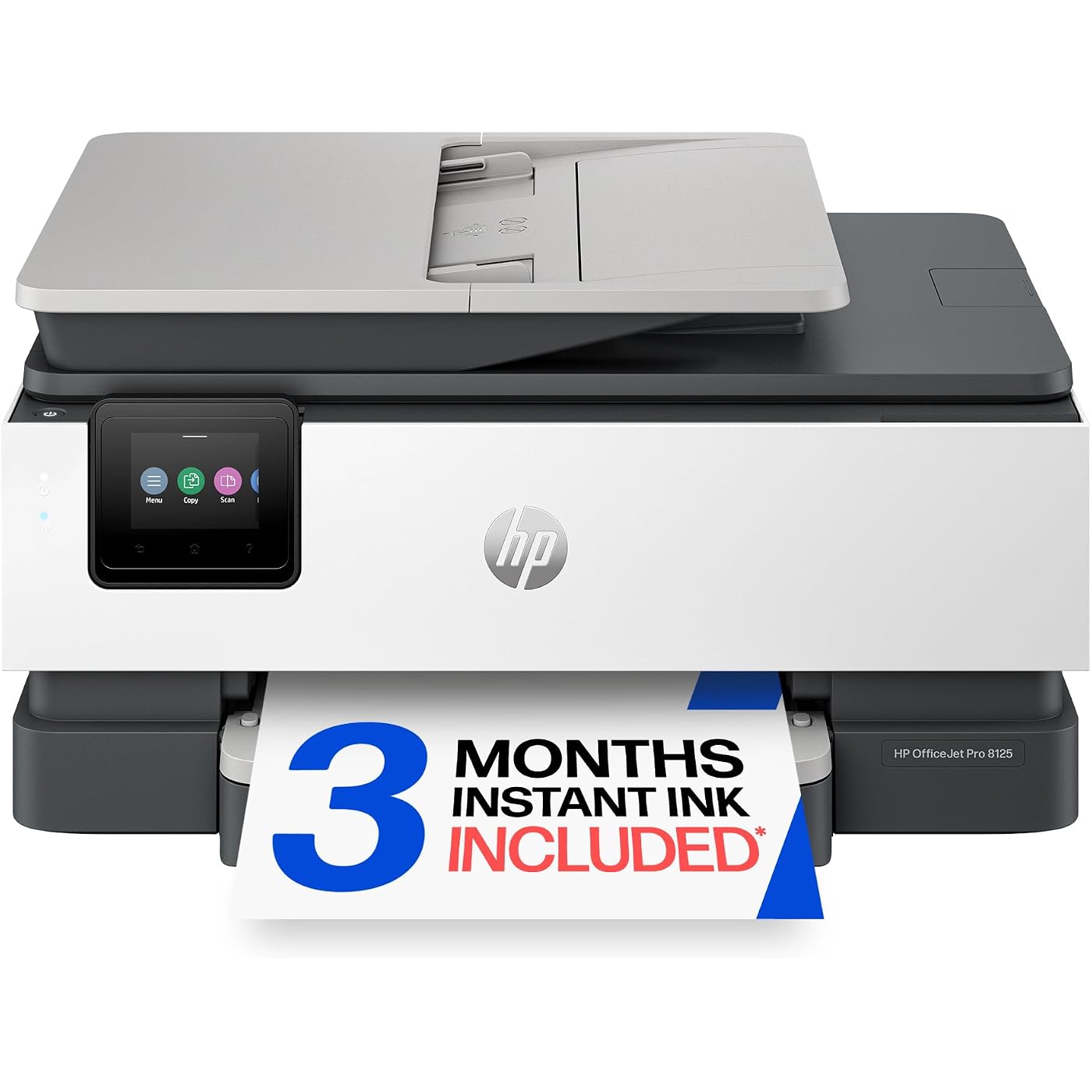
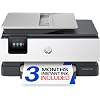
HP OfficeJet Pro 8125 Wireless All-in-One Color Inkjet Printer, Print, Scan, Copy, ADF, Duplex Printing Best-for-Home Office, 3 Month Trial of Instant Ink Included, AI-Capable (C2VJ4A)
  • Based on 0 reviews
Condition: New
Checking for the best price...
$119.99 Why this price?
Save $60.00 was $179.99

Buy Now, Pay Later


As low as $20.00 / mo
  • – 6-month term
  • – No impact on credit to apply
  • – Instant approval decision
  • – Secure and straightforward checkout

Ready to go? Add this product to your cart and select a plan during checkout.

Payment plans are offered through our trusted finance partners Klarna, Affirm, Afterpay, Zip, Apple Pay, and Google Pay. No-credit-needed leasing options through Acima may also be available at checkout.

Learn more about financing & leasing here.

Free shipping on this product

FREE 30-day refund/replacement

To qualify for a full refund, items must be returned in their original, unused condition. If an item is returned in a used, damaged, or materially different state, you may be granted a partial refund.

To initiate a return, please visit our Returns Center.

View our full returns policy here.


Availability: In Stock.
Fulfilled by Amazon

Arrives Saturday, Jul 25
Order within 2 hours and 12 minutes
Available payment plans shown during checkout

Protection Plan Protect Your Purchase
Checking for protection plans...

Features

  • FROM AMERICA'S MOST TRUSTED PRINTER BRAND The OfficeJet Pro 8125 is perfect for home offices printing professional-quality color documents like business documents, reports, presentations and flyers. Print speeds up to 20 ppm black, 10 ppm color.
  • 3 MONTH TRIAL OF INSTANT INK INCLUDED Subscribe to the Instant Ink delivery service to get ink delivered directly to your door before you run out, and you save up to 50% on ink; after 3 months, a monthly fee applies unless cancelled
  • KEY FEATURES Fast color printing, scan, copy, auto 2-sided printing, auto document feeder, and a 225-sheet input tray
  • 2.7-INCH TOUCHSCREEN Quickly navigate your printer with a large color touchscreen and a phone-like user interface
  • WIRELESS PRINTING Stay connected with our most reliable dual-band Wi-Fi, which automatically detects and resolves connection issues
  • HP APP Print, scan, copy, or fax right from your smartphone with the easy-to-use print app
  • OPTIMIZE PRINT FORMATTING WITH HP AI Print web pages and emails with precisionno wasted pages or awkward layouts; HP AI easily removes unwanted content, so your prints are just the way you want
  • PROTECTS YOUR DATA HP Wolf Essential Security bolsters security and helps keep your network protected from cyber threats
  • SUSTAINABLE DESIGN Made with more than 45% recycled plastic content
  • This printer is intended to work only with cartridges with original HP chips or circuitry and will block cartridges using non-HP chips or circuitry. Periodic firmware updates will maintain the effectiveness of these measures.

Description

The HP OfficeJet Pro 8125 All-in-One Printer delivers fast color, water- resistant, smear-resistant, and fade-resistant prints, 225-sheet paper capacity, and scan and copy capabilities perfect for your home office. Navigate this printer with the 2.7" color touchscreen and phone-like user interface. It includes wireless and printer security features to keep your multifunction printer up to date and secure, and is made with more than 45% recycled plastic content. Optimize print formatting with HP AI, that easily removes unwanted content from emails and web pages so your prints are just the way you want—no wasted pages or unwanted content. Subscribe to Instant Ink delivery service and get 3 months of free ink delivered directly to the door of your office. The HP OfficeJet Pro 8125 All-in-One also lets you print from anywhere with the HP app.

Brand: HP


Connectivity Technology: Apple AirPrint; Ethernet networking; USB; Wireless (Wi-Fi); Wireless direct printing


Printing Technology: HP Thermal Inkjet


Special Feature: Wireless; Touchscreen; Quiet mode


Color: black


Model Name: HP OfficeJet Pro 8125 All-in-One Printer


Printer Output: Color


Maximum Print Speed (Color): 10 ppm


Max Printspeed Monochrome: 20 ppm


Item Weight: 17.6 Pounds


Printer Type: HP Thermal Inkjet


Other Special Features of the Product: Wireless; Touchscreen; Quiet mode


Printer Output Type: Color


Item Weight: 17.6 Pounds


Item Dimensions D x W x H: 13.29"D x 18.11"W x 9.17"H


Print media: Glossy photo paper, Unknown


Scanner Type: Flatbed; One-sided ADF


Maximum Copy Speed Black and White: 12 ppm


Compatible Devices: Laptops, PC, Smartphones


Warranty Type: One-Year limited hardware warranty. For more info please visit us at support.hp.com .


Maximum Copies Per Run: Up to 99 copies


Ink Color: Black, cyan, magenta, yellow


Additional Printer Functions: All In One


Compatible Cartridge: HP 923 Black Original Ink Cartridge 4K0T3LN; HP 923 Cyan Original Ink Cartridge 4K0T0LN; HP 923 Magenta Original Ink Cartridge 4K0T1LN; HP 923 Yellow Original Ink Cartridge 4K0T2LN; HP EvoMore planned to be available April 2024 HP 923e EvoMore Black Original Ink Cartridge 4K0T7LN; HP 923e EvoMore Cyan Original Ink Cartridge 4K0T4LN; HP 923e EvoMore Magenta Original Ink Cartridge 4K0T5LN; HP 923e EvoMore Yellow Original Ink Cartridge 4K0T6LN.


Number of Trays: 1


Processor Count: 1


Maximum Media Size: 8.5 x 11.7 in


Maximum Sheet Capacity: 225


Paper Size: 8.5 x 11;8.27 x 11.7;8.5 x 14;7.16 x 10.12; Inches


Maximum print Resolution Color: Up to 4800 x 1200 optimized dpi on HP Advance Photo Paper 1200 x 1200 dpi input Dots Per Inch


Maximum Print Resolution Black and White: 1200 x 1200 rendered dpi Dots Per Inch


Power Consumption: 4.07 Watts


Dual-sided printing: Yes


Duplex: Automatic (standard)


Brand: HP


Model Name: HP OfficeJet Pro 8125 All-in-One Printer


Model Number: C2VJ4A#B1H


Built-In Media: HP OfficeJet 8125 AiO Printer;HP 923 Setup Black Ink Cartridge (~255 pages); HP 923 Setup Cyan Ink Cartridge (~270 pages); HP 923 Setup Magenta Ink Cartridge (~270 pages); HP 923 Setup Yellow Ink Cartridge (~270 pages); Power Cord; Regulatory Flyer; Ink Caution Flyer; Setup Poster; Reference Guide;


Model Series: OfficeJet Pro


Specific Uses For Product: Home and home office


UPC: 199485544946


Manufacturer: HP


Warranty Description: One-Year limited hardware warranty. For more info please visit us at support.hp.com .


Item Type Name: Inkjet printers


Unit Count: 1.0 Count


Color Pages per Minute: 10 ppm


B&W Pages per Minute: 20 ppm


Initial Page Print Time: 18 Seconds


Color: black


Color Depth: 24 Bits


Printer Connectivity Type: Apple AirPrint; Ethernet networking; USB; Wireless (Wi-Fi); Wireless direct printing


Hardware Interface: Ethernet, USB


Total Usb Ports: 1


Maximum Copy Resolution Color: Up to 600 dpi


Maximum Copy Resolution Black and White: Up to 600 dpi


Frequently asked questions

If you place your order now, the estimated arrival date for this product is: Saturday, Jul 25

Yes, absolutely! You may return this product for a full refund within 30 days of receiving it.

To initiate a return, please visit our Returns Center.

View our full returns policy here.

  • Klarna Financing
  • Affirm Pay in 4
  • Affirm Financing
  • Afterpay Financing
  • Zip Pay in 4
  • Financing through Apple Pay
  • Financing through Google Pay
Leasing options through Acima may also be available during checkout.

Learn more about financing & leasing here.

Top Amazon Reviews


  • Love HP
Easy to set up, love Hp
Reviewed in the United States on June 10, 2026 by dancingmoon

  • This printer is literally everything I've needed and more!
I know this is going to sound like a made up story - but this printer came into my life on the literal day that my old printer died. I just started college and desperately need a printer that works. When I was unable to get my old printer to work, I opened Amazon to start looking for a new one, and the HP OfficeJet Pro 8125 popped up. We also own a small business, so this actually sounded like it would be a better fit than my previous printer... so I bought it. The printer arrived quickly, very securely packaged, and looks exactly like the listing photos. Setup instructions are included in the materials that come with the printer. I found the instructions easy to follow and the touch screen makes everything so much easier because it tells you what the printer is doing every step of the way. You do have the option to enroll in the Instant Ink program, but it is not required to set up and use the printer right away. The printer comes with three color cartridges and one black cartridge; however, they are "starter" cartridges and are not meant to last long, so be ready to purchase new cartridges depending on your usage. What I like: - this printer prints and scans incredibly fast! - the images and text are incredibly clear on the final, printed product. - I never knew how helpful the top feeder would be until I used this machine - it's a game changer. - the touch screen has the option to stay flat, or tilt up, which makes it super easy to see. - on that note, the icons and text on the touch screen are large, clear, and easy to read. - the paper tray holds tons of paper. What I don't like: - this printer is kinda loud - it does take up more space than any other printer I've had - instead of one color and one black cartridge, this printer takes three color and one black - and the four of them together can be pretty expensive, in my opinion (nearly $100). All in all, this printer has been an absolute godsend (I know that sounds dramatic, but it came into my life at the exact time I needed it!). It's been great for my personal needs (school) and my family's needs (busy small business). I am interested to see how the Instant Ink program works out for me, as I have never used it before. Currently, this OfficeJet Pro 8125 is priced at $119.99 on sale from the regular price of $179.99, which I find to be an excellent deal based on the quality of the printer and the experience I've had with it thus far. I definitely recommend this printer either for personal or business use! ... show more
Reviewed in the United States on June 1, 2026 by CriticalCarla

  • Works but so many gotchas (SUBSCRIPTION eMail FBS)
I'm honestly of two minds on this product. On the one hand it works, prints properly, crisp and clear, doesn't jam, prints are great. On the other hand, this is the typical contemporary "you will own nothing, subscribe to anything, and get it on credit" model of business. To make this work: you need a subscription. I got it hoping I might be able to use it without one. Nope! There is no way to jailbreak this or just attach printer cables. I would not buy this though I am glad to have it as a product to review. The subscriptions lowest tier is about 2 dollars a month for ... ten pages. Ok it includes a free subscription to ink: the ink is chipped so it can ONLY be used with HP and no off-brand ink would work. Seriously, I would not buy it. I might get the subscription since I don't have many prints but I probably will use the three month free trial and wait three months then give it to goodwill. I am rating it 5 stars because 1) It works 2) It does what it promises. If for any reason you love HP -- their computers are good -- then by all means get it. I want to love it but don't 1) must subscribe 2) wireless only 3) must provide your telephone number 4) only works with HP ink 5) can't jailbreak I'm not a slave, neither are you. Unless you literally work for HP or are a shareholder I cannot recommend it even though it works as designed and isn't deceptive. My dad's an engineer. After three months I'm going to pop the hood, get a soldering iron, look for ports and see if I can get this pos to actually work. Easy to set up: if you don't mind giving HP your email for all their spam, your mailing address, and paying their monthly fee. ... show more
Reviewed in the United States on June 9, 2026 by Eric Engle

  • Fast, clean, wireless - but be careful during the ink setup Fast, clean, wireless - but be careful during the ink setup
I couldn’t be happier with this HP OfficeJet Pro 8125 Wireless All-in-One Color Inkjet Printer. It’s fast, it prints super clean, crisp copies, it has full scanner capabilities, and setup was surprisingly easy. It’s already earning its keep by helping me get rid of the spider web of wires around my computer. This one is wireless, and for me that has two big benefits - fewer wires and the ability to serve both of my computers. My living room computer is tucked behind my flat screen TV and rarely does more than YouTube, but now I can print directly from that setup to this new office printer too. That’s a bigger convenience than I expected. As a real estate broker, I do a lot of printing - forms, documents, and color flyers - so ink cost matters to me. With my last printer, I mostly lived on replacement ink, meaning off-brand or aftermarket cartridges, because they can be a lot cheaper than the manufacturer’s brand. One caution I’ll pass along: during setup, HP offers its Instant Ink subscription service. It may be a good deal for some people, especially if they want automatic ink delivery and predictable monthly costs. But read the terms carefully before enrolling. Instant Ink cartridges are tied to the subscription, and HP also uses cartridge security technology that may affect which non-HP or remanufactured cartridges will work. Since I want the option to shop around for compatible ink, I opted out and will handle ink purchases myself. For my use, this printer is a winner. Fast printing, sharp output, scanning, copying, duplex printing, wireless convenience, and an automatic document feeder - all in a machine that was easy to get running. At the list price of $180, I think it's a bargain! Just pay attention during the ink/subscription part of setup so you choose the option that’s best for you. ... show more
Reviewed in the United States on June 3, 2026 Reviewed in the United States on June 3, 2026 by Gene J Finz

  • 🖨️🔥 Reliable All-in-One Printer That Fits Perfectly in My Home Office 📄
This HP OfficeJet Pro 8125 wireless all-in-one color inkjet printer has been a really solid addition to my workspace. The overall quality is good, and it feels like a dependable machine built for everyday productivity instead of something overly complicated or fragile. The style design is clean and modern, giving it a very professional looking appearance that fits nicely in both office and home environments. The reason I got it was for my home office, and it has made handling printing tasks much easier and more efficient. Whether I’m printing documents, scanning paperwork, or making copies, having one machine that handles everything saves space and keeps things simple. One of the biggest highlights is the print quality. Text comes out crisp, and color prints look sharp and vibrant for reports, forms, presentations, and everyday use. The large color touchscreen also makes navigating settings and functions much easier than older printers I’ve used. I also really appreciate the versatility of this unit. As an Inkjet Printer, Scanner, Copier, it covers a lot of needs without needing multiple devices. It’s very versatile for business or home, making it useful for everything from office work to school projects and personal printing. Setup was another pleasant surprise because it was easy to setup and didn’t take long to get connected and running. I also like that this item requires no assembly, so once positioned, you can get right into using it without extra hassle. Another strong feature is the large paper capacity, which means fewer interruptions to reload and more time staying productive. Between the overall construction and daily usability, it feels designed to be long lasting and handle regular printing demands. ... show more
Reviewed in the United States on May 30, 2026 by C. Benton

  • Good but
Don't sign up for the free ink delivery trial unless that's something you'd regularly use anyway. HP has been running hard and fast to lock users down to their inks only which would be less problematic if they were priced competitively. Aside from the iron grip on supplies, the printer was easy to unbox and get set up. It's still a bit noisy, but prints well and quickly enough for my use. I mainly got this for the ADF feeder because I hated scanning one page at a time on my old printer. The ADF is a great feature and it has made my workflow simpler. All in all, a good printer, just make sure to do your research on consumables like ink. ... show more
Reviewed in the United States on June 8, 2026 by Nomadic

  • Fantastic All-in-One Printer for Small Business Use
The HP OfficeJet Pro 8125 Wireless All-in-One Color Inkjet Printer is honestly an all-in-one dream for a home office or small business. This printer does everything. Printing, scanning, copying, faxing, duplex printing, and the automatic document feeder all work great and make office tasks so much easier. We own a small business, and this is definitely going to come in handy for everyday office needs. Setup was surprisingly easy and mostly done through the HP app. The touchscreen is simple to navigate, and the wireless connection has worked very well so far. One thing I would recommend is paying close attention during setup when it asks about Instant Ink. For some businesses it may be a great option, but for us it really wasn’t necessary since most of our heavy printing is done on a large format printer. It’s easy to accidentally click through without thinking, so it’s worth stopping and deciding what works best for your needs. I also love that it includes HP Wolf Security protection. Having those added security features is a nice bonus for business use. For around $120, this printer is an absolute steal. Great print quality, nice color output, tons of versatility, and very user friendly. Definitely a great investment for a home office or small business setup. ... show more
Reviewed in the United States on June 9, 2026 by Dispatch4599

  • Do not sign up for HP+ or accept Instant Ink trial if you EVER want to use third party cartridges
This is the worst printer I've ever used. First impressions of the OfficeJet Pro 8125 were actually pretty solid, before I turned it on: it's a nice looking printer in a compact package, with an automatic document feeder and scanner, plus a relatively large capacity paper cassette. I was excited to get started. The first thing you need to know about this printer is that HP, uniquely among printer makers to the best of my knowledge, has tried to transition all their products to "Instant Ink" - a subscription service where you pay per page of printing - and "HP+", an absolute trap that tries to entice you into signing away your right to ever use third party ink cartridges with the promise of vague 'extra security' and an extra year of warranty coverage. The Verge, a popular tech blog, describes this product as an "ink-related hostage situation... determined to make people hate a legendary brand', and they are not wrong: this service requires a permanent Internet connection, locks down your cartridges, and will disable your printer remotely if it hasn't contacted HP's servers recently enough or if you cancel your subscription. And once you sign up for Instant Ink, even as a trial - your printer is permanently locked out from ever using non-HP cartridges. And - surprise surprise - the setup process for the printer tries in many ways to convince you to opt into this, and even if you decline it then tries to get you to opt into automatic firmware updates which also disable third party ink. And if you decline that, your only option is "notify about firmware updates" - you have to go back in a second time after the printer is set up fully to decline firmware updates at all. OK, so let's say you navigate all of that - decline HP+, decline the '3 months free ink' and the 'free extra year of warranty coverage' and the 'enhanced app'. This printer _still_ has a lot of flaws compared to any other printer I've tried. For one, you can't even turn on and set up the printer offline by default. It requires special 'setup' cartridges that are included with the printer, and they have to phone home, and if you don't use those the printer won't work, ever. And support won't necessarily help you in the future if you lose them somehow, or if your printer resets itself someday and you don't have the setup cartridges anymore to set it up again - there's a process for doing so, but - surprise! - you have to have "genuine" HP ink to go through the process, even though their web site very clearly states that you should be permitted to use the printer with cartridges with recycled HP chips. OK, but what if you always buy HP ink anyway? Maybe you print so infrequently the subscription actually sounds like a deal to you and those business practices don't bother you. Well, there's another problem that affects everyone - the paper handling in this thing is the worst I've ever seen. I've already cleared six paper jams even before successfully printing my first page, and it didn't get better afterwards. Basically, it seems any paper that's thicker than 20lb gets crunched and jammed up in the back of the thing - I had to drop down to 20lb to get it to print reliably. Which defeats the whole point of choosing an inkjet for printing photos and nicer color documents! The good news is there's a very nice liftable thing to clear paper jams in the back center of the printer. The bad news is you're going to get REALLY intimately acquainted with that piece. Finally, the touchscreen is super unresponsive - touches aren't accurately detected and it's super laggy. I had to turn on "view password" just to get my WiFi key entered correctly. It looks like this is a new listing that differs from the old 8125e by a single letter - I can't figure out what the difference is, and I'd encourage you to go review the reviews of that printer, as they appear to apply to this edition as well. 25% of users of the previous model rated it one star, and I don't disagree with them. This printer is very affordably priced for an all in one inkjet with ADF and duplexer. There's a reason for that. I can't recommend this and am going to revert back to using my trusty old Canon MX920. I hope someone within HP listens to the feedback and changes course with consumer friendly policies and higher quality paper handling before their reputation is permanently ruined. ... show more
Reviewed in the United States on June 2, 2026 by A. B.

Can't find a product?

Find it on Amazon first, then paste the link below.
Checking for best price...