Search  for anything...
HP

HP Envy 6155 Wireless All-in-One Color Inkjet Printer, Print, Scan, Copy, Duplex Printing Best-for-Home, 3 Month Trial of Instant Ink Included, AI-Capable (C2WR7A) Portobello

  • Based on 0 reviews
Condition: New
Checking for the best price...
$159.99 Why this price?

Buy Now, Pay Later


As low as $26.67 / mo
  • – 6-month term
  • – No impact on credit to apply
  • – Instant approval decision
  • – Secure and straightforward checkout

Ready to go? Add this product to your cart and select a plan during checkout.

Payment plans are offered through our trusted finance partners Klarna, Affirm, Afterpay, Apple Pay, and PayTomorrow. No-credit-needed leasing options through Acima may also be available at checkout.

Learn more about financing & leasing here.

Free shipping on this product

FREE 30-day refund/replacement

To qualify for a full refund, items must be returned in their original, unused condition. If an item is returned in a used, damaged, or materially different state, you may be granted a partial refund.

To initiate a return, please visit our Returns Center.

View our full returns policy here.


Availability: In Stock.
Fulfilled by Amazon

Arrives Tuesday, Jun 2
Order within 10 hours and 43 minutes
Available payment plans shown during checkout

Protection Plan Protect Your Purchase
Checking for protection plans...

Features

  • FROM AMERICA'S MOST TRUSTED PRINTER BRAND The Envy 6155 is perfect for homes printing everyday high-quality color documents like homework and borderless photos. Print speeds up to 10 ppm black, 7 ppm color.
  • 3 MONTH TRIAL OF INSTANT INK Subscribe to the Instant Ink delivery service to get ink delivered directly to your door before you run out, and you save up to 50% on ink. After 3 months, a monthly fee applies unless cancelled.
  • KEY FEATURES Color print, copy and scan, plus auto 2-sided printing and a 100-sheet input tray
  • HP'S MOST INTUITIVE COLOR TOUCHSCREEN Smoothly navigate your printer with the easy-to-use 2.4" touchscreen
  • WIRELESS PRINTING Stay connected with our most reliable dual-band Wi-Fi, which automatically detects and resolves connection issues
  • TRUE-TO-SCREEN TECH Print documents and photos that look as vibrant as they do on your screen with HP's P3 technology
  • HP APP Print, scan, copy, or fax right from your smartphone with the easy-to-use print app
  • OPTIMIZE PRINT FORMATTING WITH HP AI Print web pages and emails with precisionno wasted pages or awkward layouts; HP AI easily removes unwanted content, so your prints are just the way you want
  • SUSTAINABLE DESIGN Made with at least 60% recycled plastic content
  • This printer is intended to work only with cartridges with original HP chips or circuitry and will block cartridges using non-HP chips or circuitry. Periodic firmware updates will maintain the effectiveness of these measures.

Description

The HP Envy 6155 All-in-One delivers color printing, scanning and copying, plus 100-sheet paper capacity. It includes wireless and mobile printing capabilities to keep your multifunction printer connected, and prints high- quality documents and photos every time with true-to-screen tech. This inkjet printer lets you easily navigate print jobs with its intuitive color touchscreen. It's also AI-capable to intuitively adapt to your workflow, with wireless and security features that keep your multifunction printer up to date and secure.

Brand: HP


Connectivity Technology: Wi-Fi


Printing Technology: Inkjet


Special Feature: Wireless


Color: White


Model Name: HP Envy 6155 All-in-One Printer


Printer Output: Color


Maximum Print Speed (Color): 7 ppm


Max Printspeed Monochrome: 10 ppm


Product Dimensions: 17.05"D x 5.35"W x 14.21"H


Printer Type: Inkjet


Other Special Features of the Product: Wireless


Printer Output Type: Color


Item Dimensions D x W x H: 17.05"D x 5.35"W x 14.21"H


Print media: Paper (plain)


Scanner Type: Flatbed


Maximum Copy Speed Black and White: 10 ppm


Warranty Type: One-year limited hardware warranty. For more info, please visit us at


Ink Color: black, cyan, magenta, yellow


Additional Printer Functions: All In One


Color Pages per Minute: 7 ppm


B&W Pages per Minute: 10 ppm


Maximum Media Size: Letter (8.5 x 11 inches)


Maximum Sheet Capacity: 100


Printer Connectivity Type: Wi-Fi


Brand: HP


Model Name: HP Envy 6155 All-in-One Printer


Model Number: C2WR7A#B1H


Built-In Media: HP Envy 6155 All-in-One Printer; HP 68 Setup Black Cartridge (~120 pages yield); HP 68 Setup Tri-Color Cartridge (~75 pages yield); Regulatory flyer; Setup guide; Reference guide; Power cord


Model Series: Envy


Specific Uses For Product: Home document and photo printing


UPC: 199485545769


Manufacturer: HP


Warranty Description: One-year limited hardware warranty.


Item Type Name: Multifunction Printer


Unit Count: 1.0 Count


Color: White


Dual-sided printing: Yes


Duplex: Automatic


Frequently asked questions

If you place your order now, the estimated arrival date for this product is: Tuesday, Jun 2

Yes, absolutely! You may return this product for a full refund within 30 days of receiving it.

To initiate a return, please visit our Returns Center.

View our full returns policy here.

  • Klarna Financing
  • Affirm Pay in 4
  • Affirm Financing
  • Afterpay Financing
  • PayTomorrow Financing
  • Financing through Apple Pay
Leasing options through Acima may also be available during checkout.

Learn more about financing & leasing here.

Top Amazon Reviews


  • All your basics and does it well! All your basics and does it well!
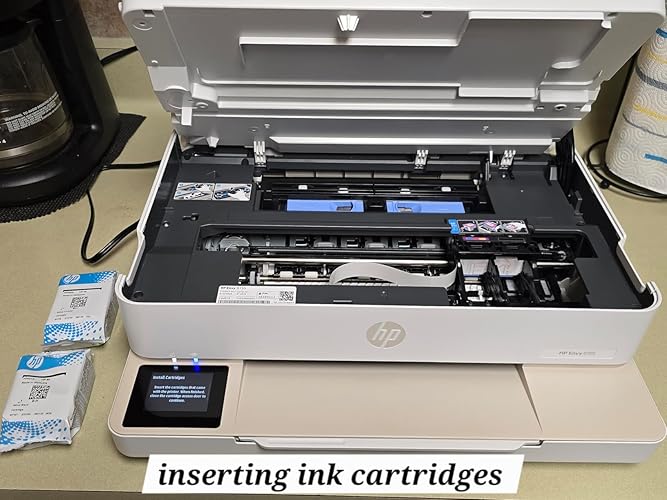
So far so good! Its been at least 15 or 20 years since Ive touched a printer and I was concerned the set up would been a complicated nightmare. However, directions super easy to follow and easy to download its app! Putting everything together for the first time set up takes a little bit of time when you dont already know what youre doing but not a big deal at all. Side note: I wish it came with a little dust cover to put over it when not in use, simply to keep pet furr and dust from accumulating. You have your phone connected to your wifi and your Bluetooth stay on to connect to the printer. The app is easy to navigate around and something I did not know about is you can now use your phone to send faxes! Not that I have faxes to send but knowing I can now do it with this printers app, its a great feature. This printer can print, copy and scan. I can print from my phone or laptop without any wires. It handles the basics perfectly. Text is crisp, and the color inkjet quality is great for school projects or the occasional photo. Although I have yet to test it out once I figure out how to, I love that it claims to do double-sided printing automatically. It will save a ton of paper and make documents look more professional without me having to manually flip pages. It doesnt seem to be the fastest printer on the market, but for home use, it’s more than adequate. First print test: I needed to make a copy of my social security card and other than the background color being a little off, it looks amazing! It was able to print the color of all the dirt on my card and everything haha. In case anyone has trouble installing the ink cartridges, I included some photos to explain how they go in correctly. I didnt realize at first they don't get pushed downward, it has to be inward. It came with a 3-month trial of HP Instant Ink. If you do a lot of printing, this is a lifesaver because the cartridges show up in the mail before you actually run out. Just keep in mind that it is a subscription service, so you’ll want to check the plans after your trial is up to see if it fits your budget. Only cons so far: Ink Costs: Without an Instant Ink subscription, individual cartridges can be pricey. Software Dependency: Requires an HP account and internet for the best experience. Speed: While efficient for home use, it may be slow for high-volume office tasks. ... show more
Reviewed in the United States on May 8, 2026 Reviewed in the United States on May 8, 2026 by Xkhozx

  • Great Printer, Tricky Setup via App Required - The Ink Subscription Pressure Is Real
The HP Envy 6155 Wireless All‑in‑One Color Inkjet Printer, priced at $159.99 at the time of this review, arrived with everything you’d expect: black and color ink cartridges, a power cord, instruction manuals, and a generous stack of “please subscribe to auto‑ink shipments” brochures. HP is nothing if not persistent. I did want to mention, the ink cartridges included are starter cartridges, so the Black cartridge yields about 120 pages, and the Tri-color cartridge yields about 75 pages, so a total of approximately 195 pages combined. After digging into the fine print, I can confirm that HP Instant Ink is completely optional — the HP Envy 6155 behaves like a normal, functional printer without it. To join the program, you have to manually enter your payment info in the HP app, so there’s no sneaky auto‑enrollment, which was my main worry. If you do decide to try it, HP hands you a 3‑month free trial, and you can cancel anytime before it ends with zero charges. Once the trial wraps up, you can either keep the subscription or cancel and go the old‑school route like I’m doing: buying replacement cartridges as needed (HP 68 or 68XL). Shipping was quick, and the printer arrived securely packed in its original HP box—then Amazon placed it in a hilariously oversized box along with my paper towels. The box was so massive I could’ve climbed in myself and still had space to stretch. As far as “padding strategies” go, using paper towels was a bold move, but the printer made it safely and powered on without a hitch. It doesn’t include paper, but standard 8.5 x 11 sheets fit perfectly, and the adjustable tray handles anything from about 3x5 to 11x14. I expected wireless setup to be quick, but it took longer than planned. I had to download the HP app on my iPhone 13 to get it on my home network, and the app really pushed the auto‑ink subscription — practically unavoidable (‑0.5 star). I skipped it because I’d like to see how the printer behaves before committing to yet another subscription. Once connected, setup was smooth. The app walked me through alignment, and I was able to locate the printer on both my phone and my son’s phone, which was a nice surprise. The only snag is pairing it with my laptop (‑1 star). Apparently, I’ll need to download the app there too (-.5 Star). It does have a USB 2.0 port for a hardwired connection, but since it’s Bluetooth‑capable, I’m determined to avoid the cable life. On the bright side, when my son needed to print paperwork from his phone, it worked instantly. Both black‑and‑white and color prints came out quickly and sharply, which gives me hope. So for now, it’s a solid 3 stars. Once I get it paired with my laptop (manifesting positive tech energy), I’ll try to come back with an update. UPDATE: Finally managed to pair it to my laptop via the HP app, and it worked perfectly. I’m adding .5 stars back, so a solid 3.5 rounded to 4, because I suspect it was initially user error on my part, however still trickier than the phones. Plus me, trying to navigate a newer laptop at the same time, 😁 ... show more
Reviewed in the United States on May 14, 2026 by Momfirst

  • Works great, just the perfect size, and comes with modern functionality
I’ve been on the hunt for a replacement inkjet printer, and this “Envy 6155 Wireless All-in-One Color Inkjet Printer, Portobello, Print, scan, Copy, Duplex Printing Best-for-Home, 3 Month Trial of Instant Ink Included, AI-Capable (C2WR7A)” by HP, couldn’t have come at a better time. This is a great all-in-one printer for everyday home use. This was quick and easy to setup and works well with my ancient laptop. The wireless connection stayed stable, and the print quality is sharp with vibrant colors for documents and photos alike. The duplex printing feature saves me a lot of paper, which is a plus! The scan/copy functions works smoothly. As for the AI functionality that this printer comes with, I have yet to test that out, so I cannot really comment much about that feature at this time. But I shall update my review here in the future once I get a chance to test it out. Other than that, I especially like the compact Portobello design, as it looks modern without taking up too much space. I also quite like and appreciate the included Instant Ink trial as it is such a nice bonus and makes printing more convenient. Overall, I find this to be a reliable and user-friendly inkjet printer, which is suitable for home use and family needs. Totally well-worth the asking price! I absolutely recommend this to others. ... show more
Reviewed in the United States on May 16, 2026 by Kitty

  • Cool Hight Quality Printer, Small footprint, quiet, good print quality.
The function is fine, the print quality is very good including for photographs. Scans and copies just as advertised. I have not tried the fax service, but it does communicate with the network well, including my iPhone, so I don't expect any problem there--and the brand is certainly high quality, I seldom need to print in color, so I was looking for a simple, small footprint economical solution, and I believe I have found it. The ink cartridges snapped in easily, and that, along with my trust in the brand, left me with only two issues: 1. I have long been concerned with ink jet "clogging" when idle for long periods. To evalluate that, I have to wait a "long period" so I will--and I will edit this review if I have any problems. 2. Installation on my MacBook Air was a bear. I kept getting an error that said my Bluetooth signal was too weak, and to move the printer closer to the computer. When I got the message with the computer sitting on top of the printer, I went to the Internet for help. Here it is: If you have MacBook and you get that error message, first clear the decks and get a clear signal--remove all Bluetooth devices from the area--or turn off bluetooth in them. Everything. Other compters, other printers, keyboards and mice, headphones and speakers, smart phones--everything. Then turn off the computer and the printer...AND your Wi-Fi router for 30 seconds. Have a cup of coffee. Then turn the computer back on--and check your bluetooth settings...bluetooth should be connected, and NOTHING should show as connected to it. Then turn on the printer, and go back through the HP install process. In my case at least, it went smoothly from there and installed like it should. The awful experience I had is apparently common with MacBooks at least. Even though it eventually worked, installation is such a basic and important feature of any peripheral device--I consider thiw a MAJOR BUG, bad enough to drop a star off the rating. --Sad, because so far everything else is excellent, and working my way through the flawed installation process was definitely worth it, ... show more
Reviewed in the United States on May 11, 2026 by New Mexico Bill

  • Excellent printer and I’ve suffered through many bad ones over the years.
My job for decades included being the equipment buyer for a business. In that capacity I’ve purchased many different printers from different companies. I have to say that overall HP printers generally performed better and proved to be more reliable than the other brands we bought, however other brands have proven themselves and come forward over the years. After having a very bad experience with a different HP printer I found myself souring on the brand, This HP Envy 6155 however, had all the attributes needed for a particular small office. I am very happy with this printer. The set up was an absolute breeze. This is coming just weeks after another printer install ( not an HP) that was irritatingly difficult. All the instructions from HP were very clear and straightforward. The machine itself leads you through the steps to set itself up and to connect wirelessly to your network. Love the touch screen and the ease of navigation through the menu.. It is easy to set up to print from a smartphone, tablet or PC. Since initial setup it has performed flawlessly. Would definitely recommend this printer. It is a winner. ... show more
Reviewed in the United States on May 13, 2026 by rezjk

  • Good printer and features for the price.
I got this as a vine item to be up front. So far my experience has been good but I did just get it too. The printer was packaged very well as you would expect from HP. Something I had never seen before is the printer was in sealed plastic wrap. Like a heat shrink type of thing. It came out the box very easily. I was able to power it on and install the ink cartridges(yes it is still ink cartridges. at the time of this review they are about 28 usd each for replacements.) Set up is fairly normal and then why this is a 4 not a 5 star it give you a QR code and make it look like you must download an app to continue with wifi set up. YOU DON'T but you have to hit the question mark then say set up later to by pass that. The app requires way to many permission like location, and phone number, and web history. To set up wifi there is a setting for wifi wizard and just use that after you finish set up. It easily connected to wifi and popped up on all my devices quickly. Print quality is good as one again HP does make good working devices as long as you use genuine parts. The shape of it is a bit odd it has a barge boat like bottom then then the top is smaller so it is a little odd on the desk. The Scanner area is a bit smaller than its frame would suggest. Its just a bit bigger than normal letter paper size so no Legal scans if you need that look else where. Scanning quality is again good as expected. So overall its a good little printer/scanner. My main thing when buying would be to check ink cost and try to get them on sale or bulk deals if you can. ... show more
Reviewed in the United States on May 13, 2026 by Sarah Cumba

  • New era of reliability
Our last printer was a HP Envy ironically enough; like 6 years old too: the upgrade on this is actually felt! One of my favorite features is the mobile app: You can check your ink levels to other additional features like scans, file printing, and more. It does have some AI features that so far feeling more-so convenient for removing ads from printed pages (like recipe pages that don’t have printer friendly options). Like our last printer: it’s a solid printer! Scans look far better (even on double-sided pages) than our previous printer though. My only complaint is how heavy they press you to subscribe to their ink program; which you do not have to sign up for by the way. Other than that: from photo-grade to everyday printer needs: this is a solid choice! ... show more
Reviewed in the United States on May 15, 2026 by TheLEGinCLEGG

  • Can't go wrong ! Can't go wrong !
This printer is easy to set up and works well for everyday home use. The wireless connection makes printing from phones, tablets, and computers convenient, and the print quality is clear for both color and black-and-white documents. I like that it can print, scan, and copy all in one machine, which helps save space. The duplex printing feature is also useful for printing double-sided pages automatically. The touchscreen controls are simple to navigate, and the printer has a clean, modern look. The included Instant Ink trial is a nice bonus for getting started. For the functionality, print quality, and convenience, this printer offers great value for the price and is a solid option for home use. ... show more
Reviewed in the United States on May 21, 2026 Reviewed in the United States on May 21, 2026 by Cash

Can't find a product?

Find it on Amazon first, then paste the link below.
Checking for best price...