Search  for anything...

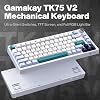
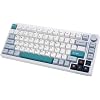
GK GAMAKAY TK75 V2 75% Silent Mechanical Keyboard with TFT Screen, Hot Swap RGB Bluetooth 5.0/2.4GHz Wireless/USB-C Wired PBT Cherry Profile Keycaps Gaming Keyboard (GamaKay Phoenix Switch)

  • Based on 160 reviews
Condition: New
Checking for the best price...

Buy Now, Pay Later


As low as $12.66 / mo
  • – 6-month term
  • – No impact on credit to apply
  • – Instant approval decision
  • – Secure and straightforward checkout

Ready to go? Add this product to your cart and select a plan during checkout.

Payment plans are offered through our trusted finance partners Klarna, Affirm, Afterpay, Apple Pay, and PayTomorrow. No-credit-needed leasing options through Acima may also be available at checkout.

Learn more about financing & leasing here.

Selected Option

Free shipping on this product

FREE 30-day refund/replacement

To qualify for a full refund, items must be returned in their original, unused condition. If an item is returned in a used, damaged, or materially different state, you may be granted a partial refund.

To initiate a return, please visit our Returns Center.

View our full returns policy here.


Availability: In Stock.
Fulfilled by Amazon

Arrives Thursday, Jul 16
Order within 3 hours and 46 minutes
Available payment plans shown during checkout

Protection Plan Protect Your Purchase
Checking for protection plans...

Color: GamaKay Phoenix Switch


Features

  • Versatile Connectivity Options to Suit Your NeedsThe GK GAMAKAY TK75 V2 offers versatility in connectivity options, allowing you to choose the best option that fits your needs. Whether you prefer the convenience of Bluetooth, the speed of 2.4G, or the stability of a wired connection, this keyboard has got you covered.
  • II Pre-lub GamaKay Phoenix V2 SwitchThe GamaKay TK75 V2 keyboard offers GamaKay Pegasus and Phoenix switches, to cater to your individual preferences and needs. Perfect for office use, the Gamakay Phoenix switch is marketed as a silent linear switch, ensuring you can type away without disturbing your colleagues. It's an ideal choice for daily use.
  • Shine Bright with Dual-Layer Lighting controlThe lighting bar on the keyboard can be independently controlled separate from the main keyboard lighting, enabling dual lighting control modes.
  • TFT ScreenThe 0.85-inch TFT screen of the TK75 V2 is an interactive interface for real-time updates and adjustments. The high-resolution screen displays customizable information such as battery status, date and time as well as JPG/GlF animations.
  • Customizable lightingThe GK GAMAKAY TK75 V2 supports music rhythm and light effect functions through its Bluetooth mode, allowing you to customize the lighting to your liking. Macro key support: The Gamakay TK75 V2 has an upgraded macro key mode and a polished metal knob (decoder 14mm) for an extra touch of style, providing more opportunities to improve your gaming and productivity experience.
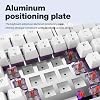
  • Aluminum positioning plateThe keyboard adopts an aluminum positioning plate,offering stronger consistent tactile feedback across all keys.
  • System compatibilityThe GK GAMAKAY TK75 V2 automatically recognizes both Mac and Windows systems, making it a versatile choice for any setup.
  • Extended battery life for uninterrupted useWith a powerful 4000mAh battery, the GK GAMAKAY TK75 V2 offers long-lasting performance without the need for frequent charging.

Brand: GK GAMAKAY


Compatible Devices: PC


Connectivity Technology: Bluetooth, USB-C


Keyboard Description: Gaming


Recommended Uses For Product: Business, Gaming, Personal, Programming


Special Feature: Backlit, Customizable Display Keys, Ergonomic, Rechargeable, Volume Roller


Color: GamaKay Phoenix Switch


Keyboard backlighting color support: RGB


Style: Contemporary


Product Dimensions: 12.95"L x 5.7"W x 1.1"H


Compatible Devices: PC


Connectivity Technology: Bluetooth, USB-C


Additional Features: Backlit, Customizable Display Keys, Ergonomic, Rechargeable, Volume Roller


Number of Keys: 81


Keyboard Backlighting Color Support: RGB


Number of Batteries Required: 1


Power Source: Battery Powered


Switch Type: Linear


Keyboard Layout: QWERTY


Hand Orientation: Ambidextrous


Button Quantity: 84


Mechanical Keyboard Switch Model: gamakay_phoenix


Number of Sections: 7


Color: GamaKay Phoenix Switch


Style Name: Contemporary


Theme: gaming


Brand: GK GAMAKAY


Keyboard Description: Gaming


Antenna Location: Business, Gaming, Personal, Programming


Built-In Media: Keycap Puller, USB Cable


Model Number: TK75


Model Name: TK75 V2


Series Number: 2


Manufacturer: GK GAMAKAY


Unit Count: 1.0 Count


Warranty Description: 1


Item Dimensions L x W x H: 12.95"L x 5.7"W x 1.1"H


Enclosure Material: Acrylonitrile Butadiene Styrene


Frequently asked questions

If you place your order now, the estimated arrival date for this product is: Thursday, Jul 16

Yes, absolutely! You may return this product for a full refund within 30 days of receiving it.

To initiate a return, please visit our Returns Center.

View our full returns policy here.

  • Klarna Financing
  • Affirm Pay in 4
  • Affirm Financing
  • Afterpay Financing
  • PayTomorrow Financing
  • Financing through Apple Pay
Leasing options through Acima may also be available during checkout.

Learn more about financing & leasing here.

Top Amazon Reviews


  • A really well made keyboard, excellent customer support.. and caters to scripting nerds!
Color: GamaKay Griffin Switch
I'm typing this review from our new Gamakay setup and, though they're not the biggest name in the mechanical keyboard game, they get my 5 stars for putting out an elegant, high end product in their TK75 keyboard. I'm not a mechanical keyboard expert, but I am a programmer, so I did immediately appreciate all of the scripting shortcuts scribed onto the keys. Of course there are a billion different aftermarket mechanical keycap combinations, so hopefully Gamakay's setup isn't a deterrent. I'm using the yellow switches, and I love the short action, soft touch, and quiet operation of the keyboard (why I chose the yellows). This is definitely among the most comfortable keyboards I've used, and this board was an easy transition with no noticeable fatigue, even after hours of use. I also like the RF and Bluetooth option. For my setup I've found the RF option to be a bit more reliable and at least anecdotally with less battery usage. The backlighting combinations on the keyboard are also really nice -- though I look forward to Gamakay either giving more backlight options, or else opening up their software to allow for full user customizations. This leads to the only downside of this keyboard: the software still leaves a lot to be desired. It's a little laggy, not particularly intuitive, and doesn't allow as much customization as many of the other "major brand" keyboards on the market. This is to be expected as Gamakay is relatively new on the market, so I hope they continue to prioritize software development as much as they have prioritized making a very nice keyboard. ... show more
Reviewed in the United States on April 29, 2023 by Jason R

  • 9.5 out of 10 (If you are having issues with battery/connection, please read)
Color: GamaKay Pegasus Switch
Tldr; Bad manual, software is laggy, but overall great value. good build quality. Silent keys. Feel: 10/10 Sound: 10/10 (I got the Pegasus silent keys, absolute dream) Size: 10/10 Macros: 10/10 (takes a bit of messing around with) User Manual: 6/10 (Needs work) Why I bought this keyboard: I want to preface this with that I am not a "keyboard head". I don't know what is "thocciest", but I imagine this would be "creamy". I don't want to spend 4 hours lubing my switches. I just wanted a keyboard that felt good, was somewhat portable (hence 75%, though would have prefered 60%, but it was hard to find something that came prebuilt with silent keys), and quiet. I plan to take this to work, as now we are required to go back to the office soon, and you have to use a flexible/unassigned desk, it is hit or miss that you get a keyboard that is not grimy. Also I have gotten used to my Corsair keyboard feel, so the low profile ones are a bit less comfortable now. I received this keyboard today. Let me tell you, it is amazing how quiet it is. My mouse click is 3 times as loud. The keyboard feels great! I wasn't too thrilled about the caps, especially the lighter color, but they are growing on me. The software is ok at best. It is slow, and take some time to get used to, but once you figure out the macros, you can modify it pretty easy. Love macros on my old corsair. If you are into the gamer LED look, you will be pleased. It has a good range of options and customizations directly controllable on the keyboard. (NOTE: To change the mode, press FN+\, the user manual isnt too clear) I prefer not to attract attention and feel it looks a bit tacky, so I preferer white backlight or no lights. Its easy to change light settings directly with the keyboard function keys. I don't use the HOME, PAGE UP, or PAGE DOWN Keys so these are what I programmed my Macros as. I also changed to volume knob press function to pause/play music as the default is mute/unmute. Macros DO require the software though. I had issues when trying to connect Bluetooth. I connected fine the first time, however my battery seemed to hold no charge. It displayed 1% on the windows Bluetooth setting app, and would disconnect if I removed the power cord. And when I tried to connect it to another device it seemed to fail due to batter not lasting long enough to register connection. I contacted their customer support but had no answer, so I planned to return. BUT THERE IS HOPE. . . I was able to fix this issue! If you are having similar issues try these steps. I am not sure which steps solved this. 1. The switch on the back of the keyboard should be pushed to the far right side if set down (Closest to the mouse if you are right handed) 2. Reset the keyboard. FN+ESC for a couple second. 3. Hold the FN+1/2/3 for a 3-5 seconds. It will slow pulse red on the middle right light, and when released it should pulse faster. 4. Connect via TK75 5.0 (TK75 3.0 will not show you your batter life) 5. If you are having issues with 5.0 vs 3.0 unpair from your computer and repeat the steps above. Hope that helps! I was about to return this and write a terrible review, but I was able to fix the issue. Battery now shows 100% and I wrote this review with THIS keyboard! I will update if any other issues come up, but as of right now I love this keyboard. If you like building keyboards then maybe its not for you, but again I am not about wasting time lubing keys for 4 hours. ... show more
Reviewed in the United States on March 16, 2023 by Stephan Rodriguez

  • Nice sounding keys, mostly feels like a great keyboard, with terrible battery life
Color: GamaKay Phoenix Switch
Feels great, but should be advertised as a wired keyboard. I've only had this like a week and the battery already doesn't last a full work day. Also there's some quirks with keyboard layouts on Macs. I noticed I changed the modifier keys, and the keyboard will randomly switch my alt/command keys, so then my modifier keys are reversed, but not using modifier keys, it seems to keep them without switching them. Very confusing problem. However, I do enjoy the sound and feel of the keyboard. The space bar is the a little loud, but all the other keys sound pretty much silent. ... show more
Reviewed in the United States on March 21, 2024 by Nic

  • Great starting board, software is just ok
Color: GamaKay Phoenix Switch
I am not an expert on mechanical keyboards, I just was looking for a good starting board to get into this hobby. I wanted a good build quality, silent switches, and hot-swappable key switches to future-proof. I have the Phoenix switches, which feel very pleasant and are very quiet. Pros: Very well built, the keyboard is heavy, comes with everything included that you need. It is plastic (i knew that before buying), but the plastic finish is very high quality. I personally like the included silent phoenix switches. The keycaps are a personal preference, I don't mind them. They feel high quality and are easy to type on, I just wish they were shine through. The volume knob feels high quality and is very satisfying. Cons: Like other reviewers have mentioned, the software that goes with this board is not the best, but it is useable, and once you set it up the way you want to, you don't have to use it again. I have yet to figure out how to set up the macros, but I don't need that, so it's not an issue for me. All I needed was to remap the function keys to brightness and media controls, which the software can do. Unfortunately, you cannot map the keyboard brightness or lighting effects to a specific key, but the built-in key combos are easy enough to remember. Fn+up/down to change keyboard brightness, Fn+enter to turn keyboard backlight on/off. Notably, Fn+\ is to change the lighting effect. This is incorrect in the included user manual, which says it is Fn+, Overall, this feels very high quality for the ~$90 price, I am satisfied with my purchase. ... show more
Reviewed in the United States on August 5, 2023 by Matthew Le

Can't find a product?

Find it on Amazon first, then paste the link below.
Checking for best price...