Search  for anything...

FLASHFORGE AD5X Multi-Material 3D Printer 4-Color Printing, 600mm/s Speed 1-Click Print with DIY IFS Creations, Full-Auto Calibration & Filament Backup, AD5X- Multi-Color Productivity Booster

  • Based on 594 reviews
Condition: New
Checking for the best price...
$339.00 Why this price?
Save $160.00 was $499.00

Buy Now, Pay Later


As low as / mo
  • – Up to 36-month term if approved
  • – No impact on credit to apply
  • – Instant approval decision
  • – Secure and straightforward checkout

Ready to go? Add this product to your cart and select a plan during checkout.

Payment plans are offered through our trusted finance partners Klarna, Affirm, Afterpay, Apple Pay, and PayTomorrow. No-credit-needed leasing options through Acima may also be available at checkout.

Learn more about financing & leasing here.

Selected Option

Free shipping on this product

FREE 30-day refund/replacement

To qualify for a full refund, items must be returned in their original, unused condition. If an item is returned in a used, damaged, or materially different state, you may be granted a partial refund.

To initiate a return, please visit our Returns Center.

View our full returns policy here.


Availability: In Stock.
Fulfilled by Amazon

Arrives Monday, May 4
Order within 7 hours and 13 minutes
Available payment plans shown during checkout

Protection Plan Protect Your Purchase
Checking for protection plans...

Size: AD5X


Features

  • Build for Speed and Full-Color Printing: Bring your creative vision to life with vibrant and multicolored 3D prints in 4-colors. With speed of up to 600mm/s and acceleration up to 20000mm/s2, AD5X delivers ultrafast printing, while maintaining exceptional accuracy and detail in your prints.
  • Seamless Printing, Precise Control: Full auto leveling sensor measures multiple points on the print bed to ensure consistent distance between nozzle and bed. As well as ensuring that the first layer adheres evenly to the print bed for flawless prints every time.
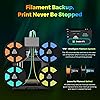
  • Multi-Material and Multi-Color Capability: Intelligent Filament System (IFS) allows you to print in multiple colors and materials simultaneously. Among the wide selection of materials that AD5X is compatible with are PLA, TPU, PETG, SILK, PLA-CF, PETG-CF, and so on.
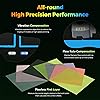
  • CoreXY Structure, Vibration Compensation: With its all-metal motion CoreXY structure offers highly rigid, reducing the risk of errors caused by vibration or mechanical shifts. Vibration suppression algorithms minimize layer alignment shifts caused by vibrations, ensuring each layer is precisely aligned, resulting in better overall print quality.
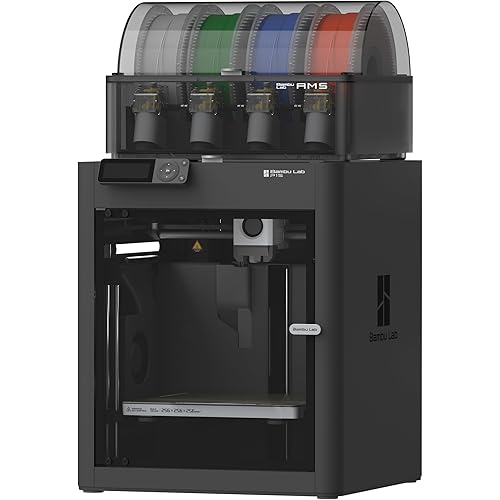
  • Compact Design, Space Saving: With its lightweight, modular design and intelligent filament system (IFS), Four spools of filament arranged side by side, AD5X offers significant space savings and for more flexible placement.

Brand: FLASHFORGE


Material: Metal


Color: Black


Product Dimensions: 14.8"D x 16.26"W x 14.29"H


Item Weight: 10000 Grams


Product Dimensions: 14.8 x 16.26 x 14.29 inches


Item Weight: 22 pounds


Item model number: 1


Date First Available: November 25, 2024


Manufacturer: Zhejiang Flashforge 3D Technology Co., Ltd


Frequently asked questions

If you place your order now, the estimated arrival date for this product is: Monday, May 4

Yes, absolutely! You may return this product for a full refund within 30 days of receiving it.

To initiate a return, please visit our Returns Center.

View our full returns policy here.

  • Klarna Financing
  • Affirm Pay in 4
  • Affirm Financing
  • Afterpay Financing
  • PayTomorrow Financing
  • Financing through Apple Pay
Leasing options through Acima may also be available during checkout.

Learn more about financing & leasing here.

Top Amazon Reviews
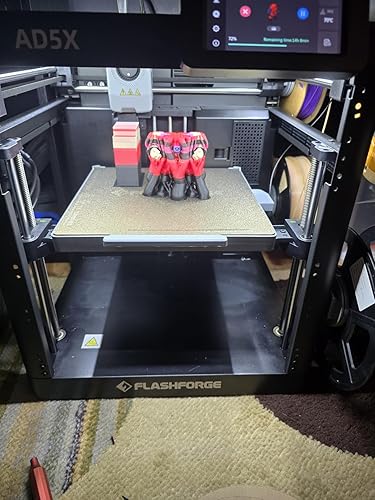

  • Probably one of the best 3D printers I have ever used!
Size: AD5X
(Intro, skip below for review) My first printer was an ender 3 years ago at this point. Then I bought a Sunlu S8 which is a CR10 clone with what at the time was a huge build plate. Running these printers could be an absolute chore. Constantly leveling the bed, constantly fixing broken parts. It was no where near a seamless process. Recently I decided to upgrade my printers after thousands of hours of printing on them and the AD5X was one of those upgrades along with an Elegoo Neptune 4 Max. The Neptune 4 max is a standard bed slinger design and also has a lengthy setup process although more streamlined, still it's a more traditional process. What about the AD5X though? (Review) All I can say is that I'm amazed. Until the ADX5 I didn't have a single printer that took me less then an hour to set up. Even the Neptune 4 Max took right around an hour and my older two printers probably took about two hours each. The ADX5 though? That took me right around 20 minutes taking my time. The thing came so nicely packed. It is definitely one of the best packaged and layed out printers out of the box I have ever seen. Within a half an hour I had this thing plugged into the wall and starting the setup. The setup took right around ten minutes to perform. You are prompted to download an app that also connects to your AD5X. It allows you to see some basic stuff but also see your camera feed if you purchased it separately. After the set-up of the AD5X comes the set-up of your slicer on your PC. For me this is where a bit of an issue comes into play. Unfortunately for me I am a Linux user and flash forge wants you to use their software out of the box, which is flash forge-orca. It's basically just a fork of orca slicer with some specific AD5X stuff built in. Unfortunately it doesn't support Linux, Windows and Apple only. I ended up just partitioning my hard drive and installing windows. This gave me the ability to finally use the software. If you have used orca before this is just about 90% the same. I'm not actually sure it was worth all of the hastle to get it. A lot of information I was finding online had me convinced I needed flashforge-orca but I'm really not understanding why. Maybe it interfaces better with the machine for wireless connection? I don't know but it does work, it works well. It's basically just orca slicer. (Printing) After everything was finally having everything set up it was time to print. I downloaded a little model. Then I colored it in flashforge orca. Changed a few settings to my liking and then sent it over to the printer. This little model generally takes about 10 hours in one color on my other printer at a 0.08 layer height but with four colors on the AD5X this little model took an entire 50 hours! Color printing is a very, very slow process. Now, I'm fine with a long or even very long print process. The bigger issue is the filament purging. This thing purges way to much filament. Don't get me wrong, this is my first ever colored print. I'm sure I could have done this in a more intelligent way to reduce waste. That being said though. Just this little print purged three to four times more the amount of fillament then the actual model itself used. (See photo). I think if I were to do it again I would do a print with less color changes. Normally this wouldn't be that big of a deal, you could just lower the purge settings in flashforge orca. The problem is though is that for whatever reason flashforge locked the purge settings in the firmware of the actual machine itself. Meaning that regardless of the changes you make in your slicer to the purge settings the machine will ignore those settings and default back to the machines settings which are far, far, far to aggressive. Again, some of this comes down to my own inexperience with multi color printing but you can see from the photo just how much filament was waisted. You can install the ZMOD to unlock the ability to adjust your own purge settings. I'm a little confused as to why these settings are locked anyways? The ZMOD will also fully unlock your ability to connect to your printer via fluid to be able to better control the printer. Beyond the major issue of purge settings and it IS a major issue in my opinion the printer swaps fillament wonderfully. It's actually very impressive to watch this thing at work. I was taken back by just how far this technology has come in the last few years! Speaking of how far this technology has improved through the years let's talk about the ease of use of this bad boy. Let me preface this with there are truly no "easy" 3D printers. If it's your first printer you'll probably spend the day watching videos trying to figure out the in's and out's of the machine and how to use the slicer but if I'm being honest if there is a good place to start it is with this machine. From powering this thing on, to having the bed fully leveled it takes less then ten minutes. You can literally be starting one of the included test prints in less then five minutes of powering on this machine this is crazy to me. It's not like back in the day either where you will spend hours adjusting belts, level in beds tightening or loosening wheels. This came pretty much ready to go. Heck the Elegoo Neptune 4 Max I recently bought to replace my CR-10 style printer took me a full week to get setup correctly before it would put out great prints. The ADX5 being a coreXY printer by it's very nature is just kind of ready to go out of the box. Being a coreXY printer means that this thing just doesn't suffer from a lot of the print issues that a lot of bed slinger style 3D printers suffer from. It puts out clean consistent prints pretty much every time without fail. I was also surprised by just how fast this is as well. My bed slinger can go fast but often times I end up slowing it down because quality really suffers. But on the AD5X being that it's CoreXY you can go much, much faster without suffering print quality issues. It is such a relief to just slice a file and just print it every time and not have to worry if it's going to stick to the bed. Once you send a file over to the machine it will auto level before it starts printing and then it will just go! 90% of the time this thing just prints without issues. Even though this thing is about 25% of the size of my large bed slinger I just end up turning to it more often do to it's reliability. Another thing I love about this printer is the amount of upgrades available for it. The ability to buy the enclosure kit and also the camera separately allows the price to be lower which is especially nice for those just looking to print PLA. For those looking to print in ABS and such it's really nice to have the enclosure as an option. I personally did take the extra step of getting the enclosure and the camera and so far they have been excellent upgrades. (Neutral points) The build plate size. Yes it is small! It reminds me of my old Ender 3 build plate. That being said, I think people make way to much out of build plate size. Most prints these days are going to be cut to fit on any size bed anyways. With the speed that this prints at as well I rarely find myself wishing it was larger. However I do have another monster size 3D printer that I can basically print anything on so your milage may very. I personally don't mind the size at all. Another neutral point is the noise level of this machine. When doing color changes it is indeed pretty loud but this is to be expected in my opinion especially at this price point. The enclosure also helped with this. That being said even when I have both 3D printers running at the same time I'm still able to work in my office. I actually find the noise to be nice. If you're bothered by noise though you might hate this aspect of the machine. (Now the bad) Is anything perfect? I think not. Especially in the world of 3D printers. There is always probably going to be some trade off with these machines and the AD5X is no different. As mentioned Flashforge Orcha doesn't work on Linux which is very annoying. They are not really alone in that though. That being said once you have Flashforge Orca set up you would think its an out of the box solution but it really isn't. I would have hoped that flashforge would know their machine better then anyone which would lead to some nice profiles for various materials like ABS,PLA, PETG ect. With the machine just being so easy to set up and get printing I would have liked to see that ease of use on the slicer side. I did find though that I had to rely on my past knowledge of the slicer to kind of hone things in to get the best print quality. This is to be expected when you are using any other printer that just uses off the shelf Orca but not as expected when you are using a proprietary version of Orca. Regardless, it did end up working great once I got all my profiles set up. I did find it a little annoying though that some settings are kind of moved around in flashforge Orca. Also, I have had constant connectivity issues with Flashforge Orcha. It just does not want to connect to the printer. It worked for a little while but then just stopped and never worked again. Fortunately there is a USB port on the AD5X so I have just been putting files on a flashdrive and transferring my prints to the machine like that. I don't really understand this issue though since the app on my phone connects perfectly to the AD5X even allowing me to see the camera feed with no issues. Another issue I have and it's a small one is how long the bed will take to heat up on this little thing, especially with anything other then PLA. For PETG for instance which I print with the bed at about 75 degrees. It takes a good 25 minutes to a half an hour. It's honestly not that big of a deal but it is worth mentioning. Then there is colored printing. It's an amazing concept and one that I will certainly use but only on occasion. Infact, I would personally lean towards perhaps getting the version of this without colored printing option. It is just a giant waste of filament. I mean seriously using double the amount of fillament or perhaps more for a single print is insane. It does work well for adding two of the same color filament and not needing to swap out filaments during long prints but with the bed size being so small that's not going to be somthing that is necessary for a lot of people. One of the larger issues I have had with this machine is actually with how the screen is attached to the unit. As mentioned earlier I decided to purchase and build the encloser. One necessary step with this is to remove the screen. Well while detaching the screen from the unit the ribbon cable popped out of the back of the screen. While trying to reattache it the little door that clamps the cable down broke off making it impossible to reattache the screen. Fortunately I reached out to support who made it right immediately sending me both a new screen and ribbon cable. Then the bracket for the enclosure that flashforge made to have 3D printed is also poorly modeled in my opinion. It actually forces the ribbon cable further from its natural seated position while simultaneously pushing against a solid portion of the bracket. This puts unnecessary pressure on the screen ribbon cable. It actually ended up ruining my ribbon cable, again though flashforge made it right. I also modified the bracket via tinkercad so that it wouldn't push against the ribbon cable in the future. (Conclusion) Despite some small complaints I think that for the price your getting more then what you're paying for with this. Reliable coreXY printing, quality build, color switching and the ability to upgrade as much as you want. Is it a perfect 3D printer, no, no it isn't. I still think full color 3D printing and color printing in general still has a ways to go. The AMS in this just waste far to much fillament and Flashforge removing the ability to adjust purge settings is a huge problem in my opinion. And there is of course a few other complaints mentioned above. That being said though when I look at this through the lens of where I started with 3D printing my ender 3 to what we have now. This 3D printer is in a whole other dimension. Do I recommend this thing? All day every day! ... show more
Reviewed in the United States on March 29, 2026 by masa1607

  • so happy as a first time printer
Size: AD5X
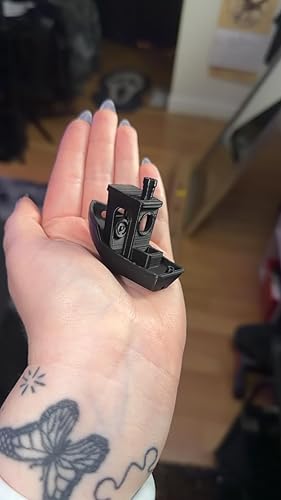
The media could not be loaded. so i am a first time 3D printer user. i watched LOTS of videos and did research but ive never even seen one before, i ended up choosing this one because of the price point and some complaints about bambu lab. i will start with a BIG TIP FOR SET UP: i did not see anywhere in the instructions that the bed plate is screwed into the machine and you have to undo the 3 screws so please note there are 3 silver screws you must undo. also, the paper instructions sucked, so i had to find youtube videos. besides that obstacle the set up wasn’t hard at all! i downloaded orca to my PC and mobile device and scanned the QR code on the printer and it all worked easily. the app on pc and mobile are super easy to use also i was sooo impressed. you can easily drag downloaded files right into the pc application and custom the print. the printer itself is loud ish? i’d say mostly the sound is from the fan because of heating, the printing head makes noise when moving but it isn’t that bad. i do plan to put an enclosure on either way for that. it does not come with one in case you were wondering. the touch screen on the display is hard to press but luckily you don’t need to press it a whole lot besides initial set up, and just for switching fillament honestly. i obviously as you can see printed my first benchy and it worked PERFECTLY. the print quality is amazing and seamless straight out of box (because I’m not an expert so i changed nothing) and it was about 6 mins faster than it predicted. the build plate that comes with it is textured but i still did a layer of glue. i also bought a smooth sparkly plate which NEEDED cleaning and glue but i eventually got it to work. you definitely want to print a poop bucket attachment lol because it just comes out the back, but wow! the fillament all automatically switches and unloads and reloads at beginning and end of printing. it honestly isn’t producing much waste (i haven’t tried multi color printing yet- however when a print is finished it also expels the fillament so next print the chamber is clear) i am SO happy i opted for the multi material printer also. i definitely recommend spending the extra $100 on it. it is so worth it and not as complicated and wasteful as i expected. can’t wait to make even more! ... show more
Reviewed in the United States on February 6, 2026 by Adrianna

  • Buyer beware
Size: AD5X
Printed great for the first few prints then the heating element went out. I contacted the seller and they advised me they would send a new heating element. Received that today, no directions as to how to replace. Emailed them and they sent a link to a YouTube video that is not even the same model. Extremely disappointed! Do not recommend ... show more
Reviewed in the United States on March 9, 2026 by HAYLEY

  • Second Printer was a charm - satisfied with printer now. I do recommend at the sale price
Size: AD5X
UPDATE: There was definitely a defect in my first printer. But, it’s been over a week with the replacement. It’s been perfect. I have printed several multi-color complex pieces with no issues. For this price point, this is a really top quality printer. Just ordered the enclosure. I was able to print all the components this week. Support I would give 2 1/2 STARS, they need to improve quality of answers and response. Initial Review: Order this after watching many reviews. First 3d Printer, was interested in the 4-color system. Reviews were mostly positive, great price point for the features. The first one I received, did not work correctly on the second color - single color prints were perfect. Software was easy to use, learning about ORCA. But when the second color started the print started 1.5cm to the right with every print. Emailed service, sent LOG and Pictures - never heard back; after waiting 5 days I returned the printer for a replacement - AMAZON sent immediately - new printer is printing perfect, ordered the enclosure and printed the enclosure pieces, perfect. So far very satisfied. The original one may have been a simple fix, not sure since support never returned my email. ... show more
Reviewed in the United States on January 21, 2026 by Jake

  • Best Bang for your buck, great for beginners
Size: AD5X
I have had no problems other than user induced errors. Works great out of box easy setup kind of loud when printing but fast. Works great with PLA,PETG that the only filament I use.
Reviewed in the United States on April 5, 2026 by joel espurvoa

Can't find a product?

Find it on Amazon first, then paste the link below.
Checking for best price...