Buy Now, Pay Later
- – 6-month term
- – No impact on credit to apply
- – Instant approval decision
- – Secure and straightforward checkout
Ready to go? Add this product to your cart and select a plan during checkout.
Payment plans are offered through our trusted finance partners Klarna, Affirm, Afterpay, Zip, Apple Pay, and Google Pay. No-credit-needed leasing options through Acima may also be available at checkout.
Learn more about financing & leasing here.
Selected Option
FREE refund/replacement until Jan 31, 2027 Learn more
To qualify for a full refund, items must be returned in their original, unused condition. If an item is returned in a used, damaged, or materially different state, you may be granted a partial refund.
To initiate a return, please visit our Returns Center.
View our full returns policy here.
At a glance
- Condition
- New
- Style
- ES-C220
- Model
- WorkForce ES-C220
- Dimensions
- 4.1"D x 11.7"W x 4.9"H
- Weight
- 3.9 lb
- Scanner Type
- Document
- Wattage
- 10 watts
- Warranty
- 1-year limited warranty
Features 8
- Ultra compact space-saving design saves 60% of desk space (1) in virtually any environment
- Quickly scan two sides at once single-step technology captures both sides of a sheet of paper in one pass as fast as 30 ppm/60 ipm (2)
- Easily scan in batches robust 20-page Auto Document Feeder accommodates stacks of paper of varying sizes
- Remarkable versatility scan most document types, from standard paper to cards and passports (5), using the flexible scan path
- Enjoy amazing image quality intelligent image adjustments with automatic cropping, blank page deletion, background removal, dirt detection, paper skew correction and staple protection
- Powerful software included easy scanning with intuitive Epson ScanSmart software (3); preview, email, upload and more; automatic file name suggestion and OCR help save time
- Convenient portability small, lightweight design
- A confident choice from the #1 best-selling scanner brand at retail (4)
Description
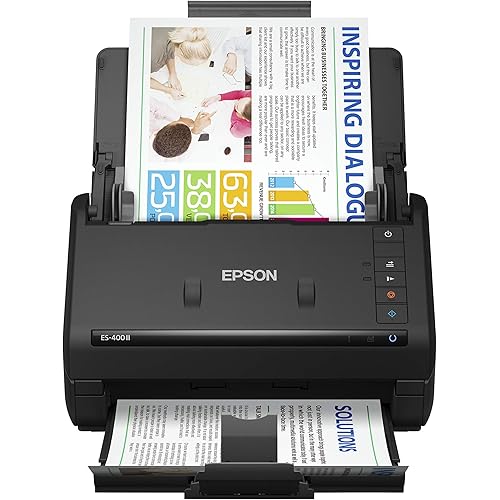
A compact modern wonder, the WorkForce ES-C220 keeps things simple with its intuitive design and exceptional flexibility. With the ES-C220, you can organize stacks of documents and make keeping piles of paperwork for your records a thing of the past. Ideal for the home or office, this easy-to-use scanner is the definition of innovation, saving 60% of desk space (1) and scanning two sides at once as fast as 30 ppm/60 ipm (2). Offering a robust solution to managing your workflow, the included Epson ScanSmart software (3) allows you to preview, email and upload your scans. In addition, help save valuable time with automatic file name suggestion for streamlined file management. The scanner features a 20-page Auto Document Feeder that makes it easy to scan in batches. In addition, the versatile ES-C220 scans papers of varying sizes up to 8.5" x 120". Maintain amazing quality with intelligent image adjustments such as cropping, paper skew correction and dirt detection. From the 1 best-selling scanner brand at retail (4), the ES-C220 proves bigger isn’t always better. 1. In vertical path scanning position compared to Epson WorkForce ES-400 II with trays extended. | 2. Based on letter-sized scans at 300 dpi in Black-and-White, Grayscale or Color Mode. |3. Requires Internet connection for Epson ScanSmart software download and installation on a connected Windows PC or Mac. | 4. Source: The NPD Group, Inc., Retail Tracking Service, U.S. & Canada, Scanners, Aug. 2021 – Jul. 2022. | 5. Optional carrier sheet required.
Specs 21
| Scanner Type | Document |
|---|---|
| Brand | Epson |
| Model Name | WorkForce ES-C220 |
| Connectivity Technology | USB |
| Product Dimensions | 4.1"D x 11.7"W x 4.9"H |
| Resolution | 300 |
| Item Weight | 3.9 pounds |
| Wattage | 10 watts |
| Color Depth | 24-bit output bpp |
| Standard Sheet Capacity | 20 |
| Connection Type | USB |
| Optical Sensor Technology | CIS |
| Greyscale Depth | 24-bit |
| Light Source Type | LED |
| Media Type | USB |
| Item Dimensions D x W x H | 4.1"D x 11.7"W x 4.9"H |
| UPC | 010343979246 |
| Unit Count | 1 Count |
| Built-In Media | Item |
| Manufacturer | Epson |
| Minimum System Requirements | Windows 7 |
No specs match.
Frequently asked questions
To initiate a return, please visit our Returns Center.
View our full returns policy here.
- Klarna Financing
- Affirm Pay in 4
- Affirm Financing
- Afterpay Financing
- Zip Pay in 4
- Financing through Apple Pay
- Financing through Google Pay
Learn more about financing & leasing here.