Search  for anything...

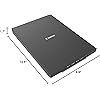
Canon Canoscan Lide 300 Scanner (PDF, AUTOSCAN, Copy, Send)

  • Based on 4,569 reviews
Condition: New
Checking for the best price...
$75.00 Why this price?
Save $2,124.00 was $2,199.00

Buy Now, Pay Later


As low as $12.50 / mo
  • – 6-month term
  • – No impact on credit to apply
  • – Instant approval decision
  • – Secure and straightforward checkout

Ready to go? Add this product to your cart and select a plan during checkout.

Payment plans are offered through our trusted finance partners Klarna, Affirm, Afterpay, Zip, Apple Pay, and Google Pay. No-credit-needed leasing options through Acima may also be available at checkout.

Learn more about financing & leasing here.

Selected Option

Free shipping on this product

FREE 30-day refund/replacement

To qualify for a full refund, items must be returned in their original, unused condition. If an item is returned in a used, damaged, or materially different state, you may be granted a partial refund.

To initiate a return, please visit our Returns Center.

View our full returns policy here.


Availability: In Stock.
Fulfilled by Amazon

Arrives Wednesday, Sep 16
Order within 10 hours and 43 minutes
Available payment plans shown during checkout

Protection Plan Protect Your Purchase
Checking for protection plans...

Style: 300 Scanner


Features

  • Scanner type: Document
  • Connectivity technology: USB
  • With Auto Scan Mode, the scanner automatically detects what you're scanning
  • Digitize documents and images

Description

The CS300 makes document and photo scanning easy. With 10 second fast scanning, 4 'EZ' buttons and 2400 x 2400 dpi resolution, the CS300 packs great features in a compact design. Digitize documents and images thanks to 2400 x 2400 dpi resolution, and with image enhancements, such as fade correction and dust reduction, your photos will continue to look great. Enjoy ease of use with the 4 'EZ' buttons. With Auto Scan Mode, the scanner automatically adjusts settings by detecting what you are scanning, and the built-in PDF button, easily scan and save PDF's that are editable and searchable with OCR .With Send to Cloud you can easily upload your photos and documents right to Cloud services like Microsoft OneDrive™ and Dropbox®.

Scanner Type: Document, Photo


Brand: Canon


Model Name: CanoScan


Connectivity Technology: USB


Product Dimensions: 14.5"D x 9.9"W x 1.7"H


Resolution: Optical 2400 x 2400 dpi


Item Weight: 3.6 pounds


Wattage: 4.5 watts


Color Depth: 48 bits bits


Standard Sheet Capacity: 1


Scanner Type: Document, Photo


Connection Type: USB


Resolution: Optical 2400 x 2400 dpi


Wattage: 4.5 watts


Color Depth: 48 bits bits


Standard Sheet Capacity: 1


Greyscale Depth: 16-bit Internal / 8-bit External


Light Source Type: LED


Media Type: Photo ; Receipt ; Business Card ; Paper


Item Dimensions D x W x H: 14.5"D x 9.9"W x 1.7"H


Item Weight: 3.6 pounds


Minimum System Requirements: Windows 7


Brand: Canon


Model Name: CanoScan


UPC: 013803306507


Unit Count: 1 Count


Global Trade Identification Number: 07


Built-In Media: CanoScan LiDE 400 Color Image Scanner, Setup CD, USB 2.0 Cable (USB A to Mini B)


Item Type Name: CanoScan LiDE 300 Slim Everyday Scanner


Manufacturer: Canon USA Inc.


Warranty Description: 1-Year Limited Warranty


Frequently asked questions

If you place your order now, the estimated arrival date for this product is: Wednesday, Sep 16

Yes, absolutely! You may return this product for a full refund within 30 days of receiving it.

To initiate a return, please visit our Returns Center.

View our full returns policy here.

  • Klarna Financing
  • Affirm Pay in 4
  • Affirm Financing
  • Afterpay Financing
  • Zip Pay in 4
  • Financing through Apple Pay
  • Financing through Google Pay
Leasing options through Acima may also be available during checkout.

Learn more about financing & leasing here.
Top Amazon Reviews


  • Little scanner, big results!
Style: 300 Scanner
As an artist, I have been meaning to find myself a nice flatbed scanner for art purposes, scanning sketches or what have you, but found myself procrastinating until I could devote time to really look at reviews and figure out a high quality, high end scanner. I found myself in a position recently that I needed to manually sign some documents and get them to where they needed to be by the next day, but my car was in the shop. I thought maybe one of those portable wand style scanners might be good, and I could use it also to scan receipts, but they are so expensive, and I needed some thing that would be delivered the next morning. What came up was the Cannon LIDE 300, which would be delivered between four and eight in the morning, and this was perfect—I could sign the documents, scan them and upload. And I would also have a nice inexpensive scanner for things. I was looking for something that would be an overnight delivery, and dare I say, on the “cheaper” side and this fit the bill. This printer far exceeded my expectations. I realized with the first scan that this little machine was way more useful, and of a higher quality than its price would suggest. Inexpensive, yes, but by no means a cheap piece of equipment. I am on an older OS Mac, so I was worried I would not find some thing that would be compatible with my system, but in reading the reviews, it looked like the scanner would work—and there were some very helpful reviews on how to use the scanner without having to download any software for Mac. It was pretty much ready to go straight out of the box, plug into your computer, go to system preferences under “printers and scanners”, hit the plus sign and you can add this scanner. Use the “printers and scanners” window to access the scanner—just hit the “open scanner” button and it will give you the scanner “user” window. It starts immediately with an overview scan and from there you can change the resolution, the size, rotation angle, even the format —say PDF or JPG. You can even do image correction with brightness and contrast. It’s pretty intuitive —all you really need to do is play around with that scanner window for a few minutes and do some test scans and you’ll see exactly where you’re at. For each new page/item that you scan you need to close the scanner window, go back to the “printers and scanners” window and hit the “open scanner” button again… There may be a way for it to auto detect when you put a new page in the scanner, but I have not figured that out… Maybe I should take a look at the manual, which is still in its plastic bag… L O L. There is a “combine into single document” option, but I chose to just do separate PDFs, and then combined them in Acrobat. And it worked out great. The quality was fantastic! And the color 300 dpi test scans I did on some color items were phenomenal, and when you enlarge them up and look at the detail, I was just blown away… Much higher quality than I expected, and I’m starting to think maybe I don’t need a higher end scanner. As I said, I bought it as an emergency measure, but now I find myself with quite a useful, high-end (in my eyes), and inexpensive little scanner. I will probably be saying quite often “how did I ever live without this”… And again I’ll mention the price is right on point, pretty inexpensive for the quality that I’m seeing, and I deal with resolution/dpi levels In my job as an artist… If you need additional information, go in under the (Amazon) reviews for this scanner and type in Mac in the search window—that was very helpful for me in making my decision to buy this scanner… The information I ultimately used for how to access the scanner without software was from one of those reviews. The scanner worked with the cable that came with it, and in less than 10 minutes I was scanning… No download of software needed for now, but I might check that out in the future. I thought this review might be helpful for others who are on an older system Mac… Sometimes it’s really hard to find useful information on products, regarding compatibility with the older systems…For reference I am on Mac, Mojave 10.14.6. Because yes, sometimes the newer OS does not always equal the best. I will say, with the positive experience of this little inexpensive model scanner, I will upgrade to another Cannon scanner, when and if needed. That’s how strongly I feel about this scanner. PS the scanner does have copy, scan/auto send as part of its functions (buttons), but I’m guessing you probably would need to download some software for those functions. As noted, this was a quick solution for some “emergency” scans, and this device was perfect! I am looking forward to seeing what else this scanner can do. ... show more
Reviewed in the United States on November 3, 2024 by Angela S

  • Quality Scanner That Works w/Windows 11 machines
Style: 300 Scanner
Great scanner. Love the printer cable charging. Only 1 cord. And it works with Windows 11 machines. Just plug it in, find it on your computer, and Microsoft has software you download. Great workflow too with the Windows ui. I did 200 scans, quick and efficiently. Great image quality, decent lightweight build. Highly recommended. ... show more
Reviewed in the United States on May 8, 2026 by Mr. Jones

  • Pretty good scanner for an amazing price!
Style: 300 Scanner
When i saw this scanner was a little over $50, i was a little sceptical on it, not expecting it to be that great. Set up was easy(was able to do so on my old microsoft surface 3 without a hitch), and it turns on with the device its connected to, so its perfect for small spaces and on the go! Its about the size of a decent sized laptop, so it fits in a messenger bag, so just find a table at a cafe and scan away! No outlet required! The images it produced were crisp, just a LITTLE over saturated, but nothing a little color correcting cant fix. I use this to scan the pages of a comic im writing and drawing, and if you scan a page with color, it does end up a little over saturated, but again, nothing a little color correcting cant fix. It scans fairly quickly, but you do have to hold the buttons down for a second for it to register it, not a quick press and scan. But all in all, its a good scanner, its lightweight, portable, and all for an amazing price! If it works on a device from 2015, it will more than likely work on any laptop or computer you have, no matter the form its in, so long that it has a usb port. If your a student who needs to scan notes or textbooks into your computer for easy access, this would be perfect for that, working best with black and white images, and if your wanting to scan colored pages(like art and stuff) into your computer, just be warned it will be more saturated in color, and will need to be color corrected to the original saturation, but it does keep the image crisp. Aside from the saturation issues, i havent had a problem with the scanner at all. If it one day breaks for some reason, im DEFINITELY getting another one! Its THAT good of a scanner! ... show more
Reviewed in the United States on August 4, 2023 by Jordan T.

  • Good Results for Scanning Documents
Style: 300 Scanner
Easy to use and set up. A single USB/C cable to power and collect data. I am using VueScan software ...have been using it for quite a few years. No problem with scanning as soon as I had it plugged in the port. Scanner powered up and ran through its start up and was ready to use within a minute or so. I mainly use this for document scanning. I have not tried photo scanning. I use an app on my phone for that (Photomyne ). However they have gone up more than 50% for a yearly contract. So I will see how this scanner does for photo copying. I have only had this for a few hours so, if anything changes I'll put an addendum to this review. ... show more
Reviewed in the United States on March 12, 2026 by Robert Morris

  • Lide 300 Scanner - Junk, do not buy
Style: 300 Scanner
The CANON Lide 300 is a good scanner. It is not as convenient as the Lide 220 that I just wore out and was an excellent scanner but it will get the job done. The Lide 220 had a 'quick menu' that stayed on my screen and controlled the scanner. For some unknown reason, CANON ditched it in favor of the IJ scan Utility which sucks but works ... and I'm sure I will get used to it over time. Listen up Canon, when you have a good item, don't trash it. Shipping was excellent and packaging was very secure and everything arrived in excellent shape. The Lide 300 scan quality is actually quite good although I only rated it 4 star because the instructions are really bad and incomplete. If I didn't already have a Canon Lide 220 I would still be trying to figure it out. Yes, I actually recommend the Lide 300 and once you get used to it, the quality if high, scans in color & b/w, and should last a good while so it is well worth the money. EDIT: Revise my comments after owning it for 10 days. What a piece of junk. I owned a Canon Lide 220 for over a decade with zero problems and it was always ready to provide quality copies. I've owned this Canon Lide 300 for 10 days and I've only been able to make 3 copies ... every other time I get error messages telling me the scanner is busy and to turn it off then turn it on again. Great, considering there is no way to turn it off or on. How does Canon even stay in business making junk such as this Canon Lide 300. Failure 97% of the time. The only way I can make a copy is to delete all of the software that is downloaded during the setup, then reload the settings .... then I am allowed to scan one document before it fails again. Canon, SHAME ON YOU!!!!! ... show more
Reviewed in the United States on June 17, 2025 by Jim H.

  • Great Scanner
Style: 300 Scanner
I bought this scanner to use working on my family history archive. We were traveling to a family reunion where several relatives and in-laws agreed to bring photos and written stories they had. For the size of the scanner bed the scanner is light weight and slim. I was able to pack it in a larger laptop case for transport. As far as performance its pretty amazing. Some of the old photos came out clearer than the actual print. The soft ware is a little hard to get used to, so make sure and work with it for a while if you will be getting into scenario were you have limited time. My example was while visiting my Mom and scanning photos I had several days at her kitchen table. But at the family reunion I had about an hour or so in my RV. Also make sure and set the scanner to documents for documents. If not the software can do some weird cropping. For the price it's a great device and helped me preserve and share some priceless family photos and stories. I should also say I have used it for work a few times, and the document scans are great also. ... show more
Reviewed in the United States on December 14, 2025 by Patrick

  • Good budget scanner
Style: 300 Scanner
Got this to scan watercolor paintings. Biggest size paper that I use is 9x12, and though the scanning area is ever so slightly too small for the paper itself, the paintings I make have a pretty substantial border of negative space, so it's fine for my purposes. It's lightweight and it fits perfectly on the shelves built into my desk. First-time setup was a breeze. I just downloaded the driver from the website and installed it and let the setup wizard do its thing. It also comes with a CD to install the driver if that's more your speed. It doesn't have an on/off switch, it's just on and ready to go when you plug it into your computer via USB. To scan, you can either open up the application that comes with the driver, Canon IJ Scan Utility (name included in this review because I may or may not have breezed past the part where it installed it; if it mentioned it then it was easy to miss) or you can just press a button on the side of the scanner. It saves what it scans as either a PDF or a JPG to your documents folder automatically, though you can change where it saves your scans in IJ Scan Utility's settings. It's quick and no-fuss. If what you're scanning is smaller than the total scan area (like my 6x6 papers, which I also tested) it automatically crops that for you, which is nice. Images saved by the scanner are good quality and save at 2504 x 3372 px and 300 DPI. The scanner washes out the colors somewhat, making them less vibrant than what they look like in real life, though this can easily be edited in your image editing or illustration software of choice (in my case that's Clip Studio Paint) by fussing with the tone curve a bit. Not really a concern if you're using this to scan documents or books, though. All in all, pretty good budget scanner. If you need something that does simple scanning work and you're not willing to drop more than a hundred dollars, it's a good buy. ... show more
Reviewed in the United States on December 1, 2025 by Phoenix

  • Works on iMac running Ventura when you follow the directions....
Style: 300 Scanner
I got this to scan some old family photo's. It works really well. Online suggestions are to scan photo's at 300 dpi and that is good for most photo's. However some photo's I scanned at 600 just because the subject was special to me. You can blow it up bigger when you do that. I have an iMac running Ventura OS. The system did not automatically see it. So I went to the Canon site and downloaded the driver's for Ventura. When I first installed the scanner it did not see it.....then I read the directions.....and it says not to plug it in until it asks for it or is scanning for it. So I re-ran the install and plugged in the scanner at the appropriate point. Presto! It works. I'm satisfied with everything.....it's pretty nostalgic going through the old photos. At least I can preserve them better/in digital format. Easier to modify and share. ... show more
Reviewed in the United States on July 28, 2025 by Michael Hoffman

Can't find a product?

Find it on Amazon first, then paste the link below.
Checking for best price...