




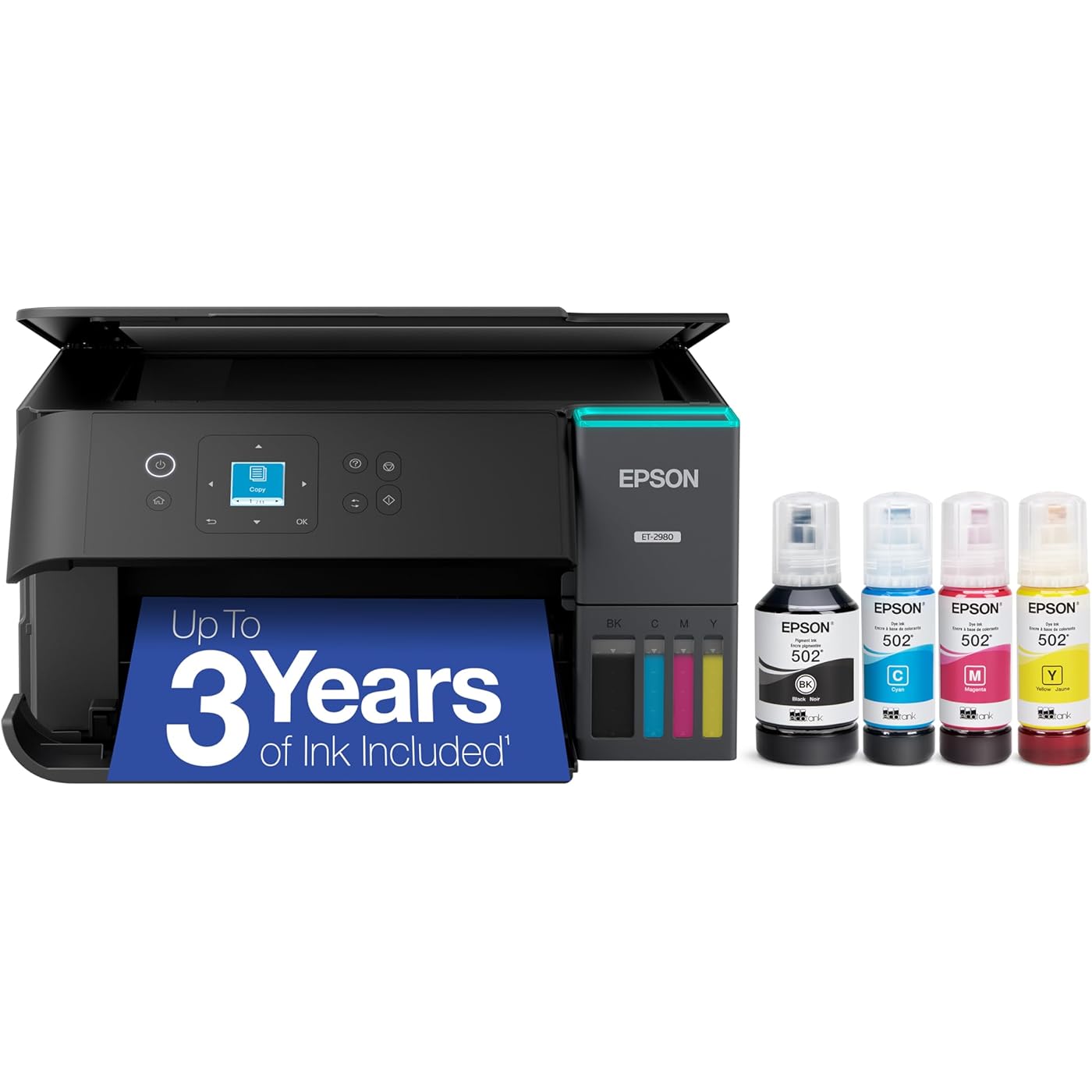
Epson EcoTank ET-2980 Wireless All-in-One Color Supertank Printer with Refillable Ink Tanks, 3 Years of Ink, Mobile Printing, 15 ISO PPM, Color Touchscreen, Auto 2-Sided, Black


Buy Now, Pay Later
- – 6-month term
- – No impact on credit to apply
- – Instant approval decision
- – Secure and straightforward checkout
Ready to go? Add this product to your cart and select a plan during checkout.
Payment plans are offered through our trusted finance partners Klarna, Affirm, Afterpay, Zip, Apple Pay, and Google Pay. No-credit-needed leasing options through Acima may also be available at checkout.
Learn more about financing & leasing here.
Selected Option
FREE 30-day refund/replacement
To qualify for a full refund, items must be returned in their original, unused condition. If an item is returned in a used, damaged, or materially different state, you may be granted a partial refund.
To initiate a return, please visit our Returns Center.
View our full returns policy here.
Recently Viewed


Color: Black
Features
- LESS FREQUENT INK REPLACEMENT Each replacement ink bottle set for this Epson color printer is equivalent to about 90 individual cartridges
- UP TO 3 YEARS OF INK INCLUDED IN THE BOX - Cartridge-free printer comes with enough ink to print up to 6,600 pages black/5,500 color for worry-free printing and fewer out-of-ink frustrations
- SIMPLE INK REFILLING Supersized ink tanks and unique EcoFit bottles make refilling your printer's ink simple without the worry of drying out
- WIRELESS PRINTER Home printer allows you to print and scan from the convenience of your smart phone or device with enhanced mobile printing from the Epson Smart Panel app
- PLEASE NOTE Epson strongly recommends the use of genuine ink to support optimal print quality and performance; Use of non-genuine ink could cause damage not covered under the printers limited warranty
Description
Introducing the Epson EcoTank ET-2980 printer, a home printer with the speed and functionality your family needs. Combining simplicity with a modern design, this all-in-one color printer is practical for everyday family printing—including content created by AI. Powered by PrecisionCore Heat-Free technology, the wireless ET-2980 printer delivers print speeds 50% faster than its predecessor³. And unlike conventional thermal inkjet printers, its unique permanent printhead is engineered to last the life of the printer. Refilling ink is a breeze with large ink tanks and uniquely keyed EcoFit bottles—no mess, no stress and no ink bottle mix-ups. And with enough ink in the box to last up to three years⁴, this printer, copier and scanner allows you to enjoy color printing without having to frequently replace cartridges. Featuring built-in USB and Wi-Fi for seamless connectivity, along with the user-friendly Epson Smart Panel app⁵, you can print and scan directly from your computer or wireless mobile device⁶. The black Epson EcoTank ET-2980 printer consistently delivers photo-quality prints, making it a reliable choice for all your printing needs. Epson strongly recommends the use of genuine ink to support print quality and performance. Use of non-genuine ink could cause damage not covered under the printer's ltd. wnty. 1. Actual savings of money, waste, and hassle will vary. Cost of printing (printer + ink) comparison based on included ink bottles vs. included and replacement ink cartridges over 3 years using average monthly print volumes. For more information, see epson.com/savings info | 2. Based on internal cumulative sales data 2010 – 2024. | 3. Versus the ET-2850. | 4. Based on average monthly document print volumes of about 125 pages. | 5. Requires Epson Smart Panel app download. Data usage fees may apply. | 6. Most features require an Internet connection to the printer, as well as an Internet- and/or email-enabled device. For a list of Epson Connect enabled printers and compatible devices and apps, visit epson.com/connect | 7. Worldwide 2011 – 10/2024. | 8. Actual savings and costs will vary considerably based on print tasks, print volumes and usage conditions. Savings and cost per ISO page are based on the cost of replacement ink bottles and the cost of enough standard cartridges to achieve the total page yields of the bottles using the MSRP (USD) and yields for Epson standard- capacity ink cartridges for similarly featured Epson consumer inkjet printers as of March 2025. | 9. Part of the ink from the included bottles is used for initial setup; yields are lower than those of replacement ink bottles. Replacement and included ink bottle yields based on the ISO/IEC 24712 pattern with Epson’s methodology. Actual ink yields will vary considerably for reasons including images printed, print settings, temperature and humidity. Yields may be lower when printing infrequently or predominantly with one ink color. All ink colors are used for printing and printer maintenance, and all colors must be available for printing. For more information, visit epson.com/inkinfo | 10. Individual cartridges estimate based on print yields of a replacement set of black and color ink bottles as compared to Epson standard-capacity ink cartridges for similarly featured printers as of March 2025. | 11. Based on product and replacement ink bottle sales in North America 2015 – June 2021.
Brand: Epson
Connectivity Technology: USB, Wi-Fi
Printing Technology: Inkjet
Special Feature: Auto-Duplex, Borderless Printing, Display Screen, Energy Star, Refillable Ink Tank
Color: Black
Model Name: EcoTank ET-2980-B
Printer Output: Color
Maximum Print Speed (Color): 8 ppm
Max Printspeed Monochrome: 15 ppm
Item Weight: 11.5 Pounds
Printer Type: Inkjet
Other Special Features of the Product: Auto-Duplex, Borderless Printing, Display Screen, Energy Star, Refillable Ink Tank
Printer Output Type: Color
Item Weight: 11.5 Pounds
Item Dimensions D x W x H: 13.7"D x 14.8"W x 7.4"H
Print media: Envelopes, Glossy photo paper, Paper (plain)
Scanner Type: Flatbed
Maximum Copy Speed Black and White: 15 ppm
Compatible Devices: Laptops, PC, Smartphones, Tablets
Warranty Type: Limited
EU Spare Part Availability Duration: 1 Years
Ink Color: Black
Additional Printer Functions: Scan
Number of Trays: 1
Resolution: 4800 x 1200
Color Pages per Minute: 8 ppm
B&W Pages per Minute: 15 ppm
Color: Black
Color Depth: 24 bits_per_pixel
Printer Connectivity Type: USB, Wi-Fi
Hardware Interface: USB
Total USB 2.0 Ports: 1
Total Usb Ports: 1
Dual-sided printing: Yes
Duplex: Automatic
Brand: Epson
Model Name: EcoTank ET-2980-B
Model Number: C11CL41201
Built-In Media: EcoTank ET-2980 all-in-one, manual, power cord, 1 bottle of 502 Black (127 mL) and 1 bottle each of 502 Cyan, Magenta, Yellow (70 mL)
Model Series: EcoTank
Specific Uses For Product: Home, Office
UPC: 198390000561
Manufacturer: Epson
Warranty Description: 1-Year Limited Warranty
Item Type Name: Inkjet Printer
Unit Count: 1.0 Count
Maximum Media Size: 8.5 x 14 inch
Maximum Sheet Capacity: 100
Paper Size: 3.5" x 5", 4" x 6", 5" x 7", 8" x 10", 8.5" x 11", 8.5" x 14" Inches
Output sheet capacity: 100
Maximum print Resolution Color: 4800 x 1200 Dots Per Inch
Maximum Print Resolution Black and White: 4800 x 1200 Dots Per Inch
Power Consumption: 13 Watts
Wattage: 13 watts
Maximum Copy Resolution Color: 4800 x 1200 dpi
Maximum Copy Resolution Black and White: 4800 x 1200 dpi
Frequently asked questions
To initiate a return, please visit our Returns Center.
View our full returns policy here.
- Klarna Financing
- Affirm Pay in 4
- Affirm Financing
- Afterpay Financing
- Zip Pay in 4
- Financing through Apple Pay
- Financing through Google Pay
Learn more about financing & leasing here.
Similar Products




Top Amazon Reviews


