




Drawing Tablet with Screen XPPen Artist 22 2nd Computer Graphics Tablet 122% sRGB with Tilt Function Battery-Free Stylus Adjustable Stand, 21.5inch Pen Display Compatible with Windows PC, Mac, Linux



Buy Now, Pay Later
- – Up to 36-month term if approved
- – No impact on credit to apply
- – Instant approval decision
- – Secure and straightforward checkout
Ready to go? Add this product to your cart and select a plan during checkout.
Payment plans are offered through our trusted finance partners Klarna, Affirm, Afterpay, Zip, Apple Pay, and Google Pay. No-credit-needed leasing options through Acima may also be available at checkout.
Learn more about financing & leasing here.
Selected Option
FREE 30-day refund/replacement
To qualify for a full refund, items must be returned in their original, unused condition. If an item is returned in a used, damaged, or materially different state, you may be granted a partial refund.
To initiate a return, please visit our Returns Center.
View our full returns policy here.
Size: 21.5 Inch
Style: Standard W/O Keys
Features
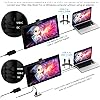
- USB-C to USB-C connection: XPPen 22 2nd drawing tablet supports USB-C to USB-C connection(sold separately), which allows you to connect your iMac, Mac Book Pro, or Windows computer without using an adapter
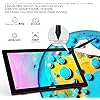
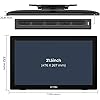
- Brilliant HD LCD Screen: XPPen Artist 22 2nd art tablet equips with a 21.5 inches working area and provide 1920*1080 high resolution presents your creation in the depth of detail, provides you with clarity to see every detail of your work
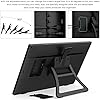
- Adjustable stand: With the adjustable stand, you can change the screens angle from 16 to 90 degrees to suit your needs and create comfortably. Also, the specially designed cable slot and detachable back cover keep your cables protected and organized.
- More precise: With better accuracy, XPPen Artist 22 2nd pen tablet lets you draw with more precise cursor positioning, even at the four corners. This ensures a satisfying drawing experience
- Richer Color Gamut: With a screen color gamut of 86% NTSC (Adobe RGB90%,sRGB122%), the 22 2nd Display delivers a diverse and vibrant spectrum of colors, allowing you to create vivid artwork enriched by lifelike hues and sharp details
- Premium Pen Technology: The batteryless stylus supports up to 60 degrees of tilt function and 8,192 pressure sensitivity levels, helping you to effortlessly create exquisite strokes and seamless shading.
- Response Time: 8ms: With a response time of 8ms, it responds nimbly to any pen movement and ensures the swift and smooth presentation of every line and stroke input onto the screen, bringing you a familiar drawing experience.
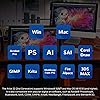
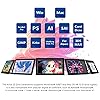
- Wide Compatibility: The 22 2nd drawing monitor supports Windows 10/8/7 and Mac OS X 10.10 (and higher). It is also compatible with popular digital art software, such as Adobe Photoshop, Illustrator, SAI, CDR, GIMP, Krita, MediBang, FireAlpaca, and Blender 3D
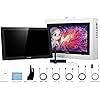
- What You Get: XPPen Artist 22 2nd drawing tablets with screen, 3 in 1 cable or 1 USB C-C cable (sold separately), PA6 Batteryless Stylus, welcome guide
- Online Teaching and Working: XPPen Artist 22 2nd drawing monitor computer graphics tablet is designed for digital drawing, painting, sketching, E-signatures, online teaching, remote work, photo editing, it's compatible with Microsoft Office apps like Word, PowerPoint, OneNote, Zoom, Xsplit etc. Works perfect than a mouse, visually present your handwritten notes, signatures precisely
Description
Our first smart chip X3, create artistic digitizers that give you a feeling as real and natural as working with a traditional tool. Visit the Store Visit the Store Visit the Store 1 Year Protection Plan & Lifetime XPPen Service 1 Year Protection Plan is offered for all XPPen products, please get in touch with us to see the terms and conditions for Support, Return and Refunds. You can get in touch with us via Amazon Message if you have any question about the product. Visit the Store The PA6 battery-free stylus supports up to 60 degrees of tilt function and 8,192 pressure sensitivity levels, helping you to effortlessly create exquisite strokes and seamless shading. During the limited protection period, XPPen will repair or replace at XPPen’s sole option, any parts of the product that are defective or malfunctioning during normal usage. Artist 22 2nd Artist Pro 19 Gen2 4K Artist Pro 24 Gen2 165hz Artist Pro 24 Gen2 4K Upgraded Artist13.3Pro V2 Artist 22R Pro Artist 24 Pro
Brand: XP-Pen
Connectivity Technology: USB
Pressure Sensitivity: 8192 levels
Operating System: Windows 7 and above, Mac OS X 10.10 (and higher), and Linux
Special Feature: drawing/learning/working
Brand: XP-Pen
Model Name: Artist 22 (2nd Generation)
Built-In Media: Stand
Target Audience: Teacher
Model Number: ArtistCD220F
Manufacturer: XP-PEN
Unit Count: 1 Count
Mfr Part Number: ArtistCD220F
Warranty Description: One Year Warranty and lifetime Technical Support
Color: Black
Connectivity Technology: USB
Pressure Sensitivity: 8192 levels
Operating System: Windows 7 and above, Mac OS X 10.10 (and higher), and Linux
Additional Features: drawing/learning/working
Specific Uses For Product: Online Teaching/E-Learning/Remote working/Digital drawing/Web-conference
Compatible Devices: Windows 7 (or later), Mac OS X 10.10 (or later)
Display Type: LCD
Native Resolution: 1920x1080
Screen Size: 21.5 inches
Item Weight: 7.98 kg
Item Dimensions L x W: 13.07"L x 21.18"W
Active Surface Area: 55.07 square inches
Frequently asked questions
To initiate a return, please visit our Returns Center.
View our full returns policy here.
- Klarna Financing
- Affirm Pay in 4
- Affirm Financing
- Afterpay Financing
- Zip Pay in 4
- Financing through Apple Pay
- Financing through Google Pay
Learn more about financing & leasing here.
Similar Products


Top Amazon Reviews

