Search  for anything...

Creality SPARKX i7 Nano Combo 3D Printer, Multi Color with CFS Nano High Speed Pre-Assemble Auto-Leveling Auto Filament Refill Auto Feed & Retract 10.24×10.24×10 inch

  • Based on 20 reviews
Condition: New
Checking for the best price...
$298.99 Why this price?
Save $53.00 was $351.99

Buy Now, Pay Later


As low as $49.83 / mo
  • – 6-month term
  • – No impact on credit to apply
  • – Instant approval decision
  • – Secure and straightforward checkout

Ready to go? Add this product to your cart and select a plan during checkout.

Payment plans are offered through our trusted finance partners Klarna, Affirm, Afterpay, Zip, Apple Pay, and Google Pay. No-credit-needed leasing options through Acima may also be available at checkout.

Learn more about financing & leasing here.

Free shipping on this product

FREE 30-day refund/replacement

To qualify for a full refund, items must be returned in their original, unused condition. If an item is returned in a used, damaged, or materially different state, you may be granted a partial refund.

To initiate a return, please visit our Returns Center.

View our full returns policy here.


Availability: In Stock.
Fulfilled by Amazon

Arrives Saturday, Oct 3
Order within 6 hours and 42 minutes
Available payment plans shown during checkout

Protection Plan Protect Your Purchase
Checking for protection plans...

Features

  • Multi-color Printing: Supports automatic filament switching for up to 4 colors, no frequent manual filamentchanging needed. The SPARKX i7 Nano Combo 3d printer lets you easily create multicolor models and vivid creative ornaments to bring rich, eyecatching print effects.
  • Large 260260255mm Build Size: Break free from size restrictions to complete diverse printing projects, from largesized items like airless basketballs to delicate intricate miniatures.
  • Compact SpaceSaving Design: Features a tiny footprint for easy desk placement. Optimized structure saves your precious desktop space while maintaining reliable printing stability and goodlooking appearance.
  • Auto Filament Refill for Uninterrupted Printing: Realtime filament monitoring automatically switches to a matching backup spool once your filament runs out. No manual operation needed, effectively avoids print failure during longtime printing tasks for a hasslefree printing experience with the SPARKX i7 Nano Combo.
  • Empty Run Detection: Realtime filament monitoring on all channels. Automatically halts printing upon detecting breakage, tangling or emptyfeed issues. Prevent wasted filament and failed prints, delivering enhanced stability and reliability for long printing tasks.
  • Auto Feed & Retract: Automates filament loading and unloading for easy operation. Filament retracts from the extruder after printing, so you can replace spools directly without extra manual steps. Brings greater convenience to multicolor printing and daily filament swaps.

Brand: Creality


Product Dimensions: 18.5"D x 16.65"W x 17.95"H


Item Weight: 21.4 pounds


Compatible Devices: Laptop, Personal Computer, Smartphone


Supported File Format: Stl, G-code,3MF


Product Dimensions: 18.5 x 16.65 x 17.95 inches


Item Weight: 21.4 pounds


Date First Available: July 23, 2026


Manufacturer: Creality


Frequently asked questions

If you place your order now, the estimated arrival date for this product is: Saturday, Oct 3

Yes, absolutely! You may return this product for a full refund within 30 days of receiving it.

To initiate a return, please visit our Returns Center.

View our full returns policy here.

  • Klarna Financing
  • Affirm Pay in 4
  • Affirm Financing
  • Afterpay Financing
  • Zip Pay in 4
  • Financing through Apple Pay
  • Financing through Google Pay
Leasing options through Acima may also be available during checkout.

Learn more about financing & leasing here.

Top Amazon Reviews


  • Great Compact Multicolor 3D Printer!
I already have three Creality SPARKX i7's, and they've been great. One is a standalone machine, another is the standalone with automatic filament reload system, and the third is the combo with the CFS lite. All of them have performed perfectly, and I also have a Bambu P1S and Bambu A1 for comparison points. When I saw the SPARKX was being offered with a more compact version of the CFS, I jumped at the opportunity to have an additional printer and try the system. The printer comes packaged in a simple relatively compact brown box (inside another Amazon box for whatever reasons). It's packaged very well and padded appropriately with nothing moving free inside when lifted. Inside is a quick start guide, the printer in two pieces, a spool holder, the CFS nano parts, a power cable, a bowden tube, and accessories (two magnetic hex wrenches, screws, PEI print bed, scraper). Assembly, following the manual, is straight forward, and care just needs to be taken with respect to alignment and screws. The bed attaches to the gantry base with some screws, you connect cables underneath, attach the CFS nano to the gantry and print head via bowden tube, remove the gantry locks, install the bed, and power it on. After that, setup steps are given via on screen dialogs (online connectivity, optional cloud account, calibrate, update). And then you're ready to print! It took me about 45 minutes. The cloud account is really nice, as it lets you use a phone and PC app for remote control and monitoring. Coming from Bambu, everything feels straight forward simple, as Creality made their mobile, PC, and web UI and and ecosystems very similar. The PC slicer is an fork of Bambu / Orca, so it's very familiar (albeit with some minor UI changes). As a nice benefit, unlike Bambu, you're not locked into the ecosystem, so you can also use third party slicers. I've used my other SPARKX for several months without any issues, and this one performs just as good. The major difference is the CFS Nano, and I find it performs just as good as my CFS Lite (no issues), only it's a different form factor that saves desk space while leaving spools exposed. For a test, I printed a multi color fidget. Color changing results in less purge that my A1, but it takes a bit longer. And with respect to noise, the motors are quieter than my P1S, and similar to my A1, however the part fan running at 75% is quite loud (to be expected). The print came out great, and I would describe the overall experience as identical to my other Sparkx i7's, and similar to the A1 with a bit more polish. And unlike the A1, it costs less, doesn't have the NTC fire risks, and has a more open ecosystem. The Sparkx i7 is a high quality and affordable 3D printer that works well right out of the box. I really like the CFS Nano option, as you sacrifice the drybox aspects of the CFS Lite, but you get a much more compact form factor and lower price. Grateful to have added this printer to my collection, and I expect to get a lot of use out of it. ... show more
Reviewed in the United States on September 14, 2026 by Hank Bacon

  • Good multicolor value, setup was a little more involved than you might expect
The SPARKX i7 Nano Combo is a good little multicolor printer, but the setup experience is more involved than the listing title might make you think. This machine does require assembly, and there are actually two setup guides: one for assembling the printer itself and another for connecting the CFS Nano kit. If you’ve worked with 3D printers before, the process is manageable, but newcomers should take some time to familiarize themselves with the parts and cable routing before diving in. There are several cables to connect, and one in particular can potentially get pinched underneath if you’re not careful. After assembling the gantry, the next step is attaching the CFS and assembling the spool-holder frames. This added a significant amount of time to the setup, because you do have to pay attention to the direction the individual parts are facing and make sure everything is assembled in the correct orientation. Again - not necessarily difficult, you just have to pay attention. After putting together the Lite combo recently, this one felt like a step backwards. The listing title says “pre-assemble,” but that does not really describe my experience. By comparison, the standard i7 Lite Combo I received arrived almost completely assembled, and its out-of-box experience was noticeably quicker and easier. One small detail I appreciated: the included Allen keys are magnetized. That made assembly a little easier than expected. The biggest actual setup issue I ran into was with the PTFE tubing connections on the CFS for spools two and three. The included tubes were 290 mm long (and are named in the manual), and connecting them as supplied would have created an extremely sharp bend that I would expect to cause feeding problems (see photo of the tube for spool 2.) Fortunately, I had spare tubing available and replaced those runs with 390 mm lengths, which gave the filament a much more natural feed path. The filament inputs also appear to be plastic. That works fine, but it does raise some longer-term wear concerns because filament will repeatedly rub against those surfaces. I suspect the maker community will eventually come up with inserts or other solutions if wear becomes an issue. The heat bed is extremely magnetic. That certainly keeps the plate secure, but it can make positioning it a little awkward because the sheet wants to snap into place before you have it perfectly aligned. Once assembly was finished and I confirmed all of the connections, initial setup went smoothly, and I performed a single firmware update. The Nano arrangement does have some advantages over the Lite Combo. It takes up less desk space because there is no separate feeder box sitting beside the printer, and the spools themselves are easier to access. Physically different layout, but functionally pretty similar. For testing, I always like to print included sample models exactly as the machine arrives, without making changes first. I printed the waste catch box and an articulated octopus, and both came out well. The waste box showed a few minor first-layer extrusion artifacts, but considering it is a large, flat print, I wasn’t particularly concerned. At the current price, especially when it is on sale, I think this is a good value for a compact multicolor desktop printer. The assembly process could be improved, and the included PTFE tubing really should have been longer, but once set up, the machine performed well and produced good prints right out of the box. For beginners who are willing to take their time during assembly, or experienced users looking for an affordable multicolor machine with a relatively small footprint, the i7 Nano Combo is a capable option. ... show more
Reviewed in the United States on September 22, 2026 by Maury

  • Impressive budget multi-filament printer
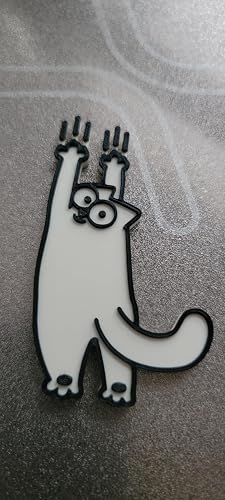
This is my 2nd Creality printer - the first being an older single filament Ender V3 Plus. I don't consider myself a 3D printer expert and only use my printer for house projects, but I have enough design experience to create and print usable 3D models (such as wall trim pieces, custom light covers, roof vent covers, etc.). This printer is significantly a step-up from my older V3 Plus and I'll likely use comparisons against my older V3 Plus in this review. In addition to the base printer, this model includes the CFS Nano Upgrade Kit which adds an automatic filament feeder (and extractor) to save time manually changing the filament. The upgrade kit basically attaches to the frame of the printer and provides filament roll storage, routing, control, and sensing for 4 filament rolls (with a maximum size of 1Kg). The upgrade kit expands needed space along the top and back side of the printer, but I felt the additional needed space wasn't too bad considering it's inside the required clearance space for the printer on the sides and only adds about additional 6 inches of needed space for the feeder on the top. Out of the box, it takes about 30 to 40 minutes to assemble. The user manuals for the printer and upgrade kit are good, but I ended up using Youtube videos (there are a number of them) to assemble it. Compared to my older V3 Plus, this printer is a major upgrade. In addition to multi-filament support, it has a built-in camera with print monitoring, LED lighting, and automated backup spool switching. Print monitoring monitors the active print sessions for potential errors (it, spaghetti) and will stop the print if an error is detected to avoid a large plastic blob. After initial powerup and setup of WIFI access, the printer was detected in the (Creality Print) slicer tool. It took me a little while to figure how filament loading and identification worked - you can setup it up on the printer's touchscreen, but I found it much easier to setup via the device tab in the slicer. Setting up a filament requires pushing the filament into the filament tube up to the CFS Nano unit until it 'grabs' it - it will then route it to about an inch of the printer head for when it's needed. Once filament is recognized, you can setup the filament type and color in the slicer. The very first print I did was the filament purge tray from the printer's touch screen. This small tray sits along the right side of the unit for filament waste (usually) when changing colors during a print (to clear the old filament color out of the print head). I used all the default settings of the printer (including generic PLA) to get an idea of what a absolute beginner might expect. I printed the purge tray in black PLA (see timelapse) and it took about 55 minutes in total with 3 small pieces of purge waste. Print quality was slightly better than my Ender V3 unit and print noise was also a lot quieter than my Ender V3. I had the printer working downstairs and had to come down a few times to make sure it was still on. One of the nice things with filament system on this printer (compared to the V3 Plus) is that the filament input side to the CFS Nano unit doesn't moved, so the filament rolls don't 'unspool' - a minor issue with the V3 Plus that could cause the filament to get tangled. I also did a 2-color print of a flat cat emblem at the default settings with black and white filament on spool holders 3 and 4. Selecting the color for the prints was easy (it could of been printed in any color) and didn't require any other special setup to start the print. The emblem (sized about 3 inches by 1 inch) took about 18 minutes with 3 filament purges. I've included an image of that print. Overall, this is an excellent printer for 3D printing and a very good first printer (especially considering the low cost). It's easy enough for a beginner, but has some room to grow once you've gained some experience in 3D printing. ... show more
Reviewed in the United States on September 16, 2026 by KWells

  • Great Multicolor Prints, But Slow Purges and a GPL Problem Hold It Back
I've been 3D printing for six years and currently own five Creality machines, most of them heavily modified, so I decided to run this one completely stock to see how it performs out of the box. Assembly is quick, but don't skip squaring the frame with an actual square. That isn't mentioned in the instructions and I checked it after assembly and had to go back since it was pretty bad. Print quality straight off the generic PLA profile was excellent, including a multicolor giraffe print done with damp filament and zero calibration. My main gripe is the filament change process: color swaps take several minutes because the purge amount is excessive, retractions are very slow and some of the scripted steps seem to repeat for no clear reason. Digging into that purge code led me to find that Creality hasn't released the source for the Nano CFS despite it running on GPL licensed Klipper code, a violation that's already been documented on their other CFS systems, and one they're clearly aware of. Printing from the cloud and from Creality Print on Windows both worked fine, though the Android slicing app was frustrating enough that I won't use it again, and at $300 this still undercuts the K1C and Ender 3 V3 Plus while putting out comparable quality, but at much slower speeds. I want to mention that Creality Print now has a beta feature that lets you adjust speeds based on the height of the print. This will help improve the quality of taller prints on bed slinger printers like this one. Pros: - Excellent print quality right out of the box, even with generic settings and slightly wet filament Cheaper than the K1C and Ender 3 V3 Plus, without giving up much Cloud printing and the Windows Creality Print app both work reliably Assembly is genuinely easy, even if getting it dialed in takes a little more effort Cons: - Color changes are slow, with more purging than seems necessary - Frame needs manual squaring with a square to print accurately, which isn't obvious from the box - Creality has not released the GPL required source code for the Nano CFS, this will require someone to reverse engineer the software - Android slicing app is clunky enough to skip Recommendation: If you want strong multicolor print quality at a lower price than Creality's other combo printers, this delivers, especially if you're new to multicolor and don't plan to tinker under the hood. If you care about open source compliance or want to eventually customize the CFS behavior yourself, know that Creality is currently keeping that code closed despite licensing obligations that say otherwise. Overall a good value printer with a real software transparency issue worth knowing about before you buy. ... show more
Reviewed in the United States on September 17, 2026 by Sleefany

  • Creality is stepping up their game with this one.
Creality has a bit of a reputation with their Ender printers and while that may not be warranted with some of their newer machines, they have definitely tried so move away from that with this machine. The biggest issue with the original CFS version is the actual footprint needed for the printer and CFS, but this machine solves that with the Nano which is a fantastic addition. The spools hang from the sides so it does have a bit wider footprint but still smaller than an entirely separate box. The print quality front the prints I've done on this one have been excellent and I have not experienced any issues yet. This has all the features you would expect from a modern printer plus the ability to "root" the machine to use so I can use it with my farm software. Overall this is a great value for a 4 color printer. If this machine is the direction that Creality is going then I see food things coming from future machines. ... show more
Reviewed in the United States on September 12, 2026 by Words R Hard

  • Great Starter printer
Up front the reason for the 4 stars vs 5 is based on mediocre instructions and missing PFTE tubing. Ok let's get started. I have a 3 year printing background with various machines so I am familar with how things work. That is how I managed through the instructions which were ok but there were a few areas where the images were just trash. I know I am not buying a $2K machine but ink can't be that much. However, you should be able to work through it even if this is your first go at 3D machines. The lack of enough PFTE tubing is another issue. I had the multi-color system and there wasn't enough tubing to go from the feeder to the printer head. Of course, I had plenty so really a non-issue for me. If this is your 1st machine go ahead and order a roll. Now on to the meat and tatters. The machine set up was flawless. Ran the self calibrations and printed a 4 color benchy. The print quality with SUNLU PLA was decent. No complaints. The color changing system worked perfectly and there were no issues. I am not overly thrilled that the entire spool holder system is plastic but it's not the worst thing. The "Creality Cloud" for the iPhone works pretty much like every other one for BAMBU Labs or ELEGOO. Same thing for the slicer "Creality Print". Pretty standard with no real bells or whistles. Like I said, great entry level printer and slicer. This is a budget friendly printer but with limitations of only 4 colors, not enclosed (although you can buy a tent with exhaust options), and I wouldn't try to print ASA or ABS or any abrasive engineering filament plus not a heated chamber. But this machine never claims to have any of that so there ya go. All in all after I ho hummed about having to assemble it I eventually came to like it. Oh it's waaaaay more quiet than the Elegoo Centuari. Thumbs up for me! ... show more
Reviewed in the United States on September 20, 2026 by Amazon Customer

  • Great multicolor printer for the money
I originally planned on giving the Creality SPARKX i7 Nano Combo four stars because I had a few hiccups during assembly. However, after spending some time actually using it, I changed my mind. This is an extremely affordable multicolor printer that I think is a great choice for beginners while still offering plenty of features for experienced users. I also own an AnyCubic Kobra X, so I've been able to compare the two directly. One thing that really surprised me is Creality's online slicer when using a mobile phone. It is incredibly feature-packed. I believe you can do nearly as much from your phone as you can using a computer and the AnyCubic slicer. By comparison, AnyCubic's mobile slicer is much more limited, primarily allowing you to size and position a model. I also like that Creality embraces an open-source ecosystem. AnyCubic is much more closed, and a recent AnyCubic update caused some problems for me. Creality offers three levels of access, free, pro, and commercial. The free plan gives you limited online functionality. The Pro plan is around $79 per year. Considering the amount of functionality available, I think the Pro plan offers a lot for the money. You can find a model you want to print, select it, slice it online if needed, and send it directly to the printer. That kind of workflow is extremely convenient. Most importantly, the printer itself has performed very well. I've been getting quality prints without problems, and the multicolor capability makes it even more impressive considering the price. If you check out the dumping fidget I made, you can see that it does an excellent job with filament roll changes. The blue and purple are different rolls, I just entered them in the printer as the same color. After actually using the SPARKX i7 Nano Combo, those initial assembly frustrations became pretty minor compared with everything this printer offers. Great multicolor printer for the money and an easy five stars from me. Update: currently making Halloween fidgets to hand out for kids. My Creality is waiting for me to add a roll of filament ( Im at work and guessed wrong on the only roll I had on it) so it's busy. I was going to do a ghost fidget on AnyCubic's Makeronline. You can't click to print on mobile, they want you to use a computer. Went to MakerWorld and found a cute ghost fidget. Downloaded it to my phone and Creality immediately opened the file and put it on their online build plate, even though it's still waiting for me. AnyCubic makes me search my download folder for the file. Currently printing air with my Kobra X due to the current update. Go with Creality, you won't be sorry. Update: successful 2 day print of a Halloween pumpkin fidget. As I said before, very easy to slice and print. I clicked on the download, it went directly to the mobile online slicer. From there I was able to clone it to 9 models and arrange them on the build plate. Game changer. Update: first time trying to unload filament. When you click unload filament on the screen, and it says no filament to unload, what are you supposed to do? I could see in the pfte tube that the filament was retracted in the head. Would not pull out. Ended up turning printer on and off. When the Nano unit started doing it's thing, I was finally able to pull the filament out. Not happy. ... show more
Reviewed in the United States on September 16, 2026 by AMT wrench

  • Impressive multicolor printer with a lot of automation built in
This has been a really enjoyable printer to use, especially if you want multicolor capability without turning the whole setup into a complicated project. The printer arrives largely pre-assembled, so getting from unboxing to the first print is much faster than with machines that require a lot of mechanical setup and calibration before they are usable. For the money, there is a surprising amount of hardware and functionality included here. Multicolor printing, a generous build volume, good speed, and all of the automated convenience features would normally require buying several upgrades or accessories separately. As a complete package, it feels like strong value and gives you room to grow into more complicated projects without immediately needing to replace or heavily modify the machine. Overall, this is a very capable and well-rounded printer that combines speed, multicolor capability, a useful build volume, and a lot of automation into one package. It has been easy to use, dependable, and genuinely fun to print with. ... show more
Reviewed in the United States on September 13, 2026 by Ian

Can't find a product?

Find it on Amazon first, then paste the link below.
Checking for best price...