Search  for anything...

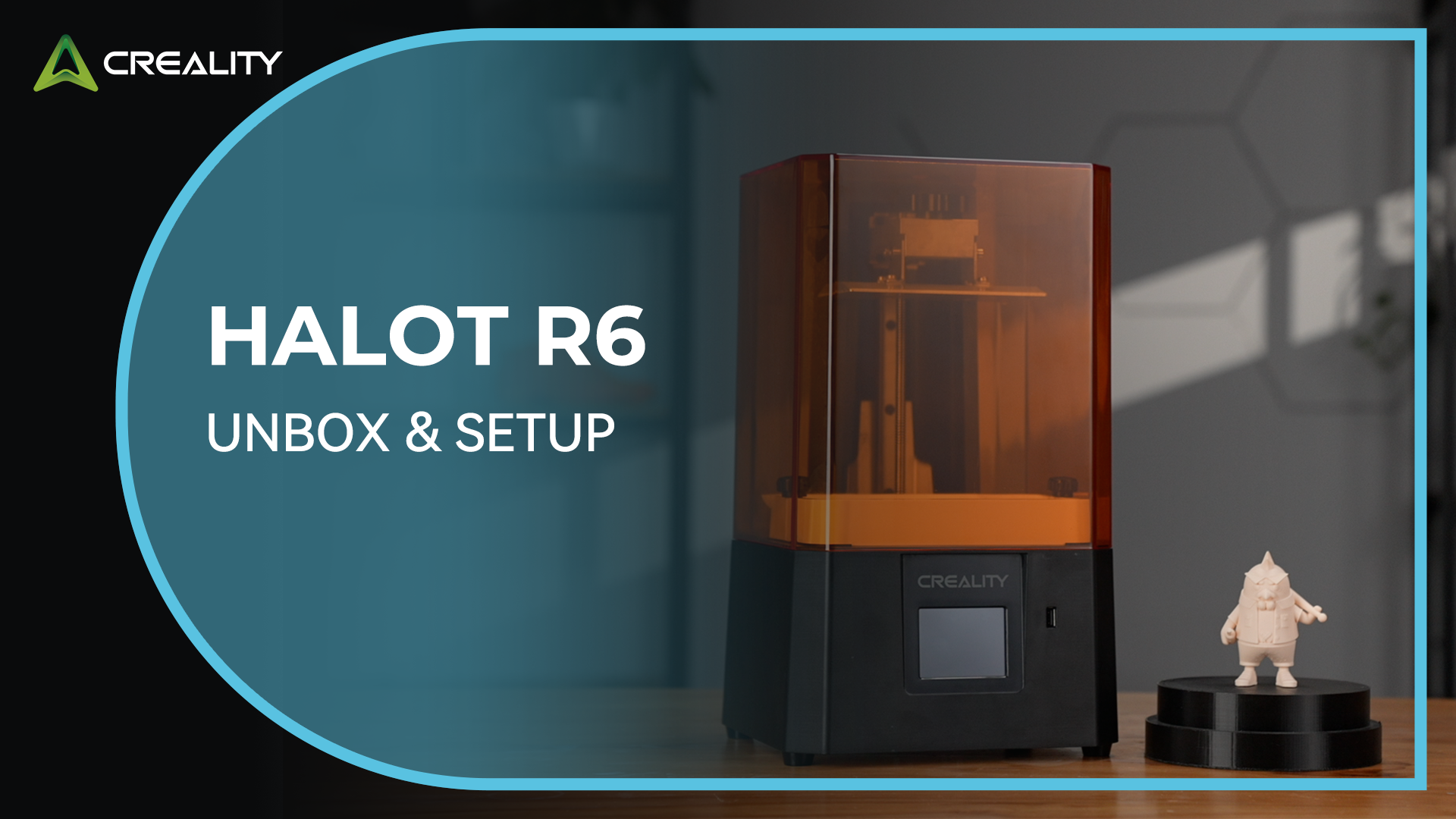
Creality Resin 3D Printer for Kids and Beginners, HALOT R6 Fully Assembled

  • Based on 1,017 reviews
Condition: New
Checking for the best price...
$139.00 Why this price?
Save $10.99 was $149.99

Buy Now, Pay Later


As low as $23.17 / mo
  • – 6-month term
  • – No impact on credit to apply
  • – Instant approval decision
  • – Secure and straightforward checkout

Ready to go? Add this product to your cart and select a plan during checkout.

Payment plans are offered through our trusted finance partners Klarna, Affirm, Afterpay, Zip, Apple Pay, and Google Pay. No-credit-needed leasing options through Acima may also be available at checkout.

Learn more about financing & leasing here.

Selected Option

Free shipping on this product

FREE 30-day refund/replacement

To qualify for a full refund, items must be returned in their original, unused condition. If an item is returned in a used, damaged, or materially different state, you may be granted a partial refund.

To initiate a return, please visit our Returns Center.

View our full returns policy here.


Availability: In Stock.
Fulfilled by Amazon

Arrives Friday, Sep 25
Order within 46 minutes
Available payment plans shown during checkout

Protection Plan Protect Your Purchase
Checking for protection plans...

Set name: HALOT-R6


Features

  • Designed for Zero-Basic Newbies: Creality Halot R6, a resin 3d printer designed for newbies, is easy to operate, it has a built-in boot guide to help you complete the networking and other basic configurations can be a complete novice can be used right out of the box
  • Compact and Flexible: Resin 3d printer Halot R6 adopts 2K 6.08-inch LCD screen, the body size is two-fifths of the conventional size, light to 4.25kg; Ultra-compact body, to save the placement of the space, use more comfortable; R6 LCD printer body is made of high-strength alloy material, impact and corrosion resistance, not afraid of the daily bumps. Let you easily 3d printing anytime and anywhere
  • Integral Light Source: Creality 3d resin printer R6 is equipped with an integral light source only available in high-end products, with light source uniformity >90%, uniform and stable light, better overall consistency when curing each layer of the model, and smoother and more delicate models printed out; The orange coated top cover can shield 99.89% of UV rays, safer and more eye-friendly
  • High Printing Success Rate: The Creality resin printer R6 is equipped with an excellent flatness platform, which can increase the adhesion of the model and improve the printing success rate; The R6 has a high-precision Z-axis single line guide and gap elimination nut, which effectively suppresses wobbling and reduces misalignment when printing, and the model surface is delicate and smooth. Meanwhile, you can additionally install a Web camera through the USB port to support high-definition remote monitoring and time-lapse shooting
  • Multi-end Intelligent Collaboration: HALOT BOX software supports all kinds of parameter presets, and slicing and printing can be completed with one click; The Creality Cloud APP can download all kinds of models; The intelligent operation is simple and friendly; What's more surprising is that you don't need to pay anything to get the season card of CHITUBOX Pro

Description

540+ Patented Technology 3.5 Million+ Number of users 5 Million+ Cumulative Shipments Creality 3D Technology Co., Ltd. focuses on the design, research, production of 3D printers and 3D printing related products. Consisting of professional researchers and skilled engineers, our R&D team constantly strives for creative function and excellent user experience. The R&D investments on 3d printing cover FDM/resin 3D printers, 3D scanners, filaments, resin, as well as 3D printed drones and robots that back up STEAM education.

Brand: Creality


Material: Aluminum


Color: Orange


Product Dimensions: 16.1"D x 15.4"W x 18.7"H


Item Weight: 5.8 kg


Product Dimensions: 16.1 x 15.4 x 18.7 inches


Item Weight: 12.76 pounds


Item model number: HALOT-R6


Date First Available: April 30, 2025


Manufacturer: Creality


Frequently asked questions

If you place your order now, the estimated arrival date for this product is: Friday, Sep 25

Yes, absolutely! You may return this product for a full refund within 30 days of receiving it.

To initiate a return, please visit our Returns Center.

View our full returns policy here.

  • Klarna Financing
  • Affirm Pay in 4
  • Affirm Financing
  • Afterpay Financing
  • Zip Pay in 4
  • Financing through Apple Pay
  • Financing through Google Pay
Leasing options through Acima may also be available during checkout.

Learn more about financing & leasing here.

Top Amazon Reviews


  • Excellent First 3D Printer – Solid, Fast, and Easy to Use
Set name: K2 Plus Combo (Grey)
The Creality K2 Plus Combo is my first 3D printer, and it has exceeded my expectations. The first thing you’ll notice is how big and heavy it is—you may want a second person to help lift it onto a table. Once it’s in place, setup is straightforward, and assembly is quick. The printer feels incredibly solid with no wobbling or vibration while printing. It’s also much quieter than I expected. I really like the clear glass enclosure because it’s easy to watch prints as they progress. My first test print came out great, and then my kids immediately took over, printing dragons and action figures. It’s been a lot of fun, and I can already see it saving money by printing toys and useful items at home instead of buying them. The multi-color system works well and automatically switches filament colors without any hassle. The Creality app is easy to learn, and I use it on both my PC and iPad. My only minor complaint is that it would have been nice if Creality included a filament purge chute (“poop shooter”) with the printer. Also, keep in mind that because of the enclosed design, it can warm up a small room during long prints. Overall, this is an outstanding machine with excellent print quality, a large build volume, fast printing speeds, and a premium, rock-solid feel. I’m looking forward to printing many more projects with it. ... show more
Reviewed in the United States on July 6, 2026 by Marisa

  • K2 Plus is a Beast
Set name: K2 Plus Combo (Grey)
Bought the K2 Plus Combo and this thing is a beast lets get that right. I have read the reviews before I purchased and I have to say, I'm not sure what they did but I didn't have any of those problems with the machine out of the box. Really take the time taking stuff out and you really need a second person to help take it out of the box and place it on a table, it is heavy. Printed 5 items in it so far without any issues, in fact they came out excellent. No bed warping, not filament going backwards, no clogging. The touch screen is awesome and clear to read. Make sure you upgrade it before you print anything, mine did have an update. Love the bed leveling on setup and you before each print. Pro: This thing is fast. Love the camera view. print quality is awesome. Nice enclosed case. Love the magnetic bed, makes parts come off easier. Packaged really awesome and ingenious. They do have a YouTube video on how to unbox and setup, really helpful. Cons: Instructions to assemble are vague and seem incomplete. Some of the screws that hold it down for shipping were really tight, so go slow with removing them before the heads strip or the "Unboxing Wrench" strips. It is loud at times when printing or changing colors, but, it's in another room so not really a issue. ... show more
Reviewed in the United States on December 5, 2025 by Scoutt

  • The Creality 2K Pro Combo is not for the faint of heart or a non-technical individual.
Set name: K2 Plus Combo (Grey)
At for now, I am giving the Creality K2 Plus Combo one star, I tried zero but it wouldn't except it.. My printer was delivered late in the evening on Thursday (after 8pm). I unpacked everything, which was no easy chore. Once I had everything unpacked, I power on the printer and was presented with the initial setup. As I proceeded with the on screen setup steps, I suddenly receive a communication failure with the Y axis step servo. After researching online, I saw many people have had this issue and claimed reseating the communication cable would fix it. So, I set out removing the (16) screw to remove the back panel. Once the cable was exposed, I could see it was glued into place; as are most of the other cables. Not wanting to break anything, I decided to contact Creality Support for steps to proceed (chat support is available 24x7). After a considerable wait, I was chatting with a support person. I gave him the error code and explained it was a brand new printer. After several minutes, the support guy sent me a link to the wiki I already read (saying to reseat the cables). I explained to him that the cable were glued in place. I was next told he would create a ticket and an engineer would get back to me by email in 24. - 48 hours. Once I got done chatting with the support person, I continued to read articles online. There was a YouTube video of someone having to replace their extruder. In the video he makes not of the cables being built in, " don't over think it, just remove the glue". So, I removed the glue and reseated the cable, then powered on the printer again. I was able to complete the setup menu and have not received the Y axis error again. I have to wonder, how did the cable come lose if it was glued in, seems more like somebody put it in wrong then glued it. Now, I have the printer powered on and the initial configuration is complete with no errors. Next step is to load filament. I insert the filament according to the directions, the filament indicator tells me the filament is detected. Next, I press the extrude button, which should extrude 10mm of filament into the waste shoot. Instead, the filament falls out. I repeat this process several time, with no success. Now, I get a communications failure on the E axis (the extruder). I set out to reseat the extruder cables, it worded for the Y axis so why not for the E axis. To reseat the extruder cables, you have to remove the extruder and motor from the unit. The control cable for the motor is at the back of the motor, which is behind the extruder. After taking our more tiny screw and reseating the cables, I power on the printer once again. With luck, it powers on with no errors. I proceed to load the filament again, and again, it just falls out. But, now with the cover off the extruder I can see the gears, and they appear to be spinning the wrong way. To test my new theory, I press the retract button to back the filament out. But, to my surprise it pulls the filament in and loads it. Another round of searching on the internet, and I learn this is a winding/wiring issue with the motor. And, I learn the Klipper firmware has a switch to reverse the servo motor. I wont get into the logic behind creating a reverse in the firmware, instead of winding the motor correctly. Now, after changing the firmware setting, I once again power on the printer and attempt to load the filament. Success, the motor is now spinning in the correct direction and the filament is loaded. This now proves the E axis servo and the extruder are working. So, what's next?? Of course the next thing to do is try to print Benchy. Filament loaded, I push the button and stand back, ready to see the power of this beast in action. And, it is moving like crazy, like a blur it moves back and forth, up and down printing Benchy for all it's worth. Except, there is no filament coming out. No errors, no fault in the movements of the printhead, just a little PLA dust on the heating plate. Thirty-six hours in, and I have not even been able to print a line. To be honest, I probably would have returned it, but I can't remember how to get everything back into the box. Maybe some day soon, some support magic will fix my printer, or I will figure out how to get it back in the box. At that time, I will update my review with the final verdict. Update: after replacing the extruder and one of the stepper motors, my 3D printer is up and working. So far, it prints well. I still have my doubts about Creality’s quality control. Creality was not the easiest to get in contact with, but they were willing to send replacement parts. The normal delivery for them on spare parts is about two weeks. As I was approaching my return window, I ordered new parts from Amazon (about $100 total). With the new parts from Amazon, I got the printer working. I am keeping the warranty parts from Creality as spares. ... show more
Reviewed in the United States on July 14, 2025 by ChrisC

  • WIsh i could afford more right now
Set name: K2 Plus Combo (Grey)
OMG this thing is awesome, hasnt stopped running since i bought it. little bit of a learning curve with ASA filamemt but the pla was littorally plug and play
Reviewed in the United States on July 31, 2026 by John anderson

  • Loving it, but don't throw your back out taking it inside.
Set name: K2 Plus Combo (Grey)
First of all, a warning, this thing is like 100 pounds (45 ish kilos), use a handtruck or get a friend to help with moving it. Loving it so far, other than the jam in the buffer tube. The machine effectively did a cold pull on itself and wouldn't retract all the way. Lovely prints so far. I forsee a lot of honey-do prints in my future. The large build volume really shines compared to the Bambu printers I've used, especially comparing cost. Wouldn't recommend it as your first printer unless you've immediately got a need to print larger things. The camera also takes some tinkering to use if you want to use OrcaSlicer or not use cloud services. I haven't yet used it for high temp filaments, but I'm stoked to try it. ... show more
Reviewed in the United States on August 2, 2026 by Kindle Customer

  • Great Quality!
Set name: K2 Plus Combo (Grey)
Wow, what a great printer for the price. I come from the industrial world and the TT printers are crazy-priced versus this unit. There, this K2 Plus would cost $15K+ I am not an expert in 3D printing yet, but I was able to start printing in about 1.5 hours and creating solid models in a week with Ashlar Xenon. BTW, I did have a problem with the camera not working on my first print. I popped an email over to support and it started working soon after. Support however was spot-on and extremely responsive (Aggressive?) even days later with multiple inquiries about my problem. I feel if I had a REAL problem, they would do a great job of taking care of it. The quality of the Creality hardware is A+ in my opinion. It could use a little more documentation in the box outside of the Web/YouTube, etc. A hard-copy manual would be cool. ... show more
Reviewed in the United States on February 3, 2026 by Colorado Jim

  • great printer
Set name: HALOT-R6
perfect prints the noise level is super quiet and very beginner friendly
Reviewed in the United States on August 15, 2026 by Isic adomat

  • Absolute Garbage
Set name: K2 Plus Combo (Grey)
I had high hopes for the Creality K2 Plus. Unfortunately, hope prints better than this machine. Customer support is basically a myth. If you’re expecting help when something goes wrong, don’t hold your breath. The problems started almost immediately. The extruder feels like it belongs in a printer from several years ago and seems to need tinkering right out of the box. That’s not exactly what I’d call “plug and play.” Reliability? Forget it. Prints would randomly fail halfway through for no apparent reason, turning hours of printing and piles of filament into expensive modern art. Then there’s the progress indicator. It would cheerfully announce, “10 minutes remaining,” only to spend the next six hours parked at 98% complete. Apparently, the K2 Plus measures time the way airports estimate delays. The grand finale? During a print, the build plate literally dropped off its axis. I’ve had printers fail before, but watching the printer start disassembling itself was a new experience. For a printer marketed as a premium machine, I spent far more time troubleshooting than actually printing. Between the outdated hardware, phantom customer support, endless failed prints, and a machine that eventually tried to self-destruct, I’ve learned an important lesson. Thanks for the memories, Creality. My next printer won’t have your logo on it. ... show more
Reviewed in the United States on July 5, 2026 by Greg Kinne

Can't find a product?

Find it on Amazon first, then paste the link below.
Checking for best price...