Search  for anything...

Creality Ender 5 Max 3D Printer, 700mm/s Max Printing Speed Large 3D Printer, Auto Leveling 300℃ High Temp Precise Linear Rail Dual Z Axis,Build Volume 15.75x15.75x15.75 inch

  • Based on 9,979 reviews
Condition: New
Checking for the best price...
$699.00 Why this price?
4th of July Sale · 3% off was $716.99

Buy Now, Pay Later


As low as / mo
  • – Up to 36-month term if approved
  • – No impact on credit to apply
  • – Instant approval decision
  • – Secure and straightforward checkout

Ready to go? Add this product to your cart and select a plan during checkout.

Payment plans are offered through our trusted finance partners Klarna, Affirm, Afterpay, Apple Pay, and PayTomorrow. No-credit-needed leasing options through Acima may also be available at checkout.

Learn more about financing & leasing here.

Selected Option

Free shipping on this product

30-day refund / replacement

To qualify for a full refund, items must be returned in their original, unused condition. If an item is returned in a used, damaged, or materially different state, you may be granted a partial refund.

To initiate a return, please visit our Returns Center.

View our full returns policy here.


Availability: Only 8 left in stock, order soon!
Fulfilled by Amazon

Arrives Thursday, Jul 16
Order within 20 hours and 25 minutes
Available payment plans shown during checkout

Protection Plan Protect Your Purchase
Checking for protection plans...

Set name: ENDER 5 MAX


Features

  • Large Printing Size: A larger bulid volume means more possibilities and more applications. Ender 5 Max offers a build volume of 400 mm x 400 mm x 400 mm, perfect for creating large items or printing small parts. You can print storage boxes, garbage cans and other household items that printers can't achieve
  • Up to 700 mm/s Maximum Printing Speed: Ender 5 Max equips 42-76 stepper motors drive the X/Y axis movement with power. Up to 700 mm/s print speed and 20000 mm/s3 acceleration for time-saving 3D printing
  • Automatic Bed Leveling and Excellent First Layer: Creality Ender 5 Max, large 3d printer, 36-point leveling for quick calibration, no longer cumbersome, easy to build a solid first layer. Hot bed tilt calibration, to prevent platforms from becoming uneven
  • High Temperature 300 C High Temperature Extruder: Hardened extruder gears of Creality Ender 5 Max, able to withstand 500 hours continuous extrusion. Reliable for 24/7 production without pause for inspection or maintenance
  • Improved design: Ender 5 Max has improved design, for example, 1.3-color status indicator light: visible from a distance of up to 10 meters, it will inform you of the exact status of the machine. 2. Robust frame and precise linear rail: super reinforced structure with enlarged die-casting aluminum alloy frame parts. The X-axis has a precise linear rail. 3. More strength from dual Z-axis motors: two independently motorized Z-axes comprising two pairs of feed screws, and each Z-axis is assisted by 2 linear rods for higher accuracy

Description

Comgrow is the first seller of Creality 3D on Amazon. We own 20+ technical staff to provide professional support to all customers. Comgrow is devoted to provide high quality and economical 3d printers, 3d printer accessories, 3d printer filament and excellent after-sales service to all customers.

Brand: Comgrow


Material: Aluminum


Color: ENDER 5 MAX


Product Dimensions: 25"D x 15"W x 22"H


Item Weight: 57.1 Pounds


Product Dimensions: 25 x 15 x 22 inches


Item Weight: 57.1 pounds


Item model number: Ender 5 Max


Date First Available: March 17, 2025


Manufacturer: Creality 3D


Frequently asked questions

If you place your order now, the estimated arrival date for this product is: Thursday, Jul 16

Yes, absolutely! You may return this product for a full refund within 30 days of receiving it.

To initiate a return, please visit our Returns Center.

View our full returns policy here.

  • Klarna Financing
  • Affirm Pay in 4
  • Affirm Financing
  • Afterpay Financing
  • PayTomorrow Financing
  • Financing through Apple Pay
Leasing options through Acima may also be available during checkout.

Learn more about financing & leasing here.

Top Amazon Reviews


  • Excellent starter (and beyond) 3D printer Excellent starter (and beyond) 3D printer
I am completely pleased with this printer and don't see spending more money would add any value or improve prints, all around excellent. Product arrived perfectly, excellent packaging, all parts included, no hardware issues. This is my first 3D printer so I want anyone new to 3D printing to have a realistic perspective. I have been printing jigs and parts useful in my woodshop and a few things for the printer itself. I had early success then lots of issues getting prints to stick then reached a plateau of excellent success with limited issues. Bad prints early on can just be stopped and restarted with the main screen. What to expect: • A steep learning curve, documentation is ok but doesn't address everything, lots of mistakes and plenty of solutions you gain quickly from just doing it. • Take the time to assemble the printer, square up the frame parts and review a couple assembly videos on youtube. They help to ensure early success in printing. • Remove and clean the magnetic sheet with warm soapy water to remove any grease or dirt. Then carefully dab to dry and don't touch the surface to avoid finger oils. • If the magnetic sheet lays flat but is crooked, that is ok and affects nothing. I had to trim each side of the sheet by 1/8-1/4" to avoid it touching the Z rails but it lays dead flat. • Bed leveling and a clean bed are two of the most valuable checklist points to make in printing. Early on I was cleaning the bed with acetone and isopropyl alcohol but since I just now use soap and water to clean it, I have had so many successful prints and have not removed the magnetic sheet at all, just use the spatula. No finger oils, no need to clean, and all the plastic comes off. • Use a feeler gauge 0.004" (1.0mm) and level the bed all around so the tip just touches the gauge but doesn't press hard because you can actually push the bed down and then it can spring back and be too close to the tip. Stay with 0.2 or 0.3mm layers in Cura slicing software early on (upgrade the software to current version). I think a feeler gauge is better than paper since paper can be compressed, fractions of a paper thickness can be the make or break it in successful prints. Home the head, set the bed just below it, disable the stepper motors from the Ender screen, then move the head around and begin to level the bed with the gauge. you can do the 4 corners only about an inch in or you can also check many other spots on the bed to ensure the bed is flat too with no cupping. • Prints can take a very long time so correct setup and first layer adhesion are so critical to success. • Cura defaults sometimes work and sometimes don't, but custom settings make for a much higher success rate of prints adhering to the bed. *** The first layer is absolutely the most important layer. *** If it is not perfect or near perfect then prints will most likely fail in many ways, lifting up at corners, shrinking, popping off, skipping, spaghetti mess etc. • Default print speed needs to be slowed down for the first layer. I am using as low as 15-20mm/s instead of the 30mm/s default. Go into preferences/settings/setting visibility and make some settings viewable in the custom window. 50mm/s is a decent normal print speed after initial layer. Top/bottom shell thicknesses can help add strength to many needed prints. • Experiment with infill. 20-50% is common unless 100% fill is needed for a solid. Higher than 50% doesn't really help much unless going full solid. • Supports do help but are not necessary for every part with small hangovers unless you require a flawless print versus a shop needed print. • Add a few extra lines for skirts to 5 which can aid in seeing any priming issues and early leveling issues. Brims are good for narrow and tall prints. Rafts can help with unique shaped prints for early layer adhesion and build. • Cura will remember the settings from the previous print so you don't have to start from scratch every time with settings. • When a print is done, Cura puts in the gcode that the steppers are disabled so you can move the head or bed, but don't move then around fast if they are not disabled. Print an extension for the spool filament from thingiverse, it will help to keep the filament at a better arc and out of the Z lead screw. Changing colors is simple, heat the tip up, then remove the filament and push in another color. The skirt/brim etc will prime the color so the part will be solid to the new color. A solid table surface is good, nothing flimsy or wobbly. Included spatula is excellent, sharp and removes prints very well. Buy some full 1kg spools of colors you like and also try some test colors which come in small loose spools about 50g. I printed a small spool to hold the test colors which helps while printing so filament can spin smoother. I am running the printer near non stop. I have many more dozens of things I want to print and just waiting to get through them all, at which point I'm sure to have added many more. Have fun and create. Plenty of free files for printing, millions are out there. Yeggi.com is a great 3D print file search engine, along with myminifactory.com and thingiverse.com ... show more
Reviewed in the United States on December 30, 2018 Reviewed in the United States on December 30, 2018 by photonashville

  • An awesome machine with great potential An awesome machine with great potential
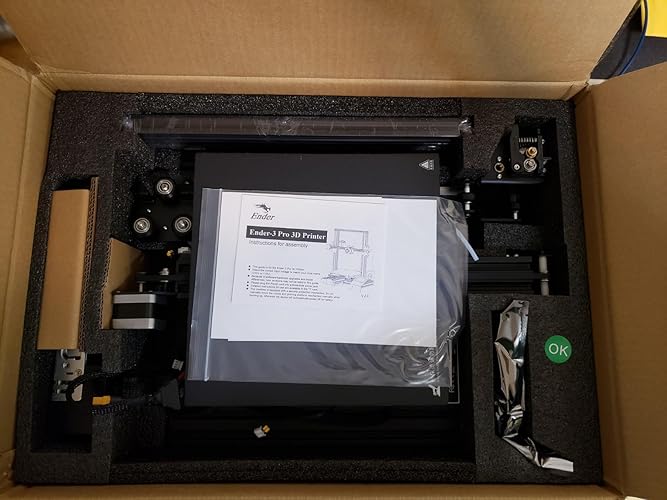
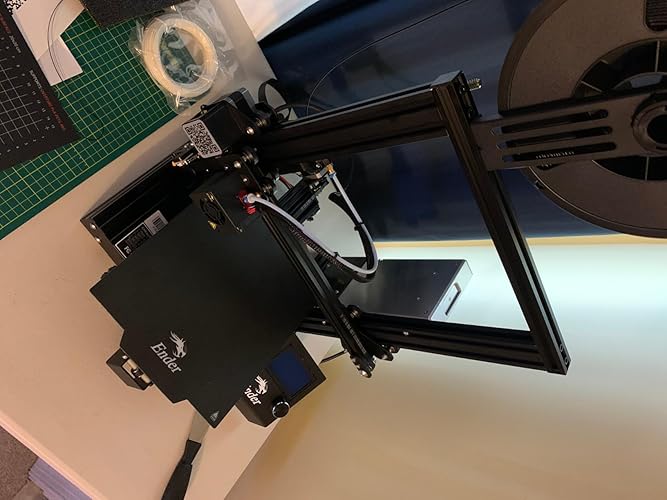
(Attached are unboxing, partial assembly, and print quality pics) After much research and many YouTube videos over the past two years, I've finally decided to get into 3D printing by purchasing an Ender 3 Pro. And yes, while you can find it a little cheaper from other sellers, Comgrow had the best ratings and reviews on their Ender 3 Pro, so I felt spending a little more was a fair tradeoff in getting one from a trustworthy source. Do your research, watch assembly videos multiple times, watch them again, watch more videos on good and bad results, then put this together. I'm a tinkerer who doesn't back down from a DIY or self fix, but opening the box and seeing all the loose parts (mostly fasteners) even with the machine shipping partially assembled was still intimidating. I took my time and over the course of two hours made sure I had this machine assembled properly. Some people say they can assemble an Ender 3 in 40 mins. Hah, sure, if they've assembled one before. Take your time, lay out the parts packets, and only open them as needed while assembling, or you will end up hopelessly confused. Common Lego assembly rules apply. * edit* And DO NOT FORGET, those of you living in North America, to switch the red slider on the power supply from 240V to 120V (it comes 240 out of the box). If you don't do this: machine won't turn on (me, oops); machine turns on but takes forever to heat up; blown circuits constantly; hate, fear, suffering, and the Dark Side ruling your life. This is so easy to miss or forget to change, or even not know about.*edit* Out of the box, I installed an all metal extruder and Capricorn tube upgrades. I had also installed a spring upgrade for the bed, but failed to check the length of the "upgrade" bed springs, which I later found were way too long after trying to fix a bed leveling issue after a catastrophic failure mid print threw the bed way out of level. I've determined the too-long springs were the culprit after having gotten proper-length upgrade springs and getting consistent bed leveling results. I would definitely get the yellow "upgraded" springs as the stock springs are just way too soft/mushy in my opinion and will result in bed leveling issues on their own. As far as a glass bed upgrade out of the box, I advise using the stock magnetic bed for your first few prints, then get an upgraded glass bed to see the difference in results. It can go either way, both have their pros and cons. Using this machine is certainly a learning process, and _do not_ expect to get a perfect print on your first try; you might get lucky or you may have bed adhesion issues. There can be alot of trial and error, and endless calibration, before you start to see consistent results. And then WHAM, you get an unexpected failure and have to figure out how/why. Print failures _will_ happen for various reasons. Sometimes it's as simple as bad filament (read reviews!), sometimes it's a bed leveling issue or a temperature issue. This is part of the learning process with FDM printers, even the expensive ones. That said, at 0.2mm layer height and 200°C/50°C with PLA I have been getting excellent print quality more often than I've gotten failures (all failures due to bad bed adhesion). The key is getting a good first layer and bed adhesion. If either of those fail, your print is doomed. These all lead back to getting the bed level with the extruder nozzle and finding the sweet spot for nozzle/bed temperature combination, and different brands of PLA have their own/different sweet spots, hence you see 3D printer users pick a brand and stay with it. I recommend Comgrow PLA, I've had consistent results in print quality, bed adhesion issues not withstanding (remember, bed adhesion issues usually stem from an unlevel bed). So far, I'm absolutely loving this machine. Keep the above in mind, and don't get in a hurry--good quality prints, even of tiny objects, can take hours or days to complete. Have patience, and check that your bed is level at least every other print and you'll be fine. ... show more
Reviewed in the United States on November 16, 2019 Reviewed in the United States on November 16, 2019 by Anthony M.

  • Fantastic first-time machine
I am very impressed by my first 3D printer - I got it for prototyping cast metal parts, and I knew it would be a rabbit hole of learning a whole new technology. But this printer has made it fun rather than difficult. Assembly took less than an hour, and within 24 hours, I had my first finished prototype, using bronze PLA. It's been running almost constantly in the 2 months I've had it. After reading reviews, I had painter's tape and hairspray at the ready, but I haven't needed them once. The magnetic bed is great, although it is getting chewed up, they're only $10 to replace. I have to relevel it using a test file once in a while, but usually I just watch the brim print when I start a file, and make any tiny adjustments to the leveling screws while it's running. I will note that the bed on mine has a slight flex upward in the middle - enough that the first layer is fully solid at the edges and nonexistant in the middle. This isn't a problem for me, as I use .6-1mm bottoms on prints, and I don't care how the bottom looks. But when I have to stop a file early on, scraping this area clean is a pain. Often a half-layer remains and is pulled off with the next successful print. Quality has met my expectations, though I've never tried printing below .1mm resolution. I just replaced the nozzle for the first time, and it had definitely degraded (pushing bronze PLA through a brass nozzle, I expected it would wear out fast). But it's back to normal now, and replacing the nozzle was simple, following instructions in a YouTube video. I did print a filament guide arm as my test file, and it seems to help as I've never had a tangle or stuck filament. I'm very impressed that my test print is now a permanent part of the printer - honestly I did not expect my first attempt hitting "print" would actually work. I'm planning a few upgrades - a Raspberry Pi with Octoprint and a webcam to enable a network interface, an auto-bed leveler. I'll probably try to get an acrylic case for it and print ABS before long - I've been working in PLA so far. This price point is incredible and allowed me to rapidly build a product line as I started my business - for the cost of Sketchup and this printer, I was able to produce perfect CAD files to send to production - prototypes that I had held in my hands and played with that cost about $1 each in PLA. That blows me away and reduced my startup time by months and thousands of dollars. My one gripe is that if I leave it on for a long time, including just having it's computer powered by USB, it'll start "hanging" when printing. It starts to print but will just stop running midway through, and instead starts this weird behavior of making a hex pattern of burnt plastic drips. So far I can't identify a cause - my STL files are clean - but I've noticed it goes away if I power it totally off for 20 minutes before starting a new print. I'm guessing there's a memory problem going on, but I haven't had time to troubleshoot it with the mfgr yet. Overall it's a major win - with the added bonus that it prints neat little toys, and replacement parts for household objects. I have a technologically-minded nephew who's 11, and he'll probably be getting one of these for Christmas. I would say that if a kid is smart enough to know what "this part is very hot" means, they could use one of these with very little support/supervision - but you might want to assist with things like assembly and replacing the nozzle, which involve small screws and a bit of experience. ... show more
Reviewed in the United States on June 26, 2019 by Paul W.

  • Updated: Decent cheap printer that needs better quality control and better customer service
First off when you get this thing setup properly it prints pretty good - as long as you're aware of where the problems are. The two biggest and most often reported issues are Z Axis motor binding and warped print bed. I got both. Both of these are serious issues directly affecting your print quality and more importantly wasted prints. This is significant because if it's worth printing it will take significant time - and I hate wasting time and materials. I bought from Comgrow because they had glowing reviews on customer service. I suspect this is from the standard Chinese practice of "I'll give you this if you leave a good review for me". Bear in mind that Creality makes these machines and Comgrow resales them, or builds to their standard. God only knows what business relationship there is there - could just be the marketing arm for Creality for all I know. Comgrow sells a boatload of Creality printers and parts. They say "As a 3D printer manufacturer, we provide " but sell very few other models. You can see this yourself at their product listing page: https://www.amazon.com/s?marketplaceID=ATVPDKIKX0DER&me=A2ALB3RMNIRLH8&merchant=A2ALB3RMNIRLH8 So here's my issues and how it went down. Z Axis binding right off the bat - and as an engineer I assure you that I made absolutely sure the frame was squared. As it comes the entire base is assembled. What this means is the stuff is assembled poorly. I needed to loosen the frame screws and adjust to take out the severe frame warp before proceeding . Then I had to adjust the bed tension because it wiggled like a hula dancer. So I got to assembling the Z Axis and was running it down by hand and you could feel it binding. WTH? Now bear in mind I had checked on the forums and groups to research this printer thoroughly before I plunked down money. Both issue I mention were supposedly fixed with the pro version which is why I spent extra money for it. The Z Axis issue is a known problem as the motor mount and guide nut on the gantry are poorly engineered. They are offset by about 2mm which cases the lead screw to pinch - and it gets worse as it descends because the error angle becomes more acute. The problem is exacerbated by the bracket that holds the extruder and the guide nut for the lead screw isn't a perfect 90 degree bend. The result is the lead screw wants to point to the front and not straight up. Coupled with the motor mismatch it creates a bad binding problem. So I contacted Comgrow through Amazon to complain. They wanted me to take it all apart and send photos of the naked bracket and how it was incorrectly bent yada yada yada. Totally unreasonable in my opinion to not accept a photo of the bracket on the machine. Then they wanted to know if I could loosen the screws on the upper nut and loosen the Z axis motor and see if it helped. So, A - they knew about the problem and already had a handy "fix" and B, this "fix" will totally screw up Z Axis precision. Heck yeah it will "work" - it makes the Z Axis loosey goosey so the rod can't bind. But your prints will not be worth anything since the printer lays down plastic in layers (Z Axis). All I asked for was a properly bent bracket and I get the royal run around. So I made a shim for the motor and bent the bracket myself to fix the issue. Second item I run into was a big ding in the magnetic bed - about 1-2mm high. I asked for a replacement and at this point they had to have me contact a "product specialist". So "Annie" asked for pictures and said the "technical" guys wanted me to print the dog model to verify there's a problem. I replied that any idiot would know a 2mm bump is going to cause print problems and I'm not going to waste expensive filament and time to prove a foregone conclusion. Then they want to know if I know I can move the model to print somewhere else. I'm sorry, I started loose my cool then - they wanted me to literally cut my print area by half so they could avoid sending me a $17 part that was defective! I then said I was going to get Amazon involved and they agreed to replace the magnetic mat - with the older version. Now one of the selling points to the Pro is the "upgraded" magnetic mat which sticks and releases better. No thanks I say - I want the one that came with my printer. "But this one has scale markers on it!" - "No, that's the older version that doesn't work as well." "No it's the same mat". "Well you'll have to wait 7 weeks because we don't have it in stock". At this point I'm fed up and say I will get Amazon involved because they are trying to clear out old stock on me. So they finally agreed. Now I measured my beds warp - another common issue since they made the plate too thin (allows them to use a cheaper heating element and claim faster heat times). Most plates people have issues with sag in the middle - mine bulges on one side. Both right corners are about 2mm lower than a spot about 3 cm to the left. So to correct this I had to invest in a BLTouch so I can do a mesh bed leveling - otherwise if I zero to those corners and print in the area the nozzle will gouge the bed. So at this point I'm unwilling to deal with them any further - after giving me such a fuss over a bracket and a cheap mat can you imagine the response I'd get for an entire heating bed? So - buyer beware indeed. I will be contacting Amazon finally to see if I can't get a little better response. I will update if anything changes. I will not however agree to a glowing review in exchange for what should have been better customer service to begin with. UPDATE: So in fact I was approached by a more experienced customer service rep that apologized for my treatment with an "inexperienced" customer service rep. At this point the service was outstanding - she escalated the trouble call and literally solved all the problems by sending replacement parts expedited from China. The replacement parts were flawless. So I've upgraded my rating and opinion of these folks - but I don't think it should have gotten to the point I left a bad review because of inadequate service. I think that every company has periodic flops - I just had one with Amazon themselves today -but I am encouraged they went over and beyond to make this situation right. To Comgrow - thanks! ... show more
Reviewed in the United States on December 14, 2018 by Jon Smith

  • Amazing value, NOT for "plug and play" people Amazing value, NOT for "plug and play" people
I will say this first: I am absolutely shocked at the quality of print from this thing for $275 -- it's genuinely the greatest bang for your buck that you're going to find in the 3D printer world. HOWEVER: I want to make it very clear this is NOT for the impatient beginner who just wants to open the package and start printing stuff. This is a PROJECT that you assemble and tinker with. If you're someone who likes working with your hands and tinkering with Arduino/RPi projects, then this is 100% the printer for you. If you don't like working with your hands and don't have patience to square up the frame, adjust the belt tensions, level the bed, etc., DO NOT waste your money because you will get garbage prints and end up frustrated. I am a complete beginner so this took me a good while to get my first print done. I didn't time it but essentially construction took around 2 hours (basically watched a YouTube video and followed along -- look up "just vlad ender 3 pro setup" his video is absolutely perfect). I took some more time familiarizing myself with the controls and UI, leveling the bed, etc (probably around a half hour). I also realized by Y belt tension was really loose and the wheel bearings were slightly rocky so that took some extra tweaking to fix as well. I also used a level test from Thingiverse (2987803) -- glad I did this because it caught some issues with one of the corners of my bed. After running this test twice and messing with the bed level (probably another 30 minutes), I printed the dog that came on the card (took around 3 hours). I cannot impress on you enough how thankful I am that I double and triple checked all the moving parts to get this stuff right the first time. Clearly there is some stringing in the print (attached, see top left ear and front paws, there was also some by the tail) so it's not perfect. But all in all for $275 I am more than happy with that quality. The magnetic surface on the bed is also fantastic, the print just popped right off no residue or anything stuck. Now for the negative: The instructions are complete garbage. Like less than 0/10. I don't care how much content is on YouTube -- Creality needs to provide a better assembly manual. There are countless things that need to be explained -- for example: check the wheel bearings on the Y axis before doing anything -- you need to flip the printer over to reach the eccentric nut on the bearings, and this is a lot easier to do before assembling the printer. Also, check the bottom support beams for level and squareness -- out of the box these are likely uneven and not parallel and it will affect the entire construction of the printer if you don't fix that before building. Or to leave the vertical beams loose while building the printer and only tighten them when you get the X axis attached to the Z axis, and roll it to the bottom-most position to allow for flex on the supports. And there's many more things (luckily Vlad covers these in the video) that 12 pictures just can't cover. Assembly aside, they do absolutely nothing to familiarize you with the interface or to get started for your first print. Again, they do the absolute bare minimum of "slice the model with the software, then print it" -- like I guess technically that counts as instructions? It would honestly be less insulting if they just said hey there's no instructions search reddit and YouTube, you'll figure it out (seriously -- this would be more acceptable to me). Luckily this printer is a bit of a cult classic in the 3D printing community. There are tons of resources available from beginner's guides, upgrades, slicer settings, etc. All you have to do is look for them. All said and done, this is an absolute steal from a cost to value perspective. If you want to get into 3D printing and have the patience to tinker with it, this is a phenomenal printer. ... show more
Reviewed in the United States on June 28, 2020 Reviewed in the United States on June 28, 2020 by Bobby Page

  • Why people refer to Creality products as "disposable"; Creality refuses to honor warranty
Set name: K1Max
Anybody purchasing a Creality printer - this K1 Max or otherwise - should read this first. Our reseller was Comgrow, which is an authorized reseller of Creality products and services Creality's warranty... but very badly. 1. The printers work decently out of the box. The problem is not IF but WHEN they need replacement parts. 2. The printers come with a 12 month warranty of sorts but it's not really worth the paper it's written on. The support is overnight email from China. 3. In our case, Comgrow sent three different parts for us to replace but the issue was never resolved. We are 2 months and counting since our printer stopped working while under warranty 4. Creality refuses to honor its warranty even though they know Comgrow can't fix the issue. 5. Comgrow refuses to offer a resolution. So be warned: There is a reason why reddit posters commonly refer to Creality printers as "disposable". Do NOT expect this printer to last. They are not easy to fix when they stop working -- Comgrow's own tech and warranty support could not correctly diagnose the issue. We replaced the hot end, the extruder gear assembly, the extruder motor and the nozzle. Prints still failing immediately. Our printer is worthless while under Creality's warranty. ... show more
Reviewed in the United States on June 14, 2026 by indiana

  • First time printer, very happy, high quality. First time printer, very happy, high quality.
I am AMAZED by how much qualtiy Creality can deliver for the rock bottom price. The whole look and feel of this machine is quality and stability. So well done! I bought the printer so I could submerge my children into the 3D printing and CAD experience. The excitement for prints to finish is amazing! My son and daughter popping out of bed and running downstairs to see if "it's" done. The printer comes with a removable magnetic mat, (think mouse pad)... just peel your print off, easy peasy. I had no problem putting the printer together, (with my mechanical skills I am able change a bicycle tire and adjust a bicyble derailleur to properly shift) plenty of YouTube help there if needed. The printer comes with a bunch of files to print, and software to get you going "out of the box". The creality software simplifies print quality settings and makes it easy. I've also printed with the free Cura software. I was about to spend seven or eight hundred bucks on a different printer, but a colleague of mine who is a very experienced 3D printer advised me to break in with something like this, and I can't thank him enough. He held my "highest quality" prints and pondered buying the printer for himself running his fingernail across the barely perceivable layers in the print. (blow up the cat pic I've attached) I've begun to learn Fusion 360 with my kids, allowing them to print from thingiverse, but challenging them to custom design something for the next one. Great way to familiarize your kids with STEM fields. Technical stuff, and tips. (don't let issues deter you... the world of 3D printing is finessing "issues" and solving puzzles) When assembling the main uprights, you want to leave the "bottom" screws a little loose until you have the "top" screws tight and alignment is forced by the top rail. the "z" axis switch that mounts on the left upright has a cleat to position the correct height, I sanded the nub off so that I could lower it an eighth of an inch. (the bed springs seemed too loose when leveled, this way the springs had more tension on them and it seemed more solid)... I realize the nub was to prevent slippage over time, but I'll keep my eye on it, I doubt it will ever move. You level the pad to the printer when it is at its native home positing. It's a good idea to watch a YouTube video on this for first timers. (like me) The monitor cable plugs into the center socket. I have a problem printing from Cura, it wants to start prints at the extreme left front edge, some of the extrusion even sagging off of the print bed. I asked my experienced friend, we double and triple checked my settings, and he didn't see anything wrong with the setup. I am able to print with Cura, manually setting the offsets closer to the center of my print bed, but a drawback from this work-around is that my size is limited because Cura sees my printable space as half gone. Still haven't solved this.. but the bundled slicer works great, and offers advanced settings and features (although not to the extent of Cura) The controls and function knob are friendly, and becoming familiar with the OS takes minutes, learning all of the ins and outs after an hour or so. Orientation of the print yields different results, you'll learn to think in supports and layers as you prepare to print. The printer takes up a space a little larger than a 5 gallon pale, + a foot taller, utilizing the spool holder that comes with the printer. I purchased a variety of filaments, no trouble yet. This is a very popular printer, has a large following, many custom made add-ons and improvements (that you print) Has many other upgrades available commercially. Noise level is present, but its not a problem for me. I have the printer in my office, we watch TV in the next room and I don't hear it with the door closed, slightly with the door open. The motors sound musical at times, like beeping other times. I could sleep with it in my room running, I don't think my wife could. It seemed louder for the first 20 hours of printing, now its not a loud, I think things "worked in" a little. Towards the end of a 44 hour print, I touched all my electrical connections, and I had no heat building up in any of them. ... show more
Reviewed in the United States on February 22, 2020 Reviewed in the United States on February 22, 2020 by Jason MacLeod

  • Creality will also be our brand!
Set name: ENDER 5 MAX
Absolutely love this machine! The price is right wjere we wanted it to be. We have made some replacement since having it and working it for days non stop for weeks! Its been doing amazing and I love the size of the bed! Creality is the way to go and will always be our brand to print with!
Reviewed in the United States on June 11, 2026 by brooke krug

Can't find a product?

Find it on Amazon first, then paste the link below.
Checking for best price...