Search  for anything...

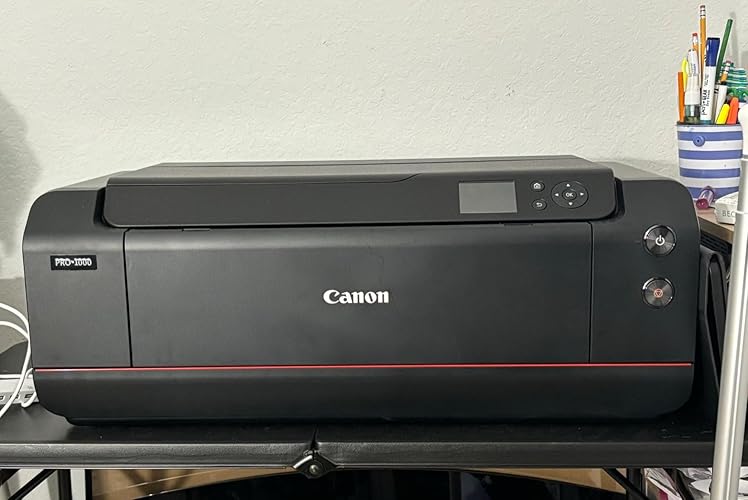
Canon imagePROGRAF PRO-1000 Professional Photographic Inkjet Printer, 17 x 22-Inches, Black

  • Based on 240 reviews
Condition: Used - Very Good
Checking for the best price...
$1,984.99 Why this price?

Buy Now, Pay Later


As low as / mo
  • – Up to 36-month term if approved
  • – No impact on credit to apply
  • – Instant approval decision
  • – Secure and straightforward checkout

Ready to go? Add this product to your cart and select a plan during checkout.

Payment plans are offered through our trusted finance partners Klarna, Affirm, Afterpay, Apple Pay, and PayTomorrow. No-credit-needed leasing options through Acima may also be available at checkout.

Learn more about financing & leasing here.

Selected Option

Free shipping on this product

This item is eligible for return within 30 days of receipt

To qualify for a full refund, items must be returned in their original, unused condition. If an item is returned in a used, damaged, or materially different state, you may be granted a partial refund.

To initiate a return, please visit our Returns Center.

View our full returns policy here.


Availability: Only 1 left in stock, order soon!
Fulfilled by Shutterbug Camera Shop

Arrives Jun 26 – Jun 28
Order within 12 hours and 33 minutes
Available payment plans shown during checkout

Protection Plan Protect Your Purchase
Checking for protection plans...

Style: Printer Only


Features

  • ANTI-CLOGGING TECHNOLOGY: The FINE print head institutes a tubular ink delivery system, this generates faster print speeds and reduces the possibility of clogging. Temperature: 59 - 86 F (15 - 30 C)
  • AIR FEEDING SYSTEM: The Canon Air Feeding System prevents each page from skewing for accurate ink placement, regardless of paper type. A series of openings located on top of the platen vacuum-grip the paper as it feeds through the printer.
  • LUCIA PRO INK SYSTEM: The LUCIA PRO 11-color plus Chroma Optimizer ink system satisfies the demands of the most critical photographer or graphic artist. Denser droplet placement provides a broader color gamut for superb glossiness/anti-bronzing.
  • WIDE COLOR GAMUT: This 11-color and Chroma Optimizer ink system helps to achieve an improvement in color-reproduction, image clarity, and enhanced darker areas. It faithfully reproduces colors and dark areas crucial for printing works of art.
  • BLACK DENSITY AND DARK SHADOW AREAS: Deep blacks, which make the image crisp, and precise gradation can be attained across all media types;Number of Nozzles : 1,536 Nozzles x 12 Inks

Description

17" Wide Format Professional Printer ANTI-CLOGGING TECHNOLOGY: The FINE print head institutes a tubular ink delivery system, this generates faster print speeds and reduces the possibility of clogging. AIR FEEDING SYSTEM: The Canon Air Feeding System prevents each page from skewing for accurate ink placement, regardless of paper type. A series of openings located on top of the platen vacuum-grip the paper as it feeds through the printer. LUCIA PRO INK SYSTEM: The LUCIA PRO 11-color plus Chroma Optimizer ink system satisfies the demands of the most critical photographer or graphic artist. Denser droplet placement provides a broader color gamut for superb glossiness/anti-bronzing. WIDE COLOR GAMUT: This 11-color and Chroma Optimizer ink system helps to achieve an improvement in color-reproduction, image clarity, and enhanced darker areas. It faithfully reproduces colors and dark areas crucial for printing works of art. BLACK DENSITY AND DARK SHADOW AREAS: Deep blacks, which make the image crisp, and precise gradation can be attained across all media types.

Brand: Canon


Connectivity Technology: USB


Printing Technology: Inkjet


Special Feature: Anti-Clogging Technology, Fast Printing


Color: Black


Model Name: PRO-1000


Printer Output: Color


Maximum Print Speed (Color): 5 ppm


Max Printspeed Monochrome: 20 ppm


Item Weight: 70.5 Pounds


Printer Type: Inkjet


Other Special Features of the Product: Anti-Clogging Technology, Fast Printing


Printer Output Type: Color


Item Weight: 70.5 Pounds


Item Dimensions D x W x H: 17"D x 28.5"W x 11.2"H


Print media: Paper (plain)


Scanner Type: Photo


Maximum Copy Speed Black and White: 20 ppm


Compatible Devices: Printer


Warranty Type: limited warranty


Ink Color: Matte Black, Photo Black, Cyan, Magenta, Yellow, Photo Cyan, Photo Magenta, Gray, Photo Gray, Red, Blue


Additional Printer Functions: Print Only


Control Method: App


Number of Trays: 1


Processor Count: 1


Resolution: 2400 x 1200


Display Type: LCD


Maximum Media Size: 13 x 19 inch


Maximum Sheet Capacity: 250


Paper Size: 17x22 inches


Printer Connectivity Type: USB


Hardware Interface: Ethernet


Total USB 2.0 Ports: 1


Total Usb Ports: 1


Maximum Copy Resolution Color: 2400 dpi


Maximum Copy Resolution Black and White: 1200


Brand: Canon


Model Name: PRO-1000


Model Number: PRO-1000


Built-In Media: imagePROGRAF PRO-1000 Professional Photographic Inkjet PrinterCD/DVD Printing TrayDocument KitGetting StartedImportant Information SheetSafety Environment InformationSetup Software & User's Guide CD-ROMRegistration CardWarranty CardInk TanksPFI-1000 Matte BlackPFI-1000 Photo BlackPFI-1000 CyanPFI-1000 MagentaPFI-1000 YellowPFI-1000 Photo CyanPFI-1000 Photo MagentaPFI-1000 GrayPFI-1000 Photo GrayPFI-1000 RedPFI-1000 BluePFI-1000 Chroma OptimizerCD/DVD Disc Printing TrayMC-20 Maintenance Cartridge (User Replaceable)Power CordPrint Head5 Sheets Photo Paper Pro Luster LU-101 (8.5"x11")


Series Number: 6


Model Series: imagePROGRAF


UPC: 013803257601


Global Trade Identification Number: 01


Manufacturer: Canon USA Inc.


Unit Count: 1.0 Count


Color Pages per Minute: 5 ppm


B&W Pages per Minute: 20 ppm


Color: Black


Color Depth: 48 bpp


Maximum print Resolution Color: 4800 x 2400 dpi


Maximum Print Resolution Black and White: 2400 x 1200 dpi


Is Electric: Yes


Dual-sided printing: Yes


Duplex: Manual


Frequently asked questions

If you place your order now, the estimated arrival date for this product is: Jun 26 – Jun 28

Yes, absolutely! You may return this product for a full refund within 30 days of receiving it.

To initiate a return, please visit our Returns Center.

View our full returns policy here.

  • Klarna Financing
  • Affirm Pay in 4
  • Affirm Financing
  • Afterpay Financing
  • PayTomorrow Financing
  • Financing through Apple Pay
Leasing options through Acima may also be available during checkout.

Learn more about financing & leasing here.

Top Amazon Reviews


  • Very good professional grade image printer
I have this printer for more than 1.5 year and I use it professionally as a print maker creating reproductions that I sell as part of my business. Prior to the Pro-1000, I had an old Canon imageProGraf 5100. I held off writing a review until I had enough time to use this machine and also to test how well it can handle an extended absence on my part. I use the machine extensively for 8 consecutive months each year but the machine is left to manage itself for 4 months. An extended period of non-use is normally a death sentence to the print head of a pigment printer. But the Pro-1000 handled my extended absence very well. Not just once. But twice already. I set the printer up on a UPS to make sure that it is always powered up even in the event of a power outage. Then it is set up to run an automatic wake-up self maintenance. This runs the print head to prevent the ink from drying. Canon has done an excellent job here. My print head has kept clean and in excellent printing condition. I use only Canon genuine ink. The cartridges work very well and the printer has given me excellent cost per print. In the time I have this printer, I have not had to perform a head cleaning. The key is to keep the print head working. This machine is designed to be used. A lot. I will feel more comfortable if my life does not require that I leave this printer for so long. My print paper is fairly narrow and limited to fine art paper.. Hahnemuhle German Etching, William Turner and PhotoRag. Red River Polar Gloss and Polar Luster. Red River Blanco Satin Canvas. The Pro-1000 does not handle a roll like the 5100. That was a nice feature and is definitely useful when making long banner prints. But it does increase the foot print and the weight. I buy my paper and canvas in 17-inch roll and cut them to size for my prints. It is not an issue as I normally print somewhat close to 11x17 size. I do not print edge-to-edge as I have no need for this. With about 1/4 inch edge, the printer does an excellent job and I never have a misaligned print. But when it comes to long banner prints, a slight initially misalignment can result in quite a noticeable slant in the image. This is a weakness in the Pro-1000. I seldom make a long banner print so it is not an issue for me. This is an area that the 5100 handled very well with the roll feed and it would be nice if Canon can make an upgrade to how the Pro-1000 feed a long paper. The 5100 can self adjust the paper so it feeds in perfectly straight. Why not for the Pro-1000? Overall, I am very satisfied with the quality I get from this printer on the above mentioned paper. My customers are happy to pay me for the image product I make and I will recommend this printer to a professional print maker who will really use the machine. A serious weakness is in making long banner prints. If this is what you do, this may not be the machine for you. I do not recommend this machine for the home hobbyist who just want to have a "nice" printer but may not actually use it every week. Get something else as this may just end up being an expensive and needless problem. ... show more
Reviewed in the United States on December 1, 2023 by Maui Northshore Sailor

  • Excellent prints and reliable printing
Since there's so much confusion about this, I feel that I have to start off the review with this.. When you first set up this printer and install the ink cartridges it comes with, even before printing anything, all of your ink levels will only be at about 50%. This is normal! It's not because something is wrong with the printer, and it's not because Canon cheaped out and included cartridges with the printer that were only half-full (as far as I know.) Every ink cartridge is connected to the print head by a long flexible tube. You can see all of them if you open up the service access cover of the printer. Before you can print anything, the printer needs to fill up those tubes with ink. Unfortunately, this does take a lot of ink, so you start off will all levels at about 50% but it is what it is. When you do run out of ink and install a new cartridge, this will not happen again since the tubes are already full of ink, so you will be able to use the entire capacity of the cartridge for printing photos. Edit: I can now confirm this, as I just installed my first replacement ink cartridge in this printer. The ink level shown on the printer registers as completely full when a new cartridge is installed. It does not drop down to half like the first initial cartridge you install when the printer is new. Also, I've since learned that the printer actually has separate holding tanks of ink inside the printer, so these are also part of what needs to be filled when the printer is new, and why your new cartridges start out at 50% when the printer is new. Now that that's out of the way, I have to say that I'm really happy with this printer. The print quality has been great, and it functions almost flawlessly. Take all of the frustrations and drawbacks you normally associate with printers and forget about them. This thing just works. I don't know much more I can say about it than that. I have even been using paper that came off of a roll (which I cut to size beforehand since this printer will not print directly from a roll of paper), and the printer has no problem even printing on the paper that is curled from being on the roll. It has a vacuum feed system that you will find in most large format printers, so this helps with feeding paper, even if it's not perfectly flat when it goes into the printer. I've been very happy with the ink usage as well. I leave this printer on all the time, and normally print something once every two weeks or so. In total, I've printed about 16 photos on this printer, most of them large 16"x24" with about a 1" border on all sides, and none of the ink cartridges have run out yet. And again keep in mind this is with cartridges that started off at only about 50% due to what I talked about above. At this point, the black and gray cartridges are getting low (at about 10% now), as the photos I've printed have generally been very dark, night time photos. But, they still haven't run completely out yet. Edit: I just ran out of my first ink cartridge, photo black, but this wasn't until I printed about 25 prints that were almost all 16x24" with a 1" border. And this is with the cartridges that started their life at 50%. Not bad! The only issue I have had with this printer so far is that I cannot get the Canon Accounting Manager software to work when I'm connected to the printer over WiFi. It seems to work when I'm plugged into it directly through USB. This is the software that will give you estimates of what each specific print costs based on the costs of ink and paper that the printer is using. I've called Canon's tech support, and they weren't able to get it to work either. For what it's worth, I'm using a Macbook with this printer. Windows users may have better luck. So, this would be nice to have, but the rest of the printer is so good that I'm still giving it 5 stars. Update: I'm still very happy with this printer. However, I'm realizing more and more how critical it is to use this printer frequently. The longer you go without printing anything, the more ink it will waste cleaning out the print head when you print again. And it seems like it wastes A LOT of ink if you go weeks without printing something. My suggestion would be to print something every day if possible. But this can be anything, even a tiny little dot of one color on a piece of paper, and you could use the same piece of paper to do this every day. It's just very important to print something (anything) frequently if you want to avoid wasting a lot of ink. I'm convinced that people who say this printer uses a lot of ink aren't printing very often. And in this case, it will tend to use a lot of ink. You can tell that it's been too long since you've printed something because when you send a job to the printer, it will take a long time of "setting itself up" (it makes a bunch of noises) before it actually pulls the paper in and prints. If the printer barely hesitates and starts printing shortly after you send a job to it, this means you're printing enough. Also, I don't feel a huge need to have the accounting manager I mentioned before. In the control panel of the printer, in job history, you can see exactly how many milliliters of ink each recent job used. If you want to obsess over the cost of each and every print, maybe you'd want the accounting manager. But I'm satisfied with just looking at how much ink a job used every now and then, and I can get a pretty good sense of what a certain size of print will cost. Back to what I said before, I figured out that printing one tiny dot of ink on an 8.5x11" sheet of paper costs about five and a half cents in ink, assuming you've printed recently and it's not using a whole lot of ink to clean itself before printing. I think most of this ink used is just to keep itself clean, not just to print a little dot on a sheet of paper. But, if you did this every day, you'd still use less than $20 of ink in a year, and I think this is far more economical than all the ink the printer seems to use when you let it set for too long without printing anything. So again, above all else, use this printer frequently and it will be good to you, even if it just means printing one tiny dot on the same sheet of paper every day. This printer does not like going for long periods without printing. ... show more
Reviewed in the United States on May 25, 2017 by M

  • Exceptional results and great technology - only limitation is 22" prints
I've had the new Pro-1000 for a week now and so far I love it - by far the best quality prints that I have gotten either from a personal photo printer or from my local photo lab. Pros: - The printer itself is well designed with an elegant build and stylish finish - The output from the printer is exceptional across all media I have tried (glossy, art, matte papers from Canon and others) and the software plugin for Lightroom is very easy to use. I am getting far better prints (more accurate color rendition, details, contrast) with this setup that I was getting from my local photo lab - Set-up and operations are a breeze. I had it from the box to my first print in under 30 minutes. The machine is quieter than I expected and faster as well - probably due to the new technologies at use in the printer. It is capable of putting down more than 30million drops of color per second! I also like the airflow technology to feed paper - this solves a fairly common problem I used to have (with Canon printers especially) of slightly crooked paper feeds. - The printer works well with non-Canon photo papers. I've tried Moab, Hahnemuhle, Canson and haven't gotten a bad print once the ICC profiles are installed. The printer comes with some of these profiles already installed. I had to experiment a bit with Matte paper to avoid very dark shadows but Canon's Print Studio Pro made this pretty easy to correct. And the flip side is that the shadows and darks on glossy paper look absolutely amazing. My first glossy print was like seeing HD TV for the first time. Cons: - I expected a large footprint from a printer that does 17" prints, but just from looking at the product specs it's hard to appreciate the size and weight of the Pro-1000. Not a big deal once you have it installed in the right location, but don't plan on moving this thing by yourself. - Would be nice for this price range if the printer did not limit length to 22". The comparable Epson has a paper roll option which would be ideal, but hopefully a driver upgrade will allow users to set a customized paper length beyond 22". - Minor point, but the buttons on the printer feel cheaply manufactured compared to the rest of the printer and have more play than I would expect. To be determined: - Is this an expensive printer? At $1300 yes, but to properly assess the value of the printer, more data is needed on the average life of the ink cartridges. At $60 each to replace the 12 ink cartridges, the print efficiency is the major factor in the overall value. It's too soon to say, but I compared the very simply ink level image that the printer provides at Photo 1 and Photo 15 (13xA4, 2xA3), and there is very little change. Ink levels are well under 70% but as another reviewed has noted, this is due to the initial charging process. Will be helpful as more experienced accumulates with this printer to get a more accurate sense of the printing capacity. ... show more
Reviewed in the United States on December 31, 2015 by Chris C.

  • Prints Great Quality Prints Great Quality
Prints great quality photo's and art, very professional looking. Had to take off one star because I cant go wireless, I have to use a cord to print. Not sure why they don't fix this problem. Pretty easy to use, love the borderless/bleed feature. Very heavy printer but overall its a good one.
Reviewed in the United States on February 9, 2024 Reviewed in the United States on February 9, 2024 by SmartNPrettyLadyJessica

  • Beautiful prints!
First of all - this printer is large. Amazon ships it with their freight delivery, and at close to 100 pounds, two adults have to carry it, two handed each. Even after unboxing, the unit is over 75 pounds, so plan on assistance placing it where you want it. The instructions are pretty clear about removing the various orange tape that hold all the various mechanisms from getting destroyed, as well as how to install the print head. The same applies to installing the 12 ink carts. -- This job will take close to 1/2 an hour! Next, when you turn the unit on for the first time, it will vibrate the ink carts, and then start to fill the reservoir for each color, and then prime the print heads. It will be VERY NOISY while it does this - but don't say to yourself 'uh-oh. did I make the right choice', THIS IS A ONE-TIME OPERATION, and it will be considerably more quiet in actual use. Plan on another half an hour. When this finishes, it comes to setting up your network. - I'll just have to assume that the instructions for USB hookup is simple and straightforward. WiFi may be a different story. My printer is in another room, about 20+ feet away, so WiFi is my choice - and need. - I'll also assume the Windows set up is also easy, but, being a Mac guy with the new Mac Silicon M-Series chip, it didn't go quite like the instructions suggest. At this point, I would suggest strongly that you call Canon Support (get their number at the Canon web site) and have them walk it through with you. I have always found them very helpful, supportive, and most importantly, considerate. - In my case, from dialing to printing, it took about half an hour, because I was jumping from room-to-room, as some of the setup requires both using your computer as well as the small but legible screen on the printer. It'll be worth it! - For both Mac and Windows, if your computer is still the Canon Support page, look up the firmware update for the Pro-1000, and install it now. This will give you the 45"+ plus printing instead of limiting it to 25" or so, as well as who knows what else. - Also, at this point, if you're going to be using other papers as well as the Canon brand, I would install the appropriate profiles. Now, make a print. Do that 16x20 you've always wanted to do. Or that 17x30. Just be prepared to be wowed! Everything I've printed so far has matched (almost) perfectly with my calibrated monitor, and is consistent with the prints made with my older Canon Pro-10 and the hundreds of prints I've made from that. It's a great printer. I'm glad I decided to buy it. ... show more
Reviewed in the United States on March 6, 2024 by Amazon Customer

  • Amazing Printer, Great Customer Support
This has been an astounding printer. I've had many different large format photo printers over the years, mostly Epson, Canon, and HP. This is by far the best one of the bunch in terms of print quality and ink efficiency. I've printed quite a few 17x22's, 13x19's and 8x10's and still the ink levels are above 70%-mile been ecstatic with how many prints I can get on a set of cartridges. The initial charging process when first setting up the printer drains quite a bit of ink filling the printers tubes, but the second set of cartridges that you use will last MUCH longer. The initial charging process drained around half of a brand new ink cartridge, but the tubes that are filled are huge- so it's understandable. I've had zero issues with clogging. I have the printer set to never turn off, only the screen goes to sleep after a few minutes. The reason for this is upon startup, a bit of ink is purged to prevent clogging- just keeping the printer on prevents this and in an idle state with the screen off, the printer uses less power than an LED lightbulb. Each week I print a nozzle test pattern if I have not printed that week to keep any ink from drying. This uses a minimal amount of ink while ensuring that clogging doesn't occur. I have an old old canon Pixma that is rarely used and now neglected- it has gone 10-11 months without printing with zero clogs. I expect the pro-1000 would have similar anti-clogging properties but I'd rather be safe and not test that theory. My first printer was recalled and all printers sold after February are the new models with the recall fix already applied. Apparently there was an issue that's could cause the printer to leak ink on the table or whatever the printer was sitting on- nothing dangerous. Canon sent me a brand new printer via overnight shipping without sending my recalled one in, then I was able to send my old printer back in the box the new one came in. Absolutely painless experience and they gave me a full set of ink cartridges and purge container for my troubles- that's over $730 worth of supplies. I recommend this printer to anyone and everyone in the market for a large format photo printer without hesitation. The black and white images are stunning, the color images are gorgeous, all the while printing faster edge-to-edge prints than most comparable models out there. I wish this printer supported rolled paper, but that's my only complaint and 17x22 is large enough for me 99% of the time. If you're on the fence about a large format photo printer, this is the one to get. I loved my Epson P800 until I bought this and got to use it- my P800 was sold approximately a month after owning the Pro-1000. ... show more
Reviewed in the United States on June 24, 2016 by Landon Dodd

  • Like having a Print Shop at Home Like having a Print Shop at Home
Bought the Imageprograf (horrible name) on an incredible Black Friday deal and after 3 months it’s definitely been one of the best splurges I’ve ever made. I sell graphic prints and do photography on the side and no matter what I print on this thing it comes out like it was done in a professional print shop. I’ve done archival quality graphic prints, photography prints, vinyl decals, and even greeting cards and everything comes out like it’s done professionally as long as you take the time to set-up the correct printing profiles based on the paper you use. As to the downsides, yes it’s expensive for a printer considering the cost of ink is nearly half the cost of the printer itself. Do yourself a favor and disable the auto-off setting and this will help reduce ink waste due to the printer cleaning itself every time it’s turned back on. I also recommend using this printer at least a couple times a week so that the print head doesn’t dry-out and force you to do a cleaning cycle. Lastly, if you’re concerned about repair down the road you can purchase a 2 or 4 year extended warranty directly from canon which includes free shipping both ways (a must due to how heavy this thing is). Overall I’m happy with the purchase but if you’re on the fence wait until Black Friday and see if Amazon has another deal. ... show more
Reviewed in the United States on February 9, 2024 Reviewed in the United States on February 9, 2024 by Mad Mensch

  • This is a Professional/Commercial grade printer
As a professional printer, the Canon Pro 1000 IS NOT for occasional, hobby use. This is a high quality professional grade printer that is meant to be used on a very regular basis. Those who say the printer uses a lot of ink are not using it frequently. The replaceable print head sets this model apart from Epson's similar printer. If you seek a exhibition quality large format printer, this is the best available in it's price range, hands-down. ... show more
Reviewed in the United States on March 13, 2024 by Stanley

Can't find a product?

Find it on Amazon first, then paste the link below.
Checking for best price...