Search  for anything...

Canon Color imageCLASS MF665Cdw - Wireless Duplex Laser Printer, All-in-One with Copier, Scanner, Fax, Auto Document Feeder, 3 Year Limited Warranty, 22 PPM

  • Based on 1,288 reviews
Condition: New
Checking for the best price...
$443.70 Why this price?
Save $106.29 was $549.99

Buy Now, Pay Later


As low as / mo
  • – Up to 36-month term if approved
  • – No impact on credit
  • – Instant approval decision
  • – Secure and straightforward checkout

Ready to go? Add this product to your cart and select a plan during checkout.

Payment plans are offered through our trusted finance partners Klarna, Affirm, Afterpay, Apple Pay, and PayTomorrow. No-credit-needed leasing options through Acima may also be available at checkout.

Learn more about financing & leasing here.
Selected Option

Free shipping on this product

30-day refund/replacement

To qualify for a full refund, items must be returned in their original, unused condition. If an item is returned in a used, damaged, or materially different state, you may be granted a partial refund.

To initiate a return, please visit our Returns Center.

View our full returns policy here.


Availability: Only 2 left in stock, order soon!
Fulfilled by SaveCentral

Arrives Tuesday, Mar 3
Order within 6 hours and 34 minutes
Available payment plans shown during checkout

Protection Plan Protect Your Purchase
Checking for protection plans...

Style: New Model


Features

  • Color, Wireless, Duplex 4-in-1: Print, scan, copy, fax.
  • Fast Print Speeds: Print up to 26 ppm in both color and monochrome and spend less time waiting with a quick first print time of approximately 10.3 seconds.
  • Easy Wireless Setup: Setup your wireless connection and get up and running in just a few steps.
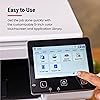
  • 5-inch Color Touchscreen: Get the job done quickly with Application Library - an intuitive and easy to use customizable access to the features you use most.
  • Mobile Device Printing: Print from your compatible mobile devices using the free Canon PRINT app, Apple AirPrint and Mopria Print Service.
  • High-capacity Toner: Uses Canon Genuine Toner 075 / 075 high-capacity, for high-quality output you can be proud of and high page yields that keep up with your printing needs and help limit toner replacements.
  • Paper Capacity: 250-sheet standard cassette, 1-sheet multipurpose tray.
  • Automatic Document Feeder (ADF): 50-sheet duplex (one pass, 2-sided) automatic document feeder, which helps save time and keeps your documents in order.
  • Auto 2-sided Printing: Save paper and limit paper replacements with automatic 2-sided printing.
  • 3 Year Limited Warranty: Have peace of mind with a 3-Year limited warranty, chromebook compatible. ENERGY STAR, EPEAT Silver.

Description

Designed for small / home offices and hybrid work environments, the imageCLASS MF665Cdw model balances speedy performance and minimal maintenance. The MF665Cdw is easy to set up and has a customizable, 5" color touchscreen that delivers an intuitive user experience. Produce crisp, colorful documents with fast print speeds of up to 26 pages per minute, using high quality Canon Genuine Toner 075 / 075 H. Use Poster Artist Online to create professional- posters, banners and signage. The MF665Cdw offers a plain paper capacity of up to 250 sheets, 1-sheet multipurpose tray, and 50-sheet automatic document feeder, which scans double-sided documents in one pass. Easily connect wirelessly from computers or mobile devices. Print using a variety of mobile apps, including the Canon PRINT app using your compatible mobile device. The MF665Cdw comes with a 3-year limited warranty and is backed by Canon's Service and Support network.

Brand: Canon


Connectivity Technology: USB


Printing Technology: Laser


Special Feature: Energy Star


Color: White


Model Name: Canon Color imageCLASS MF665Cdw


Printer Output: Color


Maximum Print Speed (Color): 26 ppm


Max Printspeed Monochrome: 26 ppm


Item Weight: 60.7 Pounds


Product Dimensions: 18.2"D x 16.8"W x 15.7"H


Maximum Media Size: Legal (8.5 x 14 inches)


Included Components: Canon Genuine Toner 075 CMYK Starter 500 Yield CMY, 700 Yield Black, Documentation, Fax Cable, Power Cord, imageCLASS MF665Cdw Printer


Print media: Paper (plain)


Scanner Type: Sheetfed


Max Input Sheet Capacity: 250


Max Copy Speed (Black & White): 26 ppm


Compatible Devices: Laptops, PC, Smartphones


Maximum Color Print Resolution: 600 x 600 dpi


Sheet Size: Standard Cassette / 1-sheet Manual Feed Slot 3" x 5" to 8.5" x 14" Inches


Maximum Black and White Print Resolution: 600 dots_per_inch


Warranty Type: limited warranty


Dual-sided printing: Yes


EU Spare Part Availability Duration: 3 Years


Wattage: 1080 watts


Initial page print time: 10.3 Seconds


Max copy resolution color: 600 x 600 dpi


Max copy resolution black-white: 600 x 600 dpi


Duplex: Automatic


Hardware Interface: USB


Additional Printer functions: All In One, Copy, Fax, Scan


Control Method: Touch


Compatible Cartridge: Canon Genuine Toner 075


Number of Trays: 2


Total USB Ports: 1


Model Series: imageCLASS


Specific Uses For Product: Office


UPC: 013803382662


Printer Ink Type: Toner


Supported Media Sizes: 3 x 5 inches, 4 x 6 inches, 5 x 7 inches


Item Weight: 60.7 pounds


Item model number: 6928C005


Date First Available: August 13, 2025


Manufacturer: Canon


Frequently asked questions

If you place your order now, the estimated arrival date for this product is: Tuesday, Mar 3

Yes, absolutely! You may return this product for a full refund within 30 days of receiving it.

To initiate a return, please visit our Returns Center.

View our full returns policy here.

  • Klarna Financing
  • Affirm Pay in 4
  • Affirm Financing
  • Afterpay Financing
  • PayTomorrow Financing
  • Financing through Apple Pay
Leasing options through Acima may also be available during checkout.

Learn more about financing & leasing here.

Top Amazon Reviews


  • Reliable, No-Fuss Color Laser for Home Office
Style: Old Model
When I started working from home, I had a company-issued laser printer from a different brand that worked great—but once I had to return it to the office, I was left scrambling for a replacement. I didn’t need anything fancy, just a no-nonsense printer that could handle everyday tasks without giving me a headache. High-quality printing was a must, and I wanted something with decent speed—not lightning fast, but not sluggish either. Copy and scan features were non-negotiable, and having Wi-Fi printing would make life a lot easier. Most importantly, I needed something that wouldn’t break the bank. After doing some research, I landed on the Canon Color imageCLASS MF652Cw, and it’s been a solid choice. It prints sharp, vibrant documents and handles color jobs like a champ. The speed is just right for my needs—quick enough to keep up with my workflow without feeling rushed. The scanner and copier are reliable, and the touchscreen makes it easy to switch between functions. Setting up Wi-Fi printing was a breeze, and now I can print from my laptop or phone without any cables. For the price, it really delivers a lot of value. It’s not the quietest printer out there. Overall, it’s exactly the kind of dependable, no-frills printer I needed to keep my home office running smoothly. ... show more
Reviewed in the United States on November 4, 2025 by richards1155 richards1155

  • The nicest printer I've ever had
Style: New Model
Before I give this review, I want to disclose a couple of relevant things: I'm not using this printer professionally, I'm not in graphic design, and I really don't know a lot about printers! This printer was on such a nice sale that I bought it anyway! So far it functions just as advertised. The software from the Canon website sucks, NBD, just enter your wifi credentials on the touchscreen and it will be fine. My Windows experience with this thing has been good out of the box. I really wanted to talk about using this thing with Linux. It DOES work, but there may be quirks. I have only used it with Zorin, an offshoot of Ubuntu. I tried Libre Office, Gimp, and Freeplane. They all work as expected. The Text Editor app, provided by Zorin, is wonky with this printer. It WILL print, but each time I have to go to the touchscreen and confirm the paper size. It disrupts my hobby time "workflow." Canon provides a Linux driver that may help, IDK, I'm not smart enough to install it yet. I haven't tried the other features yet, so i can't say how they work, making this an incomplete review. I gave 5 stars because the documents I made have been very nice, spin up time to print is reasonable, printing is fast, and I got this on a really nice sale, so it was a good deal. Edit: My OS installed new drivers on it's own somehow, and now this thing works great with Zorin Linux every time, with every app I have tried. Also, I have recently used the scan to USB drive feature, and i was very pleased with the results. ... show more
Reviewed in the United States on January 11, 2026 by Mike Cook

  • Canon MF652Cw - may be older model but a champ
Style: Old Model
Good quality and performance. Nice color printing and very quiet. Easy to operate. Good WiFi connectivity in a large area. Highly recommend this model based on price value ratio.
Reviewed in the United States on January 9, 2026 by ML897

  • Decent color laser- hard setup- annoying sleep mode function
Style: New Model
The printer itself is fine. The issue is it takes forever to set up and is not as intuitive as others. I personally own three different printers (all wireless and recently bought- this one was just for a specific use function) and the printer is very hard to set up. You have to dig around to download a bunch fo drivers- computer can’t find the driver- so you had to turn on the printers IP system in order for it to be discovered that way etc. overall, the printer and ink colors are nice and does the job. It prints relatively quickly. The biggest gripe I also have with this is when you want to print you have to physically walk to the printer to wake it up by pressing the screen. My other printers automatically wake up and start working. ... show more
Reviewed in the United States on December 4, 2025 by Forever

  • Solid Purchase
Style: New Model
For my small business I transitioned to this from two printers that died at the same time: a laser black & white, and an inkjet color. One review said it was sturdy, nothing fancy but reliable. I wanted something solid and dependable. Not terribly sleek or super quiet, but I'd rather something I could rely on to do a good job. Has a top feeder, duplex capabilities, and print from my phone, which were all crucial for my business use. A great value for the price. It is a heavier printer, so I have it on my desk instead of on a shelf where the other printers were. ... show more
Reviewed in the United States on January 10, 2026 by mommyofthree

  • Great Printer, Not Compatible With Netgear Mesh and Apple Air Print
Style: Old Model
The printer itself is tremendous. Everything I wanted in a color laser printer. Prints beautifully. The problem is that it does not work with a WiFi Mesh system--I have Netgear Orbi--and Apple Air Print while the printer is in sleep mode. It prints great while not in sleep mode, but once in sleep mode Air Print flat out does not work. You can change the timer to keep it from sleeping for 60 minutes, but after that it will not function on Apple's Air Print. Research after the fact has demonstrated to me that it's a known problem. The only solution is to purchase a software program, Printopia. I'm going to try it and will update this review afterwards. 10/8/25–No success with Printopia. None of my devices, including the Mac Air next to the printer—will wake the printer. I have diagnosed and am certain my devices are broadcasting a wake up signal, the printer is just stone deaf. It needs to be manually awakened. For printing from devices in other parts of my house I’ve connected it to a smart plug and turn it on/off via HomeKit—which works. THIS IS A KNOWN/DOCUMENTED PROBLEM. Research very, very carefully before buying. Your set up may not work and there is no cure. Buyer Beware. ... show more
Reviewed in the United States on October 6, 2025 by Kron

  • Excellent image and fast
Style: Old Model
Excellent printer—great color prints and super sharp text. Setup was straightforward and it’s been running smooth. Perfect for home or office use.
Reviewed in the United States on January 19, 2026 by L-82

  • Excellent printer.
Style: Old Model
Excellent laser printer. Clean, crisp, and fast. No ink jamming and the ink costs less and lasts longer. Wish I had thrown my overpriced ink wasting Epson in the trash years ago. One can pay less for an ink jet printer but you will quickly exceed the price difference in what you down on over priced describe Epson ink cartridges. ... show more
Reviewed in the United States on January 27, 2026 by Leslie

Can't find a product?

Find it on Amazon first, then paste the link below.
Checking for best price...