Search  for anything...

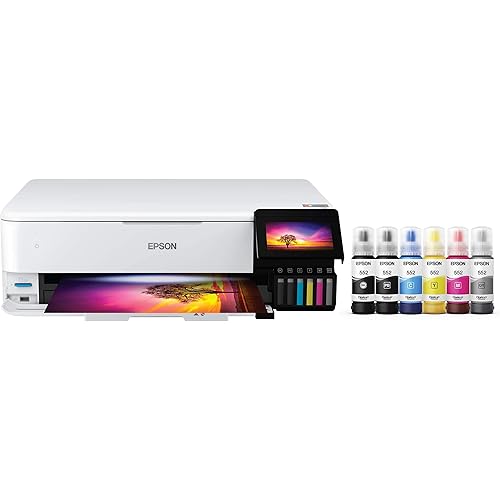
Epson EcoTank ET-4800 Wireless All-in-One Cartridge-Free Supertank Printer with Scanner, Copier, Fax, ADF and Ethernet – Ideal-for Your Home Office, White

  • Based on 4,821 reviews
Condition: New
Checking for the best price...
$299.99 Why this price?

Buy Now, Pay Later


As low as $50.00 / mo
  • – 6-month term
  • – No impact on credit
  • – Instant approval decision
  • – Secure and straightforward checkout

Ready to go? Add this product to your cart and select a plan during checkout.

Payment plans are offered through our trusted finance partners Klarna, Affirm, Afterpay, Apple Pay, and PayTomorrow. No-credit-needed leasing options through Acima may also be available at checkout.

Learn more about financing & leasing here.

Selected Option

Free shipping on this product

FREE 30-day refund/replacement

To qualify for a full refund, items must be returned in their original, unused condition. If an item is returned in a used, damaged, or materially different state, you may be granted a partial refund.

To initiate a return, please visit our Returns Center.

View our full returns policy here.


Availability: In Stock.
Fulfilled by Amazon

Arrives Friday, Jan 9
Order within 7 hours and 20 minutes
Available payment plans shown during checkout

Protection Plan Protect Your Purchase
Checking for protection plans...

Style: ET-4800


Color: White


Set: FAX/ADF/Print/Copy/Scan


Features

  • Innovative Cartridge-Free Printing High-capacity ink tanks mean no more tiny, expensive ink cartridges; Epsons exclusive EcoFit ink bottles make filling easy and worry-free
  • Impressive Print Quality Unique Micro Piezo Heat-Free Technology produces sharp text plus impressive color photos and graphics on virtually any paper type
  • Zero Cartridge Waste By using an EcoTank printer, you can help reduce the amount of cartridge waste ending up in landfills
  • Built-in Scanner & Copier High-resolution flatbed scanner and a color display for easy document copying and navigation

Description

Your home office needs a printer that’s fast, affordable, and easy to use. That’s why we developed the EcoTank ET-4800 – an innovative cartridge-free solution that uses high-capacity, easily refillable ink tanks. So you’ll worry less about running out of ink, and save a lot on replacement ink (1). The ET-4800 features genuine Epson print quality, an auto document feeder, fax, a high-resolution flatbed scanner, and convenient color display – making it the perfect basic home office printer. Epson strongly recommends the use of genuine ink to ensure optimal print quality and performance. Use of non- genuine ink could cause damage not covered under the printer’s ltd. wnty. | 1. Actual savings and costs will vary considerably based on print tasks, print volumes and usage conditions. Savings and cost per ISO page are based on the cost of replacement ink bottles and the cost of enough standard cartridges to achieve the total page yields of the bottles using the MSRP (USD) and yields for Epson standard-capacity ink cartridges for similarly featured Epson consumer inkjet printers as of March 2024. | 2. Individual cartridges estimate based on print yields of an included or replacement set of black and color ink bottles as compared to Epson standard-capacity ink cartridges for similarly featured printers as of March 2024. | 3. Part of the ink from the included bottles is used for initial setup; yields are lower than those of replacement ink bottles. Replacement and included ink bottle yields based on the ISO/IEC 24712 pattern with Epson’s methodology. Actual ink yields will vary considerably for reasons including images printed, print settings, temperature and humidity. Yields may be lower when printing infrequently or predominantly with one ink color. All ink colors are used for printing and printer maintenance, and all colors must be available for printing. For more information, visit | 4. Based on average monthly document print volumes of about 125 pages. | 5. See for device compatibility. Epson Connect account and voice-activated account registration required. | 6. Most features require an Internet connection to the printer, as well as an Internet- and/or email-enabled device. For a list of Epson Connect enabled printers and compatible devices and apps, visit | 7. Requires Epson Smart Panel app download. Data usage fees may apply.

Brand: Epson


Connectivity Technology: Wi-Fi, wired


Printing Technology: Inkjet


Special Feature: Refillable Ink Tank


Color: White


Model Name: EcoTank ET-4800


Printer Output: Color


Maximum Print Speed (Color): 5 ppm


Max Printspeed Monochrome: 10 ppm


Item Weight: 11 Pounds


Product Dimensions: 13.6"D x 14.7"W x 9.3"H


Controller Type: Android


Maximum Media Size: 8.5 x 14 inch


Power Consumption: 12 Watts


Included Components: EcoTank ET-4800 all-in-one, manual, CD-ROM for product setup, power cord, 1x bottle 522 Black (65 mL) and 1x bottle each 522 Cyan, Magenta, Yellow (65 mL)


Print media: Paper (plain)


Scanner Type: Flatbed, Sheetfed


Max Input Sheet Capacity: 100


Max Copy Speed (Black & White): 10 ppm


Maximum Color Print Resolution: 5760 x 1440 Dots Per Inch


Sheet Size: 8.5 x 14


Maximum Black and White Print Resolution: 5760 x 1440 Dots Per Inch


Warranty Type: Limited


Color Depth: 48 Bits


Dual-sided printing: Yes


Maximum copies per run: 100


Wattage: 12 watts


Max copy resolution color: 360 x 360


Max copy resolution black-white: 360 x 360


Duplex: auto


Hardware Interface: Ethernet, USB


Ink Color: Black


Additional Printer functions: All In One


Control Method: Voice


Output sheet capacity: 100


Number of Trays: 2


Processor Count: 1


Series Number: 65201


Total Ethernet Ports: 1


Number of USB 2 Ports: 1


Number of USB 3 Ports: 1


Total USB Ports: 1


Model Series: EcoTank


Specific Uses For Product: Home, Office


UPC: 010343957879


Printer Ink Type: refillable ink tank


Supported Media Sizes: Legal (8.5 x 14 inches)


Memory Storage Capacity: 8 MB


Item Weight: 11 pounds


Item model number: C11CJ65201


Date First Available: December 23, 2021


Manufacturer: Epson


Frequently asked questions

If you place your order now, the estimated arrival date for this product is: Friday, Jan 9

Yes, absolutely! You may return this product for a full refund within 30 days of receiving it.

To initiate a return, please visit our Returns Center.

View our full returns policy here.

  • Klarna Financing
  • Affirm Pay in 4
  • Affirm Financing
  • Afterpay Financing
  • PayTomorrow Financing
  • Financing through Apple Pay
Leasing options through Acima may also be available during checkout.

Learn more about financing & leasing here.

Top Amazon Reviews


  • A great printer with lower pricing
Style: ET-4800 Color: White Set: FAX/ADF/Print/Copy/Scan
I am quite happy with my ET-4800 purchase. From wirelessly connecting to my Mac to software installation to adding the ink, it was easy to set up. I feel you can't go wrong with this level of ink capacity. It holds so much ink without the bother and added expense of frequently replacing cartridges. I will never go back to a cartridge machine. I don't care who makes it! I've used my printer several times so far, and each time it has done a great job by giving me the colors and clarity that I expected. This is the first printer that I've owned that wasn't a front-feeder. I wasn't sure how I would like that, but I've found that holding the paper straight and then dropping it into the slot rather than placing it, gives the best result for paper alignment. For my needs, I have only used it one sheet of paper at a time. So if you are wanting to load several sheets at once, your loading experience may be different from mine. But just make sure that you do not load more than 100 sheets at a time, per the manufacturer's instructions. Also, be sure that the movable paper guides are in the correct spots for the size of paper being used, without any buckling. To date, I have not used the scanner, but it is definitely a feature that I did not want to be without, so I'm looking forward to using it. The display window, though small, is simple to follow along with, and I appreciate that the angle of the keypad can be adjusted. Working with the Epson Smart Panel app gives a bit more flexibility, particularly if you're not right next to your printer and want to check the ink levels or start a printing job. To use the app, be sure that you turn on your printer first and that both the printer and your device are set to the same wi-fi, so that the app can find your printer and you can begin operating it from afar. Once inside of the app, be sure to check out the "Other Features Menu" from the app's homescreen. There is a link to another Epson app that can be used to boost your creativity and streamline layouts for collages, and a colorful guide full of project ideas that outline everything that you need for each project and how to execute them. There's even a feature for sharing what you've scanned and submitting it as an assignment. This is something that you'd want to read more about to see if it is an applicable and helpful addition for you. You can use the search term, "google classroom in epson smart panel app," to find out more. There is only one downside that I have found at this point. The pull-out paper catching tray in the front feels flimsy. It seems out of place on an otherwise sturdy machine. But so far, I've had no problems with it. I just take my time pulling it out, flipping down the end, folding it back up, and pushing the tray back in. I figure if I baby it a bit, then all should be well. Overall, I really like the Epson ET-4800 as much as my ET-5170. I feel it performs well at an acceptable price point. ... show more
Reviewed in the United States on June 26, 2025 by Tay

  • This thing can hold some ink
Style: ET-4800 Color: White Set: FAX/ADF/Print/Copy/Scan
bought the Epson EcoTank ET-4800 after getting tired of constantly buying overpriced ink cartridges for my old printer. After doing a bit of research, the idea of refillable ink tanks really appealed to me—and I’m honestly glad I made the switch. Setup was pretty easy, even for someone who’s not super tech-savvy. The instructions were clear, and filling the ink tanks was way less messy than I expected. It even came with enough ink to last me months (maybe longer), which already makes it feel like a smart investment. I use this mostly for work-from-home tasks and occasional school stuff for the kids. The print quality is crisp for both black and white and color documents. I’ve printed everything from reports to coloring pages and even some photos—it’s not professional photo quality, but more than good enough for home use. Things I really like: Super affordable to run. Haven’t had to think about buying ink since I got it. All-in-one convenience. Scanning and copying are a breeze, especially with the automatic document feeder. Wireless printing. I can print from my laptop or even my phone, which has been really handy. A few drawbacks: It doesn’t do automatic double-sided printing—you have to flip the pages yourself. It’s not the fastest printer, especially if you’re printing a lot of color pages. The build is pretty lightweight plastic, so it doesn’t feel ultra-premium—but it gets the job done. All in all, it’s been a reliable and budget-friendly addition to my home office. If you're someone who prints regularly and wants to avoid the cartridge money pit, I’d definitely recommend giving the ET-4800 a try. ... show more
Reviewed in the United States on April 7, 2025 by TheKaizenOne

  • JUNK, Cheaply built, Feed Scanner fails and falls apart in less than 5 months and only 4 uses.
Style: ET-4800 Color: White Set: FAX/ADF/Print/Copy/Scan
Absolute piece of Junk! Built cheaply. Feed Scanner has never worked properly from my first scan (only did 4) and now falls apart completely, in the roller section. It falls out after it jammed for the 7th time today, this time with a SINGLE piece of paper. If you have a piece of paper that has a fold in it, forget about it. That will never feed through. I had 6 sheets I had to get out today, I had to do manually via the flat bed, both sides. It took 23 minutes to get done. Should not have taken 2. The last time I used it same issues but less sheets. The paper is SO TIGHT in the feed section it is hitting BOTH walls. You could not slip a piece of paper in there if you wanted too, most likely one of the reasons it does not feed correctly. While on the phone with support (I am right now, 4th call today and 3 emails of pictures they wanted later, the hoops they put you through is ridiculous!) Of course overseas support and has little to no knowledge of being Tech support, I asked for supervisors only to have my first call disconnect at 1 hour and 20 seconds. Then the next call was 24 minutes, then another 32 minutes and now this one still ongoing (56 minutes and still going). Now after 3 hours and 5 minutes, they are "holding" my credit card for 179.99 + tax to get a REFURB unit! So much for a 5 year Warranty. Oh they acted like it was out of date on Warranty, it has NOT been in EXISTENCE for 5 years , it came out in 2022. Did I fail to mention you WILL be dealing with Overseas people who have you repeat the same thing over and over and over and over again. They wonder why I was getting upset...hmmmm . As they pass you along the ranks you have to repeat EVERYTHING all over again. As I was on the phone and they were asking me to open WRONG doors to find the serial #, I lifted once again the Jam area and guess what, the parts fell out. Just PLOP! Other issues while I am at it, the Picture quality is "OK" nothing special. I bought it to save ink as HP gouges you to death and destroys your print head if you use a knockoff. The Ink has been "OK", but I haven't really had it long enough to tell as most everything has been Black and White, so all are still full except the Black (3.4's). Its a rear feed, I miss the HP draw on that, the print speed again is not fast, just OK. Though never really in a rush with it. I cant say it enough, this is cheaply built, and my experience with Tech Support was a HORRIFIC. I never like dealing with Over seas support as it is, but what they wanted pictures of as proof was mind blowing (pictures of the tubes that go to the ink wells? What does that have to do with the issue at hand.) The panel function is anything but user friendly. Firmware Updates, if not done, will prevent usage until done. You have to download and install ALMOST 30 different files, from drivers to firmware updates the list is endless. Never have I had to do that many of ALL printers I have had combined. Simple ZIP file and let it run on an executable file (EXE)like everyone else. That will take you over 2 hours to get all loaded. The ink wasn't bad seeing it needs to be primed first to work, I am not sure what will happen when the REFURB comes, will I get ink or just have to re-prime from the cartridges. The software for scanning is easy to use, though unnecessary, should just scan and auto save, or am I just spoiled by HP? But to send me a "REFURB" as a replacement on a 5 month old unit with a 5 year warranty is really being low. They did EVERYTHING they could to get me to NOT follow through in this return, you have ONLY 30 days on Amazon. You have been warned, I would look elsewhere, the tank issue is a great Idea, but if it doesn't work, what good does it do. ... show more
Reviewed in the United States on December 8, 2025 by Robert O. Forsyth Jr. Robert O. Forsyth Jr.

Can't find a product?

Find it on Amazon first, then paste the link below.
Checking for best price...