Search  for anything...

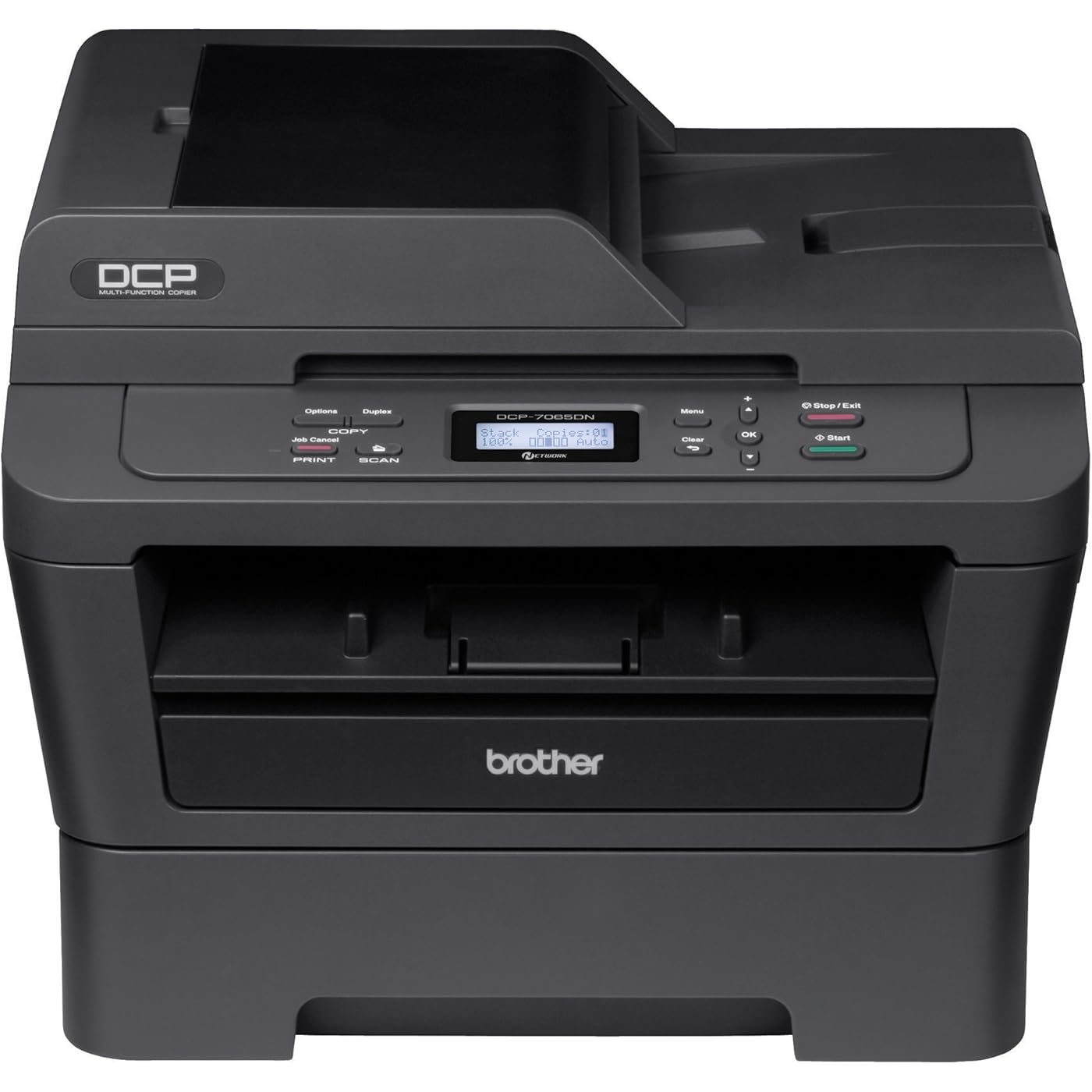
Brother DCP-7065DN Monochrome Laser Multi-Function Copier with Duplex Printing and Networking
  • Based on 1,084 reviews
Condition: New
Checking for the best price...
$1,197.95 Why this price?

Buy Now, Pay Later


As low as / mo
  • – Up to 36-month term if approved
  • – No impact on credit
  • – Instant approval decision
  • – Secure and straightforward checkout

Ready to go? Add this product to your cart and select a plan during checkout.

Payment plans are offered through our trusted finance partners Klarna, Affirm, Afterpay, Apple Pay, and PayTomorrow. No-credit-needed leasing options through Acima may also be available at checkout.

Learn more about financing & leasing here.

Free shipping on this product

30-day refund/replacement

To qualify for a full refund, items must be returned in their original, unused condition. If an item is returned in a used, damaged, or materially different state, you may be granted a partial refund.

To initiate a return, please visit our Returns Center.

View our full returns policy here.


Availability: Only 1 left in stock, order soon!
Fulfilled by Chane L chance

Arrives Jan 24 – Jan 28
Order within 21 hours and 59 minutes
Available payment plans shown during checkout

Protection Plan Protect Your Purchase
Checking for protection plans...

Features

  • Print and copy up to 27ppm
  • A built-in Ethernet network interface allows for sharing with multiple users on your network or connect locally to a single computer via its USB interface.
  • Automatic duplex for producing two-sided output
  • Stand-alone copying - No PC required
  • 35-page capacity auto document feeder,Scan To Feature: Email, Image, OCR, File

Description

The DCP-7065DN is a laser multi-function copier with networking and automatic duplex ideal for small offices or home offices. It produces fast, high-quality monochrome laser printing and copying at up to 27ppm, as well as color scanning into one space-saving design. It also offers automatic duplex for producing for two-sided output and a built-in Ethernet interface for sharing with others on your network. The DCP-7065DN provides flexible paper handling via an adjustable, 250-sheet capacity tray and a manual by-pass slot for printing thicker media. A 35-page capacity automatic document feeder allows you to copy or scan multi-page documents quickly and easily. Additionally, it offers a high-yield 2, 600-page replacement toner cartridge to help lower operating costs.What's in the box: Brother DCP-7065DN Monochrome Multifunction Laser Printer, Introductory Toner Cartridge, DR420 Drum Unit, AC Power Cord, Installation CD-ROM, Documentation CD-ROM, Quick Setup Guide, Safety & Legal Booklet and 1-Year Parts & Labor Warranty. Note: USB & Ethernet cables not included.Power Requirements: 110 - 120 V AC 50/60 Hz.Operating system: Windows 2000, XP, XP Pro x64, Vista, Windows 7, Server 2003, Server 2003 x64, Server 2008, OS X 10.4.11, OS X 10.5.x, OS X 10.6.x.Maximum Printable Area 8.5 x 14.0 (21.6 x 35.56 cm).Paper Sizes Standard Tray: Letter, executive, legal, folio, A4, A5, A6, Manual Feed Slot: 3.0 x 4.6 to 8.5 x 16" (7.62 x 11.6 to 21.6 x 40.64 cm), Duplex: Letter, legal, folio and ADF: 5.8 x 5.8 to 8.5 x 14.0" (14.73 x 14.73 to 21.59 x 35.56 cm). From the Manufacturer The DCP-7065DN is a laser multi-function copier with networking and automatic duplex ideal for small offices or home offices. It produces fast, high-quality monochrome laser printing and copying at up to 27ppm, as well as color scanning into one space-saving design. It also offers automatic duplex for producing for two-sided output and a built-in Ethernet interface for sharing with others on your network. The DCP-7065DN provides flexible paper handling via an adjustable, 250-sheet capacity tray and a manual by-pass slot for printing thicker media. A 35-page capacity automatic document feeder allows you to copy or scan multi-page documents quickly and easily. Additionally, it offers a high-yield 2, 600-page replacement toner cartridge to help lower operating costs.

Brand: Brother


Connectivity Technology: Wired; USB; Ethernet


Printing Technology: Laser


Special Feature: Network-Ready


Color: Dark grey


Model Name: 7065DN


Printer Output: Monochrome


Maximum Print Speed (Color): 27 ppm


Max Printspeed Monochrome: 27 ppm


Item Weight: 23 Pounds


Maximum Media Size: ‎8.5 x 14 inch


Print media: ‎Paper (plain)


Scanner Type: ‎document


Max Input Sheet Capacity: ‎260


Max Copy Speed (Black & White): ‎27 ppm


Compatible Devices: ‎Laptops, PC


Maximum Color Print Resolution: ‎2400 x 600 dpi


Sheet Size: ‎8.5 inch x 14 Inches


Maximum Black and White Print Resolution: ‎1200 dpi


Warranty Type: ‎Full


Dual-sided printing: ‎Yes


Max copy resolution color: ‎1200 dpi


Max copy resolution black-white: ‎1200 dpi


Duplex: ‎Yes


Hardware Interface: ‎Ethernet


Ink Color: ‎Black


Additional Printer functions: ‎Copy, Scan


Control Method: ‎App


Number of Trays: ‎2


Processor Count: ‎1


Series Number: ‎7065


Total Ethernet Ports: ‎1


Number of USB 2 Ports: ‎1


Total USB Ports: ‎1


Model Series: ‎7065


Specific Uses For Product: ‎home office


UPC: ‎012502627128


Printer Ink Type: ‎toner


Global Trade Identification Number: ‎28


Memory Storage Capacity: ‎32 MB


Manufacturer: ‎Brother Printer


Item Weight: ‎23 pounds


Product Dimensions: ‎15.9 x 15.7 x 12.4 inches


Item model number: ‎DCP7065DN


Is Discontinued By Manufacturer: ‎No


Number of Items: ‎1


Manufacturer Part Number: ‎DCP7065DN


Date First Available: May 15, 2011


Frequently asked questions

If you place your order now, the estimated arrival date for this product is: Jan 24 – Jan 28

Yes, absolutely! You may return this product for a full refund within 30 days of receiving it.

To initiate a return, please visit our Returns Center.

View our full returns policy here.

  • Klarna Financing
  • Affirm Pay in 4
  • Affirm Financing
  • Afterpay Financing
  • PayTomorrow Financing
  • Financing through Apple Pay
Leasing options through Acima may also be available during checkout.

Learn more about financing & leasing here.

Top Amazon Reviews


  • An Excellent Home Printer
We bought this as a "Black Friday" special a year ago. Now, almost a year later, would I buy it again? Absolutely, no hesitation. I wanted to give it a bit less than 5 stars - it isn't PERFECT, but it is very good. When I went to click on the stars to give it a rating - the 4 star says "I like it" and the 5 says "I love it" - well, I have to say that I fall closer to loving this product rather than just liking it. A lot has already been said, and I would encourage You to check the other reviews, but a few things from my perspective as a home user. Printing Costs - We are still on the starter cartridge and have printed over 700 pages. Costing this out at the library where I used to do a fair amount of my printing after my ink jet gave up, the cost was $0.15 / page - at this rate, the printer has already 'paid for itself' - but what about going forward? Well, costing out the Brother brand Consumables (Toner and Drum) - the cost works out to $0.02 / page - assuming that the yields are accurate (and I assume they are because the yield on the starter toner that Brother provides is 700 - and we are currently over that). So, we have a printer at home that gives us that convenience and at a cost that is very reasonable. We do have the settings for maximum yield - Toner Saver, Default printing is 300 dpi, and the replace Toner setting to Continue - I just recently (at about the 700 page mark) had to pull the toner out and give it gentle back and forth shake because the print quality was getting pretty flaky - and we are now printing out nice crisp looking page again. We are NOT power users - we use the printer pretty much only when we need (or REALLY want) to print something out - the printer can go days (if not weeks) without being used at all. The problem we ran into with ink jet is that the ink cartridges would often dry out - and we would have to run them through multiple cleaning cycles just to get a legible print. No such problems with this printer. What about energy costs? -- Well, let me say - it is pretty power hungry when it is actually printing - Brother rates it at 445W - which I have confirmed with my Kill-A-Watt. That is a pretty sizable sudden draw of power. BUT - in deep sleep (which it wakes relatively quickly from when a print request is made) - it is using less than $0.10 / month - I thought about just leaving it 'unplugged' when not in use - but the cost savings of at most $1/year versus the incredible convenience of it waking from any network request to print is well worth it. I have some very minor quibbles with it - You have to make sure that Your paper is well fanned before loading it (especially on anything 24lbs and up) because it just doesn't grab it all that well and has to be reset. You DO need considerable rear clearance for using the auxiliary printing (envelopes / card stock / etc). It isn't 'whisper quiet' - but that doesn't really matter to me - though it isn't horribly loud either - It is a laser printer - it makes some noise but not a whole lot. It DOES really draw a lot of power - especially when it first wakes to print in terms of initial power draw, but again, it is a laser printer, so it is going to use more than an inkjet. I don't LOVE the scanner part - it works ok. It works GREAT as a copier and the ADF part for full page copies is great. But, on the fly cropping and scanning doesn't seem available. Overall, my family is very happy with this. I wouldn't hesitate a moment to recommend the DCP7065DN to any home user. ... show more
Reviewed in the United States on September 7, 2013 by Kenneth Buchholz

  • Great Printer, Great Value
I got this printer to replace an HP where HP had stopped supporting the scanning function after XP. I got it on sale for under $100, which made me a bit leery, since all the specs were better than my old printer. Faster, equal or better resolution, with automatic duplex (my old one was manual duplex). My old printer was network attached, so I already had an Ethernet cable available and didn't need (or want to pay for) wireless capability. The installation was quick and easy (on a Windows 7 and a Windows 8 machine). I downloaded the current Brother software from the web before I even started, so I didn't mess with any of the CDs that came with the machine. The print quality is great, the scanning software works great, it is fast, and I love the duplexing. It is not silent when it is printing, but it is not annoyingly loud, and it goes into a low power mode most of the time where you can't hear it at all. I needn't have worried about what I was getting at the low price, because it seems like a quality printer. Additionally, supplies are a lot less expensive for Brother printers than HP ones, based on what I can see so far. ... show more
Reviewed in the United States on March 19, 2014 by West Coast Professional

  • 3 Years of Bliss
Can't believe I forgot to review this. OK. Got this almost 3 years ago, and it is literally the best printer I have ever used--in business, academia, or government. (I've worked in all three.) First off, I am frugal. I went through several home inkjets over the years because they were cheap. I decided to spend a little more and buy a laser printer instead. I hated spending the money, so I did my homework, and it paid off. The initial outlay on this thing has probably saved me hundreds of dollars in ink. This think can go as long as a year on the super cartridges, and that's with frequent printing (an attorney, a teacher, and 5 kids). The cartridges are tricky though. The name brand cartridges are so expensive that you aren't saving much over ink--though the quality is infinitely better. On the other hand, the generic ones are hit and miss. The first one I tried had terrible ghosting. If you bought it in a multipack and they were all that bad, you'd have wasted a significant amount of money. Second, I want simplicity. I always hated how most peripheral manufacturers *require* you to install a ton of bloated software to do something as simple as printing. This thing is literally plug-and-play. Of course they also recommend that you install their software suite, but the printer works just fine without it. And finally, I want efficiency and convenience. For the longest time I had this attached to a single computer, and we shared it over the homegroup. Only problem was, it had to be connected to that computer (a laptop) any time anyone wanted to print. We eventually started using it through a USB port on the router, but that required some print-server software. Then I noticed the Ethernet port. I have been using this thing for 3 years over USB and had totally forgotten that it can also be plugged directly into the router! Now we have it installed to every machine over the network--no more sharing, and no more plugging in to print. Now, as with anything, there are just a few limitations, mostly involving feeding. First, any blank material not fed through the single letter tray has to be fed through the front--which always feeds a little crooked. Furthermore, if it's an envelope or anything besides plain copy paper, it cannot be fed to the in the normal manner. You have to open the back, lower two prongs, then return them before printing normally again. Not only is this cumbersome, failure to do it properly can leave a paper jam that you will have a hard time figuring out. And it always chews up envelopes just a little. I also tried to run the really fancy wedding invitations through it. You know, the ones with the embossed border. It worked OK, but after 50 or so, the toner had started to run in little grooves--leaving streaks on the invitations. The printer was not damaged, and the lines eventually wore off, but the invitations looked a little sloppy. Second, and much less importantly, the duplex function is limited. You can copy 1-sided to 2-sided from the copy feed tray, but you cannot copy 2-sided to one sided, and I do not know of a way to scan two sided documents. And finally, the print orientation (from the letter tray) is not at all intuitive. So, let's say you have something with printing on one side, and you want to print on the reverse--but it's not all from one digital file, so you cannot simply duplex print it. (E.g. printing materials added to an earlier-printed draft.) The front feeder is intuitive enough, but as I said above, it prints crooked. So the only way I've found to print from the letter tray is to make a test page with "Top, Front" printed to the original orientation. All that being said, if you just want to print thousands of crystal clear pages without any hassle and at a bare minimum expense, then this is the printer for you! ... show more
Reviewed in the United States on December 6, 2014 by Lydia

Can't find a product?

Find it on Amazon first, then paste the link below.
Checking for best price...