




Backup Camera Monitor Only - 7 Inch HD Image Back up Camera Screen for Cars Trucks SUVs Vans RVs Trailers Campers, Dashboard/Windshield Installation, 12V/24V, Camera Not Included (7 Inch)





Buy Now, Pay Later
- – 4-month term
- – No impact on credit to apply
- – Instant approval decision
- – Secure and straightforward checkout
Ready to go? Add this product to your cart and select a plan during checkout.
Payment plans are offered through our trusted finance partners Klarna, Affirm, Afterpay, Zip, Apple Pay, and Google Pay. No-credit-needed leasing options through Acima may also be available at checkout.
Learn more about financing & leasing here.
Selected Option
FREE 30-day refund/replacement
To qualify for a full refund, items must be returned in their original, unused condition. If an item is returned in a used, damaged, or materially different state, you may be granted a partial refund.
To initiate a return, please visit our Returns Center.
View our full returns policy here.




Size: 7 Inch
Features
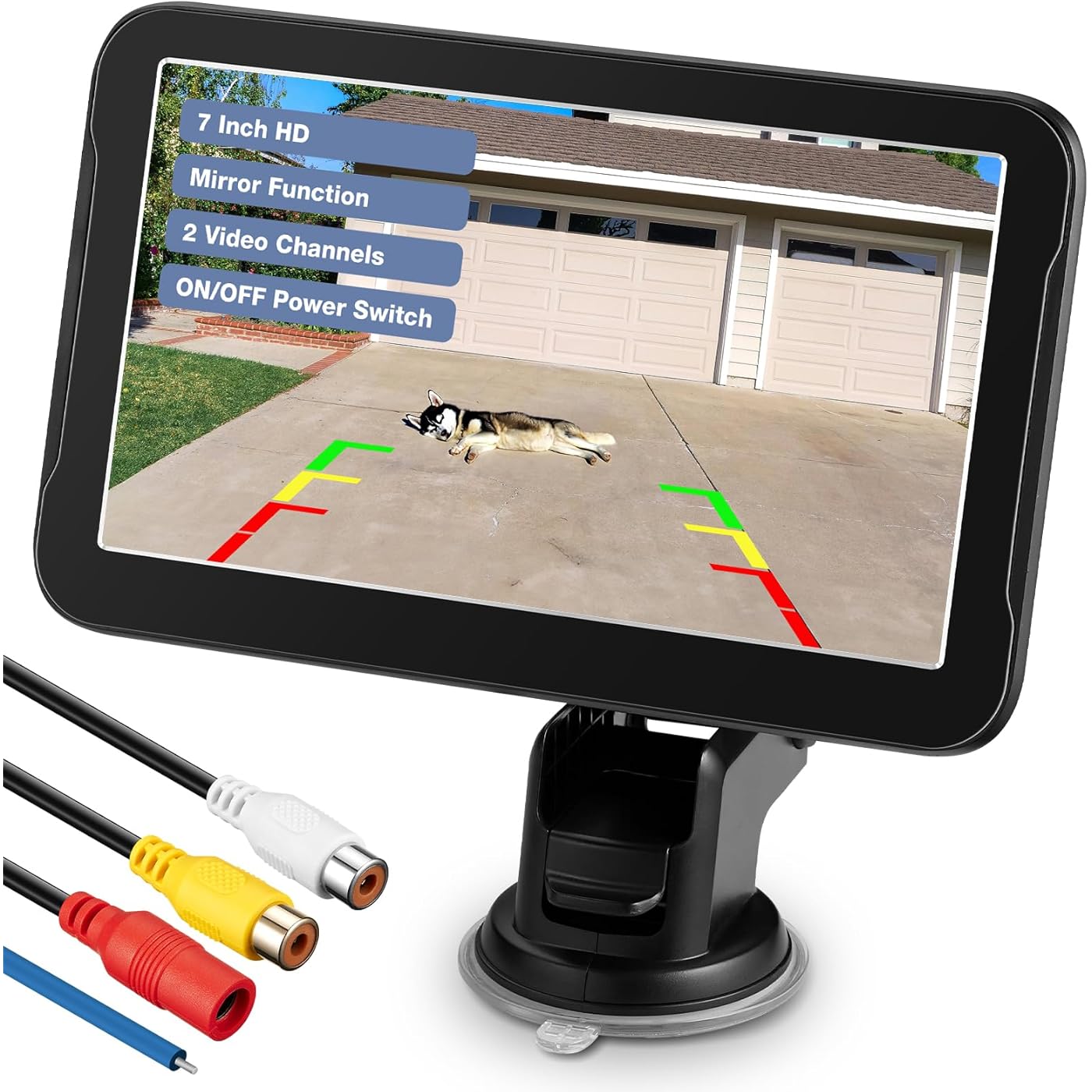
- Backup Camera Monitor OnlyThis is a 7-inch TFT LCD color monitor for a backup camera, backup camera not included. Works with CVBS cameras and does not support AHD cameras
- HD ImageThis 7 inch backup camera monitor is equipped with an 1024(RGB)X600 LCD screen, experience a crystal-clear HD view, provides a clear view to ensure safety when backing up
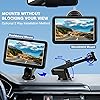
- 2 Installation MethodsYou can decide whether to install your monitor on the dashboard or the windshield based on your usage habits. The adjustable suction cup mount allows you to find the suitable viewing angle without obstructing your view
- 2-Way Video InputThe backup camera monitor has 2 ways video input interfaces. Both the white interface and yellow interface are video input interfaces. When two video signals are sent to the monitor simultaneously, if you want to prioritize the video signal from the yellow interface, please make sure to connect the blue trigger wire to activate the image from the yellow interface. The same applies to the white interface. The red interferece is power connector to get power from your vehicle
- Wide CompatibilityThe 7 inch backup camera display monitor is driver assistant, support 12V/24V, Suitable for Various of Vehicles, such as cars/trucks/trailers/RVs/vans/SUVs/campers and so on
- 24-Month Replacement PromiseWe stand behind every unit we make. If anything goes wrong within 24 months, reach out with your order ID and we'll make it rightfast. No receipts, no runaround, no stress. Our US-based support team is ready to help within 12 hours. Because a great product isn't just about how it works todayit's about knowing you're covered tomorrow
Description
This 7inch backup camera monitor offers a resolution of 1024x600 pixels, works with your backup camera to provide a sharp and clear image, ensuring you can see everything behind you, making reversing and parking safer and more convenient. This backup camera monitor compatible with all of front/side/rear view cameras with R-CA connector. When work with your backup camera(camera not included), it's like having eyes at the back of your car, helping you see your pet or obstacles and reverse safely. With the 7-inch display and backup camera(camera not included), we can effortlessly monitor and align the trailer hitch, making it a perfect trailer companion. The 7 inch monitor is driver assistant, Suitable for Various of Vehicles, such as Sedans/SUVs/RVs/Trucks/Tractors/Trailers/Buses/Vans/Campers and so on. 7inch Monitor 5inch Monitor 3.5inch Monitor 4.3inch Is this monitor compatible with all cameras? No, it only compatible with CVBS cameras as long as they have an R-CA video output, it cannot support AHD cameras. Can the monitor display 2 images simultaneously? No, the monitor can only display 1 image, so normally the white connector is for backup camera and the yellow is for front view camera, the reversing image will appear when reversing, and the front view image will be showed after parking. Can i turn off the monitor? Yes, there is a power on/off button at the back of monitor, you can turn off the monitor according to your requirement. I connected the backup camera to this monitor, why isn't the reversing guide lines appearing on the image? The monitor only have display function, the image quality you get depends on the camera you connect, so you need to connect a camera with distance scale line if you need distance scale line on the screen. Why does my image turn purple or white? Due to the infrared function of some cameras, the green tree in the monitor will turn white or purple, please note that this issue was caused by infrared function of cameras, not the display. Clear your blind spots and reverse with ease! Chuanganzhuo is a leading manufacturer of reversing cameras that helps drivers see a wider field of vision and eliminate blind spots. Our cameras are designed with advanced technology and high-quality materials to provide clear and reliable images, making reversing safer and more convenient. Many accidents happened during reversing because drivers could not see what was behind their vehicles. so we develop these reversing cameras to eliminate blind spots. Reversing cameras are an essential safety feature that can help drivers avoid accidents and collisions. We love being able to provide a product that can help keep people more safer. 12 years of production experience:From product development to production, quality inspection, sales and aftersales, we have a perfect system to ensure product quality.
Brand: Chuanganzhuo
Screen Size: 7 inches
Product Dimensions: 5.9"L x 4.7"W x 2.9"H
Compatible Devices: Devices with RCA Video Output
Installation Type: Surface Mount
Optical Sensor Technology: CMOS
Lens Type: Wide Angle, Fixed
Connector Type: RCA
Optical Sensor Size: 7 inches
Number of Items: 1
Screen Size: 7 inches
Compatible Devices: Devices with RCA Video Output
Optical Sensor Technology: CMOS
Lens: Wide Angle, Fixed
Connector Type: RCA
Optical Sensor Size: 7 inches
Display Technology: LCD
Video Capture Resolution: 720p
Installation Type: Surface Mount
Item Dimensions L x W x H: 5.9"L x 4.7"W x 2.9"H
Brand: Chuanganzhuo
Number of Items: 1
Manufacturer: Chuanganzhuo
Built-In Media: 1 x Monitor, 1 x Power Cord, 1 x User Manual
Mfr Part Number: CARA-MNT030
Warranty Description: 2 Year Manufacturer
Frequently asked questions
To initiate a return, please visit our Returns Center.
View our full returns policy here.
- Klarna Financing
- Affirm Pay in 4
- Affirm Financing
- Afterpay Financing
- Zip Pay in 4
- Financing through Apple Pay
- Financing through Google Pay
Learn more about financing & leasing here.


Top Amazon Reviews


