Search  for anything...

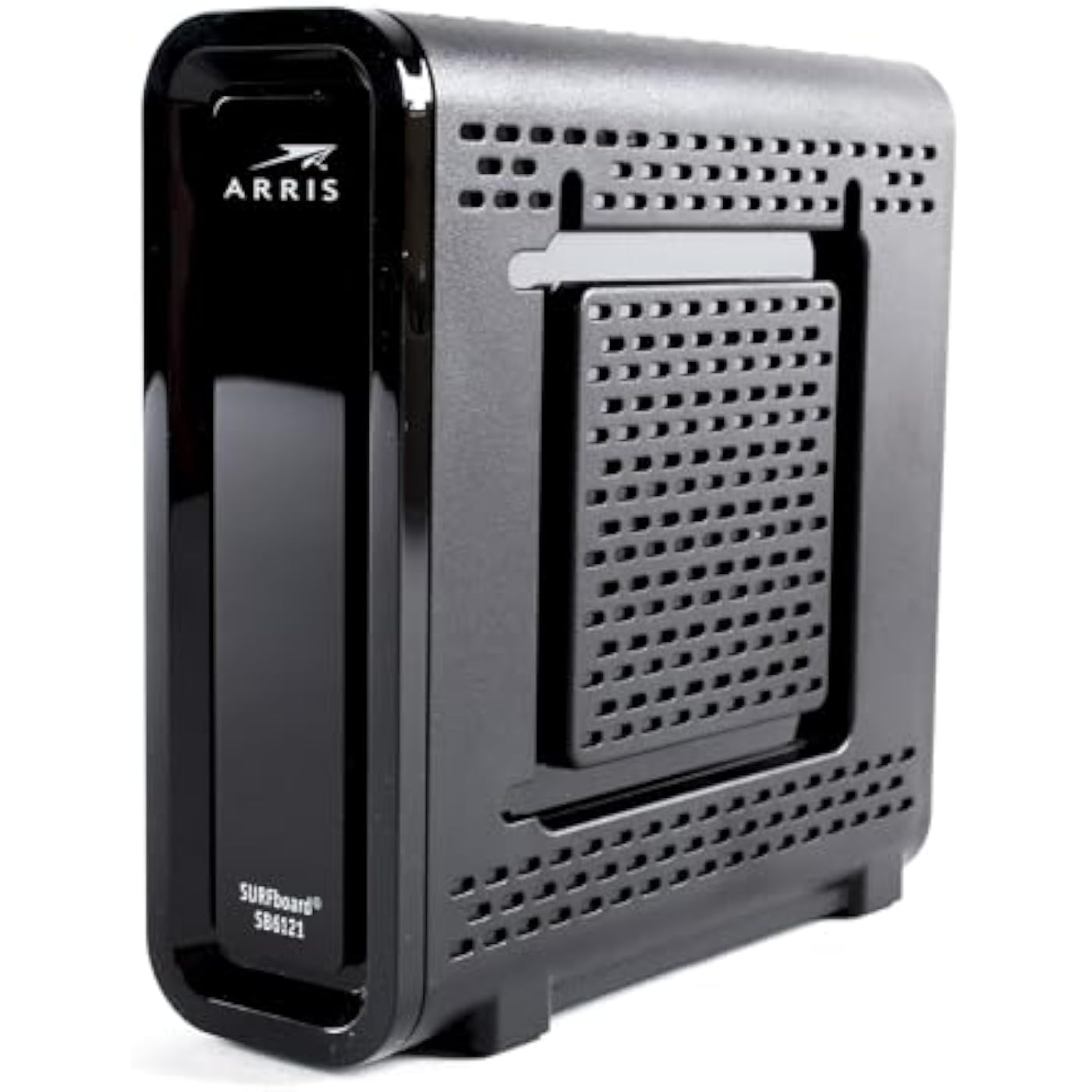
ARRIS SURFboard SB6121 4x4 DOCSIS 3.0 Cable Modem (Renewed)-Black
  • Based on 778 reviews
Condition: Refurbished - Excellent
Checking for the best price...
$47.29 Why this price?
Save $2.71 was $50.00

Buy Now, Pay Later


As low as $7.88 / mo
  • – 6-month term
  • – No impact on credit to apply
  • – Instant approval decision
  • – Secure and straightforward checkout

Ready to go? Add this product to your cart and select a plan during checkout.

Payment plans are offered through our trusted finance partners Klarna, Affirm, Afterpay, Zip, Apple Pay, and Google Pay. No-credit-needed leasing options through Acima may also be available at checkout.

Learn more about financing & leasing here.

Free shipping on this product

This item is eligible for return within 30 days of receipt

To qualify for a full refund, items must be returned in their original, unused condition. If an item is returned in a used, damaged, or materially different state, you may be granted a partial refund.

To initiate a return, please visit our Returns Center.

View our full returns policy here.


Availability: Only 4 left in stock, order soon!
Fulfilled by Search Buy Repeat

Arrives Sep 24 – Sep 26
Order within 5 hours and 13 minutes
Available payment plans shown during checkout

Protection Plan Protect Your Purchase
Checking for protection plans...

Features

  • This Certified Refurbished product is manufacturer refurbished, shows limited or no wear, and includes all original accessories plus a 90-day warranty. IMPORTANT NOTEL: A few units might show the brand as Motorola (and not Arris) as Arris had acquired Motorola for 2 years; hence it will be the same product and the same model
  • Requires CABLE Internet Service, if not sure your provider is CABLE call them to confirm. Does NOT work with Charter cable provider.
  • Compatible with MOST Major CABLE providers like Comcast/Xfinity, Cox, Time Warner, Mediacom, Bright House.
  • Wired modem only, does NOT include WIFI Router or VOIP Telephone adapter. Gigabit Ethernet port to connect to computer or Router for fast downloads.
  • Internet download speeds up to 172 Mbps and upload speeds up to 131 Mbps based on your Cable provider service. Good for streaming Video and gaming on multiple devices at a time.

Description

The ARRIS SURFboard SB6121 is a 4x4 DOCSIS 3.0 cable modem in black color.

Brand: ARRIS


Internet service provider: cox_communications, xfinity_from_comcast


Connectivity Technology: Ethernet


Compatible Devices: Personal Computer


Color: Black


Brand: ARRIS


Internet Service Provider: cox_communications, xfinity_from_comcast


Modem Type: Cable


UPC: 081258014346 081258012236


Global Trade Identification Number: 46


Unit Count: 1 Count


Manufacturer: ARRIS


Number of Items: 1


Item Weight: 1.2 pounds


Model Number: SB121


Mfr Part Number: SB121


Warranty Description: 90 days limited warranty


Connectivity Technology: Ethernet


Compatible Devices: Personal Computer


Number of Ports: 3


Maximum Downstream Data Transfer Rate: 100 megabits_per_second


Maximum Upstream Data Transfer Rate: 100 megabits_per_second


Data Transfer Rate: 100 megabits_per_second


Number of Ethernet Ports: 1


Color: Black


Frequently asked questions

If you place your order now, the estimated arrival date for this product is: Sep 24 – Sep 26

Yes, absolutely! You may return this product for a full refund within 30 days of receiving it.

To initiate a return, please visit our Returns Center.

View our full returns policy here.

  • Klarna Financing
  • Affirm Pay in 4
  • Affirm Financing
  • Afterpay Financing
  • Zip Pay in 4
  • Financing through Apple Pay
  • Financing through Google Pay
Leasing options through Acima may also be available during checkout.

Learn more about financing & leasing here.

Top Amazon Reviews


  • Works Great with Comcast
The box says refurbished, but looks new to me. Came with protective plastic on the front bezel, instructions, cable, power adapter. Best of all, it fired right up and Comcast cable had no problem provisioning it. What else can I say. I works like it was supposed to work. If you are not familiar with cable modems, here are a few things you should know before you lay out your money for one. This type modem is NOT a ROUTER, you will need one if you want any kind of firewall at all between the outside world and your computer. You may also want an Ethernet hub because this modem has only one Ethernet port on the back which is meant to go from the box to your computer and that is it. Since most households now have Smart TV, Smart Phones, Smart Refrigerators etc... these devices all require a wireless internet link. This cable modem does not provide any wireless link. That is something you must furnish as well. I have my cable modem hooked up directly to a wireless router. Then I have one Ethernet port on the router connected to an Ethernet hub to connect other computers to the network known as hard wired. The wireless router takes care of all the wireless devices in the household. Is it worth it? Yes! Why pay 10 bucks plus tax or more a month to rent this same equipment from your cable provider when you can buy it and have it pay for itself in six months time? That part is a no brainer. What if it breaks? will my cable company fix it? No. When was the last time remember a cable modem broke, outside of a house fire or other disaster? If it breaks, you buy a new one and have it delivered to your home in two days or less by Amazon. The good news is, whenever there is an update from your cable system, your modem will receive the update, because it is the same equipment most cable companies provide. You should check with your local cable company to be certain it is on their list of compatible equipment. This one IS listed with Comcast cable. I do recommend this type of cable modem over any others that have wireless internet built into them because the wireless internet they provide is normally substandard in comparison to what you can purchase here on Amazon. Any name brand wireless router is good, like Asus, Netgear, Belkin, or Linksys and they all have Ethernet ports on the back. ... show more
Reviewed in the United States on April 23, 2015 by TexasTea

  • I bought this anyway because although there are bad reviews on connectivity it was still a high quality ...
I purchased this modem after much consideration on what to buy. I have Comcast and was intimidated by the reviews on here on just how difficult it was to connect. I bought this anyway because although there are bad reviews on connectivity it was still a high quality modem. When I connected the modem I put on my boxing gloves and prepared for a fight with Comcast. It wasn't necessary! I did download the modems instruction manual before I unplugged my old modem and looked at the helpful hints on amazon reviews. Both of which I would highly recommend if you are new or unfamiliar with setting up a network. Follow the instructions exactly on how to connect the modem. The steps are important. Its how the device figures out what its job is!. When it didn't connect automatically and I troubleshooted for about 30 mins to see if I could fix it. I couldn't. I called Comcast and as long as I had my account number, social security number, and phone number that are attached to the account I was fine. The lady guided me through the steps of what I needed. This is important LOCATE YOUR HMAC # ON THE BOX before you call. Mine was stupidly put under some other stickers, and I had to scrap off to get to it with bad results in that the numbers had become worn and were hard to see. With a couple tries at numbers the Comcast lady and me figured it out. And bam I was connected. It did take a few minutes for my router to it all situated so I would suggest connecting it restarting both and walking away for 10 minutes after I did this it worked just fine. Biggest thing don't be intimidated it's really very easy. ... show more
Reviewed in the United States on March 26, 2015 by Shauna Sullivan

  • Good modem
The modem performed just as described and was easy to set up, taking under ten minutes from start to finish. After unplugging the network cable from my old modem and connecting it to the new one, I secured the coaxial cable and powered it up. A quick call to Spectrum was straightforward; after providing the MAC address and rebooting the modem and router, everything worked perfectly. Running a speed test revealed speeds of 38kbps, exceeding the 30kbps plan I pay for. However, while the modem started strong, a few weeks in, issues began to surface. It required frequent restarts and then began disconnecting on its own, logging critical error codes. Dealing with customer support from Arris was a nightmare. Although the modem was under warranty, getting a replacement required hours on the phone. Arris charged a fee for sending an advance replacement, even though holding credit card info would have sufficed. The option was either pay the fee or go without a modem for weeks. The customer service experience was disappointing, and when the replacement eventually fails, choosing a different brand will be the plan. Another experience noted that the modem, labeled as refurbished, appeared new and came with everything needed: protective film, instructions, cables, and an adapter. Setup with Comcast was seamless, and it functioned as expected. For those unfamiliar with cable modems, it's important to note this device isn’t a router, meaning a separate router is necessary for any firewall protection and to manage wireless connections for smart devices. The modem has one Ethernet port, so if you need more hardwired connections, an Ethernet hub will be required. Using it with a wireless router ensures coverage for the entire household. Considering the savings over rental fees, it’s a worthwhile purchase, and as long as it’s compatible with your cable provider, the modem will update automatically with system changes. Investing in a standalone wireless router typically offers better performance than built-in options. ... show more
Reviewed in the United States on November 7, 2024 by Whispering Whiskers

  • Only worked for 5 days
Works well with Comcast highspeed internet, but with some hassle. The item I got was still registered to someone as many other people complained. It took two days for Comcast local store to get contact with their warehouse and the original owner to get it unregistered and then registered under my account. Now, it works very well. Update: After 5 days, this unit suddenly stopped working. It can not get IP address from Comcast. The online LED keeps flashing for a long time, and then modem restarts over and over. I changed a modem to prove the line is ok and this modem is defective. I have to return it and buy a new modem (other model). ... show more
Reviewed in the United States on August 28, 2015 by Amazon Customer

  • Best modem on a budget.
This item is as described and works well. Installation was under 10 minutes and that's including the call to Time Warner Cable/Spectrum. I disconnected the network cable from my old modem to wireless router and put it in the new modem. I screwed the cable coax into modem. I plugged it in. Then I called Spectrum. After a few voice prompts I got to a technician who knew exactly what to do. I read off the MAC address and was put on hold for two minutes. When he came back on he had me restart the modem and router. Then everything worked. I went to speed test.net and am downloading at 38kbps. Pretty good when I pay for 30. It doesn't take a genius to install this. I paid $25.00 for modem and am saving $10.00 a month on lease. So in two and a half months I'll be saving money. For what my opinion is worth I would definitely recommend this product. ... show more
Reviewed in the United States on January 2, 2017 by Jason Crawford

  • Erratic performance.
This was a purchase from Woot through Amazon and was based on Comcast telling me I had to upgrade to DOCSIS 3. despite working DOCSIS 2 modem. Weekly Speedtest results and daily fluctuations show speeds dropped periodically to 3-4 Mb/s since installing. (The graph is from the times I logged in and shows consistent 30Mb/s for months and then a saw tooth pattern after the modem was installed) I rebooted the router and modem many times, replaced the cables. and disconnected/reconnected the coax with no changes. Today I dug out my old DOCSIS 2 Surfboard and plugged it in. COMCAST/Xfinity went through an activation routine and in 5 minutes I was back to my old speeds. I'm sorry I didn't realize the problem during the shortened warranty period for the refurb unit since it looks like it was faulty since day 1. I'll run the old router for a few days but I think I found the problem. Last several tests are all at 30Mb/s ... show more
Reviewed in the United States on November 2, 2015 by Scott206

  • Super Easy setup with Comcast
I was in the market for a DOCSIS 3.0 cable modem to eliminate the monthly $10 rental fee on a family member's bill and I stumbled across this refurbished unit on Amazon, which was at the time of purchase less than the half the amount for a brand new one. After going back and forth on whether to purchase a new one or buying this used one, I decided to go ahead and purchase this one. Received the unit (that same day) and hooked it up to the PC and opened a browser and went to Comcast's activation website and entered the credentials and the router was provisioned and registered within 5 minutes!! I paired this with TP-LINK Wireless N300 Home Router 300Mbps Certified for IPv6 (TL-WR841N) for WIFI (since this modem does not come with WIFI) and things have been working flawlessly now for 3 weeks. NOTE: Make sure you check with your ISP to make sure that this device is compatible with their network before you purchase. BTW, I love free same day shipping as I saw this item laying at the front door later that SAME day!! ... show more
Reviewed in the United States on June 13, 2016 by Lance C.

  • Great alternative to renting from Comcast
Works good, my parents were renting a comcast modem and I thought for 25 dollars why not give this modem a try , the cost to rent from comcast was 10 a month. They are on the 200 mbps plan so I was skeptical of this one being advertised for speeds under that , but speedtest.net with a connection wired into both the old modem and new modem netted 145 mbps down and 12mbps up. Figures this is as good as it gets for Comcast, plus my parents are happy they are saving 10 a month. Also to setup, don't call, just plug everything in and wire directly to this modem with a network wire and a laptop. Then open a browser and goto xfinity.comcast.net and follow the steps. It took me 3 times but it finally worked the third time and a hard reset of the modem. (pull the plug and plug back in). Over all very happy for 25 dollars ... show more
Reviewed in the United States on March 2, 2017 by CompsDoc

Can't find a product?

Find it on Amazon first, then paste the link below.
Checking for best price...