Search  for anything...

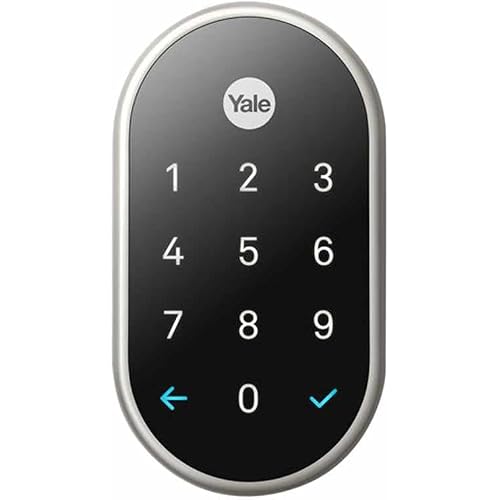
Yale Security Assure Lock Deadbolt, Satin Nickel Wi-Fi Connected Smart Lock with Back-Up Key and Digital Touchscreen Keypad for Code Entry and Remote Access, ‎YRD226-CBA-619

  • Based on 2,533 reviews
Condition: New
Checking for the best price...
$205.64 Why this price?
Holiday Deal · 36% off was $319.99

Buy Now, Pay Later


As low as $34.27 / mo
  • – 6-month term
  • – No impact on credit
  • – Instant approval decision
  • – Secure and straightforward checkout

Ready to go? Add this product to your cart and select a plan during checkout.

Payment plans are offered through our trusted finance partners Klarna, Affirm, Afterpay, Apple Pay, and PayTomorrow. No-credit-needed leasing options through Acima may also be available at checkout.

Learn more about financing & leasing here.

Selected Option

Free shipping on this product
This item's return window has been extended for the holiday season: FREE refund/replacement until Jan 31, 2026

To qualify for a full refund, items must be returned in their original, unused condition. If an item is returned in a used, damaged, or materially different state, you may be granted a partial refund.

To initiate a return, please visit our Returns Center.

View our full returns policy here.


Availability: Only 3 left in stock, order soon!
Fulfilled by Amazon

Arrives Saturday, Dec 20
Order within 7 hours and 34 minutes
Available payment plans shown during checkout

Protection Plan Protect Your Purchase
Checking for protection plans...

Color: Satin Nickel


Size: Wi-Fi- 1st Gen


Style: Touchscreen - With Key


Features

  • REPLACES YOUR EXISTING DEADBOLT: With a touchscreen smart lock, you can lock and unlock your door without the hassle of keys.
  • KEY-FREE ACCESS: Lock, unlock, share access and see who comes and goes from anywhere using the Yale Access App - no additional hub needed, Wi-Fi Connect included. This product will not operate outside of the US or Canada.
  • HANDS FULL. NO PROBLEM. A lock that auto-unlocks as you approach - now thats a warm welcome. With this hands-free option, you dont need to touch your lock or your phone. If you don't have your phone, just use the keypad Always let Yale get the door.
  • WORKS WITH YOUR FAVORITE VOICE ASSISTANTS: Lock, unlock and check lock status with voice assistants including Alexa, Hey Google and Siri. Alexa can also provide notifications when your battery is running low so you can proactively replace them. Set up smart reorders through Dash Replenishment to make sure you always have replacement batteries when you need them. - No additional hub needed.
  • AUTO LOCK FOR PEACE OF MIND:You didnt forget to lock the door, your lock did it for you. Rest easy knowing that your door is locked every time you leave the house and when you go to bed at night. Disable it at any time from the lock menu.

Description

Upgrade your door with the Assure Lock, a smart lock with a sleek touchscreen keypad for key-free entry. The lock has Wi-Fi and Bluetooth so it lets you to lock/unlock, share access and see who comes and goes all using your app, from anywhere! For ultimate convenience, your Assure Lock will unlock automatically as you approach the door and it will relock once the door is closed! Plus, you can lock, unlock or check current status with voice assistants including Amazon Alexa, Hey Google or Siri. The lock features a backlit touchscreen keypad so even when you don't have your phone, you can unlock your door without the hassle of keys. It's super easy to use and installs in minutes with just a screwdriver on standard doors (1-3/4" to 2-1/4" thick).

Brand: Yale


Special Feature: Auto-Lock, Auto-Unlock, Back-Lit Keypad, Keyless, Passcode Unlock


Lock Type: Biometric, Keypad


Item dimensions L x W x H: 1.38 x 2.75 x 6.06 inches


Material: Metal


Brand: ‎Yale


Special Feature: ‎Auto-Lock, Auto-Unlock, Back-Lit Keypad, Keyless, Passcode Unlock


Lock Type: ‎Biometric, Keypad


Item dimensions L x W x H: ‎1.38 x 2.75 x 6.06 inches


Material: ‎Metal


Recommended Uses For Product: ‎Door


Style: ‎Touchscreen - With Key


Color: ‎Satin Nickel


Number of Pieces: ‎2


Finish Type: ‎Brushed


Included Components: ‎Yale Assure Lock Touhcscreen, Connected by August Module, August Connect Wi-Fi Bridge, August DoorSense, Deadbolt, Strike Plate, Mounting Hardware, Installation Manual, 2 keys


Shape: ‎Rectangular


Item Weight: ‎4.5 Pounds


Control Method: ‎App


Connectivity Protocol: ‎Bluetooth, Wi-Fi


UPC: ‎081023044660


Model Name: ‎Yale Assure


Global Trade Identification Number: ‎60


Manufacturer: ‎Yale


Part Number: ‎YRD226-CBA-619


Item Weight: ‎4.5 pounds


Product Dimensions: ‎1.38 x 2.75 x 6.06 inches


Item model number: ‎YRD226-CBA-619


Batteries: ‎4 AA batteries required. (included)


Is Discontinued By Manufacturer: ‎No


Size: ‎Wi-Fi- 1st Gen


Finish: ‎Brushed


Pattern: ‎With Key


Power Source: ‎Battery


Item Package Quantity: ‎1


Temperature Range: ‎Outside -22 F to 140 F Inside 5 F to 158 F Degrees Fahrenheit


Head Style: ‎Lock Only


Display Style: ‎Touchscreen


Special Features: ‎Auto-Lock, Auto-Unlock, Back-Lit Keypad, Keyless, Passcode Unlock


Batteries Included?: ‎Yes


Batteries Required?: ‎Yes


Battery Cell Type: ‎Alkaline


Warranty Description: ‎Lifetime limited warranty on Finish and Mechanical. One year on Electronics


Date First Available: September 25, 2018


Frequently asked questions

If you place your order now, the estimated arrival date for this product is: Saturday, Dec 20

Yes, absolutely! You may return this product for a full refund within 30 days of receiving it.

To initiate a return, please visit our Returns Center.

View our full returns policy here.

  • Klarna Financing
  • Affirm Pay in 4
  • Affirm Financing
  • Afterpay Financing
  • PayTomorrow Financing
  • Financing through Apple Pay
Leasing options through Acima may also be available during checkout.

Learn more about financing & leasing here.

Top Amazon Reviews


  • Required some troubleshooting, but works great!
Color: Satin Nickel Size: Wi-Fi- 1st Gen Style: Touchscreen - With Key
Overall, I'd highly recommend. I went with the "keypad + key" option as I live in a condo with only one entrance, and I don't trust anything electronic 100%. This way I can keep a key in my car, just in case. The hardware part of the installation was simple enough; luckily all the dimensions on my door and doorframe were within tolerances. The only surgery was drilling a 5/8" hole in the doorframe to place the included magnet (which allows the lock to know when the door is closed, enabling features that depend on that). They also give you the option to glue this magnet to the interior face of the doorframe, if you don't want to drill (but it'll be visible). Or you can omit it entirely. The software part didn't go 100% smoothly, but it was *much* better than I'd expected. I followed the included directions which tell you to put everything together and set a master code on the keypad. I then installed the Yale app and attempted to link my lock, but got a message stating that the lock was already registered and the current owner would have to give permission to allow a factory reset. Weird, as I bought it new, but I clicked "OK". I was then prompted to scan a QR code, and received another error stating that it didn't match the lock's serial number--which was bogus. I decided to do a factory reset and try the in-app setup first (before setting a master code) and this did the trick, so it seems you need to do things in that order--but the instructions don't state this, and the app was giving odd/incorrect feedback. Another point of confusion is whether to have the 'smart' module plugged-in when you remove/insert batteries. It seems to differ based on exactly what you're trying to do. I eventually got it all set up, though. I also had a minor issue with placing the WiFi bridge module. I have an outlet that I *thought* was ideally placed: it's on the same wall as the door, only about four feet away. It's also unused and hidden behind furniture, so perfect for my purposes. Unfortunately, I could not get the bridge to connect to my WiFi from this spot. When I moved it to the other side of the room, it connected up just fine. I thought this was strange, as it's only about a 15' difference and there are no additional obstructions besides a cheap couch--which 2.5GHz should zip right through. Who knows? With everything working, I'm very satisfied. Auto-unlock (when my phone gets in range) works superbly, and I like that I can set it to automatically lock as well. The app is reasonably intuitive and stable. All in all, it's the right combination of features and it's nicely executed. ... show more
Reviewed in the United States on October 7, 2021 by emperor_penguin

  • The best digital door lock on the market IMHO
Color: Satin Nickel Size: Wi-Fi- 1st Gen Style: Touchscreen - With Key
I purchased this digital door lock because it was the only one on the market that has all the following: 1) Has a key backup (electronics can fail and being the only entrance to my condo I couldn't afford to risk not being able to get in. If you have a house with an alternate door you could risk going completely keyless) 2) Automatic lock and un-lock functionality based on my phone presence (This lock excels at this. Just need Bluetooth turned on, which it is for my car anyway. Don't need the application opened up. I just close the door and it auto locks and when I arrive home the door auto unlocks as I just get near it. No need to pull my phone out of my pocket or worry about having the application running. It's really that easy) 3) Wi-Fi connectivity (allows me to be notified of anyone entering or exiting my condo as I've given access to neighbors for use in case of emergency. I can also let a repairman in when they call just by clicking a button in the application in my phone) 4) Keypad for people to enter code to enter (either permanent or temporarily) 5) Not too obnoxious looking for a dual electronic/key lock. Others are too industrial or just plain ugly. I see others have stated things along the lines of it doesn't work or its broken. I had one problem that was self-inflicted. After installation things didn't seem to work consistently. While I could lock the door with a key, the auto lock and un-lock were unrealiable. I also noticed that the privacy button wouldn't work. After investigating I realized the deadbolt couldn't extend fully as the existing opening in the door jam was about 1/8 inch too shallow to allow such. As soon as I chisled it out everything worked perfectly. This is one area that Yale could have improved the troubleshooting on. While it loves to talk and tell you what it's status is (I turned this off in the advanced settings as it is annoying after the first time), it won't tell you anything is wrong, it just doesn't work reliably. The only other item that may turn people off is that you have a 'jumper' plugged into an electrical wall outlet to manage the lock via Wi-Fi/Internet. But this is common across the industry as Bluetooth is energy efficient and Wi-Fi is not. Just imagine either running electricity to your door or replacing the batteries every day. No thanks, a small jumper device is the best solution for the time being. I've been using this for 3 months now and couldn't be happier. Haven't had replaced the batteries yet. I'd definitely purchase again. Not that the key that comes with it is a Kwikset (KW1) and can easily be changed by your local locksmith. ... show more
Reviewed in the United States on February 5, 2019 by Sam_I_Am

Can't find a product?

Find it on Amazon first, then paste the link below.
Checking for best price...