Search  for anything...

VIWOODS Upgraded Bundle with AiPaper, Stylus Pro and 5 Nibs, Carta 1300 AI E Ink Tablet, 10.65'' 300PPI Electronic Notebook with Pen, Ultra-Thin 4.5mm, Lightweight 370g, 128GB Note-Taking Device

  • Based on 32 reviews
Condition: New
Checking for the best price...
$549.99 Why this price?

Buy Now, Pay Later


As low as / mo
  • – Up to 36-month term if approved
  • – No impact on credit to apply
  • – Instant approval decision
  • – Secure and straightforward checkout

Ready to go? Add this product to your cart and select a plan during checkout.

Payment plans are offered through our trusted finance partners Klarna, Affirm, Afterpay, Zip, Apple Pay, and Google Pay. No-credit-needed leasing options through Acima may also be available at checkout.

Learn more about financing & leasing here.

Selected Option

Free shipping on this product

This item is eligible for return within 30 days of receipt

To qualify for a full refund, items must be returned in their original, unused condition. If an item is returned in a used, damaged, or materially different state, you may be granted a partial refund.

To initiate a return, please visit our Returns Center.

View our full returns policy here.


Availability: In Stock.
Fulfilled by Amazon

Arrives Friday, Jul 24
Order within 1 hour and 11 minutes
Available payment plans shown during checkout

Protection Plan Protect Your Purchase
Checking for protection plans...

Color: AiPaper+W2 Stylus Pro+Cover+5 Nibs


Features

  • Built for Comfortable Long-Form Reading: Long documents deserve a screen that feels calm, clear, and easy to stay with. The 10.65" Carta 1300 E Ink display with 2560 x 1920 resolution creates a crisp, paper-like reading experience with reduced screen glare, making PDFs, ebooks, research papers, contracts, and manuals easier to read through extended sessions.A natural E Ink refresh latency is expected.
  • Write Naturally, Like Pen on Paper: Capture thoughts the moment they arrive with the included W2 Stylus Pro. With 4096 pressure levels and a 750-micron pen gap, every stroke feels smooth, responsive, and precise—ideal for handwritten notes, PDF annotation, document markup, sketches, signatures, and meeting ideas.
  • A Quiet Space for Immersive Thinking: AiPaper is designed for focus, not distraction. Whether you are studying, reviewing documents, planning a project, or organizing ideas, its clean E Ink workspace helps you slow down, think clearly, and stay engaged with your reading and writing with fewer digital distractions.
  • AI-Assisted Tools for Reading, Planning & Notes: Turn scattered ideas into organized action with tools that help create to-do lists and make planning easier to follow. While reading, translate and summarize content to keep your thoughts moving. During meetings, convert handwritten notes into organized documents to help capture key points, review notes faster, and improve everyday workflow.
  • Ready to Use, Built to Support Your Workflow: Open the box and start reading, writing, and organizing right away. The complete kit includes the 10.65" AiPaper E Ink tablet, protective folio cover, W2 Stylus Pro, replacement pen nibs, and USB-C charging cable. With 128GB of built-in storage, it offers generous space for your growing digital workspace, with customer support for setup, product questions, and troubleshooting.

Description

Does it support Google Play Store and Google Play related apps? Yes. Before acessing Google Play Store and related apps, please go to Setings > Play Store and enable Google Service, Complete the authorization process as prompted the first time. Can files on AiPaper be backed up automatically? Yes. Open the AiPaper File from the left menu on the homepage, then log in to your OneDrive, Dropbox,or Google Drive to sync and back up files. Automatic backups can be set for every 24 hours, 3 days, or 7 days. Why is the page-turning speed slower than other tablets like ipad? E-ink screens naturally respond slower than LCD screens. AiPaper, with its Octa-core 2.0GHz processor is the fastest among e-ink tablets. To boost speed, select Fast or Ultra-fast Mode. Note: These modes may increase ghosting How to clear ghosting? Ghosting can be cleared with a quick gesture or by tapping the quick menu button. 1.Swipe down with three fingers from the top left of the AiPaper. 2.Swipe down with one finger from the top right to open the quick menu and tap "Refresh." Does AiPaper have a front light? To better mimic the experience of writing and reading on paper, AiPaper dos not have a front light, while the AiPaper Mini is equipped with a front ight

Brand: VIWOODS


Model Name: AiPaper


Built-In Media: 10.65'' AiPaper, Folio cover, Replacement Nib, Stylus, User Manual


Manufacturer: VIWOODS


Warranty Description: 14 month


Unit Count: 1.0 Count


Best Sellers Rank: #17,945 in Electronics (See Top 100 in Electronics) #386 in Computer Tablets


ASIN: B0FNWC3ZCR


Customer Reviews: 4.1 4.1 out of 5 stars (32) 4.1 out of 5 stars


Color: AiPaper+W2 Stylus Pro+Cover+5 Nibs


Connectivity Technology: Bluetooth, USB, Wi-Fi


Operating System: Android 13


Additional Features: Anti-Glare Glass, Eye Protection, Intelligent Reading


Specific Uses For Product: Drawing, Remote Work, Teaching, Writing


Compatible Devices: Computer, Tablet


Display Type: EPD


Native Resolution: 2560x1920


Screen Size: 10.65 Inches


Active Surface Area: 85.02 square inches


Frequently asked questions

If you place your order now, the estimated arrival date for this product is: Friday, Jul 24

Yes, absolutely! You may return this product for a full refund within 30 days of receiving it.

To initiate a return, please visit our Returns Center.

View our full returns policy here.

  • Klarna Financing
  • Affirm Pay in 4
  • Affirm Financing
  • Afterpay Financing
  • Zip Pay in 4
  • Financing through Apple Pay
  • Financing through Google Pay
Leasing options through Acima may also be available during checkout.

Learn more about financing & leasing here.

Top Amazon Reviews
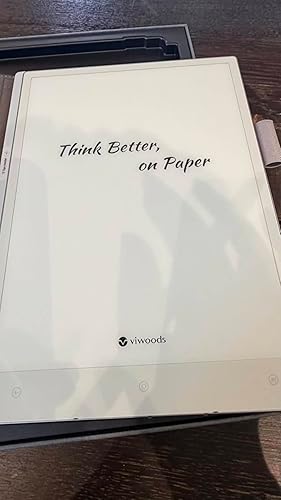

  • Well built for reading and studying long sessions
Color: AiPaper+W2 Stylus Pro+Cover+5 Nibs
My first impression after unpacking the unit is to do a straight comparison with the device I now own to read mainly textbooks and scientific magazines, the kindle scribe. Usually I download a pdf version of an article from a magazine or read my textbooks on the kindle app. In doing the comparison I have noticed that there is no backlight on the screen, and I first thougt iy as a disvantage, I was thinking maybe to return the unit and keep using my kindle scribe. I started to download some pdf and began to read, I will point to some of the advantages I find in this unit after using it that will make a better choice for my daily reading and study instead of the kindle scribe: 1. Much more light weighted and easier to carry. 2. After using the unit for a while I think the lack of backlight is an advantage rather than a disvantage. When using the kindle scribe at least you need a bit of backlight to read clearly, and that is eaven a soft a light in a screen for you eyes. With the Viwoods unit, the backround is clearer and it is used more like a book or a paper, under lighting conditions. It is more gentele on your eyes and much, much confortable to read for hours. Finally for a study session or work session you do it in lighting conditions (library, desk, office). The backligt makes more sense on pocket or portable units like reading in (train, bus). 3. The kindle app is already installed, very easy to use, all books apear seamless and great, also all controlls work fine, fonts, margins etc. Is allmost a kindle device. 4. I have enabaled the Google playstore, I download the Adobe PDF reader, and PDFs are much much easy readable, better movement, clrearer that the kindle scribe, more of the page visible on the screen, better turning the pages. 5. Also the Chrome navigator works well, very easy to sign in to my subscribed magazine, browse the journal, and then seamlessly download a PDF of the article I am interested in reading. With the Kindle Scribe I needed to first log in from the browser in my computer, save the PDF and then transfer it from the computer to the Kindle Scribe. It is a well built and designed unit, thin, lightweight ellegant, and easy to use. I do preffer the Viwoods for my purpose of studying PDFs and textbook rather than the kindle scribe. I use it mainlly for reading, I do not use the writting capablities. ... show more
Reviewed in the United States on June 5, 2026 by Reviewer-1

  • A fantastic addition to my e-ink collection A fantastic addition to my e-ink collection
Color: AiPaper+W2 Stylus Pro+Cover+5 Nibs
As someone who is deep into the e-ink ecosystem, I’ve spent a lot of time with various devices—I currently own seven tablets, including four from Boox and one from Musnap and even a Kindle Scribe. I’ve always been a big fan of Boox for their versatility, but the Viwoods AI Paper has quickly earned a top spot in my rotation. The writing feel is excellent, and the AI integration adds a layer of productivity that feels very natural. While I still get plenty of use out of my Boox devices, there’s something about the streamlined experience and the responsiveness of the Viwoods that makes it hard to put down. It’s a premium, well-built tablet that fits perfectly alongside my other favorites. If you're looking for a smooth, smart digital paper experience, this is definitely worth it. ... show more
Reviewed in the United States on May 21, 2026 Reviewed in the United States on May 21, 2026 by J. Carlos Zavala

  • Great product for a great price
Color: AiPaper+W2 Stylus Pro+Cover+5 Nibs
A user-friendly product with excellent quality, suitable for everyone to use together, and the delivery speed is very fast
Reviewed in the United States on June 5, 2026 by melody maker

  • Lots of Bugs
Color: AiPaper+W2 Stylus Pro+Cover+5 Nibs
BUGs. Text gets lost. Sometimes only half the text in a file remains a day later. Copying text from the "Meeting" page to the "To Do list" had different text being copied than what was on the Meeting page. The Calendar had numbers on it That made no sense superimposed with the date. There were some other things too. Stuff would work one second, then not work the next, then work again? Actually, I really liked the ViWoods AI Paper in concept. I think once they get the bugs worked out, this might be the best E ink tablet to get? The AI was very nice. I tried going to the company's help page but I didn't see anything in the FAQ contents that would help. I tried the chat feature but got no response. Maybe they will send me an email later, but I decided I don't trust the thing so I decided to returned it at that point. I feel bad about that because in concept, I really like this e ink tablet. I am thinking of getting a ReMarkable or a Supernote Manta instead? But I chose the ViWood over those to originally because it seemed like it would be the best one. Again, hopefully the company will fix the problems. I think it is software, but it could be a hardware problem I suppose. Oh well. ... show more
Reviewed in the United States on April 3, 2026 by Photochromes

  • Amazing, far better than others
Color: AiPaper+W2 Stylus Pro+Cover+5 Nibs
I was very surprised at how much I liked this device. I have many different tablets and many einks. Usually, I use Boox or BigMe because I like full android with google play access which this has. But something about this device sets it apart from the rest. Its layout and user interface is nothing short of fantastic. Its truly meant to be used as a daily companion instead of a traditional tablet and I find it does help me organize and focus when very little ever helps me in that department. The notes and writing are amazing, screen texture for writing is unbelievably natural. Better than the boox and bigme that I have. I'm very picky about writing feel which is why I nearly never like using electronic devices for writing. Its very similar to supernote in concept - except you get the play store. The apps I want to use from playstore are reading apps and office apps like Teams and OneNote. So far, both work well and OneNote writing is fluid, which can be an issue on einks. It doesnt have the refresh control to where Id want to try to use it as a full tablet, but I have access to my important productivity apps which most note devices lack. I love it. Its light weight, perfectly ergonomic, case it comes with is delightful. All around great. The only negative which is one I can live with is the note app's default handwriting to text is very accurate word wise, but doesn't preserve new lines. Its not a deal breaker, but is unfortunate. I am new to the device and might be user error, but I don't think so. ... show more
Reviewed in the United States on June 20, 2026 by Amazon Customer

  • not worth it
Color: AiPaper+W2 Stylus Pro+Cover+5 Nibs
I decided to return right after unbox it. This device is more like a toy than an AI paper including one straight line alphabet cross the screen. Not recommend this product.
Reviewed in the United States on March 23, 2026 by MARTIN

  • Easy to use, excellent battery life Easy to use, excellent battery life
Color: AiPaper+W2 Stylus Pro+Cover+5 Nibs
I was a die-hard Kindle user until I got this AiPaper—total game-changer. Kindle’s fine for basic reading, but it lacks so many practical features.AiPaper lets you load all kinds of documents and install the reading apps you like, no more being tied to a single book store. Its e-ink screen is also better—way clearer than my old e-reader. ... show more
Reviewed in the United States on February 24, 2026 Reviewed in the United States on February 24, 2026 by Pete

  • Very good product
Color: AiPaper+W2 Stylus Pro+Cover+5 Nibs
I do love this product, I wish the the software app integrations were more useful once you get it up to The latest update. I'm going to be using it for a while, so I'm hoping that the next updates will better integrate a Gmail calendar, Google syncing, or allow for OpenDrive. More tip types are needed for the future but everything works out of the box once you get it updated. ... show more
Reviewed in the United States on April 18, 2026 by Jamison Boucher

Can't find a product?

Find it on Amazon first, then paste the link below.
Checking for best price...