Search  for anything...

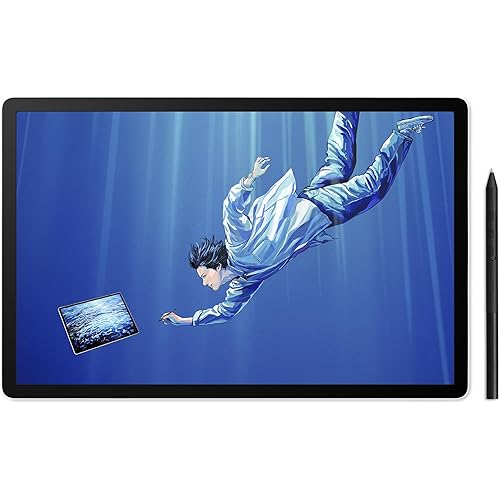
VEIKK VK850 8x5 Inch Digital Drawing Graphics Tablet with Battery-Free Pen | 16384 Levels,290 PPS for Digital Drawing,Graphic Design and Osu Gameplay,Compatible with Windows/Mac/Linux/Android

  • Based on 3,157 reviews
Condition: New
Checking for the best price...
$32.99 Why this price?
Save $27.00 was $59.99

Buy Now, Pay Later


As low as $8 / mo
  • – 4-month term
  • – No impact on credit to apply
  • – Instant approval decision
  • – Secure and straightforward checkout

Ready to go? Add this product to your cart and select a plan during checkout.

Payment plans are offered through our trusted finance partners Klarna, Affirm, Afterpay, Zip, Apple Pay, and Google Pay. No-credit-needed leasing options through Acima may also be available at checkout.

Learn more about financing & leasing here.

Selected Option

Free shipping on this product

FREE 30-day refund/replacement

To qualify for a full refund, items must be returned in their original, unused condition. If an item is returned in a used, damaged, or materially different state, you may be granted a partial refund.

To initiate a return, please visit our Returns Center.

View our full returns policy here.


Availability: In Stock.
Fulfilled by Amazon

Arrives Monday, Aug 24
Order within 5 hours and 2 minutes
Available payment plans shown during checkout

Protection Plan Protect Your Purchase
Checking for protection plans...

Size: 8x5 Inch


Features

  • EXCELLENT DRAWING PERFORMANCE: Featuring an 85 inch active working area, this digital drawing tablet supports 16384 levels pressure sensitivity, 60 tilt function and 290 PPS high reading rate. It captures every subtle brush change accurately, serving as a professional computer graphics tablet for digital art, animation creation and smooth osu gaming.
  • P05 BATTERY-FREE PASSIVE STYLUS: This graphics drawing tablet comes with a P05 battery-free pen built with 2 programmable side buttons. You can switch between pen, eraser and mouse modes instantly. No battery charging or replacement is required, allowing you to enjoy long-hour creation without interruption.The package also comes with 20 replacement pen nibs for long-term daily use.
  • FULLY CUSTOMIZABLE CONTROL & BROAD SOFTWARE COMPATIBILITY: Designed with 10 customizable shortcut keys and 1 quick dial to boost working efficiency, this art tablet fits both left-handed and right-handed users. It works perfectly with Photoshop, Illustrator, Clip Studio Paint, Zbrush, SAI, Krita, Gimp and other mainstream drawing programs.
  • DURABLE TYPE-C PORT & FULL ACCESSORIES Boasting a robust Type-C port for plug-and-play operation that avoids loose connections during long drawing sessions. This graphics tablet comes with a full suite of out-of-box accessories, including a 1.5m USB cable (fixed to the tablet), a dedicated stylus pouch, drawing glove, detailed quick start guide, and 20 replacement nibs for extended drawing use.
  • ULTRA-THIN & MULTI-SYSTEM COMPATIBLE:Featuring an ultra-slim 2mm lightweight body, this VEIKK VK850 graphics tablet is easy to transport for creation both indoors and outdoors. It delivers broad system compatibility, supporting Windows 11/10/8/7, macOS 10.12 and later, as well as Linux systems. When connected via an OTG adapter, it also works with Android 6.0+ mobile phones (Samsung devices excluded) to satisfy all your diverse drawing needs.
  • UPGRADED 85 INCH ACTIVE AREA: Our drawing tablet features an expanded 8 by 5 inch working surface, which boosts usable drawing space by 166.7% compared to the standard 64 inch graphic panel. The larger active zone eliminates cramped drawing limits, delivers more room for sketching, illustration and digital creation, and brings smoother, unrestricted creative experience for artists, designers and hobbyists.
  • RELIABLE AFTER-SALES SUPPORT & FREE DRIVER UPDATE: Choose VEIKK digital art tablet with no worries! We offer 1-year official hardware warranty and lifelong free driver updates for all users. Professional customer service team provides timely technical support to solve your using problems effectively.

Description

Founded in 2009, VEIKK has been dedicated to connect user experiences with continuous innovative technology and products, introduce new technologies that democratize creativity, and build a colorful digital creative world VEIKK developed EMR technology for pen tablet and display devices to enable a precise and speedy pen input with highly accurate pressure sensitivity. Connect creativity through technology Fill the digital world with possibilities dedicated to introduce new technologies that democratize creativity Ultra-thin 8×5 Inch Drawing Tablet! Easy to Carry Meet Voila L with extraordinary feel and personality design Designed for the creative process. Two dials, limitless possibilities. Play OSU!. Play rhythm. Play never ends. Small and Enjoyable ! Take it anywhere you want ! The tablet offers precise pen control to hit rhythm notes accurately. Natural pressure sense simulates real brushes for sketching and coloring. Handwrite notes during online lessons Carry it anywhere, finish digital signatures instantly Pressure-sensitive pen helps smooth mask drawing and frame retouching. Is this tablet compatible with windows 11 Compatible with not only Windows 11/10/8/7, Mac OS 10.12 or later, Linux OS, but also Android 6.0 or above phones How to download the driver? Please go to VEIKK official web to dowmload. How long is the included USB cable? The included USB cable is about 1.5M Is it only for drawing or can I use it with other software? It can replace a computer mouse and support image editing, illustration, animation, graphic design, and annotation. It works with most creative software, online learning apps and platforms on both PC and Mac for remote study and remote work. How can I check if my phone or tablet is compatible with this drawing tablet? This drawing tablet is compatible with Android 6.0+ devices with OTG support. Please message us if you are not sure about your device. VK850 OSU Tablet VK430 Drawing Tablet VK640 Drawing Tablet A30 V2 Drawing Tablet Voila L Drawing Tablet S640 Drawing Tablet

Brand: VEIKK


Connectivity Technology: USB


Pressure Sensitivity: 16384 levels


Operating System: Windows


Special Feature: 60° Tilt Support, Extra-Slim, Programmable Press Key, Shortcut Key


Brand: VEIKK


Model Name: VK850


Built-In Media: Digital Pen, Glove, Pen Nib Clip, Quick Start Guide, Replacement Nib


Target Audience: Student


Model Number: VK850


Number of Items: 1


Manufacturer: VEIKK


Unit Count: 1 Count


Mfr Part Number: VK850


Warranty Description: 1 Year Warrenty


Connectivity Technology: USB


Pressure Sensitivity: 16384 levels


Operating System: Windows


Additional Features: 60° Tilt Support, Extra-Slim, Programmable Press Key, Shortcut Key


Specific Uses For Product: Drawing


Compatible Devices: Desktop


Screen Size: 8 inches


Item Weight: 257 g


Item Dimensions L x W: 9.8"L x 8.8"W


Color: Black


Frequently asked questions

If you place your order now, the estimated arrival date for this product is: Monday, Aug 24

Yes, absolutely! You may return this product for a full refund within 30 days of receiving it.

To initiate a return, please visit our Returns Center.

View our full returns policy here.
  • Klarna Financing
  • Affirm Pay in 4
  • Affirm Financing
  • Afterpay Financing
  • Zip Pay in 4
  • Financing through Apple Pay
  • Financing through Google Pay
Leasing options through Acima may also be available during checkout.

Learn more about financing & leasing here.

Top Amazon Reviews


  • Great tablet for all artists at a very affordable price!
Size: 10x6 inch
As someone who had been using Wacom tablets for over 15 years, I finally got frustrated enough with their constant driver issues and decided to try out a new type of tablet. The VEIKK A15 tablet stood out to me because of it's affordable price and sleek design. Of course I was hesitant to try out a new brand, but to my surprise I'm really enjoying it. Just as the description stated, the product came with the tablet, tablet pen (and sleeve for it), an artist glove, replacement nibs, nib remover, usb cable, and installation guide. Packaging was compact and no fuss to get to the product. We all have experienced receiving a product and it's just packaged with a ton of unnecessary filler. The VEIKK A15 had none of that. The first thing you see is the tablet and glove laid out in front of you and then the rest of the items underneath supported with a carboard piece. The installation process was actually fairly simple. I downloaded the driver, plugged in my new tablet, and it was ready to go! I had expected to run into driver complications, since I had issues with my Wacom Intuos Art on multiple occasions but so far nothing. Unfortunately I am unsure if others, who had other art tablet drivers installed, would have the same smooth experience as I did (I recently got a new computer so I didn't have my Wacom driver installed anymore), but the recommendation of uninstalling any previous tablet drivers is a fairly simple process so others shouldn't have much difficulties with that. Onto the tablet itself! So far I'm loving it. It's actually extremely light for it's size and I can comfortably carry it with one hand if needed. Since this tablet is a much larger size than my old one and it takes up a lot more space on my desk I have to move my keyboard around and therefore don't have access to my ctrl+z... and as you know as an artist having that undo is essential! Well, that's no problem since I can simply assign the undo to one of the 12 buttons to the left. It's super easy to customize your buttons too! Just open the VEIKK tablet settings and it's under the 'function' tab. Super easy. The pen is also very lightweight and has two buttons which you can also assign to any shortcut you want. I know most people would probably want to shortcut it to their undo, but since I'm used to an intuos pen I kept the first button as it's default right click. The texture of the tablet is very similar to my intuos art and so it gives a slight sense of you drawing on paper vs a glass screen like some other tablets have. I prefer the slight texture since that's what I'm used to so it works out perfectly for me. Overall? This tablet is a good for anyone, whether you're an artist who had been drawing for years or are just starting out. I would highly recommend this tablet to someone who is looking for a cheap, but good tablet to use. ... show more
Reviewed in the United States on December 14, 2020 by Tiffany Pham

  • Best Beginners Tablet Ever!
Size: 10x6 inch
I've never owned or used a drawing tablet before so I was a bit nervous to try this out because I thought it might be too hard or complicated to setup and honestly I can say without a doubt this is one of the easiest to setup, very user-friendly and straightforward which is very good for anyone who may get confused easily like me. For drawing I used Autodesk Sketchbook to try it out on, I was able to complete a drawing without too much trouble and had fun doing so though I did have to get used to looking up at my laptop screen instead of looking down since this was my first time using one, it definitely got easier and easier to use once I got the hang of it. The pen felt very nice and natural for me and I really liked the two customizable buttons on it for easier undos and redos when drawing, not only that but the pen doesn't need to charge so you can spend countless hours drawing without having to stop. I also found the pressure sensitivity on the pen very cool and worked great when drawing long thick lines and long small skinny lines, sometimes it felt like drawing on paper thanks to the drawing glove that allows your hand to glide around the tablet surface easier. Installing the driver wasn't hard and the customizable buttons on the tablet helps alot when you just wanna use a shortcut quickly, I find myself using them alot and customizing them is super easy thanks to the driver. I honestly highly recommend this tablet for anyone just starting out and wanting to start drawing digitally. It's a great working tablet and it's very Budget friendly. ... show more
Reviewed in the United States on April 21, 2021 by Amazon Customer

  • Good for beginners
Size: 10x6 inch
The Veikk A15 drawing tablet is pretty solid for what it's worth. I like that it comes with everything standard that a tablet should come with (minus a pen holder). A lot of qualities it has are great for beginners, and that includes the price. Pros: -The hotkeys being in rows of two are nice. I prefer this set-up over the one my current tablet has. I was able to conveniently set them up, like having Undo and Redo next to each other, Switch to Transparency and Switch Foreground and Background colors, etc. -The surface is really smooth, but offers a nice friction. I personally prefer to have some friction to help give me some control to my lines. -The pen is battery-free, so no need to keep track of how long it's been since its last charge. Cons (mind you, these are merely because of what I have to compare them to, which is a display tablet) -While it has the standard 8192 levels of pressure, it wasn't quite as seamless as other tablets I've used. It's honestly not THAT noticeable, I just wasn't able to use a specific brush that I have because of it. Other brushes worked just fine! -This is a little bit of a nit-pick, but I wish it came with a holder for the stylus! -The pen is a little too light compared to what I'm used to, so it took a minute for me to adjust to it. Overall, the Veikk A15 drawing tablet is solid for a beginner. If you're just starting out, a hobbyist, or need a tablet to make whatever job you have easier, I do recommend this one. ... show more
Reviewed in the United States on June 23, 2021 by Andi Bonin

  • Great for the Price!
Size: 10x6 inch
When I first started to look into this tablet, I admit I was a bit skeptical; I've always been a die hard W*com user since 2003 and I have very rarely dabbled with other brands but I wanted to give this one a test to see if it was a good, budget friendly option and I was pleasantly surprised! I am a freelance illustrator and have been working in that industry for about 16 years now and I most certainly put my tablets through the ringer. I wanted to give myself a good amount of time with this tablet before I made a review since I spend about 45 hours a week with pen-to-surface and durability and consistent performance are extremely important to me; After about a month of use, I was pleasantly surprised with this tablet's performance! Now, I wouldn't say that I'll be making this my "go-to" use tablet for work as I still have a strong preference for my old one, however I will say that this is an excellent tablet for the price and is especially beginner friendly! If you're looking to get into digital art and don't want to break the bank, this is certainly an entry point I can recommend! Visually, I very much enjoy the tablet's sleek and lightweight design; It has a very classy look and feel and it certainly has that advantage over some of the bulkier names out there. It's buttons have a very tactile feel to them; You never question if you tapped one or not and they can easily be hot-keyed in most programs; I loved the freedom of having 12 separate buttons and I definitely made use of hot-keying all of them for various different uses! The drawing surface is very pleasing to use and is surprisingly resilient. It did not scratch much, in fact hardly at all and the surface is a wonderful middle ground between sleek and textured for a very comfortable feel while drawing. When it comes to use, the drivers were relatively easy to install and getting the tablet from box to use was pretty quick. I will say, if you own another tablet -be sure to uninstall that tablet's driver before installing-; You should really always do this when switching to new/different hardware but just in case you forget (which I may or may not have done), you may run into an issue here or there in which those two drivers may duke it out, haha. I also recommend turning off Windows Ink or at least toggling some settings with it when using this tablet as I personally ran into a slight issue here and there between the two. Otherwise though, this tablet and it's driver played very nicely with every program I attempted to use them with such as Paint Tool Sai, Photoshop, Clip Studio Paint and even Autodesk Sketchbook; All responded well and I had no issues getting the pen sensitivity to work just fine. The drivers certainly worked better in some programs than others, Paint Tool Sai being the only one I had to fight with a little bit, but overall the feel of drawing or sketching with this tablet was very enjoyable. sketching felt incredibly smooth and the pressure sensitivity worked great with opacity and line weights. If I had a few complaints about this device, I would say that my biggest one would be in regards to the pen stylus itself. It's very light weight and the surface is very slick and does not have a grip; I often found myself having the pen slip out of my hand and that lack of weight, for me on a personal level, was difficult to adjust to. These could be nitpicks as we artists are creatures of habit. I also was a little disappointed by how short the USB cable (The cord that connects the device to your PC) was; I imagine if you have a laptop, this may not be as much of an issue for you but given I'm a desktop PC user, it was a bit of a struggle and I had to alter my desk set up a bit to accommodate the short cord. Overall, I wouldn't quite call this tablet "Professional grade", but for the price it certainly has it's merits and again, I think it serves as a wonderful starting point for those who may want to be fresh into digital art as a hobby or a great gift for a teen or young adult who has interest in drawing. I'm constantly amazed with the quality one can find in this device for the budget and I can say that I'll definitely be recommending it to friends who are interested in just that! ... show more
Reviewed in the United States on December 15, 2020 by Samantha Olson

  • MUST HAVE FOR BEGINNER DIGITAL ARTISTS
Size: 10x6 inch
I've been a life long Wacom customer for years and I've always been loyal to them but as their tech over the years has become more cheaply made and overpriced, I have been looking for an alternative tablet company. Having never heard of Veikk before, I decided to take a chance and buy one of their tablets. I was surprised by the quality of this tablet for the price! I even got a cloth pen case and a digital tablet glove to cover my fingers so I don't smudge the surface of the tablet with my hand! The hotkeys feel very responsive and have a solid click. The overall design is very sleek but simple. The own lacks the weight other tablet pens have but it did not affect how it performs, and it performs well! Calibrating the tablet and setting the hotkeys was extremely easy! It took a minute of playing with it before I got it to operate the way I wanted! Pen pressure is decent. I compared this to a Wacom Intuos pro I own ( which cost $313 ) and other tablets of similar size and dimension. Honestly you're getting the same functionality as a much more expensive tablet for a much lower price!!! I don't have to reset my settings at all and the size of the drawing area on the tablet is amazing. It's a must have for any digital artist looking to save money or find a less expensive alternative with great quality!!! I would recommend it 100% and I am NEVER going back to Wacom after this!!! ( Also here's a picture of wolverine I drew with the tablet!! ) ... show more
Reviewed in the United States on February 20, 2020 by John

  • Cheap tablet for beginners
Size: 10x6 inch
I'm a professional artist and I've been using wacom products for as long as I can remember. With that said, I don't believe the kind of tablet you use would have a great impact on how well you draw. For beginners who are just dabbing in digital art, this is a nice, budget tablet to start off. It is however, in my opinion, nowhere near the quality of wacom tablets built for professional artists. (Yeah, I know, Wacom is like Adobe in the art world, we all complain about it but at the end of the day they are the professional standard.) Speaking of quality, this tablet screams cheap with flimsy plastic materials all around. On the bright side, it's super light weight. But it feels like it can break super easily. The tablet itself is thin and has a slick design to it, so I guess that's a plus. Coming from wacom it took me a while to get used to the extra wide drawing area. I use a small desk, and I have to suspend my hand to reach the corners of the screen because there's no room on the tablet itself to place my hand on. There wasn't any problem installing and getting the tablet to work. There's a lot of hotkeys, which may be a plus to some people. Unfortunately, I've never used any of the hotkey functions because I'm used to using my keyboard for them. Photoshop (CC2018) works well enough, SAI works well enough. Clip studio paint....not so much. I played around with the pressure curve on both the tablet and inside of CSP, but some brushes just refuse to work. See attached images: the pressure is just all over the place and impossible for me to control. It's hard to believe that the pressure sensitivity of this tablet is over 8000---my 4000 pressure sensitivity wacom tablet recognizes the pressure better than this. Even in PS and SAI, the two program that I could actually draw in, I feel that I have to press harder than I need to to make a proper line, and if I changed the pressure curve on the tablet, I can't make thin lines anymore. I think I'm going to go back to my wacom tablet and keep using it until it breaks. This one can be a backup until I get my next wacom tablet. I'll see if I can keep using it to get used to it a bit more, maybe my impression on it will change down the line. If you are just starting out in digital art, or if you just want a digital notepad, this is a pretty good option. But if you are serious about having a career as an artist, get a wacom. Sure, it's going to be at least triple the price of this one, but it'd be worth it. Pros: + Cheap + Lightweight + Slick design + Many hotkeys + Easy installation + Good starter tablet if you've never used a wacom product Cons: - Cheap quality - Pressure sensitivity is hard to adjust/control - There's no reason for me to choose this over a wacom tablet ... show more
Reviewed in the United States on May 13, 2021 by Lughg

  • Great performance for a great price
Size: 10x6 inch
For a point of reference, I'm familiar with Artist XP screen tablets and iPads for digital art purposes so it took a bit to readjust to a screenless tablet that has a rougher surface! That being said, that's really the only issue I had, I was really impressed! My first impression was that the tablet and pen were both very light and the tablet itself has a really comfortable amount of drawing space. I also really appreciated the amount of extra nibs they provide; I'm used to getting around 5 or 6 extra nibs with a tablet and you get a whopping 20 with this tablet. Setup was very simple and quick; the driver installed quickly and did require a quick restart to get started. Afterwards it's just plugging it in and getting started right away. The multiple hotkeys, mapping options, pen buttons, and pressure sensitivity settings were pretty streamlined and made customizing the tablet for my pipeline really quick. After testing out work in various programs (Clip Studio Paint, Photoshop, Paint Tool Sai), I really couldn't find any technical difficulties! I usually test around to make sure pen pressure is functional and consistent across apps and I found no issues there. Having had it for a week, I can't comment a lot on its durability, but I've had no issues maneuvering it around and it staying in tip top shape; I feel like this kind of durability is important for light tablets that are very portable. Between the simple setup, great UI, features, and performance, this is a pretty great tablet for a really great price! I'm reminded of the old Wacom Bamboo tablet I had that was smaller and about $30 more expensive. I'd really recommend this for artists that are looking for their first tablet or looking to replace an existing one with similar features. ... show more
Reviewed in the United States on February 27, 2021 by Pi Chaidez

  • Affordable and High Quality
Size: 10x6 inch
Before purchasing this tablet, I was using an older WACOM model tablet that I had been looking to replace. I purchased the red A15 and was impressed by the clean design, the fast shipping speed, and the overall durability of the tablet and all of its components. The drivers themselves are very easy to install, and if you run into issues, there are several resources on the VEIKK website that help you through your drawing program's settings and computer for a smooth installation. The information provided made it incredibly easy for me to navigate the process so that I could start drawing without any trouble. The hotkey buttons are very accessible and easy to figure out when needed. It also has a nicely sized surface area that you can adjust to your preference. For example, I'm used to drawing on smaller surfaces, so I was able to shrink the drawing area so that it would be easier for me to create long arcs in the way that I did before. The pen's sensitivity levels are also at a nice level and the pen itself works very well with the surface of the tablet. The tablet's surface is smooth, but not slippery, so I was able to create more precise lines with minimal use of stabilizers. The tablet also includes several pen nibs, so you won't have to worry about finding any replacements - they've provided plenty for you. The VEIKK A15 is overall an affordable and high-quality tablet that's well worth the price. I would really recommend it. ... show more
Reviewed in the United States on January 25, 2021 by Very happy customer

Can't find a product?

Find it on Amazon first, then paste the link below.
Checking for best price...