Search  for anything...

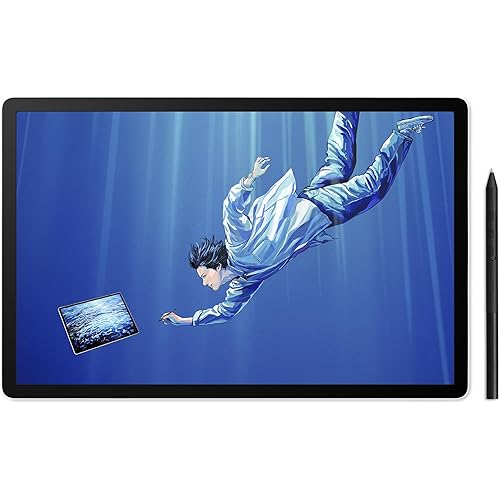
UGEE M708 V3 Graphics Drawing Tablet,10X6 Inches Digital Drawing Tablet with 8 Hot Keys 8192 Levels Pen Compatible with Chromebook, Linux, Windows 7/8/10/11, macOS 10.10

  • Based on 1,926 reviews
Condition: New
Checking for the best price...
$39.99 Why this price?
Save $280.00 was $319.99

Buy Now, Pay Later


As low as $9 / mo
  • – 4-month term
  • – No impact on credit to apply
  • – Instant approval decision
  • – Secure and straightforward checkout

Ready to go? Add this product to your cart and select a plan during checkout.

Payment plans are offered through our trusted finance partners Klarna, Affirm, Afterpay, Zip, Apple Pay, and Google Pay. No-credit-needed leasing options through Acima may also be available at checkout.

Learn more about financing & leasing here.

Selected Option

Free shipping on this product

FREE 30-day refund/replacement

To qualify for a full refund, items must be returned in their original, unused condition. If an item is returned in a used, damaged, or materially different state, you may be granted a partial refund.

To initiate a return, please visit our Returns Center.

View our full returns policy here.


Availability: In Stock.
Fulfilled by Amazon

Arrives Sunday, Sep 6
Order within 1 hour and 20 minutes
Available payment plans shown during checkout

Protection Plan Protect Your Purchase
Checking for protection plans...

Size: 10x6.25inch


Style: M708


Features

  • Powerful Compatibility: This drawing digital pen tablet performs well with Windows 11/10 / 8 / 7, macOS 10.10, Linux or above.Perfectly Compatibile with Autodesk Sketchbook/Krita/Photoshop CC/Illustrator/LightRoom/Corel Painter/drawing software
  • 8192 Pressure Stylus : Battery-free stylus technology offers 8192 levels of pressure sensitivity. Displayed clear on the screen with any pressure.This passive stylus can support mouse function, pen and eraser at same time
  • Large Space Sensitive Digital Drawing Tablets: Pro design UGEE M708 graphic drawing tablet, 10 x 6 inch large active drawing space with papery texture surface.Large active area allows u to release your inspiration perfectly
  • Intelligent Shortcuts Design:Support Shortcuts for 8 drawing softwares. open multiple software at the same time, our graphic tablet can intelligently detect the shortcut keys function of each drawing software when switching between softwares
  • Widely Uses:Works much well with UGEE driver. 8MM Thickness and Light enough to take anywhere. Even can use for remote education/conferencing. perfect for taking note, jotting down ideas and business signature during web conferencing and remote working

Description

Your first drawinng tablet Visit the Store Visit the Store Established in 1998, Ugee Graphic drawing tablet is a pioneer in the development of handwriting digitization hardware and software technology. Since its establishment, UGEE pen tablet has always focused on the research and practice of the coordinated application of the human body and digital technology. Specilized in the field of digital drawing and digital remote teaching. This digital drawing tablet not only provides you with spacious working area but also a true paper-feel drawing experience. The graphic art tablet comes with eight customizable press keys on the left side of the tablet, and you can set up the shortcuts according to your preference. Equipped with 5080LPI high resolution, 266RPS report rate, 8192 levels pen pressure sensitivity for no delay or no chopping excellent drawing experience. No need to worry about the efficiency of the art tablet. This UGEE M708 graphics tablet pen offers 8192 levels of pressure sensitivity. Passive stylus support pen tilts 0-60 degrees. What's important, our stylus drawing pen can switch between Pen and eraser at will that offer no-lag sketch, painting experience. Intelligent Shortcuts Design:8 customizable express keys for Drawing. Set up zoom in/out, brush size +/-, undo, hand, brush, eraser function as users’ habit. Improve productivity and efficiency for your drawing, far more convenient. Apart from commonly used Operating System, our R&D team has done more research and driver design for Linux, which support the tablet to be used in most platforms. UGEE Drawing pen tablet is a good partner for Online Education. The pen tablet offers excellent experience for online teaching and learning. Web conferencing, webinars, with screen sharing via Zoom, Google Keep, Google Jamboard's software, etc., improve your lecture efficiency. Our drawing tablet also suits your home office. Perfect for taking note, jotting down ideas, and business signature during web conferencing and remote working. The pen can replace your mouse during your video conference. Pro Design UGEE M708 graphic drawing tablet, 10 x 6-inch ample active drawing space with papery texture surface. Large active area allows you to release your inspiration ideally. Provides enormous and smooth drawing experience for your digital artwork creation.

Brand: UGEE


Connectivity Technology: USB


Pressure Sensitivity: 8192 levels


Operating System: Linux, MAC OS 10.10 or above, Windows 7 & above


Special Feature: Pressure Sensitive Pen


Brand: UGEE


Model Name: M708


Built-In Media: 1×UGEE M708 Graphics Tablet, 1×Drawing P01 Tablet Pen, 8 x Replacement Nibs, 1× Micro Cable, 1×Drawing Tablet Pen Holder, 1x Pen Clipper, 1×Drawing tablet Glove(Black), 1×English User Manual


Target Audience: Teacher


Model Number: M708


Manufacturer: UGEE


UPC: 850013593248


Mfr Part Number: UGEEM708


Color: M708


Connectivity Technology: USB


Pressure Sensitivity: 8192 levels


Operating System: Linux, MAC OS 10.10 or above, Windows 7 & above


Additional Features: Pressure Sensitive Pen


Specific Uses For Product: Multimedia


Compatible Devices: Autodesk Sketchbook/Krita/Photoshop CC/Illustrator/LightRoom/Corel Painter/drawing software, Chromebook, Linux, Windows 7/8/10/11, macOS 10.10


Display Type: LCD


Native Resolution: 5080


Screen Size: 1E+1 inches


Item Weight: 1.6 pounds


Item Dimensions L x W: 6"L x 10"W


Active Surface Area: 10 inches x 6 inches


Frequently asked questions

If you place your order now, the estimated arrival date for this product is: Sunday, Sep 6

Yes, absolutely! You may return this product for a full refund within 30 days of receiving it.

To initiate a return, please visit our Returns Center.

View our full returns policy here.

  • Klarna Financing
  • Affirm Pay in 4
  • Affirm Financing
  • Afterpay Financing
  • Zip Pay in 4
  • Financing through Apple Pay
  • Financing through Google Pay
Leasing options through Acima may also be available during checkout.

Learn more about financing & leasing here.

Top Amazon Reviews


  • A Great Affordable Tablet
This is my first real tablet and I love it. I feel like it definitely holds its own. It's very responsive and was easy to set up and install on my Windows PC. It feels well made. The size of the tablet and its overall quality can't be beat for the price. I highly recommend it.
Reviewed in the United States on July 24, 2026 by spikemtz

  • Great Tablet!
Been using this for quite sometime. I mainly use this for Photoshop and have never gone back to using my mouse for it. Works amazingly! I love it! I do use it for Krita every once in a while and it does great there too! I wish it was a little bigger in size to draw on but you do get used to it. It’s very light. And compatibility with other software and heck, even just using it as a simple mouse to navigate through the web is great. And if you’re starting out with something like this, I highly recommend using it as your standard mouse, makes for great practice! It may not come with a screen to draw on, but for the price, it’s definitely worth it! ... show more
Reviewed in the United States on February 11, 2026 by Safej16

  • Cost efficient
Works well and was a great price. I got a little water on it though and that spot bulged up. It still reads my stylus over that spot but it isn't flat anymore there. If you're looking for good value this item is great but definitely avoid spilling any liquid on it.
Reviewed in the United States on December 3, 2025 by Amazon Customer

  • Good hardware weak software
Very Good! Software however is a bit weak on win 11x64.
Reviewed in the United States on June 12, 2026 by Robert Charles Buck III

  • Great product
I'm new to digital illustration and got this way back in 2022, it's now 2026 and I've used it consistently and am very happy with the results. It was easy to set up . The adjustment of the features such as for sensitivity are straightforward. Out of the nine nibs the pen part came with, I've only had to use two. At least from my beginner's perspective, I love it. ... show more
Reviewed in the United States on March 17, 2026 by J.

  • Decent for the prices
I've worked with digital photo and image editing for a while, at a very basic level. I was looking for a simple pen and tablet to work on some more detailed stuff, and this works well. The sensitivity at the lower pressure levels seems, a bit inconstant, and hovering over the pad sometimes doesn't register unless I'm right on it. Which has caused me a few errors. But it's manageable. I didn't expect the 8 hot keys to feel so limited until I started using it more. Though there are many options and ways around that so it's not a big deal. The software is reasonably easy to use and setup hot keys for. I use GIMP primarily and I can use the major tools I need with these keys. Conversely, I was worried the lack of a screen would make it hard to use, but after a few minutes, it feels pretty natural to look at a screen while my hand words on the tablet. Perhaps if I was working on much more precise elements, it might be an issue. But for what I'm doing, it's fine. I'm able to what I wanted with this tablet, and the price is very reasonable for what it is. I think this is a perfect entry level device for someone just starting out looking to "dabble" in digital/computer art. ... show more
Reviewed in the United States on May 30, 2024 by Rocco

  • Budget pro tablet works on Linux, Windows, and Mac
I needed to replace a tablet that broke. I was using an old beat up back up. I became a Linux user long ago. I started using MyPaint on Windows long ago. I then started using it on Linux along with Krita. I also use Photoshop, ArtRage, Sketch, and at times use drawing tablets in vector in Windows. So needed a tablet that was going to work in Windows and Linux. Other alternative tablet makers are helping the Linux community, but the UGEE team stated they tested this out on Linux. They obviously did as the supply the driver settings software in .deb, and .rpm for various Linux families (Ubuntu, Debian, Fedora, etc. based distros). It is possibly a best buy budget pro specs tablet. If Linux work environment is important to you - this is an obvious choice. Build quality is similar to the first generation M708 I have. There is some design upgrading. It was a good tablet in first gen, and now much better in third generation. If I get a chance I will check in with a more in-depth report, but I expect it to be as dependable as the first gen it is replacing. I find it works just fine so far. I have been using digital art tablets since early WACOMs back in the Mac Quadra era. I have become tablet vendor neutral. I only care that a tablet works well, and at a convenient price. I do a variety of work. Not all my work requires using a tablet, and I also work in traditional medium. Tentatively I give it 5 stars. Reasons: it works in the desktop environments I need it to work. More over, they supply driver settings software for Linux. It is a very good price for performance! It is handling nicely, as I am used to this size tablet. This tablet appears to be a best buy budget pro specs tablet. ... show more
Reviewed in the United States on October 25, 2021 by uberzilla

  • Good
I like using this to draw or play drawing games. Although it is a tad bit complicated while setting up it was very fun to use after figuring it out
Reviewed in the United States on March 18, 2022 by Skylar

Can't find a product?

Find it on Amazon first, then paste the link below.
Checking for best price...