Search  for anything...

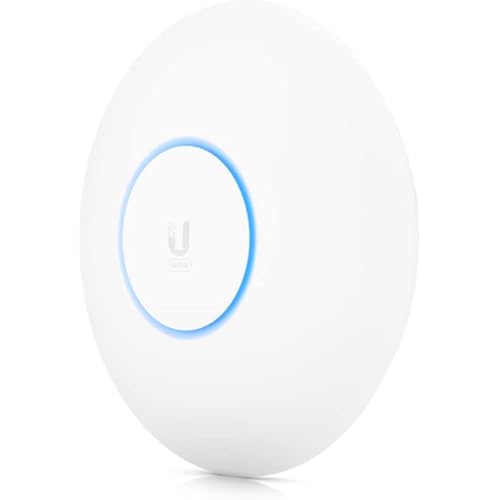
Ubiquiti UniFi UBB-US IEEE 802.11ad 1.70 Gbit/s Wireless Bridge

Based on 100 reviews
Condition: New
Checking for the best price...
$565.51

Buy Now, Pay Later


As low as / mo
  • – Up to 36-month term if approved
  • – No impact on credit to apply
  • – Instant approval decision
  • – Secure and straightforward checkout

Ready to go? Add this product to your cart and select a plan during checkout.

Payment plans are offered through our trusted finance partners Klarna, Affirm, Afterpay, Zip, Apple Pay, and Google Pay. No-credit-needed leasing options through Acima may also be available at checkout.

Learn more about financing & leasing here.

Free shipping on this product

This item is eligible for return within 30 days of receipt

To qualify for a full refund, items must be returned in their original, unused condition. If an item is returned in a used, damaged, or materially different state, you may be granted a partial refund.

To initiate a return, please visit our Returns Center.

View our full returns policy here.


Availability: In Stock.
Fulfilled by Amazon

Arrives Sunday, Nov 8
Order within 10 hours and 1 minute

Available payment plans shown during checkout

Protect Your Purchase

Easy claims online, fast replacements, no fees

Checking for protection plans...

At a glance

Condition
New
Weight
13.28 oz
Color
White
Antenna
Radio
Impedance
50 ohm
Maximum Range
500 meters
Mfr Part Number
UBB-US
Warranty
1 year Manufacturer

Features 3

  • Low-Interference 60 GHz Radio Band
  • 5 GHz Radio for Backup
  • Pre-Paired Radios for Quick Setup Using UniFi App

Description

1.7+ Gbps bi-directional Plug and Play 60 GHz Bridge with 5 GHz Radio Redundancy, UniFi Network Application, and range of up to 500 m UniFi® Building-to-Building Bridge is the ideal solution for short-range, high- throughput connectivity. Integration with the UniFi Network Application makes bridging two networks seamless. As a pack of two radios, UniFi Building-to- Building Bridge contains everything you need to get up and running within minutes. Enjoy simple, easy-to-use gigabit connectivity anywhere.

Specs 17

Antenna Radio
Brand Ubiquiti Networks
Color White
Number of Channels 2
Impedance 50 ohm
Maximum Range 500 meters
Manufacturer UBIQUITI
Number of Packs 1

Frequently asked questions

If you place your order now, the estimated arrival date for this product is: Sunday, Nov 8

Yes, absolutely! You may return this product for a full refund within 30 days of receiving it.

To initiate a return, please visit our Returns Center.

View our full returns policy here.

  • Klarna Financing
  • Affirm Pay in 4
  • Affirm Financing
  • Afterpay Financing
  • Zip Pay in 4
  • Financing through Apple Pay
  • Financing through Google Pay
Leasing options through Acima may also be available during checkout.

Learn more about financing & leasing here.

Top Amazon Reviews


Simple setup, reliable and fast performance
I replaced a pair of PowerBeam dishes with these. I did not need the range of the PowerBeams and they were old, causing problems with my Unifi network. The UBBs installed easily, had a great LED alignment system which allowed me to align both by myself, installed easily, and have performed reliably with good data speed. Not cheap, but worth the price. ... show more
Reviewed in the United States on May 9, 2024 by William Jordan

Easier installation than expected. Works excellent.
I installed this bridge between the house and barn which are about 400 feet apart. I was completely blown away at the ease of installation and how well they worked. The internet speeds at the house are around 80-100Mbps down and 15-20Mbps up. I got full speed out at the barn with this bridge. I completely expected to have to tweak the alignment to get a strong signal. However just eyeballing the alignment gave a 100% connection signal. I was fortunate to have a clear line of site between the two units, going between two trees. The transmitter on the house side was mounted on the outside wall about 8-10' from the ground, whereas the receiver was mounted on the barn above the barn door about 15' from the ground. Plus the barn elevation is a bit higher than the house, so there may be anywhere from a 5-8' height variation between the two units. So there really isn't any tweaking required. Just point them at each other and viola. While it's not the least expensive bridge on the market, it's definitely worth the money spent. Plus if you have any other Ubiquiti devices, which I do, it's adopted seamlessly into your existing Unify controller. ... show more
Reviewed in the United States on November 16, 2021 by Frankie Aponte

Works great as expected!
We used these to bridge between 2 buildings just a few hundred feet away. Obviously this is best case scenario for this type of application and I have no complaints as far as the connectivity and ease of use. They come paired already.
Reviewed in the United States on May 23, 2025 by T

Zippy throughput but lacking good install instructions
I bought these bridges to replace a pair of Netgear Airbridges that had limited throughput. I was using them to beam the Internet from my house to my office about 90 feet away. My Comcast Business internet plan speed is 800 mbps download/35 mbps upload.. The best I could get in rural MA. The best the Airbridges allowed was 45 mbps download. I installed these Ubiquiti UBB units a few days ago. The Quickstart "instructions" were pretty useless because there were really no steps to follow. The part about using their Gateway Switch or CloudKey was confusing, since no alternative method was listed. I just wanted to plug into my cable modem/router (Technicolor rental). Anyway, that's what I did, replacing the existing PoE injectors from the two AirBridge's with the ones supplied by Ubiquiti, Lan to Lan, PoE to the units. I already had Cat8 shielded outdoor cables installed to the exterior mounts. I aimed them by eye as best I could and powered them up. The LED around the unit lit up in multicolors — red, green, blue. The Quickstart said something about all green meaning they are in alignment, so I adjusted them until they were green. To my eye, they were each pointed slightly downward. I downloaded the Network Administrator app from the AppStore to my iPhone, but it was just the useless Quickstart instructions. I also downloaded the Unifi app for my MacBook Pro. No connectivity. Took a break for a party. Later that evening, somehow I stumbled upon a Devices screen in the Unifi app which gave me the option to Adopt each device. Then a firmware update mysteriously happened. I looked outside, and the LEDs were now blue, meaning they were transmitting the signal. Can't say specifically how that all took place, but whew, glad it happened. Tests on Speedtest.net were now as fast as 801 mbps download and 41 mbps upload, depending upon the server. And the Unifi app says I have 100% connectivity. A huge improvement! That first day was after a rainstorm. We had a snowstorm yesterday and throughput was good. Today it was about 2 degrees F and still good throughput at around 750 mbps/38 mbps. A good investment and big improvement for my productivity. Just need to provide numbered setup instructions which include plugging into a cable modem/router. I turned off the blue LED ring on the edge of the units. I don't want neighbors to be aware of them. ... show more
Reviewed in the United States on January 21, 2025 by Azurelink

These really saved my you know what.
Long story short, I moved to a new building on the other side of an office complex. Our Internet provider completely dropped the ball and didn't get the fiber run in time (we're still likely a month out). We literally got the keys to a building we're paying $50k/month rent on before having our Internet. Luckily about 2 weeks before we got the keys, I bought these as a contingency plan. Luckily the dmarc of my old building and new faced each other. They're 76 meters apart. I got permission from the property manager to install these as long as I promised to repair the holes when I ultimately remove them. Got them setup and pointed the first time. Installed them about 16' off the ground to avoid any delivery trucks breaking line of site. I've been using these for about 6 weeks now and have had absolutely ZERO problems. I have a fully symmetrical gig circuit. Normally I would see 945 up/down when hard wired. I just took this speed test and I'm at 762/742 up/down. Keep in mind I have 75 people in this office (we're a call center) on voip phone calls and using our cloud-based applications. We're also serving some external sites off this as well, including VPN for remote users. In addition, Five9, our voip provider, had us run their tool to determine if our site will be capable of running their services and we came back with an "Excellent" rating for up to 167 users. ... show more
Reviewed in the United States on May 26, 2022 by mike ingoglia

Great until it breaks
These work very well to connect a building that is about 1/2 a mile away line-of-sight. Most of the time it is running at 5Ghz, but I've seen it at 60 too. Either way, it moves sufficient traffic for several cameras and internet at that location. The alignment feature with the lights is quite nice too. Love that feature. HOWEVER, this thing seems susceptible to electrical storms. We had one come through about 3 miles away (so not even close to a nearby hit) and one of the units failed. Yes, it is properly grounded and uses well insulated and shielded CAT6a. The worst part about it is that you can't get one replacement, you have to buy another pair. So I might just go back to the locom5. ... show more
Reviewed in the United States on December 15, 2023 by Jon

A little pricey but worked
Replaced an old Engenius wireless bridge. Easy install and got it connected to our Unifi AP controller. The WB signal passed through a large tree with full branches at 91% signal strength
Reviewed in the United States on May 4, 2024 by Fred

Junk. Won't even align at short distances let alone 100ft.
I was trying to use this to go from my house to my metal shed then use a wireless router in the shed to disperse my internet. A cable works wonders but is in the way a lot. I got this to stop using the cable. However this is not worth buying as it is not the equivalent of a wireless cable unless it can actually be aligned. If I can't align it within 6ft, going to another building is impossible.0/10 wasted my money. ... show more
Reviewed in the United States on October 14, 2023 by Barrett
Checking for best price...