Search  for anything...

Ubiquiti Networks Networks Networks UniFi AP AC In Wall

  • Based on 582 reviews
Condition: New
Checking for the best price...
$179.95 Why this price?

Buy Now, Pay Later


As low as $29.99 / mo
  • – 6-month term
  • – No impact on credit to apply
  • – Instant approval decision
  • – Secure and straightforward checkout

Ready to go? Add this product to your cart and select a plan during checkout.

Payment plans are offered through our trusted finance partners Klarna, Affirm, Afterpay, Zip, Apple Pay, and Google Pay. No-credit-needed leasing options through Acima may also be available at checkout.

Learn more about financing & leasing here.

Selected Option

Free shipping on this product

FREE 30-day refund/replacement

To qualify for a full refund, items must be returned in their original, unused condition. If an item is returned in a used, damaged, or materially different state, you may be granted a partial refund.

To initiate a return, please visit our Returns Center.

View our full returns policy here.


Availability: Only 6 left in stock, order soon!
Fulfilled by Amazon

Arrives Oct 10 – Oct 14
Order within 22 hours and 36 minutes
Available payment plans shown during checkout

Protection Plan Protect Your Purchase
Checking for protection plans...

Model: UAP-AC-IW


Configuration: Wireless Access Point


Features

  • Ubiquiti Networks networks networks networks Unifi AP AC in wall

Description

Ubiquiti Networks networks networks networks Unifi AP AC in wall

Brand: Ubiquiti Networks


Model Name: UAP-AC-IW


Special Feature: WPS


Frequency Band Class: Single-Band


Wireless Communication Standard: 802.11ac


Compatible Devices: Most all devices


Recommended Uses For Product: Indoor


Included Components: Part


Connectivity Technology: Wi-Fi


Color: White


Other Special Features of the Product: WPS


Frequency Band Class: Single-Band


Wireless Compability: 802.11ac


Compatible Devices: Most all devices


Antenna Location: Indoor


Connectivity Technology: Wi-Fi


Antenna Type: Internal


Operating System: UBNT System


Security Protocol: WEP


Number of Ports: 1


Control Method: App


Data Transfer Rate: 867 megabits_per_second


LAN Port Bandwidth: 150 Mbps


Voltage: 24 volts


Maximum Upstream Data Transfer Rate: 867 megabits_per_second


Number of Antennas: 1


Router Firewall Security Level: Basic


Wi-Fi Generation: Wi-Fi 5


Router Network Type: Wireless


Connectivity Protocol: wi-fi


Controller Type: android, ios


Coverage: Small Indoor Spaces


Frequency: 5 GHz


Brand: Ubiquiti Networks


Model Name: UAP-AC-IW


Built-In Media: Part


Model Number: UAP-AC-IW


Unit Count: 1 Count


UPC: 709257387840 810354026195 703624197827


Number of Items: 1


Global Trade Identification Number: 95


Manufacturer: Ubiquiti


Item Type Name: Ubiquiti UniFi AP AC In Wall


Mfr Part Number: UAP-AC-IW


Warranty Description: Year


Item Weight: 7.04 ounces


Item Dimensions L x W x H: 5.5"L x 3.41"W x 1.01"H


Color: White


Frequently asked questions

If you place your order now, the estimated arrival date for this product is: Oct 10 – Oct 14

Yes, absolutely! You may return this product for a full refund within 30 days of receiving it.

To initiate a return, please visit our Returns Center.

View our full returns policy here.

  • Klarna Financing
  • Affirm Pay in 4
  • Affirm Financing
  • Afterpay Financing
  • Zip Pay in 4
  • Financing through Apple Pay
  • Financing through Google Pay
Leasing options through Acima may also be available during checkout.

Learn more about financing & leasing here.

Top Amazon Reviews


  • Perfect for the WiFi dead spot if you have access to a network drop to plug it into
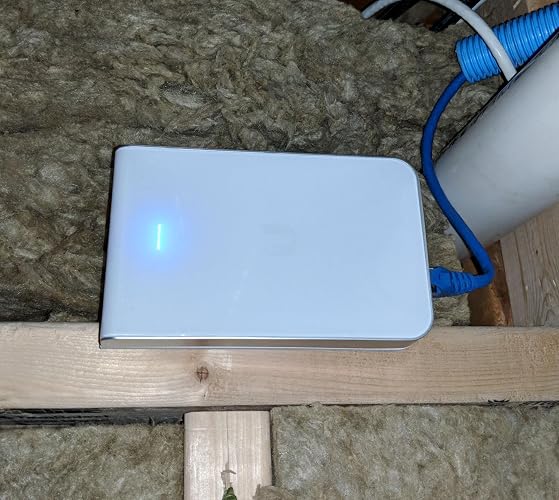
This is the product that you need if you have a WiFi dead spot in your house or place of work. * Extremely easy to install and I had it up and running in less than thirty minutes. This was install and adoption within the controller. * Comes with all the hardware you need to install it onto an outlet box. I had a low voltage box installed in my HVAC area (hence the reason the box is sideways, the picture orientations are correct) ***NOTE you will need a network drop wherever you choose to install this UAP that goes to a POE switch*** * This UAP makes a nice addition to my UNIFI Eco system. * Feels nice and hefty in your hand and not cheap. Well made * After plugging it into my Ubiquiti US-8-60W Unifi Switch it came right up in my Unifi controller. I was able to adopt and then manage it with no issues. * Gives out a strong signal and covers the dead spot I had in my house and it even extends to my backyard and side of house. * The UAP does get a little warm to the touch, but I located mine in the HVAC room and then have a cable from there feeding my other switch two floors up. So getting warm is not an issue for me as it is out of the way. * In the coming months I will be using this UAP to power the Ubiquiti UAP-AC-M-US Unifi Mesh Access Point and will update if I have any issues. ... show more
Reviewed in the United States on December 15, 2017 by Pohakurock

  • Fills in the gaps
These are great little APs for those places where you just can't put a giant UFO on the ceiling. I have a single AC pro in my two story foyer, but it doesn't cover the entire house or the devices just outside. 2.4ghz band covers well, but 5ghz just didn't want to reach where I wanted it. Putting another AC pro downstairs would have been difficult. The on wall AP fills in my coverage gaps very nicely. I ended up putting 4 of these around the outside walls of the house where the coverage fell off. In a 3k square foot, 2 story house, it's probably overkill, but now I'm strong 5ghz in every corner of the house! Do your homework on AP placement. Walk around your house with an app like wifiman and make note of the dead spots. Also, my house already had a network drop in every room, so installation was stupid easy. Keep in mind, the drops might not be in the ideal spot. Experimentation might be required to hit that sweet spot. Now go forth and get all the WiFis! ... show more
Reviewed in the United States on January 26, 2020 by Total Geek

  • Great low-profile AP solution
What a cool little AP! I have this running on an EdgeRouter X in a 2 bedroom condo and it's providing great coverage. It is powered by 48V PoE (NOTE: make sure you are getting the right voltage!) You get dual Gigabit ethernet and a PoE passthrough if you want it. The form factor makes it great for installing into an existing wall box -- I could see making this the main solution for a whole-house wifi if you needed it, adding as many as you want. I'm currently testing it outside the wall but plan on installing it to replace a plain Ethernet jack soon. I'll update the review with installation experiences once I do so. To set it up, you need to install the Unifi controller on a PC or laptop and "adopt" / configure the various AP's. It's one extra step at the beginning but worth it -- I added this as a backup radio to my UAP-AC-LITE, and they chained up without a hitch. Unifi has built in diagnostics, RF site surveying, floor-plan signal mapping, and will apparently give you some advanced usage data if you chain it to a Unifi Security Gateway. Note that for best performance, you'll want to turn off the "legacy" B/G/N 2G radio and use 5G only, or else older devices will default to 2G. I haven't played with the advanced settings yet, but so far so good. ... show more
Reviewed in the United States on October 27, 2018 by Ray

  • Really Nice WAP for Home Use (for the technically-inclined)
I have a 2000 square foot house (2 story colonial) which was wired with ethernet cable many years ago, before WiFi became the connection method of choice. I installed two of these in-wall WAPs, using existing ethernet outlets. (I simply pushed each keystone jack back into the wall and used a 6-inch jumper to go from the keystone jack to the WAP.). One WAP is located on the first floor at the northern end of the house and the other is on the second floor, at the southern end of the house. Their signals essentially overlap in the middle of the house. The two WAPS provide excellent coverage for the entire house, really good signal strength throughout. They are powered by a UniFi POE switch which resides on a shelf in my networking rack down in the basement. (But you can instead use the included POE injector.). To configure the WAPs I use a UniFi Cloud Key Controller. Admittedly, the typical homeowner may not have the technical ability to deploy devices of this nature, but if you have a hard-wired ethernet and some technical ability, this is a very nice way to provide WiFi. These devices work well and are very unobtrusive. I'll bet that a visitor to my house would never even notice them. ... show more
Reviewed in the United States on August 30, 2020 by 3Bikes

  • Very good AP, nice addition to the Unifi line.
This AP is a nice upgrade from the prior in wall model AP. Looks good and the ports coming out of the bottom help avoid breakage since in the home all the wall outlets usually has some furniture in front of it. I get very good speeds in the 200-400 Mbps on 5G. I have Ubiquiti AP Pro AC (the full sized round one) which I brought home an tested. Speeds were no faster than the in wall. The reason for only four stars is the long phillips head screws that you are supposed to use to bolt the back-plate to the wall are total CRAP. Using a very nice screwdriver the first two I tried totally stripped the head out before getting all the way in. After I had to remove the second screw with a pair of pliers I tossed the rest in the trash and reused the screws from the original cover. The small screws that attach the AP to the back-plate work fine. I'm using four of these along with the 16 port switch, USG-3p Gateway and a cloud key. You don't have to use a cloud key to control the APs, you can install the Unifi controller software on your PC. It was a bit of work getting it all going but totally worth the money and the effort. I have good solid wifi around the house with about every flavor of device connected wired or wifi. Xbox one, Roku 3, Amazon Dots, HP in wall switches (NJ5000), DirectTv, iPad, Samsung tablet, Microsoft Surface Pro 3/4, Samsung Note 5 phones, Harmony Hub,HP Printer, TP-Link Mini 10, and HS200 light switch. Unifi software and the android app are great for setting what's on your network and what it's doing. ... show more
Reviewed in the United States on May 9, 2017 by R. Andersen

  • I threw away all my non-Ubiquiti products after buying this.
Ubiquiti products are just on another level entirely. After installing this product, along with one of their PoE switches to power it, I replaced all the networking equipment in my house with Ubiquiti products. They are that good. It is silly to use anything else. A few things to be aware of. Unifi is a product line of Ubiquiti. Products in the Unifi line all use the same controller software and can be seen by the software. But products that are not in the Unifi line, such as the ER Lite router, will not be seen by the controller software. So make sure you buy products from the same product family, which is probably Unifi unless you are a global corporation. Why are Ubiquiti products so much better than consumer grade products? Because they can handle more than 100 Mbps connections, which are becoming more common now, because they can be managed, configured, and upgraded via controller software, because you can see the Wifi coverage in your house, because the Wifi access points coordinate with each other to hand off client connections. It is like being reborn. Say goodbye to network problems. ... show more
Reviewed in the United States on February 21, 2018 by Hank

  • Great to bring wireless to an old facility on existing wires
I had to retrofit an old building. I didn't expect much but when we tested the old wiring it certified as reliably 1Gb capable. I used these then to update key wall plate all over the building and ended up covering almost the entire site without pulling any add'l cable and without having to give-up the wall port -- and even gained a port. The rare win-win! You "can" power these from a standard 802.3af port in a pinch (or on accident) but know that they are designed to be fed by an 802.3at PoE+ port as that's required to get reliable full use of the PoE port on this device. Otherwise you run the risk of demanding more power than 802.3af can provide with the corresponding unexpected results. Installing these could hardly be easier, took maybe 10 minutes at each location to convert it with one of these. It was the fastest WiFi deployment I've ever done and the site has been very stable going on 5 months of very heavy use. So these are great for retrofits but, frankly, for the ease of access and flexibility I'd consider these for even a brand new installation. One of the great features is that each port can be assigned a different VLAN. These are basically WiFi + a 3 port manged switch (2 ports usable). The back port can be on a managemant vlan while the 2 user-accessible ports can be assigned to the same VLAN or their own -- useful, for example, if you want to keep a Phone off the Data+PoE port on one VLAN, and a printer or workstation off the Data port on another. Coverage is overall very good, with a slightly weaker signal pattern in the wall direction. Due to this it's probably best to consider putting on these on walls such that the face points toward the area you want cover as much as possible. In my case I basically did a ring around the building, placing these on the inside of the outer walls whenever possible. Signal to the sides and front seems pretty fantastic. I've had no issues whatsoever, they cover much better than I expected. ... show more
Reviewed in the United States on December 13, 2018 by Stark

  • As easy to setup as any other UniFi product - adopt
As easy to setup as any other UniFi product - adopt, update, profit! Lets be clear, its not exactly "in" the wall, but its a slim enough profile and a decent looking device that it won't offend. It's got 2 ethernet ports too, one of which has pass through PoE that I use to power a Switch 8. If my whole house was wired, I would get one of these for every room. Since only a few rooms are, I have just one of these at the far end of the house where it only serves my office. That said, I can't speak to its performance with a ton of devices, but speeds are very good for a the 5 thing in here that use it. To power it, I have a Switch 8 PoE in my wire room. Cat 5e was installed by the home builder and its got to be at least a 75ft run. There is no problem getting full power and speed to this device. ... show more
Reviewed in the United States on May 13, 2018 by Carl

Can't find a product?

Find it on Amazon first, then paste the link below.
Checking for best price...