Search  for anything...

TP-Link EAP610 Omada Business WiFi 6 AX1800 Wireless Gigabit Access Point - Support Mesh, OFDMA, Seamless Roaming & MU-MIMO, SDN Integrated, Cloud Access & Omada App, PoE+ Powered, White, Dual-Band

  • Based on 9,135 reviews
Condition: New
Checking for the best price...
$79.97 Why this price?
Save $20.02 was $99.99

Buy Now, Pay Later


As low as $13.33 / mo
  • – 6-month term
  • – No impact on credit to apply
  • – Instant approval decision
  • – Secure and straightforward checkout

Ready to go? Add this product to your cart and select a plan during checkout.

Payment plans are offered through our trusted finance partners Klarna, Affirm, Afterpay, Apple Pay, and PayTomorrow. No-credit-needed leasing options through Acima may also be available at checkout.

Learn more about financing & leasing here.

Selected Option

Free shipping on this product

FREE 30-day refund/replacement

To qualify for a full refund, items must be returned in their original, unused condition. If an item is returned in a used, damaged, or materially different state, you may be granted a partial refund.

To initiate a return, please visit our Returns Center.

View our full returns policy here.


Availability: Only 10 left in stock, order soon!
Fulfilled by Amazon

Arrives Tuesday, May 5
Order within 15 hours and 29 minutes
Available payment plans shown during checkout

Protection Plan Protect Your Purchase
Checking for protection plans...

Style: Indoor WiFi6


Size: AX1800+1G Port


Features

  • Designed with the latest wireless Wi-Fi 6 technology featuring 1024-QAM and Long OFDM Symbol
  • Compact design ensures simple installation while saving space
  • Remote Cloud access and Omada app
  • Supports Mesh WiFi, Seamless Roaming

Description

AX1800 Ceiling Mount Wi-Fi 6 Access Point

Brand: TP-Link


Model Name: EAP610 V2


Special Feature: WPS


Frequency Band Class: Dual-Band


Wireless Communication Standard: 802.11ax


Compatible Devices: Personal Computer


Recommended Uses For Product: Business, Home


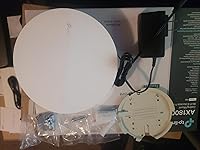
Included Components: 12V / 1.5A DC Power Adapter, Ceiling/Wall Mounting Kits, EAP610 V2, Installation Guide


Connectivity Technology: Ethernet


Color: white


Other Special Features of the Product: WPS


Frequency Band Class: Dual-Band


Wireless Compability: 802.11ax


Compatible Devices: Personal Computer


Antenna Location: Business, Home


Connectivity Technology: Ethernet


Operating System: Open Wrt OS


Security Protocol: WPA3


Number of Ports: 4


Control Method: App


Data Transfer Rate: 1800 Megabits Per Second


LAN Port Bandwidth: 10/100/1000 megabits per second


Voltage: 12 Volts


Maximum Upstream Data Transfer Rate: 1201 Megabits Per Second


RAM Memory Installed: 256 MB


Number of Antennas: 2


Wi-Fi Generation: WiFi 6


Is Modem Compatible: Yes


Connectivity Protocol: Wi-Fi, Ethernet


Coverage: Extensive


Controller Type: Switch


Is Electric: Yes


Frequency: 5 GHz


Brand: TP-Link


Model Name: EAP610 V2


Built-In Media: 12V / 1.5A DC Power Adapter, Ceiling/Wall Mounting Kits, EAP610 V2, Installation Guide


Model Number: EAP610


UPC: 840030707773


Manufacturer: TP-Link


Mfr Part Number: EAP610 V2


Item Type Name: Access Point


Warranty Description: Limited Lifetime Warranty


Item Weight: 0.39 Kilograms


Item Dimensions L x W x H: 6.3"L x 6.3"W x 1.32"H


Color: white


Frequently asked questions

If you place your order now, the estimated arrival date for this product is: Tuesday, May 5

Yes, absolutely! You may return this product for a full refund within 30 days of receiving it.

To initiate a return, please visit our Returns Center.

View our full returns policy here.

  • Klarna Financing
  • Affirm Pay in 4
  • Affirm Financing
  • Afterpay Financing
  • PayTomorrow Financing
  • Financing through Apple Pay
Leasing options through Acima may also be available during checkout.

Learn more about financing & leasing here.

Top Amazon Reviews


  • Fantastic mesh AP - Unifi competitor
Style: AX1800
I was in the market for new APs and had a few criteria: Centralized Management Gigabit+ Speed WiFi 6 or higher Wireless Mesh I was heavily considering Unifi U6 Pros, but the lack of wireless mesh functionality and the $159 price tag kept me searching for a better solution. When I came across these for half the price I had to take a chance, and I am glad I did. I installed the controller in a linux VM on my current ESXi host with no difficulty at all. If you have any linux and virtualization experience at all following the instructions is a piece of cake. To top it off, the software is free. I already have an extensive networking infrastructure built out, or I would be very tempted to pick up some of their SDN routers. Configuring the APs to work with PFSense vlans through a Cisco switch was not the easiest thing in the world, but within a couple of hours I was up and running. The control plane for the APs utilizes untagged traffic, so you will need to account for this when building your switch configs. After you figure that out adding VLANs and tying them to SSIDs could not be easier. My SDN controller has no internet access and still maintains full functionality. I get 100% coverage of my 1,800 sqft single story house and pretty good coverage in the driveway with just two access points. I get near gigabit speeds locally and my full 500mbps to the internet (depending on proximity to the APs, but more than satisfactory). For $80 each I could not be happier. Will be recommending these to friends as a good alternative to unifi. If you don't have much networking experience you may get frustrated as the SDN controller is required for wireless mesh to work. ... show more
Reviewed in the United States on January 10, 2025 by Amazon Customer

  • Fast shipping, great product
Style: AX1800| Festa
The TP-Link AX1800 Access Point is an outstanding device that truly delivers on its promises! Setting it up was a breeze, with clear instructions and an intuitive interface. The dual-band Wi-Fi 6 technology provides blazing-fast speeds and exceptional reliability, even in a busy household with multiple devices. One of the most impressive aspects is the wide coverage range—dead zones in my home are now a thing of the past. The device handles high-bandwidth activities like streaming 4K content and online gaming effortlessly, ensuring a lag-free experience. Its sleek design blends seamlessly into any environment, and the management options via the Tether app make monitoring and adjusting settings incredibly convenient. If you're looking to upgrade your home network with reliable, high-speed internet, the TP-Link AX1800 is a fantastic choice! ... show more
Reviewed in the United States on January 17, 2025 by zakk zakk

  • Good unit
Style: AX1800
Excellent unit. I use it in standalone mode. Good signal good speed. Easy install. To be honest my best wifi accesspoint experience up to date. Cant wait to try the mesh option for a bigger network.
Reviewed in the United States on June 11, 2025 by Jort Barenbrug

  • Great Device, Easy to Set-up
Style: AX1800 | Outdoor
This thing is amazing. We used it in a field that has two little league baseball diamonds. It easily provides coverage for the entire field which is 300 feet in any direction from the device. Very easy to setup as well as a stand-alone unit. I would highly recommend this unit.
Reviewed in the United States on June 17, 2025 by Southport

  • works fairly well; somewhat easy to install; almost lives up to the hype
Style: AX1800
Like most, I have a few rooms in the house that dont receive a strong signal from my (xfinity) router. I finally found a fast, easy solution to solve the problem - moca connectors. Moca connectors use your cable outlets to distribute your internet signal throughout your house, without impacting your cable signal. Read my review on the Powerbeam moca connectors if you want to learn more. Moca connectors send the signal throughout your house, but the signal is delivered at the receiving end via ethernet cable. I wanted a wireless solution (rather than hard wired - no ethernet connection on the cell phone!) so I purchased the TP-Link 1800 to use as a wireless access point (WAP - see I learned something in all my research!). The hook up of the device is simple - power it up by plugging the A/C plug into the wall, and then connect the moca device to the TP-link with the supplied ethernet cable. The installation is completed using your cell phone and the TP-link app called Omada. As other reviewers have recommended, follow the instructions closely. In the end, it was not too complex for a non-techie like me. Install the app on your phone, power up the WAP device, go to your phones wifi section and select the 2.4 or 5.0ghz signal (the full address of the signal corresponds to the address on the bottom of the TP-Link device), select that signal, then the app should tell you that no devices are hooked up and ask you for permission to access a local network. After giving the device permission to access your wifi network, you then are asked to name your WAP connection, fill in your network SSID name and password, and you are online. So I am now receiving 500+Mbps wi-fi signals in rooms which previously were dead zones. So why not five stars? Contrary to what I "thought" I understood, this device does NOT use the same SSID as your router / home network (NOTE: there is an exception noted below). I had read on the manufacturers website that you could use a single SSID name, and your device would transfer amongst access points as devices moved amongst the network - e.g. This solution for example does not automatically transfer from the WAP to the router and back as you move within the house. You have to manually select the signal / SSID you wish to connect to, in order to get the optimal signal I talked with the TP-Link help desk. Technically their marketing material is not wrong and you can have a seamless, roaming solution. However in order to achieve this, I was told that all the equipment - i.e. router and WAP, along with any relay points (I dont have any relays) need to be TP-link equipment, and running on the Omada software in order to manage the seamless transfers as you roam. in other words, my Comcast router and the TP-link cannot hand off to one another. So in this instance, if you dont have a TP-Link router / modem, you need to name your WAP separately from your router (i.e. different SSID's) so you can select the most optimal connection point as you move within the house. In conclusion, this is product is constructed quite well and works efficiently. Dont waste your time on range extenders or those Powerline / xfinity pod solutions (rubbish). Other than having to manually update access points as you roam, the device provides a strong wireless signal in rooms that were previously dead zones. ... show more
Reviewed in the United States on January 25, 2025 by kc

  • Wifi outside now
Style: AX1800 | Outdoor
Tried a wifi extender fist to get wifi in the backyard for my security cameras but it didn't work. Set this up as an access point AP and it has worked perfectly with wifi throughout the back yard. Watched a video to help with setup but it was pretty straight forward. Much easier to setup than a ubiquiti AP I had used in the past. ... show more
Reviewed in the United States on June 24, 2025 by JG

  • The solution!
Style: AX1800
This little thing solved all the problems that I had with my 2.4G network. My cameras work only on 2.4, not on 5G, and although the internet we have is the best that there is in the US, the 2.4 was not reliable. As soon as my IT support suggested this, and I connected it, the cameras started working perfectly and never since then have lost connection. ... show more
Reviewed in the United States on July 17, 2025 by M. S. M. S.

Can't find a product?

Find it on Amazon first, then paste the link below.
Checking for best price...