Search  for anything...

TP-Link Archer BE24000 Quad-Band WiFi 7 Router (Archer BE900)

  • Based on 212 reviews
Condition: New
Checking for the best price...
$699.99 Why this price?

Buy Now, Pay Later


As low as / mo
  • – Up to 36-month term if approved
  • – No impact on credit to apply
  • – Instant approval decision
  • – Secure and straightforward checkout

Ready to go? Add this product to your cart and select a plan during checkout.

Payment plans are offered through our trusted finance partners Klarna, Affirm, Afterpay, Zip, Apple Pay, and Google Pay. No-credit-needed leasing options through Acima may also be available at checkout.

Learn more about financing & leasing here.

Selected Option

Free shipping on this product

FREE 30-day refund/replacement

To qualify for a full refund, items must be returned in their original, unused condition. If an item is returned in a used, damaged, or materially different state, you may be granted a partial refund.

To initiate a return, please visit our Returns Center.

View our full returns policy here.


Availability: In Stock.
Fulfilled by Amazon

Arrives Friday, Sep 18
Order within 7 hours and 59 minutes
Available payment plans shown during checkout

Protection Plan Protect Your Purchase
Checking for protection plans...

Style: 24Gbps, 10G Port


Features

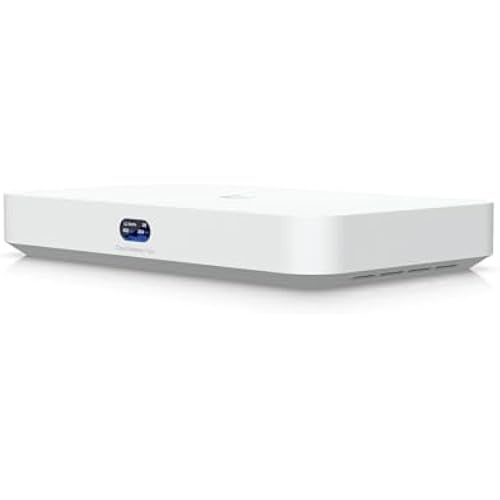
  • REDEFINING WI-FI ROUTERS: With powerful Wi-Fi 7 performance, lightning-fast wired connections, brand-new design, and easy-to-use touchscreen and LED screen. All WiFi routers require a separate modem.
  • LIGHTNING-FAST QUAD-BAND WIFI 7: Enables your devices to run at full speed. Enjoy fluent 4K/8K streaming, immersive AR/VR gaming, and unbelievably fast downloads. Performance varies by conditions, distance to devices, and obstacles such as walls.
  • DUAL 10G PORTS: 1 10 Gbps Ethernet/Fiber Combo WAN/LAN port plus 1 10 Gbps WAN/LAN port plus 4 2.5 Gbps ports plus 1 1 Gbps port plus 2 USB ports ensure max flexibility and boosted throughput.
  • MAXIMIZED COVERAGE: Proprietary Wi-Fi optimization and 12 optimally positioned antennas along with Beamforming deliver more capacity, stronger and more reliable connections, and less interference.
  • EXTEND YOUR COVERAGE WITH EASYMESH: Pair the Archer BE900 with any EasyMesh-compatible router, range extender, or wireless powerline adapter to eliminate dead zones and enjoy one network name. Not compatible with mesh WiFi systems like Deco.
  • TP-LINK HOMESHIELD: Keep your network secure and your data prive with TP-Link's premium security service. Free features include Basic Network Security, Quality of Service, and Parental Controls.
  • WORKS WITH ALL INTERNET SERVICE PROVIDERS: Such as Comcast, Charter, ATandT, Verizon, Xfinity, Spectrum, RCN, Cox, CenturyLink, Frontier, etc.( a modem is required for most internet service providers).
  • EASY SETUP AND USE: Set up your Archer BE900 in minutes and manage network settings with the Tether app (Android or iOS) or web interface. For best performance: ensure that you are on the latest firmware by checking your Tether app.

Description

Jaw-Dropping Speeds, Mind-Blowing Coverage, Wi-Fi 7. Experience the first quad-band Wi-Fi 7 router from TP-Link with blazing-fast Wi-Fi speeds up to 24.4 Gbps. Every device in your home network runs at top performance and the brand-new 6GHz band provides exceptional bandwidth and congestion-free channels exclusive to your device. Enjoy the latest Wi-Fi 7 technology with the Archer BE900: 16-stream quad-band, Dual 5 GHz bands, 320 MHz width channel and 4K-QAM.

Brand: TP-Link


Model Name: Archer BE900


Special Feature: WPS


Frequency Band Class: Quad-Band


Wireless Communication Standard: 802.11.be, 802.11ac, 802.11ax, 802.11g, 802.11n


Compatible Devices: Personal Computer


Recommended Uses For Product: Gaming


Included Components: Power Adapter, Quick Installation Guide, RJ45 Ethernet Cable, Wi-Fi 7 Router Archer BE900


Connectivity Technology: Ethernet, USB, Wi-Fi


Color: Red


Other Special Features of the Product: WPS


Frequency Band Class: Quad-Band


Wireless Compability: 802.11.be, 802.11ac, 802.11ax, 802.11g, 802.11n


Compatible Devices: Personal Computer


Antenna Location: Gaming


Connectivity Technology: Ethernet, USB, Wi-Fi


Antenna Type: Internal


Operating System: ZyNOS


Security Protocol: WPA/WPA2-Enterprise (802.1x), WPA2, WPA3


Number of Ports: 7


Control Method: App


Data Transfer Rate: 10 gigabits_per_second


LAN Port Bandwidth: 4× 2.5 Gbps LAN, 1 x 1 Gbps LAN


Maximum Upstream Data Transfer Rate: 10000 megabits_per_second


Number of Antennas: 12


Router Firewall Security Level: Basic


Wi-Fi Generation: Wi-Fi 7


Connectivity Protocol: Wi-Fi, Ethernet, IPv4, IPv6


Coverage: Extensive coverage for 4-bedroom houses


Frequency: 6


Brand: TP-Link


Model Name: Archer BE900


Built-In Media: Power Adapter, Quick Installation Guide, RJ45 Ethernet Cable, Wi-Fi 7 Router Archer BE900


Model Number: Archer BE900


Unit Count: 1 Count


UPC: 840030704727


Manufacturer: TP-Link


Item Type Name: Router


Mfr Part Number: Archer BE900


Warranty Description: 2 year manufacturer


Item Weight: 11.8 pounds


Item Dimensions L x W x H: 11.9"L x 10.3"W x 3.8"H


Color: Red


Frequently asked questions

If you place your order now, the estimated arrival date for this product is: Friday, Sep 18

Yes, absolutely! You may return this product for a full refund within 30 days of receiving it.

To initiate a return, please visit our Returns Center.

View our full returns policy here.

  • Klarna Financing
  • Affirm Pay in 4
  • Affirm Financing
  • Afterpay Financing
  • Zip Pay in 4
  • Financing through Apple Pay
  • Financing through Google Pay
Leasing options through Acima may also be available during checkout.

Learn more about financing & leasing here.

Top Amazon Reviews


  • Beats the competition. BE24000
Style: 24Gbps, 10G Port
They need to break up reviews based on models... BE24000 A month in and I'm very happy so far. Long time netgear nighthawk user and while some worked better then others the newer versions have been spotty. I purchased the latest and greatest (RS700s) at about the same price as this 24000. Tested great and 5min later slowed, rebooted or plain disconnected. Done with Netgear for good. I can't find the number of devices "supported". Other brands list up to 20,40,200 etc. I have between 35 and 45 devices connected at a time, while many use limited bandwidth my worry was the sheer number of devices were causing some of my issues. No problems with this. User interface, app, ip site and even led screen on the device itself are easy to interpret and user friendly. Preferred over the netgear option. I consistently run at 25% ram on the router (2gb, highest I've seen on a router). Download speeds heavily rely on distance to router and band you're on. I get close to 1g down and up on a fiber network through wireless on my phone in both the 5G and now 6G. You're able to split up channels with 1x 2.4G 2x 5G and 1x 6G or merg them, they can be named the same or seprate with passwords. I tried MLO network feature, worth reading up on (multi link operation) but it seemed to throw off my smart devices, many of which only function on a 2.4 channel. Pretty customizable by end user with limited tech savy. The IoT network is a nice idea but I don't use it. Qos is also nice and available on most routers now but unnecessary if your IP maintains 400mbps speeds. I do use it on 3 devices but doubt it affects much. Reception is also a win.. on my furthest devices I was getting 40-70% signal with older routers and this is above 75 at all times. This includes the RS700s returned router at this price point which was abysmal even a room away. The Mesh networks which this 24k claims to support may be good but 1 single router simplifies the process and should be pretty stable and strong depending on building for up to the stated 2500sqft. At 2k my house is fully supported and the hassle I had with range extenders (netgear) in the past is something I wanted to avoid. Looks good, screens cool.. So far it functions flawlessly and thats how I choose a router. ... show more
Reviewed in the United States on October 12, 2025 by AGP

  • Working great so far!
Style: 24Gbps, 10G Port
I’ll start off by saying I don’t have a 6ghz device.. so this is only reviewing my usage so far with my IPhone 14 pro which I believe is wifi 6. So far I’m very happy with this router. My first impressions were wow the packaging is very high quality. The box opens like a $2000 bottle of tequila and then it hits you, holy smokes this thing is huge!! Like the size of a PS5 absolutely huge but then I remember the antennas are built into the box so it’s fine. I connected the router to my modem and it brought up the setup page automatically on my phone. Set the wifi names, it has 2 wifi networks by default, one is the 2.4 and 5ghz-1 and 5ghz-2 combined into one and then a separate 6ghz network. I named my networks and set the password and that was it, works amazing so far. I’ve walked down my driveway to test the range and it seems great with the routers 12 antennas. It’s only been a week but so far absolutely zero issues and have amazing signal all the time. I wanted a way to future proof myself for years/decade to come and I’m excited I was able to get this first Wifi 7 router. Would highly recommend based off ease of use, features, build quality and signal range. Hope this helps. 5/28/24 two month update. Still really liking this router, the customizable display on the front is so fun, I’ll put something goofy on there and see how long it takes my wife to notice. I’ve had zero dropped connections and the signal seems extremely dependable and strong. I do use this router for 2 security cameras, my entire house is Hue Smart Lights, Many Homepods plus Full Sonos surround sound system. So I’m really using this puppy to control my house and so far no issues, still highly recommend if you're able to get your hands on it. Thanks. 7/4/23 Update Router is still working great. No issues with connectivity and always a super strong signal. I did make a IoT network for my cameras and Sonos system, works great with no issues. Still happy I was able to get my hands on this router when I did.. now let’s hope it’s wifi 7 compatible when that protocol is finalized. ... show more
Reviewed in the United States on April 20, 2023 by Nathan

  • Better than ISP equipment
Style: 24Gbps, 10G Port
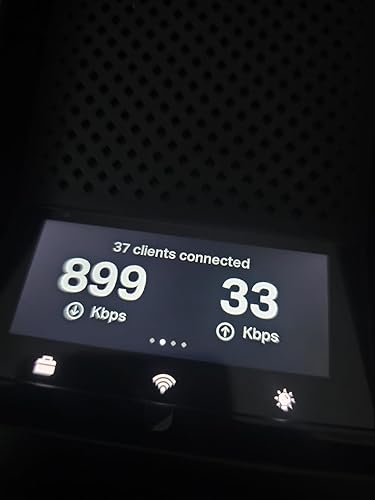
My rating is 4 stars, for now. I'll get into my reasons further down. First my criteria for choosing the TPLink Archer router. 1. Repalce ATT fiber Nokia BGW320-505 ONT with an actual router. (Bypassing my ISP hardware with my own) 2. It must have multiple 10GB SFP+ & Eth ports. (More on this, later) TPLink is somewhat limited here vs Protectli Vault. 3. I wanted a device with better wifi capabilities built into it compared to the ATT ONT. (This overshadows the Protectcli Vault imo) The TPLink Archer met my overall criteria for the most part. Primarily becasue I didn't have to comprimse too much in any one place. Positives: 1. After careful consideration, this offered more 10GB ports albiet one less than I wanted but with the wifi performance it is more of a bargin than a Protectli Vault. 2. After programming my SFP+ ONT (ODI) stick, I was surprised to find out the fiber bypass worked so quickly. I was skeptical this router would not work with my desired plan. (With a caveat or two, see negatives) 3. The softwre is simple and user-friendly as is its layout. It is easy to navigate.(This is a positive and negative) 4. The Wifi menu is thorough and thoughtfully laid out. This was a breeze to setup. 5. Performance, both Ethernet and Wifi outperforms my ISP equipment. Wifi is at least a 30% increase with better range. 6. It does have an asthetically pleasing appearance, it is somewhat light-weight but it feels nice. 7. I couldn't care less about the touch-screen but it adds a certain flair. I suppose seeing the speeds, client connections and weather is kind of a trick addition I've never seen before. Negatives: 1. One 10GB SFP+, two 10GBE (rj45) ports, four 2.5GBE ports.(I would have preverferred two 10GB SFP+) and two-four 10GBE rj45 and two 2.5GBE rj45s. 2. The SFP+ and one 10GBE rj45 ports are linked meaning you cannot use both simultaneously. This cannot be reconfigured in the software, it is one or the other and this is disappointing because I wanted at least two (available/open 10GB ports) whether rj45 or sfp+. 3. The ports cannot be reconfigured inside the software. 4. The stupid guided novice-based software sure is not tech friendly, either. Meaning you have a limited scope in which to configure absolute control. 5. Some preconfigured items must be checked enabled/disabled to allow certain advanced options to become available. Again, not tech focued on control but more novice guidance. 6. The removal of known technical nomenclature have been replaced with every day public jargon. Not once is 'WAN' mentioned and I struggled to determine what the interface was referring to when attempting to configure my WAN port and setup a VLAN. This was especially frustrating. 7. Lack of total customaization vs a PFSense setup. 8. Compared to the Protectcli and a PFSense, the ports are hard-coded for specific use, the user is unable to fully take advantage and configure the ports individually as desired. 9. Router modes. I'm confused by this. In days of old, routers would be routers regardless of a mode, you would have wifi configured or not, regardless it had antennas and the hardware to support wifi. I find this to be useless and quite frankly a waste of time because the router must be in one or the other mode. If in wifi only (access point) mode, you cannot access any actual routing features. Why? 10. The reboot times, 5 minutes. One may look at the negatives and think I made the wrong choice. The fact this is working with the fiber bypass and I have a 10GBE uplink to my 10GB switch with having better wifi coverage and performance is really all I was after. Because I was able to reach my goal and desired setup and coming in at $300 less than a custom built router, I'm happy for now. But because the lacking advanced software features, I still would prefer to have a custom router running PFSense and have a 10GBSFP+ uplink wan and a 10GBSFP+ lan fiber connections and do away entirely with copper. ... show more
Reviewed in the United States on December 14, 2025 by T

  • Wow, what a difference from my previous mesh router
Style: 24Gbps, 10G Port
I recently upgraded to the TP-Link WiFi 7, and I couldn’t be happier with the decision! This single router has replaced my previous three-node setup and delivers far superior performance with much less hassle. Setting it up was a breeze—no need to assign reserved IP addresses for my HomeKit devices or restart the router every time I made changes. It also offers a dedicated network for smart home devices, which makes managing them much easier. The performance is outstanding. Near the router, I get 800–900 Mbps on my iPhone 16, and even at the furthest point in my house, speeds are consistently 400–500 Mbps. My three-level home, including two upper floors and a basement, is now fully covered with just one router, something my old three-node system couldn’t handle nearly as well. For comparison, my previous setup consisted of three hardwired nodes configured in a star layout, with the basement router connected to a fiber modem. Despite this, the performance was only okay. Speeds maxed out at 100–200 Mbps even after upgrading to a 1 Gbps connection. Worse, I had constant issues with HomeKit devices dropping randomly. I had to assign reserved IPs to stabilize them, but every time I added one, I had to restart the router. Devices like my Logitech cameras required frequent restarts, too. In contrast, the TP-Link WiFi 7 has been rock-solid from day one. It’s a massive time-saver and a significant upgrade in both performance and convenience. If you’re considering this router, I highly recommend it. It’s worth the investment, especially if you’re looking for simplicity, reliability, and top-tier performance. ... show more
Reviewed in the United States on January 13, 2025 by Callie Dennis

  • Absolute trash
Style: 24Gbps, 10G Port
After four months of struggling with this router, I'm beyond the return window, and TP-Link support is completely worthless, so I'm stuck with a $700 paperweight. This thing will just randomly drop connection to the internet, and when you're relying upon said connection for remote meetings, you can imagine the frustration that ensues when this thing up and decides, "hey, I think I'll take a break and come back to life when I please". As of this writing, 8/28/2023, the last firmware update was made available at the end of June. TP-Link knows there's a problem with this router, but it's painfully obvious that it's hardware based and not software. This is why updates have ceased and availability for the router is non-existent. I've factory reset this thing a total of five times over the course of the last four months, even changed every ethernet and coax cable in the connection chain thinking that would make a difference, but now I have resolved that TP-Link released a half baked product and is turning a blind eye to the people who were suckered into buying this piece of trash. I've since went back to using my previous router, and surprise, I have zero issues with my internet connection. Please do yourselves a favor, if you've got this on your wishlist in anticipation to purchase it, remove it immediately and save yourself the financial burden and heartache that those of us that bought into have to show for it. Shame on you, TP-Link ... show more
Reviewed in the United States on August 29, 2023 by Amazon Customer

  • Fast!
Style: 24Gbps, 10G Port
I got a new iPhone 16 Pro which supports Wifi 7, so I decided to buy a Wifi 7 router. The BE24000 is pricey at regular price, but Amazon had it for $225 less during the recent Prime Day. I would recommend waiting for a big sale day because this router is worth the additional cost over a slower router. First, SpeedTest on WiFi equals my *wired* speeds. On my broadband 1Gbit connection, I get 24-26 ping and 1040 Mbit/s for both wired and WiFi. My desktop has Wifi 6E, and both it and my iPhone 16 Pro get those speeds over Wifi in the same room with the router on the 6G band. So WiFi is now equal to wired for getting top speed from your internet. Second, setup took less than 5 minutes. I do have nearly 10 years experience setting up TP-Link routers because they are my preferred brand. (Asus routers come in a close second. I have both on the network.) The TP-Link wizard for setting up the router asks a few questions and then handles everything else. The"Quick Setup" instructions in the box walk you through everything. Third, so far, I haven't been able to saturate the Wifi network with 4 TVs streaming 4k content at the same time. The signal strength is good everywhere in my 4000 sq ft home with the router centrally located in roughly the center of the second floor. If you need to add mesh routers, this router can be the central hub. Fourth, the IOT network is enabled by clicking on a single button. Then you tell your IOT devices, eg smart bulbs, Ring cameras, smartlocks, Nest thermostats, etc., to connect to "TP-Link_IoT_xxxx". This network is separate from your main wifi so the devices are not entry points for hackers. Because IOT devices often do not have robust security because they have simple computers in them, they have become easy targets for hackers. Using a separate WiFi network for them adds a layer of protection for the rest of the devices in your home. The only negative I have is the LED display. I am not a fan. Fortunately, you can turn it off. There is also a "night mode" which you can schedule to turn off all the lights at a specific time. Same with the touchscreen display. I leave the touchscreen on because it shows useful info about the CPU load. I don't think I would buy this router at regular price, but I am quite happy with the sales price given how powerful it is and how many features it has. ... show more
Reviewed in the United States on October 10, 2024 by Morris L.

  • Massive upgrade in speed, coverage, and stability
Style: 24Gbps, 10G Port
This router completely transformed my home network. Setup through the TP-Link app was very straightforward—plug it in, follow the prompts, and I had my main network, guest network, and basic security settings configured in just a few minutes. The interface is clean enough for non-techy users but still has plenty of advanced options if you want to tweak channels, bands, or QoS. Performance-wise, it’s a beast. WiFi coverage is strong across the whole house, including rooms that used to be dead zones. Devices connect quickly and stay connected, and even with multiple 4K streams, online gaming, and a bunch of smart home devices, everything stays smooth. Latency is noticeably lower and large downloads finish much faster compared to my older router. I also appreciate little touches like the ability to easily see which devices are connected and put limits or priorities on them. The hardware feels solid and runs surprisingly cool for how powerful it is. It’s definitely not the cheapest router out there, but if you have a lot of devices or fast internet and want to actually use all of that speed reliably, this is worth it. ... show more
Reviewed in the United States on November 26, 2025 by Joseph m.

  • Very, very fast. Touch screen, hard to navigate
Style: 24Gbps, 10G Port
This is a very fast, easy to setup router. Can be set up with a cellphone app. However, for true versatility you should use your PC. I don't use the default IP scheme (192.168..) I think doing so in any router is a potential security issues. There is one thing I did not like,the touch screen. Not a true touch screeen, its just a swipe screen between 4 display pages. Poorly responsive. Three pages are somewhat relevent, data throughput number page, ping page, and CPU, Memory usage. In my setup I used the 2.5gps port on my XB8 cable modem to feed into the 10gps Ethernet input of the BE24000. Which I use the one 10gps output to feed my 2.5gps swith with a SFP+ port with a 10gps more module via heavy Cat 8 cable. 2331mps downloads and 330 mps uploads ( which is more a function of the modem ). A 2.5gps port from the switch feeds into my PC's 10gps Ethernet port. An expensive router, but at a reasonable sale price if you consider its performance. ... show more
Reviewed in the United States on September 26, 2024 by Jeff Dranetz

Can't find a product?

Find it on Amazon first, then paste the link below.
Checking for best price...