Search  for anything...

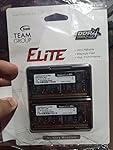
TEAMGROUP Elite 8GB Single DDR4 2400MHz PC4-19200 CL16 Unbuffered Non-ECC 1.2V SODIMM 260-Pin Laptop Notebook Computer Memory Ram - TED48G2400C16-S01

  • Based on 2,120 reviews
Condition: New
Checking for the best price...
$19.99 Why this price?
Save $1.00 was $20.99

Buy Now, Pay Later


As low as $4 / mo
  • – 4-month term
  • – No impact on credit
  • – Instant approval decision
  • – Secure and straightforward checkout

Ready to go? Add this product to your cart and select a plan during checkout.

Payment plans are offered through our trusted finance partners Klarna, Affirm, Afterpay, Apple Pay, and PayTomorrow. No-credit-needed leasing options through Acima may also be available at checkout.

Learn more about financing & leasing here.

Selected Option

Free shipping on this product

This item is eligible for return within 30 days of receipt

To qualify for a full refund, items must be returned in their original, unused condition. If an item is returned in a used, damaged, or materially different state, you may be granted a partial refund.

To initiate a return, please visit our Returns Center.

View our full returns policy here.


Availability: In Stock.
Fulfilled by Amazon

Arrives Monday, Mar 9
Order within 14 hours and 17 minutes
Available payment plans shown during checkout

Protection Plan Protect Your Purchase
Checking for protection plans...

Size: 8GB


Features

  • All new generation product of DRAM module
  • 1.2V memory module
  • Lifetime warranty and Free technical support
  • Completely compatible with X99 & Skylake chipset

RAM: ‎8 GB DDR4


Memory Speed: ‎2400 MHz


Hard Drive: ‎Memory Card


Brand: ‎TEAMGROUP


Series: ‎8GB DDR4-2400


Item model number: ‎TED48G2400C16-S01


Item Weight: ‎0.704 ounces


Product Dimensions: ‎4.92 x 3.54 x 0.39 inches


Item Dimensions LxWxH: ‎4.92 x 3.54 x 0.39 inches


Color: ‎Single Channel


Computer Memory Type: ‎DDR4 SDRAM


Voltage: ‎1.2 Volts


Manufacturer: ‎TEAM GROUP


Country of Origin: ‎Taiwan


Is Discontinued By Manufacturer: ‎No


Date First Available: ‎May 1, 2018


Frequently asked questions

If you place your order now, the estimated arrival date for this product is: Monday, Mar 9

Yes, absolutely! You may return this product for a full refund within 30 days of receiving it.

To initiate a return, please visit our Returns Center.

View our full returns policy here.

  • Klarna Financing
  • Affirm Pay in 4
  • Affirm Financing
  • Afterpay Financing
  • PayTomorrow Financing
  • Financing through Apple Pay
Leasing options through Acima may also be available during checkout.

Learn more about financing & leasing here.

Top Amazon Reviews


  • VROOM! What a noticeable difference in load time!
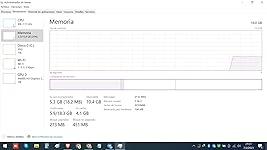
For starters, I have a Dell Latitude 5480. It came with the standard 8GB of RAM. I don't play games, but I watch YouTube a lot and commonly have over 25 tabs open at a time on top of another app or two. Commonly, I will go to sleep while YouTube is playing. But then one morning I woke up and it was locked up. I proceeded to try CTRL+ALT+DELETE, but that didn't work. So I hit the power button, let it shut down temporarily and then turned it back on. That's when it said it was preparing to restart it, but it was an endless loop. So I went into diagnostic mode, got the error code, looked it up and found out I was using too much memory. TEAM GROUP (TG) to the rescue! In my previous life, I used to be a software instructor and learned quite a bit about putting computers together. I figured it can't be hard to change out the card and it wasn't. But first I had to confirm it was compatible. I emailed TG asking about compatibility and they replied that it is. I almost went with 16GB, but decided I was going to buy another laptop, so I may as well buy (2) 16GB cards and I'm glad I did. I proceed to unscrew the 8 screws and learned I still needed to pry the back off with a small, straight-edge screwdriver. Here is where my initial mistake made me appreciate not seating the one card completely. After I installed the two cards, I turned on my laptop, got the alert that said my memory has changed, hit F1 to reboot and let it load. After I got to my desktop, I went to the search field by the start menu, typed in About and clicked on About your PC to see what the computer registered. It said 16GB only. For a moment, I thought one card was bad. So I thought I'd take one card out a time, put the original 8GB card back in and figure out which one was bad. And that is when I noticed I didn't seat the one card down all the way. Please refer to the first picture and notice the top card. You can see more gold of the pins. That is when I realized my mistake. I have changed out memory on the motherboard of a tower and that is much easier than changing out laptop memory. At least, for anyone like me that has never done it before on a laptop. So for those who are like me, I took a snapshot of the slot without a card in it. You'll notice the two arms that you have to bend out laterally in order for the RAM card to fit in. No need to fear you might break the card or damage something. Just bend one arm out laterally, carefully wedge the card into its slot and then, well, you'll figure it out. And so when I restarted the computer it again said the memory has changed, and I hit F1 to reboot it again. VROOM! What a noticeable difference in load time! And sure enough, when I went back to the settings, Installed RAM showed 32.0 GB (31.9 GB usable). I am so glad I made the mistake because it is a noticeable difference in speed between 16 and 32GB. If you're on the fence about whether to buy one or two, 16GB memory cards and you're a YouTuber like me with several YT videos open along with a bunch of other windows and apps open--commonly, I have MS Word open amongst other apps--then I strongly recommend buying two. I don't believe you'll regret it. Thank you, TEAM GROUP! I'll be back to buy more! ... show more
Reviewed in the United States on December 6, 2022 by My two cents My two cents

  • Stable Reliable RAM Great Value!
Size: 16GB
I just purchased a refurbished HP EliteBook 840 G6 with an 8th Gen i7 Processor a few weeks back. The laptop came with 8GB of RAM initially along with a 528 GB SSD. I've been in IT for about 21 years now and very rarely purchase/own my own personal laptop or PC as I have always used what is given to me by my employer. However when I saw the deal for this refurbished HP EliteBook it was almost too good to pass up so I broke down and purchased the refurbished machine. Since I am most definitely a poweruser and would be using this laptop to run some VM's and maybe practice some programming/coding along with beginning to learn more cybersecurity, I knew I needed to beef up the RAM in this laptop. Since this laptop will read up to 32GB of RAM, I figured buying a single stick of 16GB and bringing the total up to 24GB of RAM it would turn this little laptop into a beast. Since the 8GB already installed was 2400mhz I was able to find this TEAMGROUP 16GB 2400mhz stick of RAM at a great price of right around $40.00. After installing the RAM and booting up the laptop I received your typical warning by the BIOS that the RAM had changed since the last boot time. After saying "yeah I know" I was able to log into Windows extremely quickly and I could tell off of the bat that adding this additional RAM already had made significant improvements just on initial boot with the new RAM installed. After initial login, I double checked the system specs to confirm it was indeed reading a total of 24GB of RAM. I opened up a few web pages and did a few tests and so far this $40 addition has tremendously improved the speed and capability of this laptop (which it was already pretty quick and smooth). Unless something changes and this RAM completely fries my systemboard, I will definitely purchase this TEAMGROUP brand of RAM again. I might even purchase another stick of 16GB in the next couple of months and go ahead and max the system out at the 32GB that it can currently read. However, I do want to let it run for a few weeks at the 24GB level just to ensure there are not any issues. For the overall value and speed & performance this one stick of RAM has added I would highly recommend to anyone looking to beef up their PC/Laptop speed and performance. It's simple and makes a huge difference in overall performance. Thanks TEAMGROUP! ... show more
Reviewed in the United States on September 26, 2022 by joeythefoot

  • Excellent memory and value
I did quite a bit of research about this memory brand before purchasing and nearly everything I found was positive. I have been using it in my Dell laptop for the past 21 days now and it has performed flawlessly! I have also performed multiple memory tests from Dell and third parties and it passes with flying colors. I highly recommend this memory brand! ... show more
Reviewed in the United States on January 27, 2023 by J. Perry

  • All is well.
Size: 16GB Kit (2x8GB)
Worked well in a 8th gen Lenovo T480. Not much to say other than the packaging was nicely sealed. Time will tell as to the reliability, but for the time being this was a very cost effective option to bump RAM form 8G to 16G in a pinch. Could always be cheaper but that’s no fault of the product.
Reviewed in the United States on February 8, 2023 by Sergey

  • Excelente no tengo queja
Size: 16GB Kit (2x8GB)
Lo recibi en excelentes condiciones, funcionando al 100%, full recomendado TEAM GROUP.
Reviewed in the United States on February 8, 2023 by Gregori Ramos Gregori Ramos

  • Works great!
Size: 16GB
Work's great! Breathed some new life into my 5 year old laptop. Less expensive and with a lower CAS latency than Crucial.
Reviewed in the United States on January 11, 2023 by JJFoshay

  • Work perfect
Size: 8GB
Work perfect
Reviewed in the United States on January 23, 2023 by Oscar steven fallas mora

  • Excelente producto, funciona perfectamente, llegó antes de lo esperado.
Size: 8GB
Reviewed in the United States on January 22, 2023 by erwin german erwin german

Can't find a product?

Find it on Amazon first, then paste the link below.
Checking for best price...