Search  for anything...

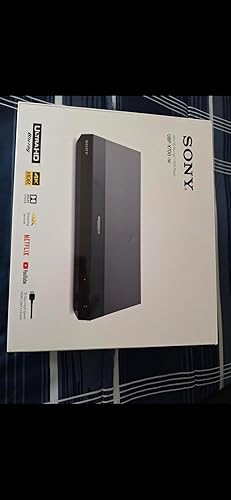
Region Free Blu-ray Player Compatible with Sony BDP-BX370 with WiFi Multi Region Code Free | Blu-ray Regions A, B, C | DVD Regions 0-8 with Dynastar 6FT HDMI Bundle

  • Based on 4,738 reviews
Condition: New
Checking for the best price...
$179.00 Why this price?
Holiday Deal · 28% off was $247.99

Buy Now, Pay Later


As low as $29.83 / mo
  • – 6-month term
  • – No impact on credit
  • – Instant approval decision
  • – Secure and straightforward checkout

Ready to go? Add this product to your cart and select a plan during checkout.

Payment plans are offered through our trusted finance partners Klarna, Affirm, Afterpay, Apple Pay, and PayTomorrow. No-credit-needed leasing options through Acima may also be available at checkout.

Learn more about financing & leasing here.

Selected Option

Free shipping on this product

FREE 30-day refund/replacement

To qualify for a full refund, items must be returned in their original, unused condition. If an item is returned in a used, damaged, or materially different state, you may be granted a partial refund.

To initiate a return, please visit our Returns Center.

View our full returns policy here.

Availability: In Stock.
Fulfilled by Amazon

Arrives Sunday, Dec 21
Order within 8 hours and 30 minutes
Available payment plans shown during checkout

Protection Plan Protect Your Purchase
Checking for protection plans...

Style: WiFi, Smart, Region Free


Features

  • REGION FREE VERSION - NO RESTRICTIONS: PLAYS BLURAY REGION A, REGION B, & REGION C & PLAYS standard DVDs from ANY REGIONS 0, 1, 2, 3, 4, 5, 6, 7, 8
  • 110-240 volts player supports Pal and NTSC / Plays Blu-rays, DVD, CDs plus has USB input to play all your content. USB Playback, External HDD Playback, 1080p Upscaling. HDMI output, coaxial audio output, Ethernet connection, and USB input
  • ***WiFi Built In*** streaming apps including Netflix, YouTube works with wired or wireless wifi connection
  • PlayStationFull HD 1080p Blu-ray disc playback & DVD upscaling

Description

The Sony BDP-S3700 Dynastar Package Includes: Sony BDP-S3700 WIFI Region Free Blu-ray Player 6-Foot Dynastar Trademark HDMI Cable 110-240 volts Power Supply with North America / USA plug EU Plug adaptor for use Overseas Features Region Free Playback of Any Region Blu-ray. Includes Region A, Region B, and Region C Reverse Compatible and Plays Any Region Standard DVD. Includes Region 0, region 1, region 2, region 3, Region 4, Region 5, Region 6, Region 7 & Region 8 Supports Pal and NTSC with Full Conversion so you can play any DVD or Blu- ray on any TV110-240 volts so the power supply is compatible with electricity anywhere in the world. It will work on 110 volts, 120 volts, 220 volts, & 240 Volts This player is easy to use and compatible with DVDs and Blu-rays purchased anywhere internationally. Supports PAL and NTSC with full conversion so you can play any DVD or Blu-ray on any TV. At 110-240 volts, the Blu ray DVD player works internationally with electricity around the world. In the box: -Sony BDP-S3700 Region Free Blu-ray Player -Dynastar TM 6-Foot HDMI cable -Dynastar plug adapter for international use -USA power cable + Dynastar plug adapter can be used with it for use outside the United States.

Brand: Dynastar


Media Type: Blu-Ray Disc, DVD


Special Feature: Wireless


Resolution: 1920x1080


Connector Type: HDMI


Connectivity Technology: HDMI


Model Name: BX3700" or "S3700


Color: Black


Item Weight: 3 Pounds


Audio Output Mode: Coaxial


Product Dimensions: 10.63 x 10.63 x 2.76 inches


Item Weight: 3 pounds


Item model number: Sony3700RegionFree/Dynastar


Batteries: 2 AAA batteries required.


Is Discontinued By Manufacturer: No


Date First Available: April 11, 2016


Manufacturer: Dynastar


Frequently asked questions

If you place your order now, the estimated arrival date for this product is: Sunday, Dec 21

Yes, absolutely! You may return this product for a full refund within 30 days of receiving it.

To initiate a return, please visit our Returns Center.

View our full returns policy here.

  • Klarna Financing
  • Affirm Pay in 4
  • Affirm Financing
  • Afterpay Financing
  • PayTomorrow Financing
  • Financing through Apple Pay
Leasing options through Acima may also be available during checkout.

Learn more about financing & leasing here.

Top Amazon Reviews


  • Works perfectly as region free player, so far no issues
Style: WiFi, Smart, Region Free
I had been shopping around for a region-free bluray/dvd player and I’d like to provide you the information I have gathered to help you with your decision. First: There are laws that prohibit the sale of region free bluray players from manufacturers or by retailers in the US. That is why you don’t see region free bluray players in brick stores like Bestbuy, WalMart, Target, etc. Second: Due to the first point, manufacturers like Sony, Samsung, etc. do not manufacture or market region free bluray players in the US. I’d like to emphasize this because I see a lot of comments and complaints from customers who purchased such players and when they contacted Sony, Samsung about their region free bluray player, they were disappointed because [insert bluray company] customer service said thay did not have region free bluray player in their line of products therefore could not provide service. If you pay attention, you will see all region free bluray players are sold by third-party sellers. There is nothing wrong with that. I have already purchased and tested two region free bluray players sold by such third-party seller on Amazon and both players met my expectations and did play discs from different regions of the world. However, you should not contact [insert bluray company] for any questions regarding region free functionality of your region free bluray player. Because they did not produce such a product. It was the third party seller (a company with technical skills and expertise) that purchased the player from [insert bluray company], changed the factory settings, unlocked the bluray player and turned it into the region free bluray player. Region free bluray player is simply an existing model of a bluray player (such as the one on this page) with all the functionalities of that model, but in addition to that, it is region free and plus converts PAL to NTSC (and the 110 - 220 voltage conversion is added if you wish to use it in another country that uses 220 voltage). Because of that, if you contact the third party seller for any of the features of the product, they will most likely refer you to the product page on the offical [insert bluray company]’s website. You should only contact them only if your question is pertaining to the region free functionality. My biggest complain is that third party sellers often double the price of that bluray player model. I checked many region free bluray models on the internet and found out that almost every bluray player is actually half the price when they are not region free. Basically, the third party seller charges the price of the bluray player to unlock it, thereby doubling its price. If a bluray player in its plain version is $75-80, the region free version will be $150 - $160. This is all because of the current regulations that prevent bluray companies from manufacturing their own region free models. I am not sure if that’s the case in other parts of the world. This Sony model works well as expected. So far I have used Region B Bluray discs imported from UK (The Avengers Series 4 Bluray) and it played it perfectly with no issues. Here’s what you need to pay attention to: 1) Make sure Quick Start Mode is off!! This is a setting on the player, very easy to see and confirm. Sony models show that when you turn on the player for the very first time and going through initial setup proceess. LG model I have tested (LG BP350), it’s in the settings. Both models have Quick Start Mode off by default so you probably won’t have to do anything. 2) Make sure your player is OFF before you press the button to change the region code. You don’t have to change the region for DVDs It is set to region free for DVDs. You only need to change it for Bluray discs. Turn off the player. For Sony models, press Yellow for Region A, Blue for Region B, Red for Region C. For LG models, press 1 for Region A, press 2 for Region B and press 3 for region C. When you do that, the player will turn ON. And it will be ready to play the disc. By habit, I turned the player on and pressed the region codes and it didn’t work. It is important that the unit must be off before you take that action. This model has wi-fi buit in and I was able to connect successfully with no issue. The third paty seller states that updating the firmware will not cause issues with the region free capability; they say they guarantee that their player won't lose region free capability but I would not want to test that theory unless my player starts having issues as I don’t want to risk losing region free capability (with so many firmware updates and codes, you never know what will happen). The only problem I had was when I played a region B Bluray disc that had 5.1 DTS audio track, and the audio kept cutting out for a second every 2-3 minutes. I had the HDMI out from the player to LG OLED TV and I was using the audio optical out from the TV to the receiver. For whatever reason, the sound kept cutting out for a second and came back on. I could see the signal going out on the front panel of my receiver. I am not sure if this issue has anything to do with the disc being region B (maybe the TV didn’t fully recognize the audio signal although I thought regions codes are only for picture signals and did not impact audio signals) I Googled it and saw recommendations about changing the audio settings on the player and turning them off (it also recommended changing the digital audio otput to PCM but that would defeat the purpose of enjoying the 5.1 DTS audio format). I have not had this issue with The Avengers Bluray disc whih only has 2.0 PMC audio track. So either the 5.1 DTS audio signal did not pass to the TV or TV did not pass it to the receiver consistently which caused the audio dropouts. But this player also had digital audio coaxial output. I think I will try that to see if it resolves the issue. The audio quality probably won’t be the same as HDMI signal but still better than constant cutouts. ONE AMAZING FEATURE NOT MENTIONED ANYWHERE ELSE: I noticed that under the Options menu, there is "Closed Captions" settings. This is a fantastic new feature that I have not seen on a Blu-ray player before. I have been trying for years for a way to turn on Closed Captions on DVDs that don't have subtitles. Not matter what I have tried, I have not been able to succeed. Recently, I read that Closed Captions signals work only on analog signals therefore I I needed to try analog cables. I tried analog cables, switched the picture settings on my Blu-ray player to analog output, also changed the settings on my TV to analog and I was not able to get a signal or turn on the Closed Captions (TV has closed caption feature but it mainly works with cable TV signal -when comes through tuner-, it has been impossible to turn them on while playing DVD without the TV tuner/cable network). All these years, I have been playing those DVDs on my laptop using Windows Player (you can turn on the closed captions on Windows Player) and using an HDMI cable from the laptop to the TV. This was the only solution I could find. Cut a long story short, this Blu-ray player enables the user to turn on the closed captions on DVD!!! My most sincere thanks and congratulations to whoever thought of adding this feature to the blu-ray player (nothing to do with 4K picture quality but such a useful and wonderful feature that had been missing from players until now). ... show more
Reviewed in the United States on February 17, 2018 by Serkan Okar

  • Versatile player works great!
Style: 4K UHD Player, Wifi, 3D, Smart, Region Free
Very pleased with the quality and performance so far. Easy to set up and use. Have played DVDs and Blu-Rays from different regions and zones without any difficulty or problems, and the picture and sound quality are excellent. Connected directly to my TV for now. The seller delivered promptly and well-packaged in original box with all paperwork and accessories needed to operate, including simple additional instructions for different disc formats. Will update my review as time goes on and I try out more features and discs (have also played DVD-R's), but for now am enjoying the player and impressed with its versatility. ... show more
Reviewed in the United States on April 28, 2025 by stephen

  • Somewhat disappointing for regular DVDs...
Style: Upconversion to 4k, Wifi, 3D, Smart, Reg...
Having an extensive library of regular DVDs, conversion to the Blu-ray format would not only be financially prohibitive, but actually impossible as several titles have simply not been issued in that format. Thus, the Sony BDP-S6700 player seemed to be an ideal choice as I ventured for the first time into the Blu-ray universe and purchased my first Blu-ray disc set. The S6700 performs superbly when I play the Blu-ray disc. However, when I use it to view a regular DVD with a 4:3 picture ( a classic TV program, for example ), the S6700 suppresses the "normal" option from the "wide mode" setting on my television; it forces the TV into the "full" option which stretches, and distorts, the 4:3 picture in order to fill the 16:9 format of the television screen. My television being also from Sony, I did not expect compatibility issues on that front. When I use my old, regular DVD player for those classic DVDs ( with 4:3 picture ), the "normal" option is available and everything is fine. I actually suspect that the disappearance of the "normal" option might be linked to the HDMI connection; my old DVD player has a 3-cable connection to the TV ( RCA plugs: composite video -yellow- and stereo audio -red and white- ). Since the HDMI connection is the only one provided on the S6700, the problem with playing classic DVDs on it remains unresolved. To make it absolutely clear, let me add that my only Blu-ray disc set is of a classic TV show with a 4:3 picture; the S6700 causes the TV's "wide mode" setting to default to "full", and yet, the picture comes out perfectly with a 4:3 ratio! ( without stretching or distortion ). The problem is when I play a regular DVD with a 4:3 picture on the S6700. I could add a minor quibble with the "Menu" and "Top Menu" buttons on the remote, but that might just be my lack of familiarity with a Blu-ray player. So the S6700 will not be putting my old DVD player out to pasture just yet. Somewhat disappointing... ... show more
Reviewed in the United States on September 6, 2018 by BernardM

  • Brilliant product highly recommended
Style: WiFi, Smart, Region Free
Extraordinarily useful because it automatically will play whatever region DVD you put in the tray, and if it’s a Blu-ray, it just takes a few seconds for you to select region A, B or C and then it plays great and boy its compact size is ideal, it’s literally half the size of the other player I had. Exceptionally good video quality. ... show more
Reviewed in the United States on July 25, 2025 by The Bethesda Gourmet

  • One player to rule them all
Style: bdps3500
This is a fantastic player. This is my second purchase. One with wifi and one without. I first bought to replace DVD in my bedroom to bluray. It is nicer than my living room player, so I bought one with wifi for upstairs and used the wired internet version for the living room next to the router. The USB app runs my old files which is great. My last dvd didnt read my usbs. The disc trey is very nice. The remote is one of the nicest small remotes. Usually I want to switch to universal, but I will keep the OG remote. I have a lot of DVD from music cds from Japan. Often those discs wont play, so now I have one player, for japan region and bluray and dvd and usb files. 🤘 ... show more
Reviewed in the United States on April 6, 2025 by Patrick Kirby

Can't find a product?

Find it on Amazon first, then paste the link below.
Checking for best price...