Search  for anything...

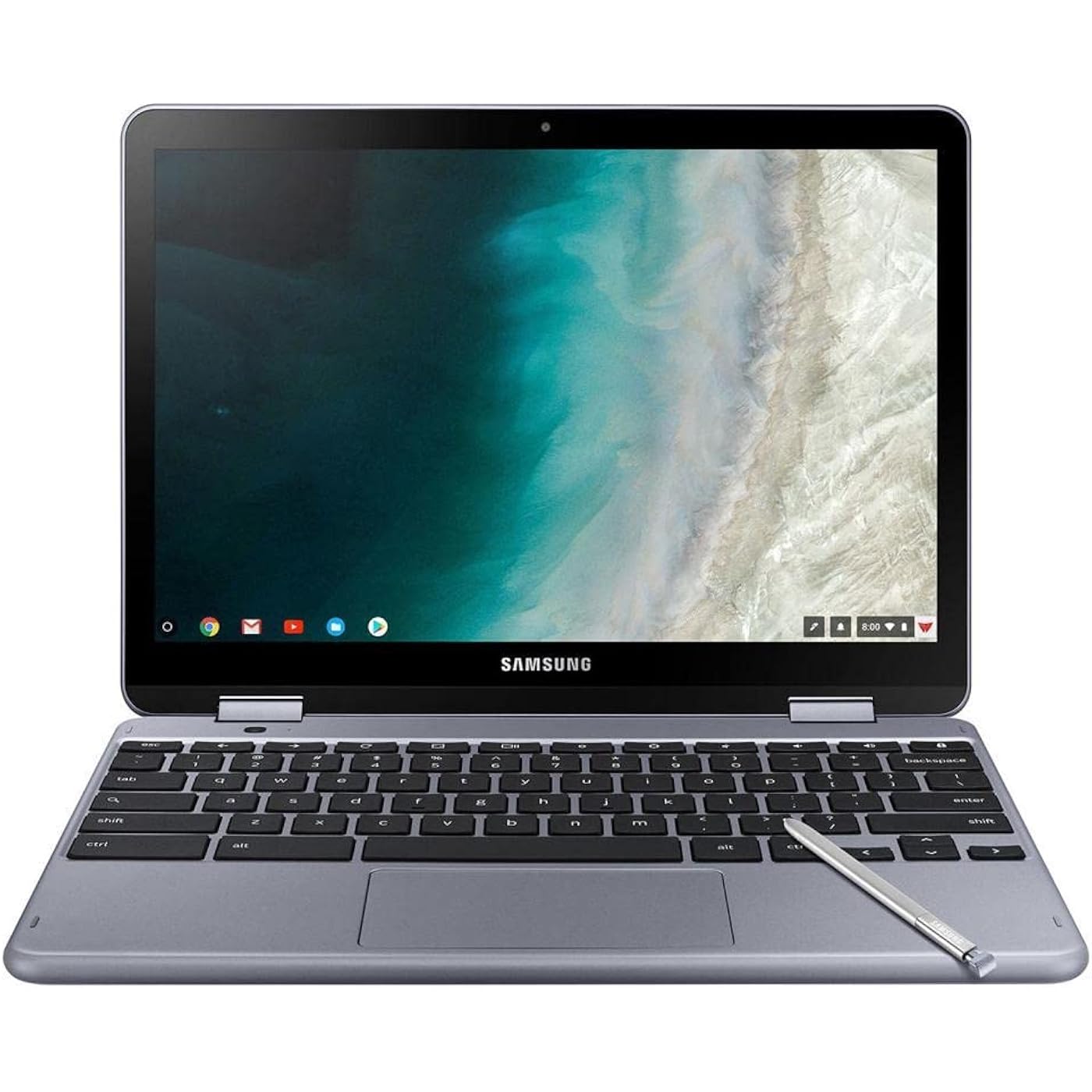
Samsung Chromebook Plus V2, 2-in-1, 4GB RAM, 32GB eMMC, 13MP Camera, Chrome OS, 12.2", 16:10 Aspect Ratio, Stealth Silver (XE521QAB-K01US)
  • Based on 272 reviews
Condition: New
Checking for the best price...
$374.00 Why this price?
Save $25.00 was $399.00

Buy Now, Pay Later


As low as / mo
  • – Up to 36-month term if approved
  • – No impact on credit to apply
  • – Instant approval decision
  • – Secure and straightforward checkout

Ready to go? Add this product to your cart and select a plan during checkout.

Payment plans are offered through our trusted finance partners Klarna, Affirm, Afterpay, Apple Pay, and PayTomorrow. No-credit-needed leasing options through Acima may also be available at checkout.

Learn more about financing & leasing here.

Selected Option

Free shipping on this product

30-day refund/replacement

To qualify for a full refund, items must be returned in their original, unused condition. If an item is returned in a used, damaged, or materially different state, you may be granted a partial refund.

To initiate a return, please visit our Returns Center.

View our full returns policy here.


Availability: Only 2 left in stock, order soon!
Fulfilled by Silmarils (Serial Number Recorded)

Arrives Thursday, Jul 16
Order within 4 hours and 52 minutes
Available payment plans shown during checkout

Protection Plan Protect Your Purchase
Checking for protection plans...

Set name: 32GB eMMC


Features

  • LIGHTWEIGHT 2-in-1 DESIGN At just under 3 pounds, the Chromebook Plus is incredibly lightweight. You can easily fold it into tablet mode for comfortable viewing and browsing
  • BUILT-IN PEN Experience the power of the incredibly precise built-in pen that never needs charging. It's always ready to write, sketch, edit, magnify and even take screenshots
  • DUAL CAMERA Fold your laptop into tablet mode to capture clear shots and even zoom in for a closer look with the revolutionary 13MP world-facing camera with autofocus
  • CHROME OS AND GOOGLE PLAY STORE Create, explore and browse on a bigger screen with the tools you use every day all on the secure Chrome OS
  • GET THE MOST OUT OF GOOGLE: Create and explore in a whole new way with the tools you use most. Take your experiences to the big screen, and navigate intuitively with the keyboard and touchpad. Plus, easily download your favorite apps, movies and games from Google Play. Your Chrome OS experience is simple, secure and fast.
  • DO MORE. STORE MORE: Tackle anything that comes your way, thanks to a long-lasting battery and an Intel Celeron 3965Y Processor that lets you work on multiple things at once. With 32GB of built-in memory, you have room for your favorite photos, documents, music and more. Even store movies to watch offline while on the go. When you need extra room, add more storage with a microSD card.

Description

Get more done anywhere, anytime, with the lightweight 2-in-1 Chromebook Plus. Stay on top of your projects with the built-in pen, dual camera and full Google experience right at your fingertips. And cross more off your list without slowing down with a powerful battery and Intel processor. At just under 3 pounds, The Chromebook Plus is incredibly lightweight-just slip it into your bag and take it anywhere. Plus, it easily folds over into tablet mode so you can quickly switch between typing and writing down ideas.

Specs & Other Info

SpecificationDetails
ManufacturerSamsung
Product LineChromebook Plus
Display12.2-inch Screen
Color OptionStealth Silver
Processor TypeIntel Core M at 1.5 GHz
RAM Capacity4 GB DDR3
System SoftwareChrome OS
Unique AttributeIncluded Stylus Pen
Main Graphics UnitIntel HD Graphics 615 Integrated
Maximum Resolution Supported1920x1200 Pixels
Storage TypeSSD for quicker access
Connectivity TechnologyBluetooth, Wi-Fi 802.11ac
USB 3.0 Ports Quantity1 Port
Product Model NumberXE521QAB-K01US
Physical Dimensions8.1 x 11.4 x 1 inches
Weight11.2 ounces
Integrated Graphics Memory2 GB
Flash Storage Size32 GB
Battery Type1 Lithium Polymer (included)
Energy InputBattery Powered, 30 Volts

Frequently asked questions

Yes, the Samsung Chromebook Plus V2 supports running Android apps through the Google Play Store and can also run Linux apps via the Crostini project. This allows for a versatile computing experience, letting users access a vast array of applications beyond what's traditionally available on Chrome OS.

Yes, the Samsung Chromebook Plus V2 comes with a built-in stylus pen. This pen is designed to enhance productivity and creativity, allowing users to take notes, draw, and navigate the device more efficiently without the need for charging or pairing.

The Samsung Chromebook Plus V2 offers a battery life of up to 10 hours on a single charge, though actual usage time can vary based on applications used and other factors. It charges via a USB-C port, which provides fast charging capabilities in addition to simplifying the charging process with a reversible plug.

Yes, although the Samsung Chromebook Plus V2 comes with 32GB of eMMC storage, it also has a microSD card slot. This allows you to expand the storage capacity significantly by inserting a microSD card, making it easier to store more applications, documents, and media files.

Top Amazon Reviews

🚀 Abunda's Overview

This is our summary and key points to consider based on customer reviews.


Customers generally appreciate the compact, sleek design and lightweight nature of the Chromebook, finding it perfect for activities such as emailing, web browsing, and using Google Classroom applications. The inclusion of a stylus pen for handwriting-to-text conversion is particularly praised for work or school use. However, some users report concerns over battery life, performance speed, and potential hinge issues compared to other laptops.

Pros

  • 🎒 Compact and lightweight design fits into small bags
  • 🖌 Includes a stylus pen for handwriting-to-text conversion, ideal for productivity
  • 🚀 Chrome OS offers a basic, speedy user experience
  • ✨ Sleek and attractive appearance
  • 👌 Good build quality with metal construction
  • 💼 Perfect for Google Classroom and other web-based applications

Cons

  • 🔋 Shorter battery life than some users are accustomed to
  • 🐢 Some reports of slightly slower app and web process speeds
  • ⚠️ Concerns over potential hinge issues that could impact screen integrity
  • ❌ Not recommended for heavy computing or professional work uses

Should I Buy It?

Yes, if you need a lightweight, portable device primarily for web browsing, emails, and school or light work tasks. The Chromebook is an excellent choice for users integrated into the Google ecosystem. However, consider your need for longer battery life and heavy computing tasks, as well as the noted potential for hinge issues, before purchasing.


  • Good for college
Set name: 32GB eMMC
Bought this when I started college its been a game changer.
Reviewed in the United States on January 28, 2026 by Magen Wheeler

  • Perfect for me!
Set name: 32GB eMMC
So I’ve been primarily using Google classroom, sheets, docs, presentation ect.. all this last year and this device is perfect for that. The touchscreen is fantastic. The only thing that is taking sons time to get used to is that on tablet mode you feel the keys when holding it on the back side. They are deactivated in tablet mode. The stylus pen is really nice. There aren’t any good cases because of the way it moves. Do not be fooled, a case never works in tablet mode. ... show more
Reviewed in the United States on July 21, 2021 by Jeff Burdess

  • Beautiful screen quality, very good sound
Set name: 32GB eMMC
I generally love this Chromebook, especially the 2 in 1 feature. My experience is consistent with the reviews I saw on the internet. Two things I found slightly different: the battery life is fine but not as long as some heavy users might like, and; the sound quality is better than the reviews led me to expect. Also, I did get the stealth color with the sturdier feel which I like but if you want to spend a lot of time holding it in one hand you might prefer the all plastic, lighter version. The stylus works great. ... show more
Reviewed in the United States on July 31, 2021 by NIfty Betty

  • Excellent Form Factor, A Pleasure to Use, A Little Underpowered
Set name: 32GB eMMC
I have been used to using a 13.3" MacBook Air every day for several years. When the MacBook took a fall and the display broke beyond repair, I went looking for a slightly cheaper and smaller option. The 10" and 11" convertible books seemed a bit too small to work on comfortably for hours at a time, so I was interested in the Samsung Chromebook XE521 for it's 12.2" HD screen and metal construction. So far I love the size, construction, fit and finish, etc. It feels like a much more expensive laptop. PROS: - Great size and feel when using. - Good construction, nice fit and finish. - Chrome OS is great. Very basic and speedy, yet does everything I really need. CONS: - My old MacBook Air spoiled me with consistently giving me 8-9 hours of use on a single charge. I haven't tested it extensively, but Samsung Chromebook XE521 has been giving me about 5 hours of medium use. It's not terrible, but is a pretty big drop off from what I am used to having. - I have also noticed apps and processes run a tiny bit slower than my old MacBook with the Core i5. Still completely adequate for basic apps and web-based work. - I found the reviews about the hinge breaking AFTER purchasing. The possibility of cracking the screen just by opening the lid worried me enough that I purchased a two year, $57 protection plan from Asurion. Now I have the peace of mind that even if my unit does break, I will have it covered. I will say the left hing feels especially stiff when opening and closing. To see if I could make it a little more smooth, I applied a few drops of very light gun oil to the hinge assembly. I didn't remove the case or anything, so I was just counting on the oil penetrating to the moving parts. I don't think it made too much of a difference, but maybe just enough to prevent the hinge from seizing up and breaking the screen? I plan to add a few tiny drops of oil every month or so (if I remember). Four stars. Would definitely be five stars if the battery life and processing speed was a bit more impressive and there were no catastrophic hinge issues potentially looming on the horizon. ... show more
Reviewed in the United States on April 28, 2021 by Blake Law

  • It’s light weight..And easy to use
Set name: 32GB eMMC
I like it…bought to transfer my pictures from cell phone
Reviewed in the United States on November 19, 2025 by Michelle M.

  • Too slow
Set name: 32GB eMMC
Man this thing is so slow!! I’m disappointed in the lagging. My old Chromebook preformed better and it was 10 years old.
Reviewed in the United States on May 29, 2026 by Bridget Tracy

  • Love this Chromebook!
Set name: 32GB eMMC
This Chromebook is so perfect for someone who doesn't need a lot of memory and just enjoys playing a few games, especially coloring apps where the stylus comes in very handy. It's lightweight for traveling, has beautiful graphics, and it's so quick for browsing, unlike MS Windows products that are slow and cumbersome. I hope Samsung never quits making this product! ... show more
Reviewed in the United States on September 27, 2024 by Amazon Customer

  • Linda
Set name: 32GB eMMC
Fue un regalo para mi hijo, el está feliz dice que es muy buena y rápida, es touch y se puede usar como tablet. Me gusto mucho espero no falle mas adelante estaré actualizando.
Reviewed in the United States on December 26, 2024 by Meidy Avila

Can't find a product?

Find it on Amazon first, then paste the link below.
Checking for best price...