Search  for anything...

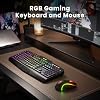
Redragon S101M-KS Gaming Keyboard and Mouse Wireless with Tri-Mode, RGB Keyboard and 4800 DPI Gaming Mouse, 10 Independent Multimedia Keys for Wins, PC, Computer, Wireless S101 Ideal for Gamer

  • Based on 51,628 reviews
Condition: New
Checking for the best price...
$54.99 Why this price?
Labor Day Deal · 31% off was $79.98

Buy Now, Pay Later


As low as $9.17 / mo
  • – 6-month term
  • – No impact on credit to apply
  • – Instant approval decision
  • – Secure and straightforward checkout

Ready to go? Add this product to your cart and select a plan during checkout.

Payment plans are offered through our trusted finance partners Klarna, Affirm, Afterpay, Zip, Apple Pay, and Google Pay. No-credit-needed leasing options through Acima may also be available at checkout.

Learn more about financing & leasing here.

Selected Option

Free shipping on this product

FREE 30-day refund/replacement

To qualify for a full refund, items must be returned in their original, unused condition. If an item is returned in a used, damaged, or materially different state, you may be granted a partial refund.

To initiate a return, please visit our Returns Center.

View our full returns policy here.


Availability: In Stock.
Fulfilled by Amazon

Arrives Tuesday, Sep 8
Order within 21 hours and 8 minutes
Available payment plans shown during checkout

Protection Plan Protect Your Purchase
Checking for protection plans...

Color: Black-New


Features

  • Wireless Gaming Keyboard and Mouse ComboGet rid of the messy cables, Redragon Tri-mode Wireless Gaming Keyboard and Mouse will provide more freedom of choice for your gaming operations (wired/Bluetooth/2.4G receiver) and provide long-lasting and stable connection, which is ideal for gamers (Note: The 2.4G receiver is a 2-in-1 version, you can use one 2.4G receiver to control the keyboard and mouse at the same time)
  • RGB Gaming Keyboard and MouseTurely RGB Backlight with 8 backlight patterns, you also can adjust the lighting speed and lightness of your keyboard and mouse to fit your gaming scene and enhance the gaming atmosphere. The rechargeable keyboard stands up to 300 Hrs (RGB OFF), and you can get the keyboard status by the battery indicator
  • 4800 DPI Adjustable Gaming MouseThere are 5 DPI Levels(800/1200/1600/3200/4800) that can be chosen by clicking the dip button to fit your different needs(or adjust the DPI freely through the software) You can judge the DPI level by the number of flashes of the indicator light
  • Fully Function KeyboardRedragon S101M-KS Wireless Keyboard is equipped with 10 independent multimedia keys and 12 Combination multimedia keys to ensure quick management during gaming. It also has splash resistance, WIN lock function, and comes with a 6-foot detachable USB-C cable
  • Programmable Keyboard and Mouse GamingYou can customize the keyboard keys and backlighting as well as the DPI value and polling rate of the mouse (125-1000Hz) and remap the 7 mouse buttons through the software (download the software on Redragon.com). The ergonomic design of this gaming keyboard makes you feel comfortable while typing and gaming!
  • Amazing Gaming Keyboard and MousePlug and Play, Tri-modes Gaming Keyboard and Mouse is widely compatible with Windows, PC, laptop, computer, etc. Redragon provides every customer a 36-month warranty, 7*24Hrs Technology Support Team (Software download address: redragon.com)

Description

How do I download the S101M-KS driver software? Step 1: Visit the official Redragon website: Redragon.com Step 2: Click the “Downloads” section, search for the model “S101M-KS” to download the software driver Note: Software drivers for keyboards and mice must be downloaded separately How do I connect a wireless keyboard? Slide the power switch on the back of the keyboard to the ON position 2.4G - Insert the receiver and press and hold FN+4 (if automatic pairing does not occur) Bluetooth - Press and hold FN+1/2/3 and search for the device on your computer to connect How do I connect a wireless mouse? Switch the mode selector on the mouse's underside to the corresponding position 2.4G - Mouse will automatically connect after inserting the receiver BT - Set the switch to BT mode, press and hold the “Pair BT” button for three seconds, then connect Where can I find a 2.4 GHz receiver? The S101M-KS's 2.4 GHz receiver is located in a slot on the back of the keyboard. This is a two-in-one receiver, allowing you to control both the mouse and keyboard with a single receiver. Redragon S101MKS Wireless Redragon S107 Wired Redragon S107 Wireless Redragon S101-3 Pro Wired Redragon S156 Wireless Redragon S107 Combo Redragon S101-3 Combo

Brand: Redragon


Color: Black-New


Connectivity Technology: 2.4G, Bluetooth, Wired


Special Feature: Backlit, Ergonomic


Compatible Devices: Laptop, Personal Computer


Connectivity Technology: 2.4G, Bluetooth, Wired


Other Special Features of the Product: Backlit, Ergonomic


Compatible Devices: Laptop, Personal Computer


Keyboard Backlighting Color Support: RGB


Keyboard Layout: QWERTY


Number of Batteries: 1 Nonstandard Battery batteries required. (included)


Compatible Operating System Family: Windows


Minimum Required Operating System Version: Windows 7


Hand Orientation: Ambidextrous


Operating System: Windows


Number of Keys: 104


Color: Black-New


Item Weight: 1.06 kg


Brand: Redragon


Keyboard Description: Gaming


Antenna Location: Gaming


Number of Packs: 1


Manufacturer: Redragon


Unit Count: 1 Count


Model Number: S101MKS


Mfr Part Number: 725876731


Warranty Description: 2


Frequently asked questions

If you place your order now, the estimated arrival date for this product is: Tuesday, Sep 8

Yes, absolutely! You may return this product for a full refund within 30 days of receiving it.

To initiate a return, please visit our Returns Center.

View our full returns policy here.

  • Klarna Financing
  • Affirm Pay in 4
  • Affirm Financing
  • Afterpay Financing
  • Zip Pay in 4
  • Financing through Apple Pay
  • Financing through Google Pay
Leasing options through Acima may also be available during checkout.

Learn more about financing & leasing here.

Top Amazon Reviews


  • Need a super keyboard and mouse for under $30? (2020 update)
Color: Black
If you can spare two USB ports, this set is a fantastic bargain. Maybe there's more customization on more expensive gaming keyboards - this is my first step into the field. However, everything works great and I honestly have no complaints. It exceeded my expectations so far (A month or two of use so far). 2020 Update: I liked my first Redragon set enough to buy a second set for at work. The price is still right, and everything still looks and feels great. A few things have changed, though. The keyboard is now RGB backlit rather than plain unlit keys with red LED embellishments. There are FN controls to regulate the "breathing" (light-dark pulsing) of the keyboard, which is good because I found it distracting. The included instruction booklet lists these key combinations. FN+END pauses and unpauses breathing. FN+PGDN enables and disables the backlight entirely. FN+PGUP rotates through 3 still rainbow lighting arrangements. FN+HOME rotates through 7 monochromatic colors (white, blue, red, green, purple, yellow, and cyan). FN+INS smoothly transitions through the 7 colors over the course of a few seconds, though to my eyes the brightness was uneven. FN+UP and FN+DN scale through 4 levels of brightness, and FN+LEFT and FN+RIGHT scale through 4 speeds of animation. For my money, the backlight will be kept motionless on a monochrome light, but to each their own. All told, very happy with the keyboard. It also features two new sets of buttons above the F-row, which are oddly not backlit. The set to left of center includes links to My Computer, Search, Refresh, Email, Calculator, and Home Page. The keys to the right are media controls for Stop, Last Track, Play/Pause, and Next Track. These are all fine, but unnecessary since the F-row already has FN shortcuts to most of these things, and the topmost row, again, isn't backlit. And we have the mouse. It feels identical to the previous mouse, though it has 4 DPI settings rather than 3. There's a catch though, which is that the mouse backlight (red only) is set to "breathe" by default. To disable this, you'll need to download software from the Redragon support page. Although my mouse and keyboard both list their parts # as S101-3, the mouse is actually a M601-3 CENTROPHORUS. You'll need to download the drivers for this mouse in order to disable breathing. All the way left on the software's slider will disable the light fully, and all the way right will leave it permanently backlit (my preference). The other new thing with the mouse is that a LED flashes when you change DPI; it's flash speed correlating to how high the DPI is. It seems unnecessary but harmless. All told, my first impression is that the addition of pulsing lights just makes first time setup harder as you need to track down the software for the mouse and learn the keyboard controls. I want to take off a half point for the mouse not having a hardware option to disable the light, but all told I'll keep my rating at a 5 as the backlit keys are actually an improvement once you learn how to freeze them. ***** 2023 update - I deep cleaned the mouse some time ago and since it was beginning to wear off, I removed the painted black dragon silhouette from the mouse where the palm lies, revealing clear plastic underneath. Don't do that. The reason being, that my palm has slowly developed an irritation which has lasted weeks directly where that LED is closest when holding the mouse. I just now connected the dots and opened it again to insert some paper on top of it, but if my hand doesn't clear up within a week I'll remove the LED entirely and see if that helps. (Photo doesn't really do justice to the palm, but anyway trust me it's not great to keep LEDs millimeters from your skin without filtration of some kind.) I'll update if this does/doesn't resolve things. ... show more
Reviewed in the United States on July 20, 2017 by A fishmonger

  • Smooth Keys and Nice RGB Lighting
Color: Black
I really like this keyboard. It works well with a wired connection, and the keys are very quiet with almost no noise. The typing feels smooth and comfortable, and it’s great for both gaming and everyday use. The RGB lighting looks nice and adds a great touch to my setup. Very happy with this purchase! ... show more
Reviewed in the United States on July 10, 2026 by Sitora Abduvalieva

  • Great keyboard. Mouse... Out of box mouse issues - UPDATE 12/2019 - Great mouse/keyboard combo!
Color: Black
I bought this combination, expecting it to work out of the box. The Keyboard is beautiful and does a fine job of working for what I intend it for. The mouse... No spring back for either left or right mouse buttons. I am a little more than peeved at seeing this obvious factory issue make it all the way to my doorstep. Still mulling over what to do - I may send this back. Poor quality control. Update: On closer inspection, the mouse had been misaligned at the factory and the top and bottom pieces of the mouse body were not aligned correctly. I watched a video on YouTube for this mouse as to how to disassemble and reassemble the mouse and after a few minutes I had the mouse repaired. I *WILL* be covering this on my YouTube channel since I plan to review this combo set. One more item: Redragon makes it VERY clear that software is included with this package. It is most certainly NOT. And they go to great lengths to hide the software from the end user. I have found what I believe to be the software links, but plan to test before I share them here. I will bump up the review one notch if the package works out well over the long haul, but given the mouse issue right out of the gate and the promised software NOT being in the box plus the poor web site support to find the program, I cannot reasonably give Redragon a 5 star rating until these items are corrected. Update: December 2019 - I was able to correct all the issues with that first mouse and the software works just fine. I've since bought this combination of mouse and keyboard 3 more times and had no issues. This truly is a great keyboard/mouse combination and I've made it a standard setup on the 3 gaming systems I've built to date. Software is indeed on their website but it is a little strange to find - The mouse is on the website as "Redragon M601-3 CENTROPHORUS 3200 DPI Gaming Mouse " and has two downloadable executables - The Windows 10 version works just fine. I rarely run the software since it works fine without it but it is nice to be able to change the mouse parameters if needed. ... show more
Reviewed in the United States on August 4, 2018 by Jon Almada

  • Very quiet, very light. But not a Razer pro-grade device.
Color: Black
If you’ve ever had a higher end gaming device (mouse, keyboard, etc.) you’ll know what I mean. The chassis is plastic, vs sheet metal. It’s very light, vs you could club several people senseless with a Razer-type keyboard and it would just laugh without a dent. You don’t have nearly infinite color customization options—only 6, IIRC. It has several modes of lighting and but not “I’m customizing every key, every symbol” option. Not that big a deal to me. And there’s no app; just plug and play. The biggest thing I noticed is the brightness of the background lighting. It’s nowhere near as blinding as my Razer can get, especially under bright light (see pics). Probably no problem if working in the dark. It’s nearly silent, no mechanical hammer click sound that will get you booted from a library by the time you type the word “What”. Very easy to record macros. Love the media control buttons. Love the quiet keyboard because my office area is equal to a library: you can hear a bug sneeze from quite a ways out. And, it’s not going to make your checking account scream by buying it. It beats the crap out of boring Dell keyboards that work PC’s have. No regrets about getting it: didn’t use the mouse (don’t need to) but am impressed with the sensitivity options among other things. ... show more
Reviewed in the United States on February 3, 2026 by Chris B

  • Not top of the line, not bottom of the barrel, but still perfect for those on a budget!
Color: Black-New
I'd never had wireless keyboards or mice until recently. Wanting to get away from "wire spaghetti" on my desk made getting a set a logical choice. The first one I bought was from SABLUTE, yeah, I hadn't heard of it either but it sounded good in the reviews. Within the first day I noticed that the keys were sticking. Within the first week I noticed that the paint on the clear keys for the backlighting was wearing through. I returned it to Amazon. THEN I bought this set. It was a little more pricey but at least it was a brand I could find a real webstore for! Once I received it I charged them completely before trying them out. There was no more sticking keys & so far there's no sign of wear on the keys either. It is a full size keyboard. The mouse is full size as well. (I hate the mini-mice!) The buttons on both the mouse & KB are GREAT. I'm still getting used to adjusting my mouse speed & using the side buttons for going back & forth on my browser. Functionally, I can't complain at all! The build quality is quite obviously superior to the other brand. I have to charge my mouse more than the I do the keyboard but the batteries on both seem pretty good, for the moment. The only downside is that if you use both mouse & KB controls be careful about the keyboard falling asleep. It can take five to ten seconds to reconnect so make sure you toggle keys frequently to keep it awake for if you're going to be gaming with these. The key takeaway is that this KB is of higher quality than the competitor brands here on Amazon, at least compared to the other I tried & is worth the ten or so extra bucks. ... show more
Reviewed in the United States on December 26, 2025 by Angelina May

  • Oh, joy! Love this combo!
Color: Black
I’ve been really enjoying my Redragon S101-3 PRO Gaming Keyboard and Mouse combo. Both pieces feel comfortable and well-made right out of the box. The keyboard has a smooth, quiet typing experience that I really appreciate. I’m usually a fan of clicky keyboards, so switching to a quieter keyboard was something different for me—but this one did not disappoint. The keys feel responsive, comfortable, and great for both typing and everyday use. I also love the RGB lighting on the keyboard. The colors look great and pair nicely with the mouse, giving the whole setup a clean and stylish look. The mouse feels excellent in the hand. I have smaller hands, and it fits perfectly—not too large and not too small. It feels comfortable to use for extended periods and moves smoothly. Overall, I’m very happy with this combo and would definitely recommend it to anyone looking for a comfortable, attractive, and affordable keyboard and mouse set. ... show more
Reviewed in the United States on April 24, 2026 by Padeda

  • Great backup keyboard
Color: Black
Honestly a great keyboard. I do a lot of typing and gaming and this has been a great backup keyboard that I've been using until I find another keyboard that I like. - Durable - Doesn't make much sound when typing - Easy to use - Feels pretty good under fingers but maybe just a bit more force needed than a mechanical keyboard? - Looks nice - Great quality for value - I like the stop | forward | backwards | play buttons at the top right of the keyboard ... show more
Reviewed in the United States on June 16, 2026 by Ashley Lynn

  • Ok, but expensive for what it is
Color: Black-New
First impressions are "nice" but not "great." I don't want the software download so i never performed that. The keyboard looks nice, and I like the colors, which as a small reason for buying it...lit keys instead of adding a light to my desktop. Mouse is nice, it's bigger and fits very well with a lot of adjustability (DPI, colors, connection type). I really wanted the ability to connect these together with one dongle, or use BT, or wired....and that works as advertised. I have issues with the keys where I'm hitting some key combinations unintended while working so I lost my work multiple times. swapping keyboards fixed that quick enough so i'll use the new redragon as a backup elsewhere. However I noticed there is a coating on all the keys that is already coming off after one night of use. After returning to work this morning, using my previous keyboard, I have noticed that items that were lagging are no longer lagging, i.e. keyboard inputs to a database I use. There may be more problems with this redragon keyboard than I realized. Kinda nice but I would not purchase it again given the opportunity. My Logitechs will continue to be my favorite. ... show more
Reviewed in the United States on May 26, 2026 by Kindle Stickboy

Can't find a product?

Find it on Amazon first, then paste the link below.
Checking for best price...