Search  for anything...

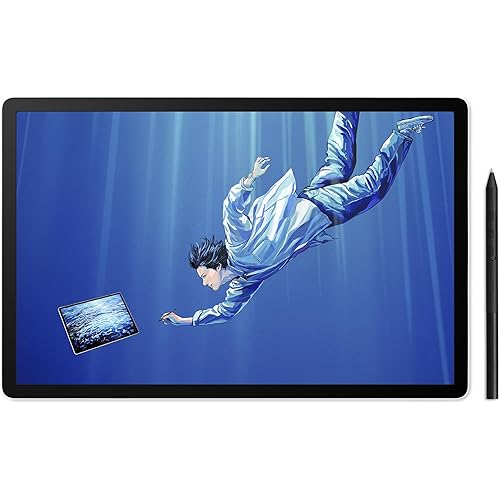
PicassoTab Z13 Standalone EMR Drawing Tablet, Battery-Free 8192 Levels Pen, No Computer Needed, Paper-Like 13.3" Screen, Pro Drawing Apps & Tutorials, Android 15, Designed for PRO Artists -Z13

Based on 1,700 reviews
Condition: New
Checking for the best price...
$349.95
Save $50.00 was $399.95

Buy Now, Pay Later


As low as / mo
  • – Up to 36-month term if approved
  • – No impact on credit to apply
  • – Instant approval decision
  • – Secure and straightforward checkout

Ready to go? Add this product to your cart and select a plan during checkout.

Payment plans are offered through our trusted finance partners Klarna, Affirm, Afterpay, Zip, Apple Pay, and Google Pay. No-credit-needed leasing options through Acima may also be available at checkout.

Learn more about financing & leasing here.

Selected Option

Free shipping on this product

FREE 30-day refund/replacement

To qualify for a full refund, items must be returned in their original, unused condition. If an item is returned in a used, damaged, or materially different state, you may be granted a partial refund.

To initiate a return, please visit our Returns Center.

View our full returns policy here.


Availability: In Stock.
Fulfilled by Amazon

Arrives Friday, Oct 30
Order within 6 minutes

Available payment plans shown during checkout

Protect Your Purchase

Easy claims online, fast replacements, no fees

Checking for protection plans...

At a glance

Condition
New
Size
13.3 in Screen
Model
Z13
Screen size
13.3 in
Pressure Sensitivity
8192 levels
Operating System
Android 15
Target Audience
Student
Warranty
1 Year
Works with
Laptop

Features 5

  • EMR PEN-DISPLAY TECHNOLOGY MEETS TRUE ANDROID STANDALONE FREEDOM: Z13 combines the precision of traditional EMR pen displays with the freedom of an Android tablet no computer, no cables, no drivers. Just draw anywhere.
  • BATTERY-FREE EMR PEN WITH 8192 PRESSURE LEVELS: Experience ultraaccurate strokes, natural tilt response, and zerolag drawing. The pen never needs charging, making it ideal for long sketching sessions.
  • LARGE 13.3" PAPER-LIKE MATTE SCREEN FOR REALISTIC DRAWING FEEL: The antiglare, textured surface mimics real paper, giving artists better control for sketching, shading, and detailed illustration work.
  • PROGRADE APPS & ADVANCED TUTORIALS INCLUDED: Create at a professional level from day one with premium drawing apps and indepth guided lessons. Designed for serious artists who want highquality tools, refined workflows, and skillbuilding tutorials that accelerate digital art mastery.

Description

Z13 combines the best of both worlds - the ultra‑accurate EMR pen technology found in professional pen displays, and the freedom of a fully standalone Android tablet. Powered by Android 15 and a battery‑free EMR stylus, it delivers natural, precise drawing with zero cables and no computer required. Draw with the same EMR technology used in professional pen displays - now in a standalone tablet. Every stroke feels natural, controlled, and consistent. Whether she’s sketching on the porch or he’s designing at his desk, the Z13 delivers the same paper‑like EMR precision and smooth Android performance. Students and young artists can create in their own style, in their own space — no computer needed, no limits on imagination. Vector-based infinite canvas for sketching, wireframing, and design work. Create detailed artwork with advanced brushes, layers, and blending tools for digital artists. Create animations frame by frame with easy tools for storyboards, sketches, and creative projects. Learn sketching, coloring, and digital art with beginner-friendly step-by-step tutorials. Discover tips, manuals, and creative guides to get the best out of your PicassoTab. Unbox your full creative kit and start drawing instantly. Power it on, grab the EMR pen, and begin your next masterpiece today.

Specs 16

Brand PicassoTab
Connectivity Technology Wi-Fi
Pressure Sensitivity 8192 levels
Operating System Android 15
Special Feature Front Facing Camera, Multi-Touch Screen, Rear Facing Camera, Stylus Pen
Model Name Z13
Built-In Media AC Adapter, Digital Pen, Glove, USB Cable
Target Audience Student

Frequently asked questions

If you place your order now, the estimated arrival date for this product is: Friday, Oct 30

Yes, absolutely! You may return this product for a full refund within 30 days of receiving it.

To initiate a return, please visit our Returns Center.

View our full returns policy here.

  • Klarna Financing
  • Affirm Pay in 4
  • Affirm Financing
  • Afterpay Financing
  • Zip Pay in 4
  • Financing through Apple Pay
  • Financing through Google Pay
Leasing options through Acima may also be available during checkout.

Learn more about financing & leasing here.

Top Amazon Reviews


Excellent tablet exceptional customer service
Size: Largest 14 Inch Screen
This brand has EXCELLENT customer service. And this tablet is amazing. I purchased last year for my son who is on the spectrum and obsessed with drawing and he uses it literally every single day he’s obsessed with it. It unfortunately stopped charging and the screen was randomly blacking out so I reached out to Simbans. I did have to pay $30 to send it back but they completely replaced the device, brand new shipped back at no cost and my son couldn’t be happier to have it back. I couldn’t be more please with how the company handles customers even after they have had their device for some time. ... show more
Reviewed in the United States on August 24, 2026 by Alexandria j.

Good quality for the cost
Size: Largest 14 Inch Screen
Everything has been working very well. I did experience some port rot but an email to customer service solved it VERY quickly, I sent in my old tablet and they ordered me a new one. (I was still under warranty, though past the initial 30 days.) All done quickly, politely and exclusively through email too, which I really appreciated. (Thanks Chris) I use it for a lot of stuff, primarily browsing, art and gaming. I've not experienced any lag. The apps that come preinstalled are meh (I recommend Krita or Clip Studio) but they can be uninstalled and there's a nice amount of space to play with. The quality for the price is actually really good. I do wish the pen was a little better, it's a bit simplistic, my phone apparently isn't compatible to be a shortcut device and I'm not dropping $40-$50 for the tabmate device. It's not a deal breaker for me though and a good app will provide on screen shortcuts for ease of use. Battery life is good (so far) and it charges quickly. Just treat the port well like you would/should any device and make sure you have some spare AAAA batteries. The pen doesn't burn through them but I like knowing I have plenty of spares besides the two they ship it with. The drawing glove was way too big for my hand though, so I just cut the index and middle finger off an old glove, works like a charm. ... show more
Reviewed in the United States on March 19, 2026 by J.L.

After sales service (very good)
Size: Largest 14 Inch Screen
I had a very positive experience with PicassoTab’s after-sales customer service. One of the tablets I purchased developed a problem, so I contacted their support team regarding the warranty. The process was straightforward and hassle-free. They handled my warranty claim professionally and replaced the defective tablet with a new one without any major issues. I was very satisfied with how they handled the situation. Their customer service was responsive, helpful, and made the warranty replacement process easy. Based on my experience, I would definitely recommend PicassoTab, especially because they stand behind their products and provide good after-sales support. ... show more
Reviewed in the United States on August 11, 2026 by Hugo Mendez

Good tablet, crappy stylus
Size: Compact 11 Inch Screen
The tablet works fine, connects to the internet perfectly and doesn't lag. Screen quality is pretty good, pressure sensitivity is a little iffy and it will read your palm even with the glove on which is very annoying. The color is alright, shows them accurately and is pretty good. The size of the tablet is bigger than I thought it would be but it's absolutely perfect. The only thing that lags is the stylus. It will suddenly disconnect and you gotta smack it like a TV remote for it to work again. Besides the stylus, the tablet is perfectly fine and pretty great. I love it and it's definitely worth the money if you can overlook the stylus like I can. ... show more
Reviewed in the United States on September 15, 2025 by Dakota

Great tablet and outstanding customer service!
Size: Compact 11 Inch Screen
Short story... Both the tablet and the customer service are outstanding... Can't recommend highly enough. Longer story... I started learning Japanese, and---quickly realizing that my phone wasn't going to cut it--- needed a tablet to get a larger screen. Also needed a stylus to practice writing. This tablet has been absolutely great... Again, can't recommend it highly enough. I also tried a Samsung tablet that was almost twice the price, and wound up returning the latter because it wasn't nearly as good as the Picasso Tabb. The screen on the supposedely better Samsung tablet was VERY reflective... If there was any light shining on it would reflect images to one degree or another. The pen on the Samsung tablet was also terrible... Overall, the effect was that using the Samsung wasn't anything like writing on paper. I found it to be kind of a chore. As I say, I returned the Samsung tablet and kept this one... Apart from being about half , the price, this just wound up being much better in terms of feeling and looking like I'm actually writing Japanese on paper. But, to my surprise, I even found that I liked surfing the web and watching videos on the Picasso Tab more than the Samsung. I'm not an expert on any of this stuff, so all I can say is that the colors on the Picasso Tab just seemed a lot nicer and, hence, the overall experience more immersive. Though I only expected to be using the Picasso Tab for Japanese, I wound up using it for literally everything---haven't opened either of my laptops since I bought the Picasso Tab. Which brings us to the customer service... So I wound up using the thing A LOT... Like I was on it 8 to 10 hours a day, frequently doing Japanese while walking my dog. The result was that the poor tablet took one hell of a beating in terms of wear and tear. My dog is blind, and I have to carry her out of the house... So I wound up dropping it more times than I can count while trying to open the door and carrying her. The unfortunate but inevitable result was a screen full of cracks. Around 10 months post-purchase, I also started having troubles with the USB port... It got to the point where I couldn't charge the tablet. I didn't think either of these issues would be covered by the warranty... figured they'd count as "ordinary wear and tear"... So I contacted Simbans and asked how much it would cost to repair the USB port and cracked screen. They requested some info from me along some photos of the tablet. When they got back to me the next day, I had another pleasant surprise. They offered to fix the tablet for free and pay the cost of shipping it back to me.. All I had to do was pay for getting it to them. But that's not the best part. They also gave me another option that was even better! If I didn't want to get the old one fixed for free, I could pay $30 and they would send have Amazon ship me a brand new one. That's what I did. So for $30, I not only got a brand new tablet, I also got a brand new pen and lilkewise for all the other accessories. All in all, this is a great product at a reasonable price and, importantly, one that the manufacturer is willing to stand by. Based on my experience, can't recommend highly enough. ... show more
Reviewed in the United States on April 30, 2025 by Michael Thau

Defects & Performance Issues
Size: Compact 11 Inch Screen
Initial Inspection: Pros: ~Concepts Preinstalled ~Great Value ~Android 13 Cons: ~Screen Protector Application ~Performance ~Ghost Touching ~Pen Input Analysis: When I opened the package, the product was nice and secure. Yet, I noticed the pre-installed screen protector had a few bubbles. There was also dirt or dust stuck underneath which looked like a tiny dot. Ghost touching was also evident when I tried signing into Android "Google". But I was able to mitigate this by turning the screen on and off, not completely shutting it down. A few days after use, the pen would not register some inputs/touches. Lastly, the performance, while on an octa core cpu and 6 gb of ram, would still "feel" slow. Recommendation: Opt for a more popular brand, like Apple or Samsung, or try the older, well-reviewed product from this brand, or wait until they mature. Background: This was my first purchase of a standalone portable tablet because half of my classmates in college were using one. I love how this product comes with the app, Concepts, preinstalled, which enables me to have an infinite canvas for drawing and note taking. I checked other brands and this seemed like a very nice value for what I needed. However, once I got it, I was plagued by ghost touching. I tried my best to remove the problem by removing the pre-installed screen protector. I also went into settings to try and boost the performance (developer settings, background limit none, force close all apps on exit). I could have lived with the ghost touching because it was a simple fix (turning the screen on and off). This made me conclude that it is a software problem and not a hardware problem. Not long after, I would experience the pen, that was fine receiving instant input, now not registering some strokes. At this point, I concluded that I can not fix this. I wish to warn you of the inherent software and general product problems. If you are not experiencing any software problems right now, you may experience it in the future. I pray that this is a unique problem for my case. You should not have to experience this. While I may have critical points about the product, I do wish to support this company for what they do. I will check up on them in a few months or a few years. ... show more
Reviewed in the United States on October 16, 2024 by David Llacuna

I love it
Size: Largest 14 Inch Screen
I am loving this tablet. They offer a lot of stuff with it. And its so easy to set up. Ive been practicing drawing stuff and it feels like im drawing on paper. The pen is weighted and feels like im holding a pen. Its offers apps that help tech you to draw and they even offer coupons that give you the pro version. I feel like ive been given so much for a great price. ... show more
Reviewed in the United States on July 21, 2026 by DESTINIE BLACKMON

Excellent gift
Size: Compact 11 Inch Screen
We bought this as a Christmas gift 7 months ago and our teenager has yet to put it down! I am continuously amazed at all the creativity that is being poured out. One of the best purchases we have made.
Reviewed in the United States on July 30, 2026 by Virgie
Checking for best price...