Search  for anything...

Phomemo Label Maker, Bluetooth Thermal Printer for Barcode, Address, Home, Mailing, Small Business,Clothing, Portable Label Maker Machine with 3 Label

  • Based on 3,591 reviews
Condition: New
Checking for the best price...
$64.98 Why this price?
Save $22.01 was $86.99

Buy Now, Pay Later


As low as $10.83 / mo
  • – 6-month term
  • – No impact on credit to apply
  • – Instant approval decision
  • – Secure and straightforward checkout

Ready to go? Add this product to your cart and select a plan during checkout.

Payment plans are offered through our trusted finance partners Klarna, Affirm, Afterpay, Zip, Apple Pay, and Google Pay. No-credit-needed leasing options through Acima may also be available at checkout.

Learn more about financing & leasing here.

Selected Option

Free shipping on this product

FREE 30-day refund/replacement

To qualify for a full refund, items must be returned in their original, unused condition. If an item is returned in a used, damaged, or materially different state, you may be granted a partial refund.

To initiate a return, please visit our Returns Center.

View our full returns policy here.


Availability: Only 3 left in stock, order soon!
Fulfilled by Amazon

Arrives Sunday, Oct 11
Order within 23 hours and 5 minutes
Available payment plans shown during checkout

Protection Plan Protect Your Purchase
Checking for protection plans...

Color: Purple


Set name: 1 Printer + 3 Roll Labels


Features

  • Thermal Label Printer- Never need the ink, toner, and ribbon again. This barcode label printer prints using thermal technology, meaning you only need to restock on labels, the thermal label maker come with 3 Rolls Labels(1 Roll 40x30mm label, 1 Roll 60x40mm label, 1 Roll 70x80mm label)(Attention: The label maker only support print 0.78''- 3.14'' width labels, can't print 4 x 6 shipping labels)
  • All-singing, All-dancing APP - Phomemo's R&D team create the Print Master APP for you, with a variety of built-in functions. One-click use: text, pictures, barcodes, QR codes, OCR, Form, hundreds of icons, and many pre-made templates for commercial and home use. Improve your efficiency
  • High Compatibility - Not only Phomemo M220 label maker machine supports IOS, and Android mobile phone by bluetooth connection, but also supports USB connection for MAC and Windows 10. (WARNING: For your better experience, please be sure to watch the software installation tutorial on the page)
  • Long Battery Life - Phomemo M220 Label Printer Upgrade 2200 mAh battery provides up to 36 rolls of continuous printing, newly added auto-sleep mode, which can reduce power consumption by 25% and extend the use time by 2-3 hours.
  • Widespread Use - M220 3.14 Inch Bluetooth label printer has an extensive variety of uses and creative possibilities. and Enjoy Labeling Anything Anywhere like Small businesses: clothing, crafts, retail, jewelry, eBay, etc. Labeling address, barcode, shipping, price, date, ingredients, logos labels for product. Save you a lot of time for handwriting labels, allowing you to focus more on your small businesses
  • Phone and Tablet Start Printing - Step 1: Download the App 'Print Master'. Step 2: Turn on the M220 label maker and your phone's or tablet's Bluetooth. Step 3: Click the 'Printer' icon in the App to search for the M220 portable label printer, connect it via Bluetooth in the App, select the label size, and edit the content to start printing
  • Laptop/PC Starts Printing - Step 1: Please check your laptop/PC's operating system (OS) and download and install the correct M220 driver and the 'Labelife' app from the Phomemo website. Step 2: Use the USB data cable to connect the M220 label maker to your computer. Step 3: Select the label size, edit the content, and choose M220 from the printer list

Description

1" x 2-5/8" Label 1.57'' x 1.18'' Label 1.18'' x 0.78'' Label 2.75'' x 3.14'' Label 1.96'' x 1.18'' Label Does The Label Maker Could Pair Bluetooth with Phone or Tablet Directly? Sorry, The label maker couldn't pair with Phone or Tablet Directly Now, It should be pair on the App " Print master", connect by the App M220 Label Maker Can Connect with Laptop Via Bluetooth? No, The label maker can't support connect laptop by Bluetooth, connect laptop should be use USB cable Which App for It ? Do I Need to Log Into The App to Use it? Attention: The label maker use "Print master" not "Phomemo", you could log into the app to use also could use it without log in Will The Label Maker Work for 4 x 6 Shipping Labels? No, The label maker only support print 0.78''- 3.14 width labels, couldn't work for 4 x 6 shipping labels

Brand: Phomemo


Connectivity Technology: Bluetooth, USB-Type-C


Printing Technology: Thermal


Special Feature: Compatible with pc and smart phone, Portable & Easy to use, Wireless & Inkless


Color: Purple


Model Name: M220


Printer Output: Monochrome


Max Printspeed Monochrome: 59 pages_per_minute


Item Weight: 473.5 g


Product Dimensions: 7.99"D x 5.9"W x 2.91"H


Printer Type: Thermal


Other Special Features of the Product: Compatible with pc and smart phone, Portable & Easy to use, Wireless & Inkless


Printer Output Type: Monochrome


Item Weight: 473.5 g


Item Dimensions D x W x H: 7.99"D x 5.9"W x 2.91"H


Controller Type: iOS


Print media: Labels


Scanner Type: Portable


Maximum Copy Speed Black and White: 59 pages_per_minute


Compatible Devices: Android & iOS Phone / Tablet (Connection Via Bluetooth on The App Not Phone or Tablet Directly), Chrome OS v3 and above laptop /PC (Connection Via USB Not Bluetooth), Linux laptop/PC (Connection Via USB Not Bluetooth), Windows x86 / Windows 7/8/10/11 and above laptop / PC (Connection Via USB Not Bluetooth), macOS 10.14 and above laptop/PC(Connection Via USB Not Bluetooth)


Warranty Type: full warranty


Ink Color: black


Additional Printer Functions: Print Only


Control Method: App


Number of Trays: 1


Processor Count: 1


Resolution: 203DPI


Color: Purple


Maximum print Resolution Color: 203DPI


Maximum Print Resolution Black and White: 203DPI


Duplex: Simplex


Maximum Copy Resolution Black and White: 203DPI


Brand: Phomemo


Model Name: M220


Model Number: M220-PL-M1-3SET


Built-In Media: 1 Roll 1.57x1.18Labels(230pcs), 1 Roll 2.36x1.57Labels(180pcs), 1 Roll 2.75x3.14Labels(100pcs), M220 Label Printer, USB cable, Manual


Series Number: 220


Model Series: M220


Specific Uses For Product: Small businesses, labeling address, barcode, shipping, crafts, retail, jewelry, eBay, logos


Unit Count: 1 Count


Manufacturer: Phomemo


B&W Pages per Minute: 59 pages_per_minute


Maximum Media Size: 3.14 inches


Maximum Sheet Capacity: 140


Paper Size: 0.78"-3.14" Width inches


Output sheet capacity: 140


Printer Connectivity Type: Bluetooth, USB-Type-C


Hardware Interface: USB


Total Usb Ports: 1


Frequently asked questions

If you place your order now, the estimated arrival date for this product is: Sunday, Oct 11

Yes, absolutely! You may return this product for a full refund within 30 days of receiving it.

To initiate a return, please visit our Returns Center.

View our full returns policy here.

  • Klarna Financing
  • Affirm Pay in 4
  • Affirm Financing
  • Afterpay Financing
  • Zip Pay in 4
  • Financing through Apple Pay
  • Financing through Google Pay
Leasing options through Acima may also be available during checkout.

Learn more about financing & leasing here.

Top Amazon Reviews

  • Great little printer for my small business!
Color: Pink Set name: 1 Printer + 1 Roll Labels
⭐⭐⭐⭐⭐ Great little printer for my small business! I’m really happy with my Phomemo M220. I bought it to make labels for my small business, and it has made things so much easier. At first, I had to spend a little time getting familiar with the Print Master app and figuring out the settings, but once I got the hang of it, I was able to create my own labels and save my designs to use again. I love being able to make changes myself and print labels whenever I need them. The print quality is clear, the printer is small and convenient, and it doesn’t take up much space. It has helped me make my products look much more professional without having to pay someone else every time I need labels. I’m especially pleased that I can use it with my tablet. For a small business owner like me, this has been a very useful purchase. I’m glad I bought it and would definitely recommend the M220 to anyone looking for a simple, affordable label printer. ... show more
Reviewed in the United States on September 11, 2026 by Opal chambers

  • Reliable, Fast, and Ink-Free Labeling | A Must-Have Label Printer for Everyday Use
Color: Black Set name: 1 Printer + 3 Roll Labels + 1 Case
⭐⭐⭐⭐⭐ The Phomemo M220 Thermal Label Printer is a fantastic tool for organizing and labeling. It is compact, easy to use, and connects quickly via Bluetooth. The print quality is clear and professional, making it perfect for barcodes, product labels, and home organization. I love that it uses thermal printing, so there is no need for ink or toner. The battery life is excellent, and the app offers plenty of customization options. I highly recommend the Phomemo Label Maker, M220 Thermal Label Printer for EVERYONE small businesses and personal use! ... show more
Reviewed in the United States on June 23, 2026 by Tru💙Blue

  • Must have to use anywhere at anytime.
Very reliable and easy to use.
Reviewed in the United States on August 24, 2026 by CarlaK

  • Convenience over quality. Keeping, but will use for crafts.
Color: Black Set name: 1 Printer + 1 Roll Labels
Set up was easy. I like that this little printer is Bluetooth and can work with just my phone. I plan to use it in my craft space to do some labels for my candles and items I make for friends. The app works fairly well. I would give the app 4/5 stars. Someone mentioned you have to subscribe to the app. No, you don't. If you want premium fonts and graphics you require a subscription. If you are fine with the standard or can import your own graphics, you are good to go. As for printing quality, that is where I knocked a star off. It is ok. It isn't great. It is a $45 thermal printer, so I need to keep that in mind. It isn't going to print like my laser or my ink jet. However, I am trading quality for convenience. If I were selling my crafts, then yes, I would do higher quality labels on a different printer. However, I want fast labels for items I give friends and family. So, this printer will be fine for that. Again, convenience over quality I guess. I don't need a $1500 label printer. I like that the printer fits on my craft desk in my garage. That is one of the reason I wanted it. I can print nicer labels on my other printers, but I have to go in the house, pull the files up on my computer, print to my inkjet or laser, then go back out to the garage. I do this all for one label. Yes, it is a first world problem. However, it is not convenient for one label. One label takes 10-15 minutes by the time I go through the process. I don't love the quality of this little printer when it comes to the handling of graphics, but I am not sending it back either. I didn't want to spend more than $50. So, I am getting what I paid for. It will work for my needs. ... show more
Reviewed in the United States on July 30, 2025 by KaceyB

  • Nice gadget
Color: White Set name: 1 Printer + 3 Roll Labels
Great little machine. Definitely have to pay the subscription on the app to get anything other than basic font. Prints out very clear and was easy to set up. Love how it comes half way charger so it was read to go.
Reviewed in the United States on September 23, 2026 by momof5

  • Do not buy their products
Color: Black Set name: 1 Printer + 1 Roll Labels
Seller’s support center is very helpless making lot of complications when you have printer’s issues . The printer went out of order and does not work and I asked either to let have the troubleshooting procedures or to replace the printer without delay . They sent me their first email asking for evidence and I submitted a very clear video of the problem but unfortunately, they started to manipulate and they added different requirements through series of emails not the whole requirements at the fist place within their first email . They took days to answer every email that I sent to them . At the end of the, I followed all the steps which they mentioned in their last email but the printer stayed out of order ,then they asked me to repeat same steps and recorded ( which they did not asked in their last email) . It is vey clear to me that they do not want to admit that the printer does not work and they tried their best to avoid to replace it . I still have their warranty valid till 09/13/2026 but they delay and delay and delay their response and positive actions . I do not recommend any one to buy such printer and has the obstacles and hassle which I had and still have . Their negative actions caused me losing lot of business opportunities and money . ... show more
Reviewed in the United States on August 19, 2026 by hishamsaad

  • Awesome label maker. So fun 🌠😎☀️
Color: Purple Set name: 1 Printer + 3 Roll Labels
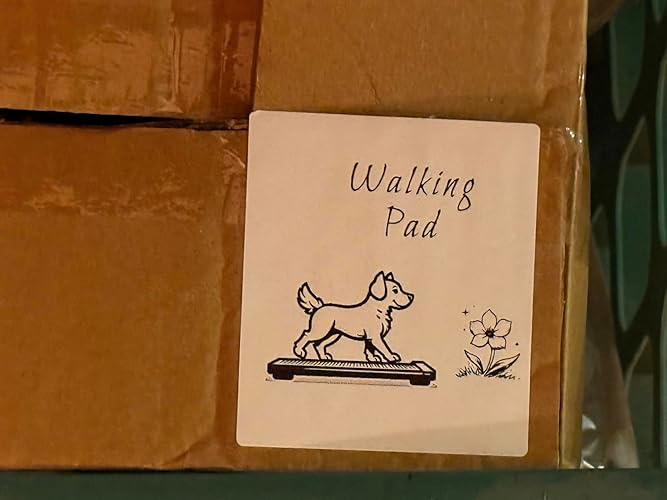
This LabelMaker is great 😊 It is so fun to use and I feel it’s very easy to learn. They have a lot of YouTube video tutorials on their YouTube channel so I highly recommend that and you could go to the playlists that they have on their YouTube channel to learn for the exact model printer you have for example this one they have 14 videos on the playlist. I bought some special labels for my cables and I’ve been making some for my boxes and they even have an AI feature so I asked it to make a dog walking on a treadmill because it was for my treadmill equipment and they made a really cute label which I’ll post here on this review. I think their customer is really good as I did reach out to them. They got back to me. I really like the color purple and the battery seems to be good. I like the fact that this is USB-C so I can use my existing iPhone charger to charge this. I think it’s very fun to make these labels. With the app, you can change many different fonts and you could add designs and choose from their templates. It’s very customizable.. The quality is very good. This is a thermal printer so there’s no ink it’s done by heat so that’s great. You never need to buy ink. The Bluetooth connectivity was very easy to connect to my iPhone. ... show more
Reviewed in the United States on July 25, 2025 by Dude

  • so far so good. love that it prints true black background labels.
Color: Black Set name: 1 Printer + 1 Roll Labels
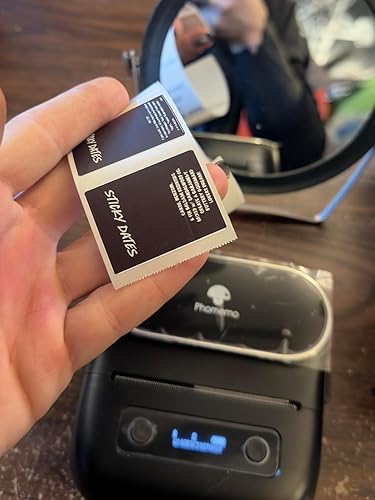
so far so good. it definitely prints just as clear as my munbyn 300dpi printer. doesn’t handle smaller fonts as well. but it prints TRUE BLACK BACKGROUND LABELS! which is what i’m looking for. i wanted to have white text w/ a black background & my munbyn is TERRIBLE at this. this app is also way better & has way more features than the ones for the larger phomemo & munbyn printers. which i appreciate. (im sorry but the labelife app for the larger phomemo printers is too bare bones! why can’t we have an app like print master for larger printers!) i’m glad they FINALLY fixed the app bc it was a mess for a while there. it’s the whole reason i even bought a munbyn to begin w/. i swore off phomemo bc the app was so bad. but they listened to the feedback & they fixed the issues & i appreciate that. i love a company that listens to its consumers. it connected to my phone super easily. it’s so cheap for how high quality the print is. i do wish you could use flat labels w/ it. only bc i have so many of them. but it’s a trade off im willing to make. i will update if i have any issues. also, i love that its very easy to align the labels. my munbyn is INCREDIBLY DIFFICULT to print straight w/. it’s the biggest reason im getting rid of it. i end up wasting 5x more labels than i actually use. so hopefully i dont have that issue w/ this. i will need to see how well it prints small shipping labels. bc it does say it can do that. so i’ll update once those labels get delivered. but i normally use 2x3in shipping labels printers on my inkjet and munbyn so it shouldnt be an issue bc this seems to print even clearer than that. ... show more
Reviewed in the United States on March 23, 2026 by Imogene

Can't find a product?

Find it on Amazon first, then paste the link below.
Checking for best price...