Search  for anything...

Brother P-Touch Monochrome Label Maker, Versatile Easy-to-Use Labeler, PTD400AD, AC Adapter, QWERTY Keyboard, Multiple Line Labeling, White

  • Based on 6,050 reviews
Condition: New
Checking for the best price...

Buy Now, Pay Later


As low as $16.65 / mo
  • – 6-month term
  • – No impact on credit to apply
  • – Instant approval decision
  • – Secure and straightforward checkout

Ready to go? Add this product to your cart and select a plan during checkout.

Payment plans are offered through our trusted finance partners Klarna, Affirm, Afterpay, Apple Pay, and PayTomorrow. No-credit-needed leasing options through Acima may also be available at checkout.

Learn more about financing & leasing here.

Selected Option

Free shipping on this product

FREE 30-day refund/replacement

To qualify for a full refund, items must be returned in their original, unused condition. If an item is returned in a used, damaged, or materially different state, you may be granted a partial refund.

To initiate a return, please visit our Returns Center.

View our full returns policy here.


Availability: 12 left in stock
Fulfilled by Amazon

Arrives Thursday, Jun 25
Order within 4 hours and 29 minutes
Available payment plans shown during checkout

Protection Plan Protect Your Purchase
Checking for protection plans...

Style: PTD400


Features

  • EASY TO USE: The compact design and easy type QWERTY keyboard feature make the PT D400AD a versatile and easy label maker to use
  • ONE TOUCH KEYS: Easily add one of 99 frames, over 600 symbols, and 14 fonts by accessing the one touch keys. Maximum Print Height - 15.8 mm. Maximum Number of Print Copies - 9
  • SUPPORTS LARGE CHARACTER PRINTING: The P touch Versatile Easy to Use Label Maker supports up to 7 font sizes
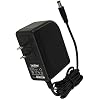
  • AC ADAPTER INCLUDED: The PT D400AD includes an easy to use AC Adapter and can operate on 6 AA batteries (not included)
  • FOR USE WITH BROTHER GENUINE TAPES: Use Brother Genuine P touch TZe tapes 12mm, 9mm, 6mm, 3.5mm, 18mm for best performance

Description

The PTD400AD P touch printer is a simple to use label maker that permits users to create personalized and professional appearing labels with ease. Its compact design makes this label printer a versatile device that can meet your personal or office label printing needs. The Brother P touch PT D400AD offers 14 fonts, 10 font styles, and over 600 symbols plus barcodes that can be accessed by typing content and formatting with one touch keys. This unit even allows users to save up to 50 labels in the large memory, which is a great time saving feature that allows you to reprint commonly used labels. The PT D400AD is a user friendly device that also includes an easy to read graphical display. This function permits the user to review the text and format prior to submitting the print job, reducing typing errors and helping save you money on mistake prints. The P touch easy to use label maker supports large character printing in up to 7 font sizes and uses durable, easy peel tapes in 5 different widths of up to 18mm (approximately ¾”). In fact, you can use up to 5 different TZe Brother Genuine tape widths, and the convenient, top loading tape design lets you easily change tape cassette colors and sizes. For use with Brother Genuine P touch TZe tapes: TZe MQF31, TZe MQE31, TZe MQ531, TZe 2312PK, TZe 1312PK, TZe 111, TZe 211, TZe N201, TZe 315, TZe S211, TZe 121, TZe 325, TZe 221, TZe 421, TZe S121, TZe S221, TZe S621, TZe 131, TZe 135, TZe 231, TZe 232, TZe 334, TZe 335, TZe 631, TZe AF131, TZe AF231, TZe FA3, TZe FX231, TZe FX631, TZe MQ835, TZe MQ934, TZe MQG35, TZe MQP35, TZe S131, TZe S135, TZe S231, TZe S631, TZe 141, TZe 145, TZe 241, TZe 242, TZe 243, TZe 344, TZe 345, TZe 441, TZe 541, TZe 545, TZe 641, TZe 741, TZe B41, TZe FX241, TZe S141, TZe S241, TZe S641, TZe S941. This Brother P touch label printer comes with an AC power adapter, so you can be confident that your label maker will be ready when you are. It is also powered by 6 AA batteries (not included). The standard TZe tapes are durable and laminated so that they withstand water, heat, and fading.

Brand: Brother


Connectivity Technology: USB


Printing Technology: Thermal


Special Feature: Internal Memory, Portable


Color: Gray/white


Model Name: PTD400AD


Printer Output: Monochrome


Maximum Print Speed (Color): 1 ppm


Max Printspeed Monochrome: 1 ppm


Item Weight: 1.6 Pounds


Printer Type: Thermal


Other Special Features of the Product: Internal Memory, Portable


Printer Output Type: Monochrome


Item Weight: 1.6 Pounds


Item Dimensions D x W x H: 7"D x 7.4"W x 2.8"H


Controller Type: Push Button


Print media: Labels


Maximum Copy Speed Black and White: 1 ppm


Compatible Devices: PC


Warranty Type: Limited Warranty


Ink Color: Gray


Additional Printer Functions: Print Only


Control Method: Touch


Number of Trays: 1


Resolution: 180 dpi


Display Type: LCD


Color Pages per Minute: 1 ppm


B&W Pages per Minute: 1 ppm


Color: Gray/white


Color Depth: 1 bpp


Printer Connectivity Type: USB


Hardware Interface: USB


Total Usb Ports: 1


Maximum Copy Resolution Black and White: 180 dpi


Brand: Brother


Model Name: PTD400AD


Model Number: PTD400AD


Built-In Media: 18 mm x 4 m black on white TZe laminated tape cassette, Labelmaker, Power adapter


Model Series: PTD


Specific Uses For Product: Office


UPC: 804067315363 012502638810


Global Trade Identification Number: 10, 63


Manufacturer: Brother


Warranty Description: 2 years limited warranty


Item Type Name: Brother PT-D400AD Desktop Labeler


Unit Count: 1.0 Count


Maximum Media Size: Paper Roll


Maximum Sheet Capacity: 1


Paper Size: 3/4"


Output sheet capacity: 50


Maximum Print Resolution Black and White: 180


Wattage: 2.42 watts


Dual-sided printing: No


Duplex: Simplex


Frequently asked questions

If you place your order now, the estimated arrival date for this product is: Thursday, Jun 25

Yes, absolutely! You may return this product for a full refund within 30 days of receiving it.

To initiate a return, please visit our Returns Center.

View our full returns policy here.

  • Klarna Financing
  • Affirm Pay in 4
  • Affirm Financing
  • Afterpay Financing
  • PayTomorrow Financing
  • Financing through Apple Pay
Leasing options through Acima may also be available during checkout.

Learn more about financing & leasing here.

Top Amazon Reviews


  • Great Label Maker
This is my third label maker. My first was DYMO, which worked well for a few years and then started to fail. The second was the smaller version of this Brother one, which I've had for three years. Without going into detail, the Brother models, while they take up more shelf space, are much easier to use than the DYMO and much more versatile. I'm about to turn 77, and I think they are very easy to learn; but maybe that's because I started with DYMO. Anyhow, if I can do it you certainly can. Others have complained about the high cost of tape. There are plenty of third party tape manufacturers whose products are good. I now default to Unistar, which has been as good as Brother for my use. I don't expose my labels to the weather, and I don't know if the Brother labels would be better for that. The cost of Unistar is about a third, which validates the complaint that all the money for Brother seems to be in the tape. Also, read the posts by others on how to use the chain function to conserve tape. Again, as others have said, there is significant wastage if you make a lot of separate short labels. Here's another insider secret: If you want the font to be as easy as possible to read at a distance, use the Florida font. It is BY FAR the best for that purpose. I particularly like how easy it is to switch tapes. I can do it in about five seconds. Tapes come in various widths and color combinations. You will find that when you switch tape widths, the font sizes for ALL type size-settings adjust accordingly. That caught me by surprise the first time. I do like the bigger (PT-D400) model better than the smaller one (PT-D210). The key layout is more intuitive, and you don't have to use the shift function as often. Its max tape width is 50% greater, and for items on high (distant) shelves, that can make all the difference. The cabinet opens and closes easier, and the window that shows what tape is loaded is right on top and easy to see. Also the "clear" function works, which is the one thing that i could never get working on the smaller model. I'm addicted to these label makers. I wouldn't want to be without them. ... show more
Reviewed in the United States on July 18, 2021 by The Experimentalist

  • The new technology of labeling
I use the labeling device all the time. It is fun to be able to play around with the font size, style, and so forth – in order to instantly professionalize whatever it is I am labeling. ☺ It is light years beyond the Dymo Labeler I was using for many years. Technology has moved on at an accessible price. This particular device can be used on electrical current or on batteries. That is handy if you want to take the device around with you to where you are doing the labeling. It comes with a charger, which other models do not. It is 7" x 7" and I keep the extra tapes in a zipper pouch. It comes with a wide, white starter tape. The ones I ordered in the pack of 5 are more narrow, but that is fine for most labeling tasks. It is very easy to snap in the different colored tapes. Gone are the tape-feeding problems I continually had with the Dymo labeler. The labeler is great for labeling all those connector wires you have to deal with now in your life. It is great for labeling pill cases. The spices in our spice rack have never looked more elegant since I labeled them with large, bold font. At his request, I used a blue one to label our 7-year-old grandson's script for his last play. ... show more
Reviewed in the United States on July 1, 2019 by Andrew Cohen

  • Best Label Maker
Love it.
Reviewed in the United States on April 9, 2026 by Branden

  • Label all the things!
I bought this as a way to label my daughters bottles for daycare. I'm glad I did this rather than buying label stickers as we have had to change formula a few times now. The label stick on rather well and because of the cute designs they get compliments all the time. However because of the curve of the bottles the edges didn't lay flat and they start to peel apart after they have been in the bottle warmer. When the labels are applied right they don't have this problem and stay on, yet peel of easily and cleanly if you need to change them. The machine itself is pretty straight forward and easy to use. The reviews about the wasted inch should be geared more towards the actual cartridges themselves as it comes from how is fed through them. As others have stated you can save on the right side margin by setting it to narrow. I actually printed off myself a little label to stick by the print button to remind me to check it before printing. That small label has saved me so much tape. What I do wish the machine had is a cancel button. Once you hit print you had better be ready for it to quickly spit out your labels. I once had the wrong color in and didn't realize it until I hit print, the only way I knew to stop it before it printed all eight was to open the machine (probably not advisable). There is a little window for you to see which tape cartridge is in it, so the fault is really my own. If printing multiples I'd advise to always to a test one first. Sometimes when you mix the fancier fonts with having multiple lines they become hard to read. I also wish there was a way for me to input how big the label is allowed to be to fit specific spaces (such as my bottles) so I wouldn't have to do so many test strips to get it right. Overall though I'm very happy with this machine as it is very fun to use. I really like that it can save labels so that I don't have to input them again if I need one redone. I've since used this to label my large storage totes. I also always keep the 'wasted' tape. I use it for the dates on my bottles. (Writing with a permanent marker abs wiping of with a magic eraser.) ... show more
Reviewed in the United States on November 24, 2016 by Matthew Churilla

  • I put off buying a label maker for years and so happy with this one.
This fits between the handheld label makers that are easy to carry around, but not that easy to use and the label makers that rely on computer input, so aren't portable, but do a good job. This has a full QWERTY keyboard, so is easy to type labels. It has several selections of fonts with user controlled font size, preset frames if you want to pretty up your labels, symbols and accent marks for non-English language labels. The machine can also print barcodes, although I have no need for them and haven't tried that. The Brother brand labels adhesive holds labels in place very well. Although there are much, much cheaper brands of label tape available, I have not, yet, used them, so cannot say how well they work in this machine. I got this primarily to labeling all the charging cords for phones, tablets, portable fans, etc.. It seems everything uses USB charging cords, but the world has yet to standardize to any one USB type. This also is handy to label those cords that have their own AC plug and that require a specific output level. Mixing those up could harm a machine and quickly cost a lot more than this label maker. ... show more
Reviewed in the United States on July 6, 2020 by JoeInTampa

  • Reliable, Easy to Use
This thing is awesome. So easy to use. The cartridge has never jammed. I've printed hundreds of labels over two years and it never skips a beat. The only thing I would like to see changed is the amount of leading and trailing waste produced with a single label. If you only print one label, there is over one inch on either side of the print that is wasted and that you have to trim manually. I wish they could design it so that the edge of the cartridge is closer to the exit to reduce this waste. Of course, if you will be printing multiple labels, you can enter them all at once with a few spaces in between to print a single label and manually cut each. Oh, and the label backing has a slit down the middle for easy removal. That is a big plus. ... show more
Reviewed in the United States on February 24, 2025 by Steve Beatty

  • Wonderful for creating spine labels for my books
I used the sample cartridge to experiment and still had enough to do a bunch of labels. The cure for too-much-white-space on each end of the label is to put it into 'chain' mode. (I don't have the manual with me, so I can't tell you what page explains how to get it into that mode.) There will be white space at the beginning and end of the chain, but hardly any in between each label. It asks you after each label is printed if you want to advance the tape so that it can be cut. I printed 10 labels in a row with minimal white in between. Perfect. Keyboard makes creating the labels so quick, printing is almost instant, the AC adapter means I won't ever have to fool with batteries, and the manual explains everything very well, making it easy for me to jump in and start creating labels immediately. At the moment, I'm using them for spine labels on books, so I mostly did 2 lines. Big numbers and letters. I also used the 4-line setting when I had very thin books: small numbers & letters but very clear and readable. Auto-font chooses the largest font that will fit, depending on the number of lines needed. I easily changed the font size down when I needed the letters to fit onto a smaller space. When I'm done with the books, I will try address labels and labels for the drawers and boxes that hold supplies for all my other hobbies. I've not had any trouble with it, so I can't say how helpful customer support is...and that's good! ... show more
Reviewed in the United States on June 3, 2016 by M. Ward

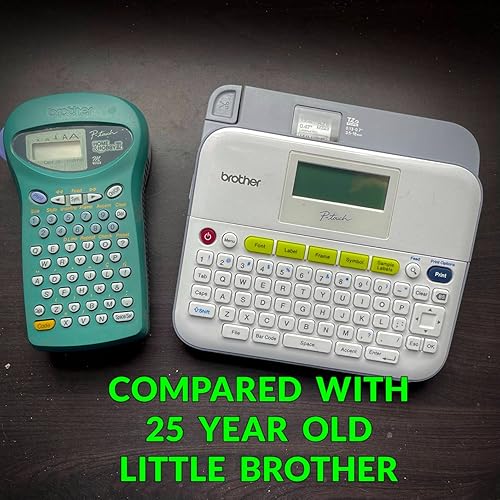
  • Meet my big brother Meet my big brother
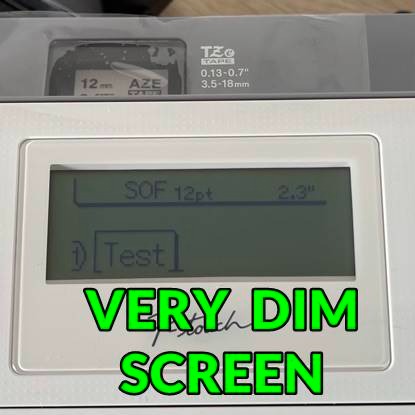
My first Brother product of any kind was a PT-85 handheld personal label printer. I’ve had it for about twenty-five years now, bought it at an office supply store when Amazon was still only selling books. It cost me about fifty bucks and at the time all of the other options available seemed like they were made out of cheap plastic. It is the only electronic gadget I keep in my office desk drawer and I use it all the time and it is still going strong. Of the things I love about it is that it literally seems to go forever on six AA batteries, like over a year per set. Of the few things I don’t like about it is that like all label printers it wastes too much unprinted tape although I have found a few ways to trick it into wasting less. I saw today, in mid 2021, that Amazon was selling a new one for $220 bucks. It must still be very desirable. THE NEED FOR MORE But then was then and now is now. Since the mid-nineties I’ve owned label makers from several other brands. Each has things going for it but none every gets used as much as my ancient Personal Touch. Today however I need more versatility, different tape widths, larger fonts, more colors, bar codes, etc. It took me a long time to decide on finally choosing this model. I knew it goes on sale a lot and some stores almost give it away to get your replacement tape business but I didn’t want to wait or shop around so I accepted that about sixty bucks was more than fair for something that does as much as this thing. PROS 1. Lots of font faces, sizes and styles 2. AC adapter included 3. Two year warranty 4. Real keys like a laptop computer 5. Several hidden features CONS 1. Wasteful – but they all are. Learn the tricks to save money 2. Unusually dim and low resolution screen 3. Lever that has to be manually pushed down before lid will close (inconvenience, not a flaw) Before adding my opinion I need to say that only about one in ten is really helpful, and they usually point out the ones that are error filled or dead wrong. I don’t want to take the time to do that but it’s obvious most of the ones that are off base obviously didn’t read the instructions or if they did, they didn’t understand them. Considering its price I could not find one reason working against this model. Is it perfect? No, in a real world that’s not going to happen, but properly used I am very happy with my choice. ... show more
Reviewed in the United States on July 18, 2021 Reviewed in the United States on July 18, 2021 by PhotoGraphics

Can't find a product?

Find it on Amazon first, then paste the link below.
Checking for best price...