Search  for anything...

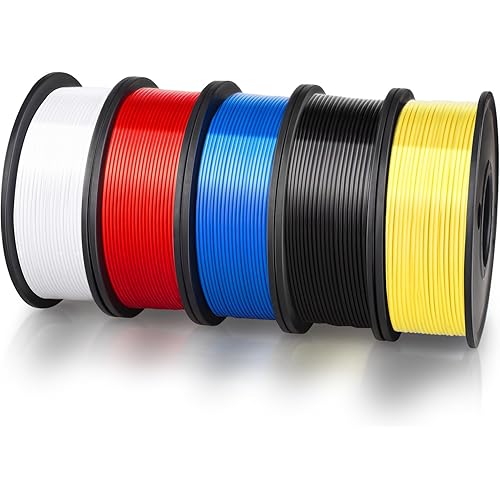
OVERTURE 10KG Bundle PETG 3D Printer Filament 1.75mm, Neatly Wound Durable PETG 10kg Spool (22.2lbs), Strong Toughness Filament, Fit Most FDM Printers (Black*5+White*5)

  • Based on 0 reviews
Condition: New
Checking for the best price...

Buy Now, Pay Later


As low as $16.67 / mo
  • – 6-month term
  • – No impact on credit to apply
  • – Instant approval decision
  • – Secure and straightforward checkout

Ready to go? Add this product to your cart and select a plan during checkout.

Payment plans are offered through our trusted finance partners Klarna, Affirm, Afterpay, Apple Pay, and PayTomorrow. No-credit-needed leasing options through Acima may also be available at checkout.

Learn more about financing & leasing here.

Selected Option

Free shipping on this product

FREE 30-day refund/replacement

To qualify for a full refund, items must be returned in their original, unused condition. If an item is returned in a used, damaged, or materially different state, you may be granted a partial refund.

To initiate a return, please visit our Returns Center.

View our full returns policy here.


Availability: In Stock.
Fulfilled by Amazon

Arrives Friday, May 15
Order within 11 hours and 33 minutes
Available payment plans shown during checkout

Protection Plan Protect Your Purchase
Checking for protection plans...

Color: Black 5-pack & White 5-pack


Size: 10kg


Features

  • [High Speed Printing Up to 300mm/s] Engineered for high-speed printers like Bambu Lab, Creality K1, and Voron. While others chase extreme numbers, Overture focuses on flow consistency. Our High-Speed PETG formula ensures smooth extrusion and superior layer bonding at rapid speeds, eliminating the common issues of underextrusion and delamination when pushing your machine to its limits.
  • [AMS Friendly & Tangle-Free] Perfect for Multi-Material Systems (AMS). We understand the frustration of a failed 20-hour print due to a snag. OVERTURE rapid PETG filament provides meticulous neat winding that guarantees a tangle-free experience and smooth retraction. Its exceptional reliability allows for worry-free, overnight printing sessions, ensuring seamless material switching and zero jams in your AMS or MMU while you sleep.
  • [High Precision & Toughness] Engineered for functional parts with an industry-leading +/- 0.02mm tolerance, ensuring perfect fit for mechanical assemblies without constant recalibration. OVERTURE PETG can provide excellent bed adhesion while remaining easy to remove once cooled, protecting your PEI or glass build plates from damagea reliable choice for durable, professional-grade prototypes.
  • [Consistent Quality & Vivid Colors] OVERTURE PETG filament bundles are designed for print farms and batch production. Our PETG features zero color difference and "what you see is what you get" accuracy across our wide, vibrant color selection. Each spool is vacuum-sealed and pre-dried for bubble-free, low-stringing results, ensuring reliable, identical quality for every batch of your commercial projects.
  • [Pro Support & Technical Settings] Smooth Printing with recommended parameters: Nozzle Temp: 230-260C, Bed Temp: 65-70C, and Speed: 30-300mm/s. OVERTURE provides a 1-year shelf life for unopened spools (proper storage required) and is committed to timely solutions for a seamless experience. Our dedicated technical support is always ready to assist, making us your reliable partner for a clog-free, hassle-free 3D printing journey.

Brand: OVERTURE


Material: Polyethylene Terephthalate Glycol


Color: Black 5-pack & White 5-pack


Item Weight: 10 Kilograms


Item Diameter: 1.75 Millimeters


Brand Name: OVERTURE


Additional Features: Exceptional Strength & Enhanced Toughness, Weather-Resistant & Ideal for Outdoor Use, Vibrant Colors, Supported & Smooth Printing


UPC: 840302823354


Manufacturer Part Number: OVPETG175


Manufacturer: OVERTURE


Number of Items: 6


Warranty Description: 1-year Warranty


Material Type: Polyethylene Terephthalate Glycol


Color: Black 5-pack & White 5-pack


Item Weight: 10 Kilograms


Item Diameter: 1.75 Millimeters


Frequently asked questions

If you place your order now, the estimated arrival date for this product is: Friday, May 15

Yes, absolutely! You may return this product for a full refund within 30 days of receiving it.

To initiate a return, please visit our Returns Center.

View our full returns policy here.

  • Klarna Financing
  • Affirm Pay in 4
  • Affirm Financing
  • Afterpay Financing
  • PayTomorrow Financing
  • Financing through Apple Pay
Leasing options through Acima may also be available during checkout.

Learn more about financing & leasing here.

Top Amazon Reviews


  • Great PETG for my project. 250C was sweet spot, and prints perfect on Sovol SV07+ PEI bed.
Color: Grass Green Size: 1kg
Grass Green is pretty close to Ryobi's green. I printed PETG and found 250C, the max, was best. I also noticed it printed more shiny at higher temps. Duller at lower. 70C bed was fine and 80C no different on Sovol SV07 PEI bed. Fast led to problems. Sweet spot was around 38mm/sec for walls. If I dialed it up to 50mm/sec then stringing started. On a roll sitting for about 3-4 weeks it did pick up moisture which can cause your nozzle to accumulate some excess. Keep an eye out for it. If you come back to a final print with little extra blobs, it's probably knocked off the nozzle as it moved around. I used Cura default for wall thickness but I did drop my layers to 1.6mm for better arches. I didn't use bed adhesion (brim, raft, etc), bridges or supports but I also kept all my angles gradual. Look at the pic and you'll see they are basically circles. I used 20% infill as well as 30%. No real difference. When setting the power drills on the bracket arms, they only deflect maybe 1-2mm. Barely noticeable. Yes, by hand you can make it deflect 5-6mm but this is just to organize my tools, not create a climbing wall that will support lots of weight. I printed all of what you see with 1 spool. I have a 2nd loaded to do a ton of more tool wall brackets, but wanted to get this review up. If your print has started, and you have moisture issues, try bumping the temp up and keep an eye on it. You may get through it bumping 5 degrees at a time to watch for change. In my case, it was in the infill area, and so it's "entombed" inside. When I ramped up to 60mm/sec and got to higher layers, like around 300 of 500 (again, 1.6mm height layers) it did start to have issues rising a bit, and catching upon hot end return. I reduced the speed back to 32, and dropped the fan from 20% to 10% and the clipping stopped for a perfect finish. I do also use glue pen for adhesion to the bed, but even on a clean bed (no glue pen) I still had great adhesion. Finish is great. No stringing if I keep speeds down. Strong as you'd expect from PETG. I am super happy. I did read reviews that were negative but didn't have problems. The storage bag is resealable which is really nice. Spool did not detach on either spools. My filament was unopened on both rolls, ordered about 4 weeks apart. I will definitely order this product again as I get more of my power tools wall mounted, and when I get a chance I will upload the STL files to Thingiverse. I created these prints on TinkerCad. website, exported STL into Cura and then sliced GCode sent to Sovol SV07Plus. ... show more
Reviewed in the United States on September 10, 2025 by John Schubert

  • Great PETG Filament That Just Works!
Color: Black*2+white*2 Size: 4kg
I've been using the OVERTURE 4KG PETG bundle with my FDM printer and overall it’s been an excellent experience. This filament prints very reliably and gives strong, functional parts right off the spool. 👍 What I Loved Smooth prints on a .4 mm nozzle — surfaces come out clean and even, with very nice finish quality. Supports release easily — support structures peel off without leaving noticeable marks on the model, which saves tons of cleanup time. No clogs at all — runs smoothly with no jams or feed issues, even with extended prints. Strong, durable prints — parts feel tough and are well suited for functional prints, prototypes, or mechanical uses. 🛠️ Printing Tips On smaller parts that have limited area touching the build plate, I recommend adding a brim to improve first-layer adhesion and prevent lifting. The filament sticks well overall, but a brim really helps those tiny contact points. 🎯 Summary Great value PETG filament that hits all the basics: reliable extrusion, smooth finish, easy support removal, and zero clogging. Ideal for hobbyists or anyone doing lots of functional prints — highly recommend! ... show more
Reviewed in the United States on February 11, 2026 by Patriot Mountain

  • GREAT VALUE
Color: Black 5-pack & White 5-pack Size: 10kg
one of the best filament and works well. if u can get it on sale… GET IT. use for most of my prints without any issues and doesn’t jam or clog . after running through 4 kg filament i only have one jam but thats from my ams
Reviewed in the United States on May 4, 2026 by rip pop smoke

  • Easy to print and strong
Color: Purple Size: 1kg
Good PETG for the price. It is not too picky on temperature, it prints fine anywhere from 245-255 on my Ender 3 V2. It doesn't bridge very well but that is to be expected for PETG, if you want to bridge I recommend printing at 245 and turning on bridging settings in Cura which makes bridges possible although pretty ugly. Supports work better than bridging, but can be hard to remove because PETG sticks to itself so well. Here are my settings for Ender 3 v2: micro swiss all-metal hotend / original extruder / original bowden tube bltouch leveling probe + yellow springs nozzle 0.4mm 250c bed plain glass + gluestick, 85c first layer speed 10 speed after first layer 30 first layer height: 0.28 layer height after first layer: 0.2 fan: none unless you are trying to bridge, if so use bridge detection to turn fan 100% only for the bridge retraction 3mm @ 30 I find that the biggest struggle with PETG is just getting the first layer to stick and look good. Once you get past the first layer it is usually smooth sailing. If you have problems with the first layer, first of all dry your filament even if it is brand new. It is an easy way to eliminate frustrations. Also go ahead and calibrate your extruder steps and measure your filament diameter and put that into your slicer, again these are easy steps that ensure you will not be fighting under/over extrusion while you are trying to get everything else figured out. Next use glue stick on plain glass and let the glue stick dry. You want the glass to look dull, not shiny, but it also shouldn't feel sticky to the touch. This combo works great for me, it adheres well but not TOO well and the prints pop themselves off when they cool. Lots of people like hairspray too but gluestick works fine for me and is less messy. Finally the #1 most important thing is to adjust your z offset and first layer height. You cannot mush the filament onto the bed like PLA, it needs to fall out of the nozzle and gently lay down onto the bed. Before doing anything with your z-offset I recommend turning your first layer height up to .28 or .3. The reason is that this sets your nozzle higher AND automatically adjusts the flow rate to match. If you just start bumping your z-offset higher and higher, you will be under-extruding by a lot which can cause its own problems. Once you set your first-layer height to .28, then start printing a test print and live-adjust your Z until the lines lay down and stick to the bed, and are neither gooping up onto the nozzle, nor being hit by the nozzle and pulled off the bed. This is tricky because the sweet spot here is TINY. Like within one or 2 micro-adjustments on the z, either side of that you will have issues. But once you hit the sweet spot on the Z you are golden. Then print some bed leveling test prints and adjust your first layer extrusion multiplier or line width if needed so your lines are touching. I recommend always using the bed level print that is CIRCLES when starting off, not squares. The sharp corners on the squares are super unforgiving and will pop off instantly if your settings aren't right. It is easier to use a bed leveling print with circles to dial your settings in without frustrating yourself and needing to restart the print a hundred times. When printing things over 2" tall I recommend using a wide brim because originally I was using skirt and I have had taller prints pop off the bed right as they are nearly finished, I think the reason is due to the lower part of the print cooling off. A brim is cheap insurance against your whole print being ruined at the last moment, and is easy to remove and leaves little trace that it was ever there. ... show more
Reviewed in the United States on August 6, 2021 by haggis

Can't find a product?

Find it on Amazon first, then paste the link below.
Checking for best price...