




New USB PCIe Motherboard Diagnostic Tester Kit Computer BIOS Post Test Card





Buy Now, Pay Later
- – 6-month term
- – No impact on credit to apply
- – Instant approval decision
- – Secure and straightforward checkout
Ready to go? Add this product to your cart and select a plan during checkout.
Payment plans are offered through our trusted finance partners Klarna, Affirm, Afterpay, Zip, Apple Pay, and Google Pay. No-credit-needed leasing options through Acima may also be available at checkout.
Learn more about financing & leasing here.
FREE refund/replacement until Jan 31, 2027 Learn more
To qualify for a full refund, items must be returned in their original, unused condition. If an item is returned in a used, damaged, or materially different state, you may be granted a partial refund.
To initiate a return, please visit our Returns Center.
View our full returns policy here.
Recently Viewed






At a glance
- Condition
- New
- Model
- KQCPET6 v8 KQMET8 STC LMC6
- Screen size
- 7 in
- Weight
- 3 oz
- Power Source
- Android USB adapter power
- Operating System
- Android 6.0, Linux, Windows, Windows 10
- In the box
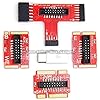
- master diagnostic boardmulti computer ports connection adaptersdata and power cablesOTG dongles ...etc all in plastic case plus antistatic strap
Features 5
- ATTN : Please DO study the listing page the "Product Guides and Documents" section, the "Instructions for Use (IFU) (PDF)" guide for all manual links at the end of the PDF, to use this kit correctly and easily. The item PACKING includes the paper printout with the same Complete Instruction Folder with PDFs and APP. Only use the tested APP in the folder BOTH 64bit for Newer Androids and 32bit Manufacturer APP are available, passed the Android security scan checks and Google Play pending. MUST use the Android APP to display results on the screen, NO Traditional DIGITAL Display to show the POST codes, Great Ease to save hassles of diagnostic codes lookup one by one manually.
- Easy To Use Unique USB Diagnosis with Videos and PDF Guides. MUST study the Guides Before Use New latest smartphone technology in using the USB ports ( Standard USB / micro USB / Type C ) to diagnose the computers. NOT just getting the electric power but RUNNING the Diagnosis Data through USB ports. A very powerful Essential Nice Handy computer repair tool kit for quick help on diagnosing Desktop PC, Server, Laptop, All-in-one PC, Android Smartphone / Tablet, customized built miniPC and Mac machines ... etc. A great motherboard tester diagnostic kit that provides the most accuracy and effectiveness in making the computer troubleshooting and repairs much easier.
- USB Diagnosis Unique Feature - Save hassles of taking the dusty PCs or laptops apart. Follow the English PDF user guides to power on and let the Android APP to work with this new test kit to auto scan the motherboard for faulty components quickly. When testing different PCs together, make sure follow the listing User Guide(PDF) to see Latest Updates with PRECAUTIONs and Extra Tech Tip to UNPLUG the USB cable between each test and restart to clear the last cached working motherboard diagnosis data. The ONBOARD USB cable is needed to plug to the Android charger, the other dedicate USB cable connects to motherboard USB port. Connect this 2 USB cable wrongly causes the unstable connectivity.
- All-in-one Multiports support - Different complete bus connector adapter parts included. Made of quality PCB, transistors and capacitor components. Direct pinpointing the faulty motherboard components to greatly reduce the costs yet increase the effectiveness in the computer diagnostic repairs. Videos and the PDFs instructions please see the listing "Videos" section and the "Product guides and documents" section for more details.
- Tested and brought to you by 29 years IT Professionals This kit works with all machines with USB ports including New Old Desktop PC and Laptop Computers, IBM compatible, Mac machines (using USB), Android devices Smartphones and Tablet PCs. Comes with Step by Step Easy Guides, videos instructions, PDF pictorial manuals with Easy Flowcharts and Latest Updates with Precautions. Great for PC Technicians, Computer Owners, Computer Class Student Learners and PC DIY Lovers, Hardware Traders, professionals and novices . Nice Essential must have to add to our computer tool boxes.
Description
***** Android Device (smartphone or tablet) Is Needed To Use This New Latest Computer Motherboard Smart Diagnostic Kit *** ***** Supports 64 bit new latest Android as well as earlier 32 bit Android devices ***** With the continuous advancement of computer motherboard technology, our motherboard diagnostic kit has also evolved to keep pace. It eliminates the hassle of opening a dusty computer case, enabling direct motherboard hardware diagnostics via an external USB port. Please note that this new motherboard POST test card kit includes two USB cables: 1. The integrated USB cable (mostly the white color USB cord) on the V8 master diagnostic board must be connected to an Android charger for power input. 2. The second is a dedicated Black Android Micro USB cable, used to connect the V8 master diagnostic board to a computer USB port. This dedicated Micro USB cable facilitates motherboard diagnostics via the USB port. It does not supply power; instead, it transmits the motherboard BIOS Power-On Self-Test (POST) signal data to this V8 master diagnostic board for POST codes diagnostic analysis. Modern information technology has greatly simplified computer troubleshooting and repair workflows. We do not need to be a certified hardware technician to diagnose motherboard issues on your own: all that is required is the ability to connect hardware components via a USB port, operate an Android smartphone or tablet as you normally would, and have basic familiarity with common computer terminology and component names. This all-new Android-powered motherboard analysis kit leverages a dedicated mobile application to handle the full workload of motherboard diagnostics, and will even provide targeted repair recommendations directly within the app. This exclusive USB-based diagnostic functionality integrated into the POST test card kit enables rapid, straightforward motherboard troubleshooting via standard computer USB ports. There is no requirement to disassemble the computer chassis or deal with the associated complexity — all diagnostics can be performed through the external USB ports on the PC motherboard. Traditional motherboard troubleshooting often requires working with dusty internal components, and the mandatory post-diagnostic chassis cleaning adds unnecessary overhead to the entire process. With our proprietary external USB diagnostic functionality, this issue is completely eliminated. All diagnostics can be performed externally, without opening the dusty computer case or ever coming into contact with the dusty internal motherboard components, keeping our workflow clean and efficient. All computing hardware requires regular maintenance, troubleshooting, and repair to maintain reliable operation — from consumer equipment like desktop gaming rigs, all-in-one PCs, laptops, mini PCs, Android mobile devices, and smart TVs, to enterprise-grade server deployments, and regardless of platform (IBM-compatible Windows systems or Apple iMacs/Retina MacBooks). This latest V8 motherboard diagnostic tester kit consolidates multi-platform troubleshooting capabilities into a single, cost-effective tool, covering all of our diverse motherboard diagnostic needs across devices. It is also backed by a dedicated free support service, making it a high-value addition to any IT professional or enthusiast's toolbox. Leverage modern Android smartphone technology for streamlined motherboard diagnostics. Using the right tool in the right way, even complex computer troubleshooting can be performed quickly and expertly. This high-performance USB PCIe POST test diagnostic kit integrates seamlessly with the latest Android application to deliver significantly faster, more accurate diagnostic results for motherboards. Integrating an Android application for computer motherboard diagnostics represents a significant technological advancement in PC troubleshooting. The app automatically translates POST diagnostic codes and presents clear, detailed results on your Android device’s large display, while also providing actionable troubleshooting recommendations—including guidance on which additional motherboard components to inspect. Compared with traditional diagnostic cards that require manual error code book code lookup and interpretation, this modern smartphone-accelerated diagnostic solution leverages the latest mobile technology to deliver a far more streamlined, user-friendly troubleshooting experience with improved workflow efficiency. This adapter suite is compatible with the vast majority of IBM-compatible systems as well as Mac machines currently available on the market. The latest-generation V8 computer POST test card supports a full range of motherboard bus interfaces including USB, PCI, PCIe, mSATA, miniPCIe, M.2, EC, and LPC, to accommodate diverse system design requirements. It is recommended to follow the priority order below when connecting to different motherboard bus interfaces: For Desktop / Server Computers USB > PCI > PCIe > LPC > M.2 > mSATA For Laptop Computers USB > miniPCIe > M.2 > mSATA > EC Pre-Installation Guidelines & Technical Best Practices for this V8 USB PCIe Motherboard Diagnostic Tester Kit. Prior to installing, please review the following Critical Precautions and technical specifications to ensure accurate testing and proper device functionality: The two distinct USB cable models included with the kit are not interchangeable — do not swap or cross-connect them during setup. USB 3.0 connectivity must be prioritized: a USB 3.0 port must be used for connections whenever available other than the USB 2.0 ports. When both PCI and PCIe expansion slots are present on the target motherboard, the PCI slot must be prioritized for tester installation. For repeated testing on the same system or testing multiple computers : perform a full cold reboot of the target computer, then initiate a "Restart" operation in the Android APP. Prior to the installation and the use of this new latest V8 computer motherboard tester kit, it is essential to learn some of the precautions and the tech tips. Prior to the installation and the use of this new latest V8 computer motherboard tester kit, it is essential to learn some of the precautions and the tech tips. Prior to the installation and the use of this new latest V8 computer motherboard tester kit, it is essential to learn some of the precautions and the tech tips. As illustrated in the diagram, the two USB cable variants provided with the kit are not interchangeable and must not be cross-connected or used in the wrong ports If both USB 3.0 and USB 2.0 host ports are available on the target motherboard, the USB 3.0 port must be used for connection to ensure proper communication and performance with the test kit Must Use PCI Slot if PCIe Slots Are Also Available on Motherboard Must Cold Boot (Power OFF & On) the PC Then Click "Restart" in APP when Need to Redo Test Or Test the Next Computer Please also see the Videos Instruction after the PDF guides, the Videos could be of great helps as well Our mission is to deliver professionally vetted, rigorously compared, carefully selected high-quality, best-value IT gadgets backed by free support to ensure complete best customer shopping experience. We leverage 29 years of specialized IT industry experience to provide knowledgeable assistance for all your needs. Please feel free to reach out to us directly through Amazon messaging anytime as needed. Most inquiries receive a detailed, helpful response within 12 business hours. Thanks! To deploy and operate the latest V8 computer motherboard diagnostic tester kit smoothly and effectively, we provide complete PDFs and video instructional materials that can be downloaded directly from the product's Amazon listing page. 1. On the listing page, scroll past the Product Description table to locate the Product guides and documents section, download the Installation Manual (PDFs) and User Guide (PDF) 2. See the instructional videos at the following Product Videos section. This V8 PCIe USB computer motherboard POST test card kit is developed and brought to you by Lingvetron. It is backed by MCSE- and DCSE-certified expertise and includes free lifetime product support. For 26 years, we have specialized in delivering practical, reliable computer hardware and have operated our online sales channel with a proven track record of customer focus. This multi-motherboard diagnostic kit stands out as a best-in-market solution for troubleshooting a wide range of computer systems, enabled by two key technological innovations: 1. An Android app that delivers automatic, seamless, fast, and efficient diagnostic analysis 2. A proprietary USB-based motherboard diagnosis method that provides simple, convenient rapid testing for multi-platform systems (both IBM-compatible and Apple Mac computers) The kit can also be used to test a variety of other computer-enabled devices, including automotive on-board computers via smart vehicle USB data ports, and smart TVs. It is the ideal diagnostic tool for PC technicians, computer DIY enthusiasts, desktop and laptop owners, computer lab administrators, educational computer courses, and computer parts resellers. Q: Will this kit work with my work or home desktop PC/laptop? A: Yes, the new V8 motherboard diagnostic tester kit is compatible with all computer systems that have an available USB port. Q: Do I need an Android device to use this kit, does it support 64 bit new Android? Is Apple iPhone supported? A: The current generation V8 kit requires an Android smartphone or tablet to operate, it supports 64 bit new Android as well. We are actively developing an iOS version of the companion app, but iPhone support is not available at this time. Q: Instruction guides available to learn using this kit? A: Yes, complete guide in PDF and Video to guide using this kit seamlessly. Q: Is specialized IT technical knowledge required to use this kit? A: No, specialized training is not required. Simply follow the step-by-step instructions in the included video and PDF guides to install the Android app, and the app will run diagnostics automatically. Full diagnostic results and recommended next-step troubleshooting actions will be displayed clearly on your Android device screen. Q: Is everything included in the kit? A: Yes, the kit comes fully complete with all required components and accessories. No additional parts or purchases are required.
Specs 11
| Brand | Lingvetron |
|---|---|
| Power Source | Android USB adapter power |
| Operating System | Android 6.0, Linux, Windows, Windows 10 |
| Screen Size | 7 inches |
| Item Highlight | Diagnose Through USB & Multi Ports, V8 Computer Analyzer Kit for PC, Laptop, Server, All-in-One, NUC, Mac, Tablet, Androids |
| Brand Name | Lingvetron |
| UPC | 312685808681 |
| Manufacturer | Qiguan Electronics Co., Ltd. |
| Item Weight | 3 ounces |
| Model Number | KQCPET6 v8 KQMET8 STC LMC6 |
| Manufacturer Part Number | KQCPET6 v8 |
No specs match.
Frequently asked questions
To initiate a return, please visit our Returns Center.
View our full returns policy here.
- Klarna Financing
- Affirm Pay in 4
- Affirm Financing
- Afterpay Financing
- Zip Pay in 4
- Financing through Apple Pay
- Financing through Google Pay
Learn more about financing & leasing here.
Similar Products


Top Amazon Reviews
