Search  for anything...

CyberPower CP1500PFCLCD PFC Sinewave UPS Battery Backup and Surge Protector, 1500VA/1000W, 12 Outlets, AVR, Mini Tower, UL Certified

  • Based on 11,610 reviews
Condition: New
Checking for the best price...
$239.95 Why this price?
Save $10.04 was $249.99

Buy Now, Pay Later


As low as $39.99 / mo
  • – 6-month term
  • – No impact on credit to apply
  • – Instant approval decision
  • – Secure and straightforward checkout

Ready to go? Add this product to your cart and select a plan during checkout.

Payment plans are offered through our trusted finance partners Klarna, Affirm, Afterpay, Apple Pay, and PayTomorrow. No-credit-needed leasing options through Acima may also be available at checkout.

Learn more about financing & leasing here.

Selected Option

Free shipping on this product

FREE 30-day refund/replacement

To qualify for a full refund, items must be returned in their original, unused condition. If an item is returned in a used, damaged, or materially different state, you may be granted a partial refund.

To initiate a return, please visit our Returns Center.

View our full returns policy here.


Availability: Only 5 left in stock, order soon!
Fulfilled by Amazon

Arrives Friday, Jul 17
Order within 14 hours and 36 minutes
Available payment plans shown during checkout

Protection Plan Protect Your Purchase
Checking for protection plans...

Style: Mini-Tower


Size: 1500VA


Features

  • 1500VA/1000W PFC Sine Wave Battery Backup Uninterruptible Power Supply (UPS) System designed to support active PFC and conventional power supplies; Safeguards computers, workstations, network devices, and telecom equipment
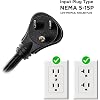
  • 12 NEMA 5-15R OUTLETS: Six battery backup & surge protected outlets, six surge protected outlets; INPUT: NEMA 5-15P right angle, 45 degree offset plug with five foot power cord; 2 USB charge ports (1 Type-A, 1 Type-C) quickly charges mobile phones and tablets
  • MULTIFUNCTION, COLOR LCD PANEL: Displays immediate, detailed information on battery and power conditions; Color display alerts users to potential issues before they can affect critical equipment and cause downtime; Screen tilts up to 22 degrees
  • AUTOMATIC VOLTAGE REGULATION (AVR): Corrects minor power fluctuations without switching to battery power, thereby extending the life of the battery
  • 3-YEAR WARRANTY INCLUDING THE BATTERY; $500,000 Connected Equipment Guarantee and FREE PowerPanel Management Software (Download)
  • 1500VA/900W Pure Sinewave UPS
  • Line-Interactive Topology
  • AVR and GreenPower UPS
  • Multi-function LCD display
  • $500,000 Connected Equipment Guarantee

Description

A mini-tower UPS with line interactive topology, the CyberPower PFC Sinewave CP1500PFCLCD provides battery backup (using sine wave output) and surge protection for desktop computers, workstations, networking devices, and home entertainment systems requiring active PFC power source compatibility. The CP1500PFCLCD features an advanced multifunction control panel with a color LCD to quickly confirm status and alerts at-a-glance. The screen tilts for easy viewing when the UPS is placed in a low position such as under a desk. Two USB charge ports (one Type-A and one Type-C) power portable devices such as mobile phones and tablets, even during a utility power failure. The CP1500PFCLCD uses Automatic Voltage Regulation (AVR) to correct minor power fluctuations without switching to battery power, which extends battery life. AVR is essential in areas where power fluctuations occur frequently. The CP1500PFCLCD comes with a three-year warranty (including coverage of batteries) and a $500,000 Connected Equipment Guarantee.

Product Dimensions: 14 x 3.9 x 11 inches


Item Weight: 24.9 pounds


Item model number: CP1500PFCLCDA


Batteries: 2 12V batteries required.


Is Discontinued By Manufacturer: No


Date First Available: September 8, 2010


Manufacturer: CyberPower Systems


Language: English


Frequently asked questions

If you place your order now, the estimated arrival date for this product is: Friday, Jul 17

Yes, absolutely! You may return this product for a full refund within 30 days of receiving it.

To initiate a return, please visit our Returns Center.

View our full returns policy here.

  • Klarna Financing
  • Affirm Pay in 4
  • Affirm Financing
  • Afterpay Financing
  • PayTomorrow Financing
  • Financing through Apple Pay
Leasing options through Acima may also be available during checkout.

Learn more about financing & leasing here.

Top Amazon Reviews


  • CyberPower CP1500PFCLCD 1500VA Pure Sine Wave-Cures MacPro Wake From Sleep Shutdown
Style: Mini-Tower Size: 1500VA
Purchased this CyberPower unit about month ago. Have 2008 MacPro 8 core 3. GHZ fully loaded internally that was running for last couple years along with assorted Monitors-(2), printer etc. Had been using an APC 1500 & APC 1000- splitting various thing around plugged in to either one to share load. A MDD dual processor was in the mix but it was always on the opposite power supply, not both on one APC unit. For the last 3 yrs have been enduring endless stupidity with these APC power supplies. They would shut down randomly & repeatedly EVEN if the MacPro was not the one on that particular power UPS.Although for the most part - the UPS that was on the MacPro would shut down. You could switch a light on in another room- even a 1 bulb 75 watt could essentially trigger one of the 2 APC units to shut down as if they were overloaded. They were not. House is newer & wired correctly with 12 gauge/20 amp romex wire everywhere for any normal 110v outlets & 8 gauge 50 amp for 220v outlets & 200 amp service. The 2 power supplies are on their own line by themselves-nothing else. I am very familiar with house wiring & have rewired several homes I've owned. All wiring in house is up to snuff done properly. I tolerated this nonsense with these APC for years. They made absolutely no sense. I was aware at some point & positively as of recent reading that the 2008 MacPro's had PFC power supplies in them & that they would prefer pure sine wave power- as house current is. Even with that knowledge it still made no senses as to the random-regular weekly shutdown on the APC units with the computer asleep not even trying to wake or even having A TRUE power outage. The batteries checked out ALWAYS and if not hooked up to computer would work fine. If computer was awake & cut power they would hold system for as many minutes long as they were expected to. No problem. Just if asleep- turn light on anywhere in house- units sometimes/randomly cut out. If house current off & wake computers units shut down. Stupid really. Whats the point of the power supply ? (sounds like I am reviewing the APC's not CyberPower-right ?)Finally my MP had 8Gb of ram out of 16GB go bad. Had it replaced and I said that's it. I mean really- the APC power supplies were shutting down on a almost weekly basis & there wasn't even any power failures- the units themselves were THE power failures. Did as much research as possible regarding PFC power supplies & chose the CyberPower PFC 1500 unit. Cost more than the similar NON pure sine wave APC units. But cost quite a bit less than the Pure sine wave APC units. Who knows why APC charges so much for pure sine wave units. But after using their product probably for nearly 15 yrs- I was done. The CyberPower unit is a GREAT unit. Have read various reviews about the power switch(on unit-on/off & menu) etc problem some are having with it-I don't get the problem. It is a bit of a different technique how the button operates- but I picked it up quickly. The current power draw in numbers of watts as well as load capacity being used on the LCD display is great. You have real-time readout if you chose to, as to those numbers. It's like having Kill-A-Watt meter always on. You get to see the basic power fluctuations of your components. The unit is very compact- somewhat smaller than the APC 1500/1000 units. Right now connected with MacPro w/4 Hitachi 7200 rpm 64MB cache 3TB drives internal, ATI/Apple 5870 video card- w/3 24" monitors, epson 3800 printer, external OWC QX2 raid case w-4 hitachi 7200 rpm 32 MB cache 2TB drives & 2008 8 core MacPro booted off of that raid case along with MBP early 2011-17" plugged in but asleep, DSL modem, Dlink 8 port gigabit ethernet hub, 5th Gen AirPort extreme, MDD G/4 plugged in but off, the CyberPower shows a load of about 564 watts. That draw is confirmed accurate(slightly less actually for CyberPower unit itself not being in mix) if all were disconnected from CyberPower unit and plugged in- instead to the Kill-A=Watt meter. Everything asleep around 54 watts draw. I can switch ANY combination of light/appliance/central a/c /55" plasma/electric 220v clothes dryer/3.5HP 220v air compressor/ 5500watt electric heater- 500 gallon spa w/dual pumps etc in any combination on or off with computers asleep, awake, getting awake, going to sleep. UPS functions PERFECTLY & as expected- stellar performance. NO random shutdowns-nothing. Cut power to unit while computers asleep-no problem. You know the conclusion here -right? Pro's * Economical, compact, nice looking * PFC compatible- Pure Sine Wave unit. * Operates flawlessly * Cheaper than APC pure sine wave units * Power consumption/load LCD is very useful if you like that sort of thing-I do * 3yr warranty -same as APC Cons * Cost more than NON PFC compatible/Pure Sine Wave units * CyberPower warranty/service- unknown quality yet. APC was/had excellent service Conclusion. Highly recommended, especially if you have any of the MacPro's. I imagine some on PC side have units that are PFC and would require pure sine wave to operate a UPS on those computers properly also. I will not ever buy a UPS that is not a pure sine wave unit again. ... show more
Reviewed in the United States on December 13, 2011 by PB

  • Rock solid, good price, good runtime, easy to manage
Style: Mini-Tower Size: 1500VA
CyberPower CP1500PFCLCD PFC Sinewave So good, I bought 2! UPS systems in this class can easily cost more. I have had poor experience with APC systems in this range, so I gave CyberPower a shot. First one I bought for all my network equipment. I bought the optional network card as well. I have a couple routers attached, several WiFi Mesh base units attached by PoE router, laptop, NAS and a couple other items. I get 1 hour or more of uptime! (YMMV, yada yada) All the items I have attached amount to about 40% load if they are all on at the time. The 2nd UPS I bought about a year later for my home entertainment stuff - TV, stereo and a couple miscellaneous network items. Also gets about 1 hour uptime. No net card on the 2nd one, I wanted to test connecting it to HomeIt via HomeBridge and RPi. I don't need to manage these UPSs on a regular basis. We live in the mountains and power can be flaky. I wanted to have some way to monitor utility power when I was at work. The NIC adapter is perfect for that. I think it is a little on the $$ side, but has been worth it. Plugs right in and easy to configure. I started out with a 1 year promotional subscription to their service, but don't really need it. I still get power change notifications even without the subscription. When I get a power out notification I know I have about 1 hour of uptime before I need to turn on the generator. I did get the other CyberPower UPS to hook up pretty easily to my RPi unit running HomeBridge, with NUT UPS plugin. NUT can have a reasonably steep learning curve. I did get it working, but haven't really had the need to play with it too much since I still have the other UPS with the NIC. FWIW, I already had the RPi unit in place for a bunch of other IoT integrations with HomeKit - I would not go that route just for UPS management! ;P A word about generators: Most UPS systems will not play nicely with your standard portable open frame generator, regardless of how large/stable it is. It's the shape of the stepped wave that can often fool the UPS causing it to trip on. The only foolproof way around that is to 1) Get an online UPS system at 3-5 times the cost of line-interactive 2) get an inverter generator. Don't get too fooled by 'generator' modes on line-interactive or standby UPS types. Those modes may help, but in my experience it will not work 100% of the time. Initially I had a standard Champion 7kw open frame delivering power to whole house. Performance was rock solid voltage and frequency delivery without fluctuation. These CyberPower systems worked off the generator about 75% of the time, tripping on the rest of the time. I have a couple APC systems with 'generator' mode that would have nothing to do with the generator - they would trip instantly even in 'generator' mode. Still, this was not stable enough for me. My solution was to get the inverter generator - a 9kw Westinghouse delivering power to the whole house. It was actually cheaper than getting an online UPS equivalent to this CyberPower! Ultimately it wasn't just the lower cost, but the versatility and stability of delivering super clean pure sine to the whole house. Better for everything inside. Zero issues, of course, with these CyberPwoer UPSs. They just see the generator output as regular utility power. ... show more
Reviewed in the United States on June 13, 2025 by Kailou

  • Reliable UPS
Style: Mini-Tower Size: 1500VA
I have used this UPS brand many years and it has exceeded my expectations. Quickly turning over to battery and keeping my internet connection and WiFi stable, it works with all my devices and completely maintenance free. Remains relatively cool and has been a great resource during storms and power outages. ... show more
Reviewed in the United States on June 27, 2026 by D

  • Excellent UPS for my Gaming Desktop Excellent UPS for my Gaming Desktop
Style: Mini-Tower Size: 1500VA
I ordered this UPS because I wanted one for my custom built PC and its peripherals. Fortunately, I found the 900W/1500VA when it was a lightning deal and ordered it immediately to take advantage of the savings. The first thing I noticed when it was delivered was that it was much heavier than it looks, it made sense though since this is essentially a car battery (lead-acid) in a different form. The second thing I noticed after I opened it was that it had a strong smell to it, after I plugged it in the smell went away after about a day. The smell only comes back when the UPS switches to battery mode and the internal fan goes on. I think that it may go away if I left it on battery mode for a while but I have not gotten to testing it yet. The sticker says to charge it for 8 hours before use to fully charge it but mine was about 80% charged when I received it and plugged it in. In order to turn it on, you have to hold the power button (instead of just pressing it) and then let off after 1 short beep. In order to turn it off you have to do the same process but it instead of letting off after 1 beep, you let off after 2 short beeps. There is an LCD screen on the front of the unit and the top half shows constant information about the battery capacity, load, and whether it is connected to the outlet or running on battery power. There are 10 information displays that you can cycle through on the bottom half: 1. Input Voltage 2. Output Voltage 3. Output Frequency 4. Output Power in Watts 5. Output Power in Volt-Amperes 6. Output Power in Percent Watts to Maximum Wattage 7. Output Power in Percent VA to Maximum VA 8. Battery Charge in Percent 9. Estimated Run Time in Minutes 10. Number of Events (Times switched to Battery Power) The included manual states the other button functions such as next, previous, keep display on, etc. There are 12 total outlets, 2 front USB ports for charging, 5 for surge protection and another 5 for surge protection with backup battery power. There is a input and output for coax and ethernet cables and an output for USB B and Serial connector. The unit comes with a USB B male to A male cable, a coax cable, and telephone cable as well.I don’t use the coax cable but I do use the ethernet input and output, as far as I’ve noticed it doesn’t slow down the connection at all and it feels like the UPS isn’t even there. I also use the USB connection to plug into my computer and use the PowerPanel software I downloaded from CyberPower’s website to monitor the UPS from my computer desktop. I found that the software isn’t as accurate as the LCD screen on the UPS itself but there are some extras found in the application that isn’t on the unit. These extras include but aren’t limited to: 1. The ability to set the sensitivity to low, medium, or high so that you can choose what the difference in voltage relative to the AC outlet is for the unit to switch to battery power 2. Setting whether to keep the computer on as long as possible (i.e. run until 5 minutes left on battery) or to conserve the battery life of UPS (i.e. run for 5 minutes on battery). 3. Being able to schedule when to turn on and turn off the computer at an exact day and approximate time. I currently have my desktop and monitor connected to it and the estimated running time at full load on both is about 15 minutes which is more than enough time to properly shut down my machine. I may have to set the sensitivity lower because it switches to battery power whenever the clothes dryer is initiated but everything else works fine. I do not have an oscilloscope so I can’t comment on the sine wave output but from the other pictures posted it looks and functions fine for my use. It features Active Power Factor Correction and that works well with my power supply as well. Overall, this is an excellent UPS and I would recommend it to anyone who needs backup battery power for sensitive devices, just be aware of the initial smell that comes with the unit and you will be satisfied. ... show more
Reviewed in the United States on March 28, 2017 Reviewed in the United States on March 28, 2017 by Vinny R.

  • CyberPower for life.
Style: Mini-Tower Size: 1500VA
My PC Setup (for reference) • GPU: RTX 5090 • CPU: Intel Core Ultra 9 285K • PSU: be quiet! Dark Power Pro 13 – 1600W • RAM: DDR5 8000 • Storage: Samsung 9100 Gen5 SSD • Monitor + High-end gaming system UPS Performance I purchased this UPS to protect my high-end gaming PC and decided to test it under real load. Idle desktop power draw: ~260W PUBG gameplay: ~630 Maximum spike I observed: ~820W Battlefield 6 heavy scenes: ~820W Maximum spike I observed: ~870W The UPS handled everything perfectly. No overload warnings, no beeping, and it stayed in ON-LINE mode the entire time. I also tested a power-loss scenario by unplugging the UPS from the wall while the PC was running. The system instantly switched to battery and kept my PC and monitor running without any interruption. Estimated runtime during the test was around 25 minutes at light load, which is more than enough time to safely save work or shut down the system. Conclusion If you have a powerful gaming PC and want reliable protection against power outages, voltage drops, or spikes, this UPS works extremely well. Even with a very demanding system like mine, it handled the load without any issues. Respect to the CyberPower team ! ... show more
Reviewed in the United States on March 19, 2026 by GoodGuyAvi

  • Works well.
Style: Rackmount 2U Size: 1500VA
Update: This UPS does NOT mount flush with the rack rails, unlike every other rack-mounted equipment I have seen in decades of working in computer centers! The ears are not flush with the front of the UPS, but are set back about 2/3 of an inch. This makes the UPS protrude more than all the other components in my cabinet and mars the aesthetics. Spouse wanted a horizontal orientation on the UPS we use for our media component. This fits the bill perfectly. We are very satisfied so far. We have it connected via local USB to our media server PC, and it's supposed to methodically shut the PC down when we lose power. This has been successfully tested during a power outage. A few caveats: - I'm not a big fan of the not too intuitive Windows-based monitoring software, but it "usually" works. I had to uninstall, remove drivers, reinstall, reboot a few times, though. It keeps asking me to enter the battery purchase date, but offers no way to do so. I tried installing the "management" software in accordance with Internet advice, but that didn't function AND broke the monitoring software... - I did not add the optional network card (over $300?) - I did not pay for the optional subscription to their cloud-based monitoring service. For a 15 amp circuit and/or rack mounting this is a great option, subject to the above caveats. ... show more
Reviewed in the United States on April 6, 2026 by Live to read

  • Great for Stereo and TV and Satellite
Style: Rackmount 2U Size: 1500VA
I got this for my audiophile stereo system, satellite tv receiver, and 65” tv. It works great. No noise at all on the stereo, even on phono and am radio. It arrived showing 100% charged. I had everything on, pulled the plug, and everything kept running with no glitches. Showed 30-45min of battery runtime depending on TV content. I onl ran it a couple minutes on battery. This home entertainment system does not like brief power interruptions and this backup power supply is just what I wanted. ... show more
Reviewed in the United States on June 5, 2026 by Donald L Smith

  • Doesn't smell. It works as advertised -not even a blink.
Style: Mini-Tower Size: 1500VA
[update 10/1/24] We have 4 of these cyberpower sine wave units, and 3 APC units. They are still going strong, except one, the rest still last long enough to save and shutdown safely. The only issue is that when they fully die, they do not turn back on automatically, you have to push the power button which is REALLY stupid on a product like this. The good thing is, they shut the computer down when the battery is at 20%, and the last 20% will last so long the UPC almost never turns off. But when the battery goes bad, then you have the issue of the computer not being able to turn on the next morning because the UPS is off from the storm night before. I wish I could say which one lasts longer, APC or Cyberpower, but I can't tell the difference. I think I'll buy whatever is cheaper. You can buy generic 12v 9ah batteries and change them out when needed, so battery life is not really a selling point IMO. I wonder if you can buy a lower wattage and upgrade the battery amp hours? I only need like 600 watts. [update 8/21/18] I'm back to buy another one for another office computer. The 2 I have currently have kicked in about 3-5 times when the power blinked, and once the power was out for almost a whole minute. Again, no issues. [orginal] So far so good. I was worried about the smell other's talked about. I bought 2, and when I pulled them out of the box they smelled pretty bad. I immediately took all of the plastic off in hopes that the smell would dissipate faster with the plastic off. I let both of them charge last night in my office, and this morning there was no smell. So whatever the issue was, I think it was resolved. With 2 of them and my office does not have very good ventilation, I think I'd smell it if it was a serious problem. I know my ventilation isn't great because I remember my printer smelling bad for about 2 days. I tested the battery backup. I unplugged with my computer running. For context: I have 3 monitors, a small 2.1 speaker system, and my 1-year-old desktop tower plugged into it (with wireless keyboard/mouse). So I'm using 5 out of the 6 plugs. It says I'm pulling 153 watts, and that I should last between 47-53 minutes. The display says that that input is 119volts. When I cut the power, my monitors did not even blink. The UPS beeped like it should, and the display switched to telling me how many minutes I had left. it bounced around a little, I assume my computer pulls varying rates of power. It leveled out at 53 minutes. I did not wait to see how it shuts the computer down after 5 minutes of being on power. I was also surprised that I did not see any notification on my computer monitor, it was just an audible beep. My computer is very quiet, so I could hear the UPS start to hum, but it was around the volume of a normal computer starting up. The hum was a little reassuring that it was working. I will update this if I have any issues. ... show more
Reviewed in the United States on June 20, 2017 by Hezekiah

Can't find a product?

Find it on Amazon first, then paste the link below.
Checking for best price...