Search  for anything...

NETGEAR Nighthawk Whole Home Mesh WiFi 6 System (MK62) - AX1800 Router with 1 Satellite Extender, Coverage up to 3,000 sq. ft. and 25+ Devices

  • Based on 3,307 reviews
Condition: New
Checking for the best price...
$149.99 Why this price?
Save $150.00 was $299.99

Buy Now, Pay Later


As low as $25.00 / mo
  • – 6-month term
  • – No impact on credit to apply
  • – Instant approval decision
  • – Secure and straightforward checkout

Ready to go? Add this product to your cart and select a plan during checkout.

Payment plans are offered through our trusted finance partners Klarna, Affirm, Afterpay, Zip, Apple Pay, and Google Pay. No-credit-needed leasing options through Acima may also be available at checkout.

Learn more about financing & leasing here.

Selected Option

Free shipping on this product

This item is eligible for return within 30 days of receipt

To qualify for a full refund, items must be returned in their original, unused condition. If an item is returned in a used, damaged, or materially different state, you may be granted a partial refund.

To initiate a return, please visit our Returns Center.

View our full returns policy here.


Availability: Only 1 left in stock, order soon!
Fulfilled by Digital Depot Deals

Arrives Oct 11 – Oct 13
Order within 18 hours and 17 minutes
Available payment plans shown during checkout

Protection Plan Protect Your Purchase
Checking for protection plans...

Size: 4.8 x 4.8 x 2.5 inches


Style: WiFi 6 | 2-pack


Features

  • Coverage up to 3,000 sq. ft. and 25 plus devices.Processor : Powerful Qual-Code 1.5GHz processor.
  • Fast AX1800 Gigabit speed with WiFi 6 technology for uninterrupted streaming, HD video gaming, and web conferencing
  • Connects to your existing cable modem and replaces your WiFi router. Compatible with any internet service provider up to 1Gbps including cable, satellite, fiber, and DSL
  • Plug in computers, game consoles, streaming players, and more with 2 (1 plus1) Gigabit Ethernet LAN ports in the router and satellite
  • Sets up in minutes with the Nighthawk App; easily manage WiFi settings, test internet speed, and monitor data usage
  • NETGEAR Armor protects your family's WiFi with an automatic shield of security across all your connected devices with a 30-day free trial
  • NETGEAR Smart Parental Controls promotes healthy Internet habits, fosters responsibility and builds trust with your kids (30-day free trial included)
  • Expand coverage by 1,500 sq. ft. with each additional Nighthawk Whole Home Mesh WiFi 6 Add-on MS60 satellite (sold separately, not compatible with Nighthawk Tri-band or Orbi WiFi 6 Mesh systems)
  • Backed by a 1-year limited hardware warranty

Description

Your family wants super-fast reliable Wi-Fi for your whole home up to 3 000 sq Ft With the Nighthawk mesh Wi-Fi 6 system experience the future of Wi-Fi with next-generation 802 11ax (Wi-Fi 6) Enjoy Dual-Band technology designed to handle 4x more connections and the increasing demand for Fast gaming without interruption and smooth streaming The Nighthawk mesh system comes with one high-power Satellite to provide you with broad Wi-Fi coverage so you can eliminate dead zones by easily adding satellites wherever needed Set up in minutes and control your home's Wi-Fi with the Nighthawk app. Powerful Security on Your Nighthawk Mesh: ANTIVIRUS & RANSOMWARE PROTECTION— Keeps you safe from phishing and online fraud VULNERABILITY ASSESSMENT—Scans and identifies network security flaws BITDEFENDER TOTAL SECURITY 2020—Protects all connected devices at home and on-the-go BITDEFENDER VPN—Encrypts your internet connection to keep your online activity private even while you’re on unsecured public networks STAY SAFE EVEN WHEN AWAY FROM HOME WIFI— Stay in the know with Nighthawk App. Anywhere, anytime.

Brand: NETGEAR


Model Name: MK62-100NAS


Special Feature: Alexa Compatible, Guest Mode, Internet Security, Parental Control, Remote Access


Frequency Band Class: Dual-Band


Wireless Communication Standard: 802.11ax


Compatible Devices: Gaming Console, Smart Television, iPhone


Recommended Uses For Product: Gaming, Home, Security


Included Components: One (1) Mesh WiFi 6 Router (MR60), One (1) Mesh WiFi 6 Satellite (MS60), One (1) 2m Ethernet cable, Three (3) 12V/1.5A power adapters, Quick start guide See more


Connectivity Technology: Ethernet, Wi-Fi


Color: black


Other Special Features of the Product: Alexa Compatible, Guest Mode, Internet Security, Parental Control, Remote Access


Frequency Band Class: Dual-Band


Wireless Compability: 802.11ax


Compatible Devices: Gaming Console, Smart Television, iPhone


Antenna Location: Gaming, Home, Security


Connectivity Technology: Ethernet, Wi-Fi


Antenna Type: Internal


Operating System: Linux


Security Protocol: wpa2-psk, wpa3


Number of Ports: 2


Control Method: App


Data Transfer Rate: 1 gigabits_per_second


LAN Port Bandwidth: 1000 Mbps


Voltage: 100240 volts


Maximum Upstream Data Transfer Rate: 900 megabits_per_second


Number of Antennas: 2


Router Firewall Security Level: High


Wi-Fi Generation: Wi-Fi 6


Router Network Type: Wireless and Wired


Connectivity Range: 3000 square_feet


Connectivity Protocol: ethernet, wi-fi


Controller Type: ios


Coverage: 3000 sq.ft


Frequency: 165


Brand: NETGEAR


Model Name: MK62-100NAS


Built-In Media: One (1) Mesh WiFi 6 Router (MR60), One (1) Mesh WiFi 6 Satellite (MS60), One (1) 2m Ethernet cable, Three (3) 12V/1.5A power adapters, Quick start guide


Model Number: MK62-100NAS


Unit Count: 2 Count


UPC: 606449144581


Number of Items: 1


Global Trade Identification Number: 81


Manufacturer: NETGEAR


Mfr Part Number: MK62-100NAS


Warranty Description: 1-year warranty


Item Weight: 2.7 pounds


Item Dimensions L x W x H: 4.8"L x 4.8"W x 2.5"H


Color: black


Frequently asked questions

If you place your order now, the estimated arrival date for this product is: Oct 11 – Oct 13

Yes, absolutely! You may return this product for a full refund within 30 days of receiving it.

To initiate a return, please visit our Returns Center.

View our full returns policy here.

  • Klarna Financing
  • Affirm Pay in 4
  • Affirm Financing
  • Afterpay Financing
  • Zip Pay in 4
  • Financing through Apple Pay
  • Financing through Google Pay
Leasing options through Acima may also be available during checkout.

Learn more about financing & leasing here.

Top Amazon Reviews


  • Don’t run, good wifi 6 system!
Size: 4.8 x 4.8 x 2.5 inches Style: WiFi 6 | 2-pack
I bought this to take advantage of my full internet connection speed. I’m getting 460Mbps next to the router which I’m pretty damn happy with. I read the reviews after I ordered and figured I was just gonna send it right back since so many people struggled. However, my setup was easy (although kind of long) and the speeds are great. Also, I’m getting great coverage in my 3,300 sq ft 2 story block home out of just 2 nodes. I don’t know what everyone is complaining about. These things are great! If you want to know more, read on. I pay for and get 500/500 fiber internet when tethered at the modem. With my Linksys Velop wifi 5 mesh system (3 nodes) I was getting max 200Mbps standing next to the wireless router. I was also experiencing dead spots around the house. Stubborn ones where even when a node reading 200Mbps was in the next room I still had issues. Bottom line is I can’t manage two fantasy football teams and give my wife advice on her team while I’m on the can when my bathroom is a wifi dead spot! So this system came up “used - good condition” for a fair price and I decided to give it a go. I mean, I don’t care if my wifi routers have cosmetic damage greater than 1 inch. Setup was a little slow, but easy. Biggest problem was that I didn’t realize there’s a difference between router and satellite. Hook the one with 2 Ethernet ports to your modem. The single Ethernet port is the satellite. Updates took awhile but all good. Tested around the house, now I’m getting 460 down standing next to the router, totally acceptable to me. Btw, that’s on an iPhone 11 Pro which has a wifi 6 card. Make sure you test with something that is wifi 6 enabled. System only has two nose and I’m getting at worst to 170 Mbps in the farthest corners of my house. So this is a great buy. I think other users are just not doing it right. I don’t know, but don’t runaway from a good system at a good price. I highly recommend buying used on a product like this. ... show more
Reviewed in the United States on October 17, 2020 by Scallywags

  • Great starter mesh system
Size: 4.8 x 4.8 x 2.5 inches Style: WiFi 6 | 2-pack
I’ve been searching around for a mesh WiFi system for a while now. Most systems seemed too expensive/robust for my purposes. Found the Netgear Nighthawk mesh WiFi system on sale a decided to pull the trigger. Very happy with the easy setup, the performance and the extended range from my previous modem/router combo. I have my PC hardwired into one of the satellites and I am getting the max ISP speed that I’m paying for. Have close to 20 devices connected between phones, computers, tv’s, etc. I am getting consistent download/upload speed in every room, where before with my previous WiFi router/modem the performance would vary greatly depending on where I was. This is a major upgrade and I would highly recommend. ... show more
Reviewed in the United States on February 7, 2024 by Amazon Customer

  • Great Coverage
Size: 4.8 x 4.8 x 2.5 inches Style: WiFi 6 | 2-pack
When I received this product it set up quite easily and the wifi coverage was excellent. It wasn't long, however, that I noticed the satellite (MS60) was having problems. Over several days I corresponded with Netgear support until I was just fed up with spending all of my time troubleshooting and having my wifi down half the time. I arranged a replacement through Amazon while I reinstalled my Linksys wifi router. A new system arrived in a few days which I set up in parallel with my Linksys system allowing 48 hours before proceeding. After making most of the required settings for my network I further tested for another 24-36 hours. The system is now online and is performing quite well. Several problems have cropped up since coming online. Firstly most of my attached devices had some problems reconnecting which did not happen the first time around. A problem which is being widely discussed in the Netgear Community is the inability to have separate SSIDs for the 2.4 and 5GHz wifi bands. This 'feature' is intended to make the reconnecting to either band without intervention as portable devices like your phone or tablet are moved around the wifi mesh. The problem comes when you have devices that only operate in the 2.4GHz wifi band. Many do so because the 2.4GHz band has a longer reach which is important as many of these devices are located in diverse locations around the home where there are intervening walls. Many of these devices require an app on a phone or tablet for their setup and require that device to be connected to the 2.4GHz wifi band which is not possible in the current design as phones and tablets are designed to connect to the best available wifi signal and I have found no way to change this behavior. Certain apps claim to be able to do this but none have succeeded on my devices. Some have suggested taking your phone or tablet to a location where the 5GHz signal is weak causing the device to choose the 2.4GHz band. This almost works but on my devices the connection dithers between bands while attempting setup of the intended device. My solution was to use a TPLink wifi extender from my shop building which only operates in the 2.4GHz band. I moved the extender into my house and set it up with a distinct SSID which I use exclusively to connect to my 2.4GHz only devices like my Ambient Weather weather station, my MyQ garage door controller, and my Sonoff TH16 remote temperature sensor. I know Netgear has been swamped with requests to change this behavior if possible and I await that although at this point my current solution may be a better one. All in all Netgear was responsive, at least in the way that all of these tech companies are responsive, i.e. "yes I already powered it off and stood on one leg and swung a dead chicken over my head" and all of the scripted suggestions that you get. ... show more
Reviewed in the United States on March 23, 2020 by davel4wa

  • Overall Easy to Set Up and Install, and VERY FAST WiFi
Size: 4.8 x 4.8 x 2.5 inches Style: WiFi 6 | 2-pack
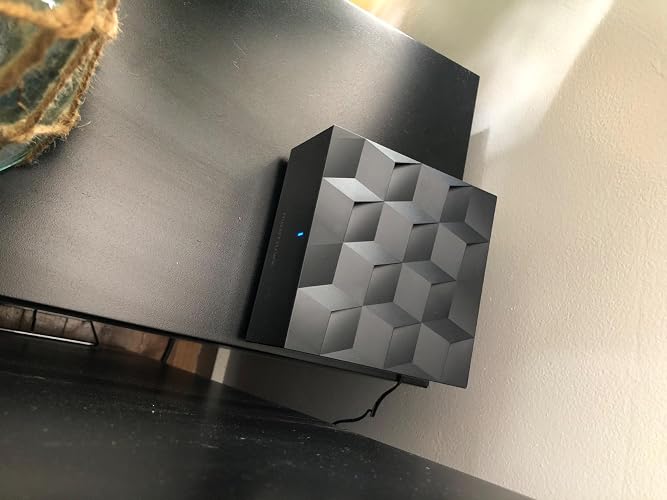
Overall, I was skeptical of changing out my 10 year old Apple AirPort Extreme, but it finally had started showing it’s age. After a lot of research, I arrived at the NightHawk Wifi Mesh system. Setup, WiFi coverage and speed, and the UI interface have overall been a very positive. The download speeds are significantly higher with this product compared to my old router: 150mbps within 5 feet to the AirPort Extreme, to 235mbps anywhere in my home. PROs: - Setup and installation - Nighthawk app and ease of use - Whole house wifi coverage - Seemless transition between router and satellite networks - Nice product design CONs: - Only one Ethernet port on the router (and one on the satellite), making a hub necessary to use more than one wired connection - Lack of advanced features in app (although the sacrifice of it “just working,” seems worth it thus far) - The Blue indicator light is a verified night light (Pro or Con depending on your preference!) however, it is bright enough to cast shadows and distract you, if the router or satellite is in your bedroom. You can put a piece of electrical or masking tape on it to dim or block the light. Overall, great product. I’m glad I upgraded. I would recommend. ... show more
Reviewed in the United States on March 10, 2020 by Marc

  • Less lag and wifi drop
Size: 4.8 x 4.8 x 2.5 inches Style: WiFi 6 | 2-pack
I finally listed to my work IT guy and connected my work computer with an ethernet cord. Ive been working from home for years before corona. Work computer was always on the wifi and it would freeze and kick me out of VPN or what I currently have follow me desktop. So I bought the mesh, set it up and put the second one in the room I had my work computer in. Well, it still kept freezing. I called IT and he asked if I was still connected by wifi to the new mesh, and of course I was. I plugged my work computer via ethernet to the back of the mesh and so far it has worked like it should. ... show more
Reviewed in the United States on August 13, 2020 by cms76

  • You get what you pay for...
Size: 4.8 x 4.8 x 2.5 inches Style: WiFi 6 | 2-pack
I jumped on this and pre purchased the minute I saw it announced at ces earlier this year. Affordable wifi 6 mesh in an easy to use package what could go wrong. Well honestly you get what you pay for here. The Good -Affordable -Main router has decent range and promised speeds The Bad -Setup is abysmal. It's slow... Doesn't always work as well. May have to tell it to setup multiple times before going through. -Router setup options are very very limited. There is not much you can do with the app or on the ip interface through Ethernet. -Mesh Network is slowwwwwwwww and has very limited range! This is the main reason for 1 star and a quick return of the product. The mesh node is simply awful. -No way to get my LED lights to connect as the smart switching network has no way to limit a device to only 2.4ghz network. (Required for my LEDs) I returned this and went with Google's mesh. Sure no wifi 6 but also it just works. If your looking for the fastest mesh network it was Amazon's eero pro system but paying a yearly premium for features that should be included in every router puts an awful taste in my mouth. So in Google I currently trust until someone releases a mesh that is better. Also stay far away from TP Link it was faster then this network but if your a gamer it can experience intermittent disconnects that can ruin the online experience. Hope this review helps save you time and fraustration with your mesh network search. ... show more
Reviewed in the United States on March 9, 2020 by Chuck Pappas

  • Love this whole home system, best wifi coverage we’ve ever had
Size: 4.8 x 4.8 x 2.5 inches Style: WiFi 6 | 2-pack
UPDATED JUNE 2021: We recently moved into a new home, almost double the size of our previous. Was able to hardwire the satellite in the center of our home and honestly, this system is working better than my previous review. It’s unreal. Over 3K sqft and this system has our home completely covered. Considering a third satellite just to get some better coverage outside the home. Awesome system if you can do the things needed to set it up. Original review: This system is no joke. We also got a nighthawk modem so we stopped paying the monthly fee to the provider. This things gives us the fastest wifi through the entire house that we’ve honestly ever had. I average in our bedroom across the other side of our house (1500 sqft home) about 75-90 mbps. 140-150 mbps in the middle of our home and in the same room as the main modem, 300 mbps. If your home is bigger and you can’t set up the main connection & router in the middle you may need an additional satellite but so far, this covers our whole home and then some. Love it ... show more
Reviewed in the United States on July 16, 2020 by Ryan Sheehy

  • GREAT Router Mesh System!
Size: 4.8 x 4.8 x 2.5 inches Style: WiFi 6 | 2-pack
I bought this product after doing research on current routers. I bought this along with a 50 ft Ethernet CAT 7 cable. Because of the pandemic, I've been working from home for the past 4 months (isn't everybody?). My wife moved me to the master bedroom downstairs, where the our WiFi connection was very poor (2.x Mb/s). I wanted to buy a router that had WiFi 6, so as to stay current and benefit from the latest tech. Our current modem/router is in a room on the second floor. I installed the primary router to the game area outside the room, minimizing walls and floors. I then installed the satellite in the master bedroom downstairs. I've read other reviews where users had trouble with installation via the mobile app. I didn't have that issue. I installed the mobile app first, created a Netgear account, then got to the point where it was giving me installation instructions. After setting up the router and satellite, I then connected to the new wireless access point, and continued the prompts. You won't get internet enabled until you go through the entire process. After the router finished a firmware update, the internet connection was enabled. Performance Numbers: Internet Modem/Router: In Downstairs Room: ~2 MB/s Upstairs: ~7 Mb/s Netgear Nighthawk: In Downstairs Room: ~11 MB/s Upstairs: ~33 Mb/s Conclusion: Yes, I am satisfied with this product! ... show more
Reviewed in the United States on July 9, 2020 by Jose E.

Can't find a product?

Find it on Amazon first, then paste the link below.
Checking for best price...