Search  for anything...

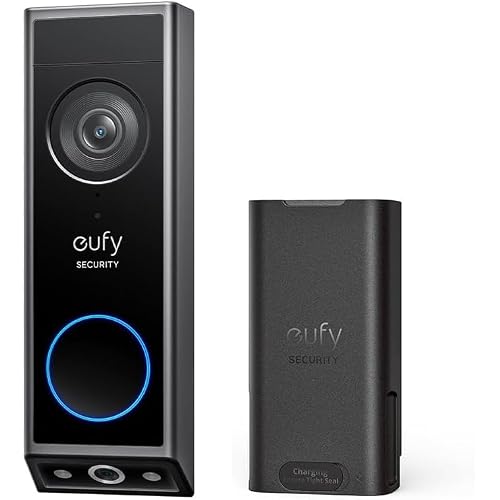
MUBVIEW Doorbell Camera Wireless with Chime, Video Doorbell - No Subscription, Voice Changer, Motion Zones Customization, 1080HD, PIR Human Detection, 2.4Ghz WiFi, Battery-Powered Smart Doorbell

  • Based on 2,154 reviews
Condition: New
Checking for the best price...
$49.99 Why this price?
Save $19.99 was $69.98

Buy Now, Pay Later


As low as $8.33 / mo
  • – 6-month term
  • – No impact on credit to apply
  • – Instant approval decision
  • – Secure and straightforward checkout

Ready to go? Add this product to your cart and select a plan during checkout.

Payment plans are offered through our trusted finance partners Klarna, Affirm, Afterpay, Zip, Apple Pay, and Google Pay. No-credit-needed leasing options through Acima may also be available at checkout.

Learn more about financing & leasing here.

Free shipping on this product

FREE 30-day refund/replacement

To qualify for a full refund, items must be returned in their original, unused condition. If an item is returned in a used, damaged, or materially different state, you may be granted a partial refund.

To initiate a return, please visit our Returns Center.

View our full returns policy here.


Availability: Only 5 left in stock, order soon!
Fulfilled by Amazon

Arrives Sunday, Aug 2
Order within 10 hours and 9 minutes
Available payment plans shown during checkout

Protection Plan Protect Your Purchase
Checking for protection plans...

Features

  • Voice Changer & Real-time Interaction: With the upgraded feature of changing voices, MUBVIEW wireless doorbell can disguise actual gender and age. Perfect for the elderly, children, and females living alone. Two-way intercom allows you to talk to couriers or greet visitors anytime and anywhere. 2.4GHz WiFi only. DOESN'T SUPPORT 5G WIFI.
  • Motion Zone & PIR Human Detection: With built-in motion sensor, this Wi-Fi doorbell will send you an instant alert when there is human movement. Five levels of adjustable sensitivity and motion zone settings avoid receiving frequent and unnecessary notifications.
  • Wide-angle View & Sharp HD Video: Get a detailed image and cover most of the area at your front door with high definition resolution 1080P and 120viewing angle. Keep your home secure with infrared night vision and never miss anything. Wireless doorbell cameras protect your home from day to night.
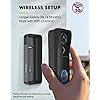
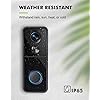
  • Rechargeable Battery & Weather Resistant: Powered by battery packs with experience up to 3-year life, this battery operated doorbell also achieves lower power consumption and fast recharge. With IP65 waterproof and dust-resistant housing, the video doorbell has incredible standby time and long-lasting performance.
  • Flexible Storage & Top-notch Support: View historical footage from lifetime free cloud service with 7-day free loop recording.Save videos on local SD card up to 128 GB (not included) with no hidden fees. Our security doorbell cameras protect your data with strong encryption. And we will help you with any problem!

Recommended Uses For Product: Outdoor Security


Brand: MUBVIEW


Model Name: Bell J9


Connectivity Technology: Wireless


Special Feature: Night Vision


Other Special Features of the Product: Night Vision


Indoor Outdoor Usage: Indoor, Outdoor


Compatible Devices: Smartphone


Controller Type: CloudEdge/Mubview APP


Mount Type: Wall Mount


Color: Black


Installation Type: Wall-Mounted


Enclosure Material: Acrylonitrile Butadiene Styrene (ABS)


Water Resistance Level: Water Resistant


Alert Type: Motion Only


Room Type: Garage, Hallway, Living Room, Office, Store Room


Light Source: LED


Waterproof Rating: IP65


Photo Sensor Resolution: 0.33 MP


Control Method: App


Power Source: Battery Powered


Voltage: 5 Volts


Wattage: 3.7 watts


Are Batteries Required: Yes


Viewing Angle: 120 Degrees


Focus Type: Manual Focus


Field Of View: 120 Degrees


Zoom Type: Digital Zoom


Photo Sensor Technology: CMOS


Antenna Location: Outdoor Security


Brand: MUBVIEW


Model Name: Bell J9


Number of Items: 1


Built-In Media: Chime*1, Quick User Guide*1, Screws Set*1, Smart Doorbell*1


Model Number: J9


Specific Uses For Product: Amateur, Outside, Outside; Amateur, Professional


Manufacturer: MUBVIEW


Connectivity Technology: Wireless


Connectivity Protocol: 2.4GHz WiFi (Not support 5G)


Wireless Technology: 2.4GHz WiFi (Not support 5G)


Video Capture Resolution: 1080p


Number of Channels: 4


Video Capture Format: MP4


Night Vision Range: 33 Inches


Night Vision: Starlight


Item Dimensions: 7 x 3.8 x 2.9 inches


Unit Count: 1.0 Count


Frequently asked questions

If you place your order now, the estimated arrival date for this product is: Sunday, Aug 2

Yes, absolutely! You may return this product for a full refund within 30 days of receiving it.

To initiate a return, please visit our Returns Center.

View our full returns policy here.

  • Klarna Financing
  • Affirm Pay in 4
  • Affirm Financing
  • Afterpay Financing
  • Zip Pay in 4
  • Financing through Apple Pay
  • Financing through Google Pay
Leasing options through Acima may also be available during checkout.

Learn more about financing & leasing here.
Top Amazon Reviews


  • Great doorbell camera... just ordered two more Mubview security cameras
OK - this is a nice doorbell camera (J9) and the first security camera I have owned. So, with that said, I would buy again and, in fact, just ordered two more (indoor and outdoor security cameras). Just installed the unit and it has been running outside in 25-degree weather for 3 days/50 alerts with no hiccups and battery still at 93%. Very nice app with a BUNCH of options. I have the camera mounted at 5ft to view the approaching person but at that height I can't see packages left on porch. I ordered an adjustable bracket for that as Mubview says that will resolve the issue. So, here's my pros/cons. Pros: 1. Mubview app loaded on phone (a Moto G stylus 5g 2022) just fine 2. VERY easy to install camera in app - just follow the instructions. (I love this app - MANY options) 3. Easy to physically install. Screws that came with camera are not strong and tend to break so use different screws if possible. Easy to pair indoor chime with unit. 4. You must explore the app because it has so MANY options. 5. You can customize almost all aspects of monitoring. Range of monitoring/sensitivity can be set to ignore motions you aren't concerned about (I set the monitor range to ignore people on the sidewalk). Type of object monitoring - example, monitor humans only setting. Time frames for monitoring (ex: monitor 8AM to 9PM). And so much more. 6. Good day and night vision 7. The app can manage multiple cameras 8. Good alerts and easy to access on app - I haven't tried the voice/mic option but will update when I do. 9. SD mem card slot to locally store images and videos. I'm not using the cloud storage option so can't comment on that. 10. Motion alerts are instantaneous - still experimenting with the doorbell answering mode, will update. 11. You can view a live stream of the doorbell's view etc. On power saver the alerts run. I believe, for 15 seconds, longer if power saver option is turned off. Very good picture. 12. Many more options I'm still exploring. Cons: 1. The camera angle (mentioned above) when mounted and ordered angle bracket to hopefully fix. 2. My camera faces a very bright front lawn/street, so the faces of visitors close to the camera (3-4 ft) are a little dark but still recognizable. Maybe a setting I missed. Overall, a GREAT doorbell camera. I ordered two more. I'll update pros and cons as I use the cameras. ... show more
Reviewed in the United States on February 1, 2023 by ddallas

  • YES. TWO OR MORE Devices CAN Use and CONTROL at the same time!
You do NOT have to have a paid Mubview service account to have more than 1 device, use and control this security doorbell at the same time. It took me almost a month to figure out how. I almost returned it, until I figured out the solution to the problem. Full instructions are below. You can easily share the device, via the app, but for some reason, I couldn't figure out how to share it. I tried inviting my husband by his email, but it wasn't working. He could sign into the app on his phone. But, when he did, it threw me out, and vice versa. I tried making his own mubview account, but that didn't work. I'm very good with computers and technology. My older husband is awful. I finally brought him into the 21st century, kicking and screaming, when his flip phone battery died for the umpteenth time, with no replacement (yup, you read right. That was 2018!). I had the wireless carrier fire up one of my older Note phones for him. So, he's up to the Note 9 now, only because I refuse to give up my Note 10+ (and he gripes to me every day, wanting that flip phone . It dawned on me why the sharing wasn't working just 2 days ago. I have very few apps on his phone, for obvious reasons. He doesn't know how to email or text (you read THAT right too!). I maintain an email account for him on my phone. No one in their right mind would text him. But, the Note 9 is also in my name. I've never even thought of opening a Samsung account in his name. Why would I? I had deleted the mubview account I had made in his name, in the mubview app, on his phone. First, I had to remake the account. Then, I made him a Samsung account on his phone, which identifies the phone with his email account. THAT was the missing element. I went into my app, clicked "share" put his email in, then sent it. When I signed into HIS mubview account on his phone, in the mubview app, the invitation was there. All I had to do was accept it for him. 99.9% of you won't have the problem that I had, assuming your spouse is at least minimally computer literate. My husband, who's 24 years older, ain't gonna learn computers at 86 years of age, especially since he has his own tech troubleshooter right there to help him! But now he can look at what's happening live on the front porch and street, without kicking me out of the app. To cap it off, this is how you get more than one device to work with all aspects of the doorbell: 1. Download the mubview app. 2. Using their email address, make a NEW ACCOUNT on the mubview app, on their phone. 3. Make sure that whomever has the phone, has an account with the phone manufacturer (in this case, it's Samsung). 4. Go into the mubview app on your phone and invite the person, using their email address. 5. The person with whom you've invited, must sign into their mubview app (on their phone) to accept. This will be under SETTINGS --> DEVICE SHARE. They need to ACCEPT. All involved now have full access and control, AT THE SAME TIME! As far as the functionality of the doorbell system, we can't be happier. I cannot think of a single thing I would change. When someone rings the bell, both of our phones ring like doorbells. You answer with your phone and talk to whomever is out there. It's really cool. You can change the viewing/security area in the app, and control sensitivity. The view is sharp, even across the street. The view is black/white near infrared, at night, but we have motion lights on the porch. The image goes to color when they're activated. I've had the doorbell installed for a month and it doesn't need recharging yet. I turned down the sensitivity, because it was alarming (to the phone) when the school buses were picking up and dropping off kids. It's been good at differentiating humans, but we have a pair of Robins with babies on the front porch. Although I've blocked out the nest, if one flies in front of the camera, we get an alert. The doorbell hardware is well thought out. You must install it (if using screws) from the inside of the box. The box locks into place. They give you a "key" which must be used to push in the release. The release is out of view, under the device. You can go into the app for live viewing, talk to anyone 2 ways usIng the intercom, set off an alarm, take a screen shot, or video, right from the app. Mubview even provided a 32gb mini SD card for recording. I think Mubview thought of everything and then some. ... show more
Reviewed in the United States on May 27, 2023 by dsk

  • Decent doorbell camera
I searched a lot looking for the best doorbell camera that didn't require a subscription. This is alright, not the best, but overall works well. The resolution and sound quality is great, everything is very clear and the doorbell function and the tiny speaker that comes with it works nicely. The negative portions about this camera is that you have to purchase another angle mount (if you want more coverage and view), the lag/upload speed when you open up the camera and to view past recordings are ridiculously slow. I've read that in several reviews but hoped for the best, but it really does lag and take way too long. It also doesn't record everything, to explain, I had a mentally unstable neighbor barge into my front door, and the camera caught it and recorded the incident, but only from the point where the neighbors was leaving out of my front door. Nothing at all from the person walking up to the door and opening and entering was recorded, which kind of defeated the purpose of the security camera. It records in chunks and when it does, it often (if not every time actually) leaves the important first several seconds/minutes out, probably due to its lag. I guess you get what you pay for. Overall, it works very well when it works, but may miss important recordings if that's what you need it for. As a doorbell camera just to see who's at the door, it works fine. But it's not great in terms of using it as a cctv by the door. I would return it if possible, but the time frame passed for me. ... show more
Reviewed in the United States on May 16, 2023 by M. P.

Can't find a product?

Find it on Amazon first, then paste the link below.
Checking for best price...