Search  for anything...

MAONO G3 Gaming Audio Mixer with Map Any Audio Sources for PC Streaming

  • Based on 51 reviews
Condition: New
Checking for the best price...

Buy Now, Pay Later


As low as $16.66 / mo
  • – 6-month term
  • – No impact on credit to apply
  • – Instant approval decision
  • – Secure and straightforward checkout

Ready to go? Add this product to your cart and select a plan during checkout.

Payment plans are offered through our trusted finance partners Klarna, Affirm, Afterpay, Zip, Apple Pay, and Google Pay. No-credit-needed leasing options through Acima may also be available at checkout.

Learn more about financing & leasing here.

Selected Option

Free shipping on this product

FREE 30-day refund/replacement

To qualify for a full refund, items must be returned in their original, unused condition. If an item is returned in a used, damaged, or materially different state, you may be granted a partial refund.

To initiate a return, please visit our Returns Center.

View our full returns policy here.


Availability: Only 5 left in stock, order soon!
Fulfilled by Amazon

Arrives Sep 19 – Sep 20
Order within 13 hours and 54 minutes
Available payment plans shown during checkout

Protection Plan Protect Your Purchase
Checking for protection plans...

Material Type: White


Features

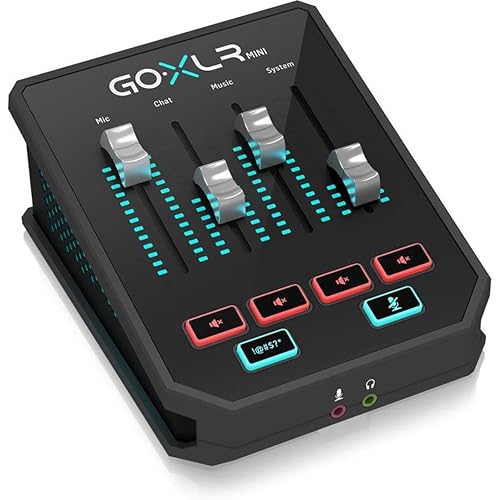
  • All-in-One PC Streaming Control: MAONO G3 is a desktop audio mixer and XLR interface designed for Windows PC gamers, streamers, and solo content creators who need faster control over voice, game sound, chat, and music in one compact setup. Four physical faders, mute keys, Arena routing, XLR input and dual USB help manage mic, game, music and chat from one desktop unit, so audio stays organized while your screen stays on the match
  • Map Any Source to 4 Faders: When you are in the middle of a match, live stream or audience interaction, fast audio adjustment matters more than deep menu diving. In MAONO Arena, assign mic, game, music, chat app, or alerts to the four faders you actually use. Letting gamers lower music, raise voice, or cut a noisy lobby without leaving the game window during live sessions
  • 3 Submixes for Different Listeners: With three submixes, you can build separate audio experiences for yourself, your audience, and your teammates. Instead of sending the same sound to everyone, you can keep full game awareness in your headphones, send commentary and balanced music to viewers, and give the squad only callouts or key game sound, with quick switching for fast stream changes
  • XLR Input for Creator Voice Upgrades: With XLR input, 48V phantom power, up to 57 dB low-noise preamp, direct monitoring and AI noise reduction support. this G3 audio mixer for streaming fits desk-based scenarios like live commentary, gaming streams, reaction content, online teaching, product walkthroughs and solo creator setups where clearer spoken audio matters.
  • Dual PC Streaming Setup Made Easier: G3 is built around real desktop workflows with dual USB-C connectivity, hands-on routing and direct access to key controls. It is a strong fit for Windows-based gaming and streaming setups where you want to manage multiple sources without constantly switching screens. Whether you are balancing Discord, game audio and your own voice during squad play, or adjusting levels for a live product demo, the control flow is easier and faster once your routing is set
  • Interactive Features That Fit Live Content: The G3 live streaming audio mixer adds more than level control. Dedicated mute buttons, customizable sound pads, RGB lighting and a compact angled desktop design help creators react faster during live sessions. That makes G3 useful for reaction streams, funny sound triggers, creator commentary, audience interaction and gameplay moments where fast sound control adds energy without interrupting your flow or forcing you back into software menus
  • Best for Streaming, Not Every Audio Workflow: G3 is a strong fit for Windows gamers, beginner streamers, solo content creators and users building a desk-based XLR streaming setup with more hands-on control. It is best for livestreaming, game chat balance, creator commentary and multi-source audio management. Users with Mac-first workflows, highly demanding studio recording chains or very gain-hungry dynamic microphones should review compatibility and setup needs first so they choose the right mixer for their workflow
  • Compatibility & Package List: G3 is designed for Windows based streaming with MAONO Arena software, XLR microphones, headset monitoring, and desktop speakers. The package includes the mixer, USB cable and quick start guide, giving creators a clear start for single computer or dual PC workflows on a gaming desk

Description

PODCASTING · GAMING · STREAMING · CONTENT CREATION Ideal for Streamer & Gamer Maono[ˈmɑnoʊ] stands for "VISION", is the Global Best Selling Internet Microphone Brand that products sold well in 153 countries worldwide. Maono focuses on microphones, interfaces & mixers, and other audio products for the fast-growing young generations who like podcasting, streaming, gaming, and content creation on the Internet. Ideal for Mobile Recording

Brand: MAONO


Number of Channels: 4


Connectivity Technology: USB


Power Source: Corded Electric


Output Connector type: XLR


Number of Channels: 4


Connectivity Technology: USB


Power Source: Corded Electric


Output Connector Type: XLR


Audio Input: XLR


Brand Name: MAONO


Number of Items: 1


Item Highlight: Mixer with 4 Faders, 3 Submixes, dual PC setup, Noise Reduction, 57dB XLR input, Windows Arena control for Gamers & Streamers


Manufacturer: MAONO


Unit Count: 1 Count


Item Type Name: Mixer - Unpowered


Model Number: G3


Warranty Description: 1 year manufacturer.


Frequently asked questions

If you place your order now, the estimated arrival date for this product is: Sep 19 – Sep 20

Yes, absolutely! You may return this product for a full refund within 30 days of receiving it.

To initiate a return, please visit our Returns Center.

View our full returns policy here.

  • Klarna Financing
  • Affirm Pay in 4
  • Affirm Financing
  • Afterpay Financing
  • Zip Pay in 4
  • Financing through Apple Pay
  • Financing through Google Pay
Leasing options through Acima may also be available during checkout.

Learn more about financing & leasing here.

Top Amazon Reviews


  • Fabulous interface for solo creators/streamers
Material Type: Black
This is a nice piece of gear and an attractive and capable piece of hardware for content creators and live streamers. This interface is well made and feels creamy smooth with the action of the knobs, sliders and pads. Well done, Maono. This gear hinges off the functionality of the software that allows you to customize your routing and audio input levels of your source media. The software is well thought out and intuitive, and allows you to customize and switch the sources of the faders and touch pads. The pads can be geared for one shot audio, hold to play, or loops... and color change the RGB light that illuminates them. The great thing about this is it's fairly flexible and integrated with the software which is free to download. You need the software. This interface is great for that immediate hands on control of the features linked to it. There is a single XLR input that provides a sufficient preamp/booster for some of the most gain hungry mics 🎤 ... I am impressed. There are ports on the back that accomodate for outputs which offers headphones and monitors, but unfortunately are only 3.5mm TRS outputs... not a problem. This gear is quite capable, but falls just short of pro-audio/studio gear, but still it is capable with the right audio adapters if you took it to that level. All the IO ports are on the back, so there are no front facing jack's, which might be a little inconvenient, but still not a problem. This is great for any beginner streamer who wants strong capabilities right out of the gate. The price is very affordable and in my opinion a great value for what you get and what you are capable of doing. I would not say this is for podcasting, but more for content creation and solo creator and streamer. What I love about this is the ability to connect OTG to your USB-C phone and port the audio with phone calls, which is huge. The software is fairly intuitive, but keep in mind, with the realm of audio routing, the more involved you get, might yield more learning curves. This seems manageable if you spend a little time to figure things out. You will get it down. I work with podcasters and my original setup and audio configuration requires some integrations of various video conferencing apps, soundboards, phone call integrations etc, which I must say can get very confusing and easy to goof things up... while my situation is very fine tuned, it takes getting over a huge learning curve with Windows audio routing and the 3rd party software that makes that happen. If you are not going all out like that, then this solution/interface/mixer is more than likely more than capable of accommodating your needs. Well done Maono.. 👏 It's a relief knowing there are some worthy products like this on the market that delivers some good quality. ... show more
Reviewed in the United States on July 29, 2026 by Sid

  • A Powerful Dual-PC Streamer’s With a VERY Steep learning curve
Material Type: White
I'm a full time filmmaker and podcast producer and I have reviewed countless pieces of equipment. Over the years, I’ve routed everything from massive studio consoles to compact desktop interfaces. Audio gear for live streaming usually falls into two traps: it’s either an overpriced commercial console with a massive learning curve, or a cheap plastic box that sounds like talking through a tin can. When I brought the MAONO G3 Gaming Audio Mixer into my setup, I was curious to see if it could bridge the gap between dedicated streaming functionality and actual broadcast-quality preamps. After dialing it in across multi-PC gaming rigs and dual-host podcast workflows, here is my hands-on breakdown. Pros Impressive 57dB Gain XLR Input: Preamps on budget mixers are usually noisy and underpowered, but the G3 packs a solid 57dB low-noise gain range along with true 48V phantom power. It drives power-hungry dynamic microphones (like the Shure SM7B) surprisingly well without forcing you to buy an inline activator. Dual USB-C Ports for Dual-PC Setups: This is a massive feature for gaming streamers. Having two separate USB connections lets you route audio seamlessly between a dedicated Gaming PC and a Streaming PC (or a laptop and desktop) without ground loop hums or complex cable splitters. 4 Physical Faders & Submix Management: Having four physical faders gives you instant, tactile control over your Mic, Chat (Discord), Game, and System/Aux audio channels. The submix capability allows you to balance what you hear in your headphones versus what your audience hears on stream independently. Intuitive Windows Arena Software Control: The companion software layout makes audio routing surprisingly easy. Mapping inputs, tweaking equalizer profiles, setting up custom noise gates, and managing sound pads takes seconds once you get used to the interface. On-the-Fly Audio Tools: Dedicated hardware buttons for quick-mute, background noise cancellation, voice pitch modification, and customizable sound pads add instant production value to live streams without needing complex OBS hotkeys. Cons Plastic Desktop Build: While the tactile controls feel good, the chassis itself is lightweight plastic. It looks great on camera with its subtle RGB accents, but it doesn't quite have the heavy-duty aluminum feel of high-end studio interfaces. No ASIO Drivers for Music Production: If you plan on using this as a studio DAW interface for recording complex multitrack music projects, keep in mind it uses standard OS audio drivers rather than low-latency ASIO drivers. It's built ground-up for content creators, gamers, and podcasters rather than music producers. Slight Learning Curve for Submix Routing: While the physical layout is clean, mastering submix routing across dual PCs and the Windows Arena software takes a bit of initial trial and error to get right. Overall Verdict: Buy or Pass? Verdict: BUY If you are a streamer, gamer, or podcaster—especially one running a dual-PC setup or looking to upgrade from a standard USB microphone to XLR—the MAONO G3 Audio Mixer is an easy BUY. It packs features typically reserved for mixers double its price point—namely 57dB clean gain, 4 physical faders, submix flexibility, and dual USB connectivity. While it isn't designed for music production DAWs, for live content creation, it simplifies your audio workflow while keeping your voice sounding crisp and professional. ... show more
Reviewed in the United States on August 6, 2026 by Andy Costa Films

  • Effortless Hardware, But Uses Proprietary Software
Material Type: White
I've been able to mess with this mixer a bit as I'm trying out Twitch streaming, and generally, I am extremely impressed with the ease in which it has worked. If you are looking for a relatively straightforward audio setup, plugging everything into this unit has been pretty effortless. The hardware itself is very well designed, featuring clearly labeled ports on the back. It does require you to have an XLR microphone, which was a little bit of a barrier for me as I typically use USB, but thankfully even fairly cheap ones are pretty good. The top interface is also very clean, giving you four standard faders with individual mute buttons. I don't think I've been able to use them to their full extent - I'm just not that advanced with my sound mixing skills yet - but they're easy to use, and pleasantly they feel good to move. There's a little bit of a satisfying friction with the sliders where you have to put effort on them to move them, but they're so, so smooth. Also, everything on the panel lights up in a nice RGB coloration, so you get to have that "pro gamer" feel. However, there is one major caveat that brings this down a star. My only real gripe with this unit (albeit a big one) is that you are forced to use their proprietary software to utilize it to its fullest. I really wish I didn't have to install and rely on their specific software, alongside all of the other programs that I'm trying to run while also streaming. If this was a purely hardware-driven device, it would honestly be a complete, perfect tool. Ultimately, it is a very solid piece of equipment that gets the job done easily, provided you do not mind adding another piece of proprietary software to your computer. ... show more
Reviewed in the United States on August 15, 2026 by Pancake Man

  • Talkin smack never sounded so good
Material Type: Black
You know the hype the G1 got? Well, it was a lot and that just got three x’d. Yeah, double the price, but an easy three times the interface. The 6090 will be so expensive you aren’t going to need the extra coin anyway, so have your sound dialed in until then. You stream, have a dedicated streaming machine, you know the struggle. This gives you a dedicated line out and OTG, can output to just about anything as long as running the app on a connected PC. Linking stream outputs is super easy and even allows for dedicated stream master volume. The big sell for me is four dedicated faders. The G3 lets you easily drop it like it’s hot, so you don’t get the boot because of coms. We are dropping Ws in chat, the boys and ladies alike are getting sweaty, that rando you picked up in pubs is getting carried away and you gotta cut that team chat, done. Right from console, no hot keys that don’t work, no slapping another keyboard, bang, right at your finger tips. Four faders and a dedicated mute for each. Getting stream sniped, easy to cut the team chat going out to stream, but also keep it for your recording. Volumes and selecting audio inputs and outputs is always a nightmare, because microslop is going to do microslop things, but that’s why you’ve now got hardware and software that will handle it all and get your levels and mapping all back to just right. Very easy setup. DL the software, plug it in, start mapping and get your settings where you want. The GUI is super easy to navigate and setting inputs to outputs in mixes is simple. You can add basically as many virtual channels as you want, I haven’t hit a limit yet. Three dedicated mixing channels lets you even jam to some beats without broadcasting it to the world by having one dedicated mix for just headphone. It took a minute to get the mixing channels figured out, but it actually makes for a much simpler process. Stream, is just that, the stream input. Chat, yup, chat input and headphone mixing is your personal monitoring channel. As soon as you open an app and set your input or output to the G3 you get a visible link icon showing on that slider. This gives you complete control of all your audio streams and tracks, all in one place. The console soundpad buttons you can map any sound you want and adjust how the track plays. Gain control to help some of those notoriously quiet XLR mics and even 48v on board means no extra adapters for those that are ballers with condenser mics. One thing I found really cool is when adjusting the gain, if you start to clip, the console goes red, there is no missing one little light and messing up a live stream. Real time mic monitoring, and on or off with just a button press. I’m a yeller, I like having the audible queue, it keeps me from getting too loud because I use ANC and also lets me know if something is not going right. Speaking about ANC, my rigs throw out some serious heat so not only is there noise from them, but A/C and sometimes even a fan as well. The noise reduction works very well on this interface and pretty much eliminates all that background noise, but the gate is pretty sensitive and preset upper levels must be made for those streaming in industrial machining facilities. There is also an AI noise reduction, because AI needs to be slapped on everything now, but it does a pretty decent job filtering inconsistent noise. This interface is nice and compact, it doesn’t take up a ton real estate, but still manages to provide a lot for a streaming interface. RGB, because I guess we are still doing that, okay, it looks pretty slick, but also the ability to change button activation colors as well, just in case you do the whole on brand color thing. The buttons and knobs feel premium, smooth resistance, tactile presses and a solid feel. The whole unit in fact feels great, not quite an aluminum build, but solid feel nonetheless. What got me was the buttery smooth faders. Not sloppy, no crackle or jumping, just smooth, precise adjustment and consistent resistance. Again, just feels so much better using it than you would expect at this price. Using this with OBS, streamlabs and twitch, I haven’t run into a single conflict. Operation and build quality don’t mean anything though if it doesn’t sound good and after some playback and monitoring it was almost a mic drop experience. While not studio quality, unbelievably good in this price range, especially for a gaming/streaming interface. There is only one thing I wish this interface had on it, global master volume for the selected mix. It is available in software, but would love to have it on console. Still, these features, this sound quality, you would usually have to jump up to a much more expensive unit to get here, I’m still waiting for a flaw to pop up. Until then, you’ll know when you find me in the lobby, because I’ll be talkin smack, with the sound quality to back it up. ... show more
Reviewed in the United States on August 13, 2026 by KOz

  • Solved A Problem I Didn't Realize I Had!
Material Type: Black
Though I've been producing music for years, I'm just now really getting into the content creation/podcasting arena. I knew from experience that I wanted the chat to be on a different computer than the computer I'm broadcasting from and realized that this gaming audio mixer solved that issue before I could even think to solve it! With the dual USB-c slots in the back, I can hook one up to my main computer and the other to my chat computer, controlling each level individually. Sure, I could do this with my house mixer and a few wires, but this method is cleaner, requires less wiring, and less THINKING. You download the software and you plug it in (just make sure the software is on the other computer, too). Though the body is plastic, it still feels well built, and provides an easy way to get up and going quickly. At it's price point, it's also an inexpensive way to get started without buying tons of audio equipment. The small, compact build also makes this a great choice for portable rigs (it would be great if they made a protective case for it). You get 4 manual faders (with individual mute buttons) for hands-on control as well as dedicated noise reduction and direct monitoring buttons, and with it's powerful 57db XLR input, you'll be able come through clearly and hassle free. I'm still learning the software (it's a bit confusing), so I'm not sure how or if you can modify the output of the other 4 buttons. As I learn my way around the software, I'm pleased with the quality and versatility of this highly focused mixer. It's a great buy if you're gaming or podcasting and need something robust and simple (I wouldn't try to use this in music production, though). ... show more
Reviewed in the United States on September 2, 2026 by Andre Jones

  • Impressed
Material Type: White
I tested the MAONO G3 with a Windows gaming and content creation setup, and overall I came away impressed with what it offers for the price. The hardware feels solid, the angled desktop design is comfortable to use, and having physical faders readily available is much more convenient than constantly alt-tabbing between applications to adjust audio levels. The standout feature for me is the ability to assign different audio sources to the faders. Being able to quickly adjust game audio, voice chat, music, or microphone levels with a physical control makes a big difference during gaming sessions or live streams. Once everything is configured, the workflow becomes much more efficient. The XLR input also performed well in my testing. My microphone sounded clean and clear, and direct monitoring made it easy to hear exactly what was being sent through the mixer. The dedicated mute buttons and customizable sound pads are useful additions that can help streamline live content creation. There is a learning curve during the initial setup, especially if you're new to audio routing and virtual audio devices. Expect to spend some time configuring sources and understanding how the software and mixer work together. The good news is that once the routing is set up, daily use is straightforward. This device feels best suited for gamers, streamers, podcasters, and solo content creators who want more control over multiple audio sources without investing in more expensive professional equipment. It offers a good balance of functionality and ease of use while keeping everything within reach on the desktop. Overall, the MAONO G3 provides a lot of useful features in a compact package. If you're looking for a dedicated streaming-focused audio mixer with physical controls, XLR support, and flexible audio routing, this is a solid option worth considering. ... show more
Reviewed in the United States on August 19, 2026 by manuel

  • Great Audio Mixer for Streaming and Content Creation
Material Type: White
This is a really nice audio mixer, especially for streaming, podcasting, or other content creation. One thing to know upfront is that it’s designed for PC use. What really makes it useful is having four separate faders that let you control different audio sources individually. You can assign things like your microphone, music, chat, or other audio to separate channels and adjust them without having to dig through settings while you’re streaming. It also has an XLR input, headphone monitoring, noise reduction, and plenty of controls while still being fairly compact. We’re not gamers, but you definitely don’t have to be one to get good use out of this. For anyone doing livestreams, podcasts, or other audio-heavy content, it gives you a lot of control in one little unit. ... show more
Reviewed in the United States on September 7, 2026 by J.E. Soper

  • Useful physical controls after the initial setup
Material Type: White
The four physical faders make it much easier to adjust microphone, game, chat, and music levels without leaving the game window. The mute buttons are easy to reach, and the angled layout keeps the controls visible on the desk. The XLR input, phantom power, direct monitoring, and separate submixes provide a useful amount of control in a compact unit. The initial routing through MAONO Arena took some time to understand, and the instructions could explain the more advanced settings better. I also experienced some audio bleeding between sources until I went back through the routing configuration. Once everything was set correctly, the mixer was convenient to use. The hardware is good, but the software setup keeps it from being a five-star experience. ... show more
Reviewed in the United States on August 30, 2026 by Matthew Drake

Can't find a product?

Find it on Amazon first, then paste the link below.
Checking for best price...