Search  for anything...

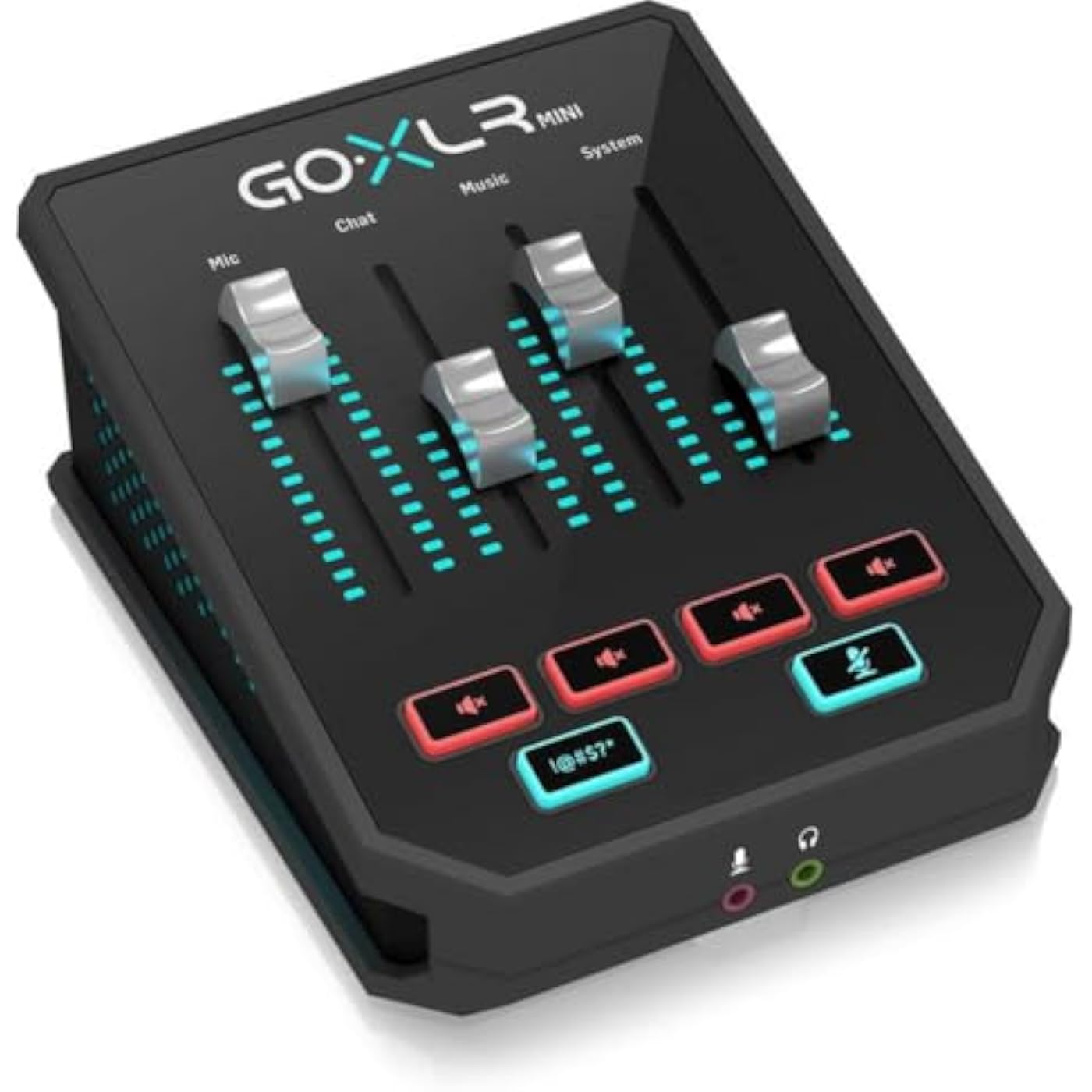
TC Helicon GoXLR MINI Online Broadcast Mixer with USB/Audio Interface and Midas Preamp, Officially Supported on Windows
  • Based on 4,274 reviews
Condition: New
Checking for the best price...
$158.99 Why this price?
Save $30.01 was $189.00

Buy Now, Pay Later


As low as $26.50 / mo
  • – 6-month term
  • – No impact on credit to apply
  • – Instant approval decision
  • – Secure and straightforward checkout

Ready to go? Add this product to your cart and select a plan during checkout.

Payment plans are offered through our trusted finance partners Klarna, Affirm, Afterpay, Zip, Apple Pay, and Google Pay. No-credit-needed leasing options through Acima may also be available at checkout.

Learn more about financing & leasing here.

Selected Option

Free shipping on this product

FREE 30-day refund/replacement

To qualify for a full refund, items must be returned in their original, unused condition. If an item is returned in a used, damaged, or materially different state, you may be granted a partial refund.

To initiate a return, please visit our Returns Center.

View our full returns policy here.


Availability: In Stock.
Fulfilled by Amazon

Arrives Tuesday, Jul 28
Order within 15 hours and 24 minutes
Available payment plans shown during checkout

Protection Plan Protect Your Purchase
Checking for protection plans...

Pattern Name: Mixer


Style: GoXLR MINI


Features

  • Go live desktop rig for online broadcasters gives you instant control over your audio
  • Flexible and intuitive USB-based mixing for all of your audio - simple, easy-to-use controls get you up and running quickly
  • Studio quality MIDAS preamp with EQ, compression, and gating to help your voice sound its best
  • GoXLR Windows app: PC app lets you control and recall all of your favorite settings. App required for functionality.
  • Officially supported on Windows 7, 8, 10, 11. No official Linux support. No macOS support.

Description

GoXLR mini is an intuitive all-in-one audio interface for live streamers and content creators. Designed specifically for an online creator’s workflow, GoXLR mini establishes multiple USB Audio devices in Windows so you can control your app volumes individually. Our award-winning Midas preamps are quiet and versatile, perfect for any voice and microphone. Whether you’re an established creator with a multi-packs setup, or just getting started, GoXLR mini has all the inputs and outputs to grow with you.

Brand: TC Helicon


Number of Channels: 1


Product Dimensions: 5.2"D x 6.61"W x 2.76"H


Item Weight: 730 Grams


Connectivity Technology: 1x USB 2.0, type B


Number of Channels: 1


Connectivity Technology: 1x USB 2.0, type B


Power Source: Battery Powered


Frequency: 10 Hz


Output Connector Type: USB Type B


Audio Input: XLR


Voltage: 220 Volts


Item Dimensions D x W x H: 5.2"D x 6.61"W x 2.76"H


Item Weight: 730 Grams


Brand Name: TC Helicon


Manufacturer: Music Tribe US


UPC: 653341336538


Global Trade Identification Number: 38


Manufacturer Part Number: GOXLRMINI


Model Number: GOXLRMINI


Item Type Name: GoXLR MINI Online Broadcast Mixer with USB/Audio Interface and Midas Preamp


Warranty Description: 3 year manufacturer.


Unit Count: 1.0 Count


Frequently asked questions

If you place your order now, the estimated arrival date for this product is: Tuesday, Jul 28

Yes, absolutely! You may return this product for a full refund within 30 days of receiving it.

To initiate a return, please visit our Returns Center.

View our full returns policy here.

  • Klarna Financing
  • Affirm Pay in 4
  • Affirm Financing
  • Afterpay Financing
  • Zip Pay in 4
  • Financing through Apple Pay
  • Financing through Google Pay
Leasing options through Acima may also be available during checkout.

Learn more about financing & leasing here.

Top Amazon Reviews


  • Mini takes 99% of the useful bits and halves the price
Pattern Name: Mixer Style: GoXLR MINI
This is an utterly fantastic device. If you are a streamer, this will seriously up your stream quality when paired with a quality mic. Background: I'm a semi-regular Twitch streamer and also a software engineer and digital recording nerd. I have high standards for digital audio equipment. In the past, I've used Presonus, Alesis, and Focusrite USB and firewire audio interfaces, the dbx 286s processor that everybody uses, Behringer X AIR mixers, and even a full size X32 mixer for a few days until I realized what overkill that was for producing a stream :-P My GoXLR Mini is replacing about 3x its dollar value in high-quality preamps, outboard processors, and interfaces, and I couldn't be happier with it. The built-in preamp is high quality and has more then enough gain for my PR40 without needing a Cloudlifter. The included gate, compressor, and EQ help make your voice clear, clean, and consistent. And, although it looks like you only get 4 inputs due to the 4 faders, you actually get quite a bit more I/O than it appears - the GoXLR Mini adds 5 virtual output devices, plus the hardware mic in, line in, and optical in, and you can flexibly route all of these and re-map the faders in the GoXLR app however you like. I'm appreciative of the ability to configure the lights to act as meters, and the full audio engineer-level control over parameters like compression ratio and gate attack & release timing. They also thoughtfully beat me to a feature request by allowing you to map the headphone output level as a fader, even though it's an output and not an input. I have a few niggles / feature requests, many of which were acknowledged by TC on their Discord server and are planned soon: 1) StreamDeck integration - natural pairing for a device like this. ** UPDATE: This is available now. ** 2) Making the 'cough' button a toggle instead of a momentary switch. ** UPDATE: This is available now. ** 3) Visual cues when configuring the gate and compressor to see when they're kicking in. No ETA but acknowledged by TC. 4) The app is helpful and the ability to mix ALL of the inputs and outputs in one place is great. However, there's no minimal 'mixer only' view in the app, so if you want to keep the mixer handy, you have to also waste screen space showing the profile load/save and a picture of the device itself. At $500, the GoXLR was expensive and had features that were cool as a novelty but unnecessary. At $250, TC has hit this offering out of the park. ... show more
Reviewed in the United States on November 27, 2019 by Tim

  • Simply the best in it’s category, for now.
Pattern Name: Mixer Style: GoXLR MINI
Top quality materials, sound quality, and functionality. If you want the ability to adjust individual audio sources on the fly there is no substitute. “You can do that with many audio mixers”. You can, but the beauty is in the software. And the software is exclusive. It can be a little confusing at first but if you break it down and learn the basics you can do so much with it. Like iOS makes the iPhone what it is, this software is a great compliment to this high quality mixer. Complaints: - Bigger than I thought. The top side with the volume adjusters seems pretty standard. Could be condensed but not a big deal. The fact that it’s around 2.5” high makes it a little overly cumbersome. - power doesn’t shut off when you turn off your pc, you need to set a sleep mode and turn off all the lights. If your power resets for whatever reason it goes into a default state with lights shining bright. - the bottom left button could easily be customizable in the software as opposed to strictly an audio censorship sound. - why is the headphone jack on the front?? -$250 is steep. No better quality in the class but the price is definitely a slight drawback imo. ... show more
Reviewed in the United States on June 19, 2021 by NotXilent

  • Great combo for preamp, mixing, eq, compressor, noise gate
Pattern Name: Mixer Style: GoXLR MINI
After a year of experience, I have edited my review to share my observations, and why I still would justify buying the GO XLR mini over the other options I tried (like Blue Yeti X with Logitech G-Hub or Voicemeeter or M-Audio or MOTU M2). -The preamp is loud and has a superior tone compared to other preamps I have used. I don’t have a great voice, and this makes me sound good on any mic, which says a lot. It’s full, warm, and balanced and retains a lot of coloration and character in my recordings. The noise is not loud at all. I've had quieter self noise on the MOTU M2, but it makes my voice sound a tad muffled. I find the GOXLR Midas preamps have the best balance and sound quality. -EQ, compressor, noise gate, and mix: The EQ, compressor, and noise gate is just minimum customization for pre-processing. It allows for just enough, but it felt limited. In a sense, it’s better that way because if I just customize minimally, I can avoid over-processing and sounding unnatural. It also means that it’s a little easy to over-process if settings are too high. -EQ works great. I found that my settings with different mics are fairly consistent with my surroundings and my voice. Was able to tame some of the annoying clicks, sibilance, room reverb, boom/rumble a tad while retaining the high/mids/lows I need. The GOXLR mini only has 6 frequencies to EQ, so it does feel a tad limited, but at least can do the minimum I require. The normal GOXLR has more options (but bigger and more expensive). -The compressor is so strong it’s too easy to screw it up. I had my attack too low and release too high with not enough make-up gain for the longest time that sometimes it produced a pumping noise. I found out that the attack and release has to be closer to the lower middle end, with a tad higher make-up gain for best results. For low compression, I found 2.5:1 works quite naturally. For higher compression, 4:1 works best overall. Just real sweet without distracting booms. -The noise gate settings are strong, but if slightly adjusted, works great without sounding distracting or taking away from my voice. It’s so strong in fact that I leave it in the minimum settings and it does a great job. Any higher will ruin the quality. -Mixing: Sometimes I have music streaming from my phone in the background. It’s cool to adjust once in awhile for effect. Usually keep it at 35%. -Live monitoring/Playback: The preamp hiss is so loud, I had to buy a 3.5mm filter to get more accurate live monitoring/playback. And it can get LOUD. If not careful, the live monitoring can get so loud it can create an echo or feedback on the mic, or worse yet, hurt my ears. Gotta keep it turned down. Gotta have the filter to cut down the hissing noise. Just to be clear, the hiss is not recorded. -Interface/Menu/Sliders: The software menu isn’t too confusing. It can be used to customize LED settings or save other mic profiles. Using the sliders is fairly straightforward. I find the soft buttons of the mute and bleep to be pleasing to the touch. The Go XLR menu interface is great because it’s not a resource hog, but rather a control center with minimum resource drain because the actual processing is done onboard the Go XLR mini itself, which also makes for smoother output. -Build: It feels sturdy but like all interfaces, it’s a bit clunky and can be awkward to place on a desk. The GOXLR mini is just slightly bigger than the other 2 audio interfaces I used. For $200, the GOXLR is a better deal than all other audio interface and processor combos. High quality audio and pre-processing all in one package. The ONLY issue some people may have with it that I can think of, is that there is only 1 mic XLR input. If you want to podcast with multiple people on one device, this would be a hard no. For my usage scenario: 10/10 - I do not need any other device. ... show more
Reviewed in the United States on July 14, 2021 by BK

  • Best device I've bought for my computer in a long time
Pattern Name: Mixer Style: GoXLR MINI
This device is great even when not being a streamer, its amazing when you are though. I have the GoXLR mini and it has so many great little features if you use an XLR mic. As a XLR interface this has all the features you would want, it does processing internally so no processor usage from your PC, and the internals are good quality. There is a pretty good headphone amp so it can drive your high oom headphones and it sounds better then most on board audio from the motherboard of your pc. The fact that it adds individual audio lines to your computer is the main selling point to me, set your music up so the fader controls the volume. Put your voice channels on the chat fader so you can control how loud your party members in discord or xbox party chat are for you. Put your web browser on music for videos when not listening to music, the volume controls can be highly customizable and it helps a lot when just using your computer or gaming with friends not just for streaming. I would recommend this device to anyone who wants to up their voice chat to an XLR mic and wants a little more fine control on their audio. I would highly recommend to anyone wanting to stream and have a great audio set up. ... show more
Reviewed in the United States on May 22, 2020 by Scott Schisler

  • Fantastic overall Fantastic overall
Pattern Name: Mixer Style: GoXLR MINI
I really like this product. It has allowed me to separate my audio tracks for streaming very well. The software interface for doing so is well designed and easy to use. But it can be a bit daunting to set up the first time. I used Herris Heller's setup video to help me figure it out which was great. There are some issues though I ran into that showed the support for it is pretty lack luster, they have a discord for support but they don't seem to want to help you very much. But I was able to figure out the issue myself and have helped people with the same issue find the solution. The issue was a crackling pop pretty often with it and I discovered it was because my motherboard usb port was dropping power to it in mere milliseconds causing the popping noise. It wouldnt reboot or anything but the power delivery was faulty. Updating my motherboard's BIOS fixed this issue. Apparently it stemmed from a greater issue they had with AMD motherboard usb ports, so if you have that issue, update your motherboard BIOS to the latest version and you should be good to go. I love the ability to customize the look of it and how nice it fits on my desk. Honestly perfect for my needs as I was looking for a device that could use my XLR mic and allow me to separate out my audio tracks on my PC for streaming and gaming. If you want something simple like that, highly recommend. Previously I used Shure's xlr to usb adapter and that sucked compared to this. Very happy with my purchase. ... show more
Reviewed in the United States on October 27, 2022 Reviewed in the United States on October 27, 2022 by Cam H

  • Can’t live without it
Pattern Name: Mixer Style: GoXLR MINI
I don’t know how I’ve gone my entire content creator life without this. I was always getting overwhelmed. Y watching videos of people using it. Just kept. Rushing it off thinking I didn’t need it. When I got a second computer for streaming and recording purposes and I needed to connect both my gaming and streaming pc this GOxlr mini made everything easy. I couldn’t picture my life without this in it now. It makes controlling two pcs extremely easy. Even if you just use one PC it lets you control everything from music to gaming sounds and just about anything you customize it to control. Long gone are the days of tabbing out and opening mixer to control volumes separate when I can do it right from the GOxlr. There’s free mixers out there that anyone can use. But for me ever since I made the change to physical mixer vs a free digital one it’s made my experience with streaming and recording videos extremely enjoyable and easy. If I could give it 10 stars I would. It was a little complicated and overwhelming at first to learn how to route different sounds to different locations on the mixer and to the computer. But after watching a few YouTube videos and learning how routing worked it worked exactly like what I needed it to. Highly recommend it if you do any kind of content creation if it’s streaming or recording or just need easier way to control multiple computers! ... show more
Reviewed in the United States on March 17, 2025 by Fellipe

  • Just as YouTube says Just as YouTube says
Pattern Name: Mixer Style: GoXLR MINI
-It's a great product! Should you buy it? Yes, especially if you plan on streaming or hate using Voice meter like I have for many years. There's several videos on YouTube that helps you set it up. The hardest part is fine tuning some EQs since it's unique to everyone. -Only thing I haven't checked to see if you can have 2 mixes. For example having stream hear chat, game, and music at one level. And you as the gamer hearing all that at a different level. All in all it's great if you're not a big streamer. If you're a big streamer I say go for the fullsize one or the RodeCaster. Cons: -There's really not any but if I had to nit pick...the device doesn't turn off if your computer is in sleep mode. You have to go in the software and choose a profile that puts it in silent mode. (Doesn't really bother me much. -Still checking the software to see if I find this, but for now there doesn't seem to have the ability to have two separate mixes. Its not a big deal -Sidenote: not sure why most remove the protective film. It doesn't get in the way and protects the unit. Also if you plan on using this with a blue yeti (USB type) you can, but I didn't get it to work super well cause you have to find a sweetspot with the gain on the yeti and the gain with the Go XLR software. So just get a PodMic like I did and sell the Yeti ... show more
Reviewed in the United States on June 12, 2021 Reviewed in the United States on June 12, 2021 by Julio J.

  • Hit and Miss - Wouldn't buy it again
Pattern Name: Mixer Style: GoXLR MINI
I'm giving this product three stars because it's so close to be being great, but has so many problems that I can't quite bring myself to give it more. I would love to be able to give it five stars. I've had it for a year now and have been through the ringer trying to keep it dialed in. Pros: - It's very easy to setup and get going - It has a very easy to understand and navigate use interface - There are a lot of instructional videos online from the company - The mini reduces cost by eliminating voice change controls, sound effects, and motorized level slides Cons: - No de-esser. I didn't realize that from some of the video I researched before purchase. There is a EQ method to come close to de-essing, but it isn't as effective as a dedicated de-esser band - The application is in the audio path and is required to be running - For the rest of the cons, I'll assume you can easily find them with a simple search online, won't write a novel here. The thing I like least is the support method. No phone number, no email, no place to open a ticket. Just a discord chat board. And if you offend anyone of the moderators, you are banned. So you can no longer receive any support or access things like specific drivers you might want to download. Very poor setup in my opinion. I would not buy this product right now if I knew what I know now. When the product works, it is super. As many others have said, I really want to like this. That means, I really want it to be a set it and forget it configuration. Not a set, check, reset, check, reboot, reset, uninstall/reinstall, and so on. I would not recommend to anyone. For ~$340 you can go with a SBX 286s, Focustrite Solo, 1/4 inch TRS patch cable, and be way better off. Don't use any of the processing on the DBX. Just use the noise gate. Put the gain at just enough to light the first LED green up, keep the output gain at 0, set the Focusrite gain to hit -18 to -12 db on your DAW, and you're good. The small difference in cost is worth it a thousand times over for the hassle you will avoid. ... show more
Reviewed in the United States on February 23, 2020 by NR

Can't find a product?

Find it on Amazon first, then paste the link below.
Checking for best price...