Search  for anything...

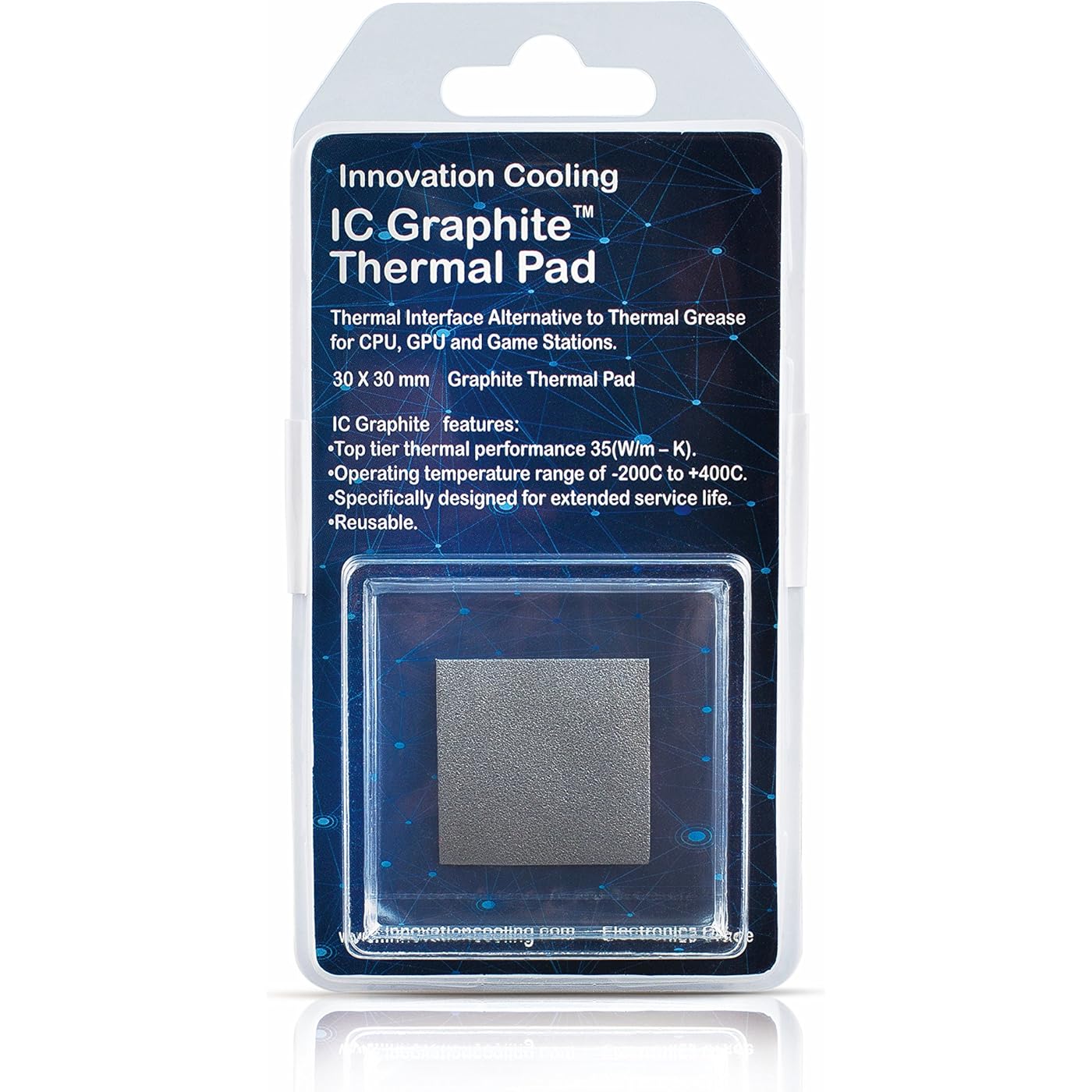
Graphite Thermal Pad – Permanent Replacement for Thermal Paste/Grease (30 X 30 mm)
  • Based on 3,188 reviews
Condition: New
Checking for the best price...
$14.69 Why this price?
New Year Deal · 26% off was $19.98

Buy Now, Pay Later


As low as $3 / mo
  • – 4-month term
  • – No impact on credit
  • – Instant approval decision
  • – Secure and straightforward checkout

Ready to go? Add this product to your cart and select a plan during checkout.

Payment plans are offered through our trusted finance partners Klarna, Affirm, Afterpay, Apple Pay, and PayTomorrow. No-credit-needed leasing options through Acima may also be available at checkout.

Learn more about financing & leasing here.

Selected Option

Free shipping on this product

FREE 30-day refund/replacement

To qualify for a full refund, items must be returned in their original, unused condition. If an item is returned in a used, damaged, or materially different state, you may be granted a partial refund.

To initiate a return, please visit our Returns Center.

View our full returns policy here.


Availability: In Stock.
Fulfilled by Amazon

Arrives Wednesday, Jan 28
Order within 4 hours and 32 minutes
Available payment plans shown during checkout

Protection Plan Protect Your Purchase
Checking for protection plans...

Size: 30x30mm (1-pack)


Features

  • TOP TIER THERMAL PERFORMANCE The IC graphite pad features a thermal conductivity of 35W/m-k.
  • EXTRAORDINARY DURABILITY This thermal pad features a dry solution that contains no liquids. It will not pump or bake out like regular thermal compounds.
  • UNMATCHED TEMPERATURE RANGE Keeps your CPU safe with a temperature operating range of -200C to 400C. RoHS compliant.
  • TAKE THE GUESSWORK OUT The modular solution means never again having to wonder if youve applied too much or too little thermal paste.
  • REUSABLE Youll never have to worry about buying thermal paste ever again. The graphite thermal pad can be reused on multiple builds with no loss in performance.

Brand: Innovation Cooling


Cooler Heatsink Compatibility: CPU and GPU


Mounting Type: Chassis Mount


Manufacturer: Innovation Cooling


UPC:


Product Dimensions: 5 x 2.9 x 1 inches


Item Weight: 0.317 ounces


Manufacturer: Innovation Cooling


Item model number: IC Graphite Thermal Pad 30


Is Discontinued By Manufacturer: No


Date First Available: April 21, 2018


Frequently asked questions

If you place your order now, the estimated arrival date for this product is: Wednesday, Jan 28

Yes, absolutely! You may return this product for a full refund within 30 days of receiving it.

To initiate a return, please visit our Returns Center.

View our full returns policy here.

  • Klarna Financing
  • Affirm Pay in 4
  • Affirm Financing
  • Afterpay Financing
  • PayTomorrow Financing
  • Financing through Apple Pay
Leasing options through Acima may also be available during checkout.

Learn more about financing & leasing here.

Top Amazon Reviews


  • Amazing, I'll never go back to paste again.
Capacity: 40x40mm (1-pack)
This stuff is super easy to use. You'll see people complaining about it being slippery and hard to hold in place ... I had to install this under a desk on my home server, which means I could not lay the case flat. (The Corsair H100i V2 pump died and I was replacing it with an H100i Pro). So I put two tiny daubs of regular paste in the top corners of the processor and stuck it on with that. Then I put everything together and fired up the system. I had been using Thermal Grizzly Conductonaut liquid metal before this. It had dried out and failed after two years. It's a serious pain to install and it is really, really hard to get applied correctly. It's almost worse to try to clean it off. I used a Dremel and a buffing wheel and polished it off after getting the bulk removed with ArticClean binary cleaner. I'll never use that stuff again. BUT it did do a good job as a new install until it began failing. The problem is that eventually either your cooling solution or your thermal paste is going to fail and then you're going to be taking things apart ... Degrading thermal paste, even liquid metals, is a serious problem for high use, high availability, high performance, long duration computer systems. I have replaced the thermal paste on the processor for this machine at least a half dozen times because I've had at least a half dozen CPU coolers on this machine. The computer I'm using this pad on is an AMD FX 8350 Black (On an ASUS 990FX Sabertooth R1 board) that's been running this machine for over ten years. Pretty much everything on the machine has been replaced multiple times except for the processor and motherboard. The processor has a nearly 25% overclock running 24/7/365 (4.95 GHz) It serves all my multimedia (which is a LOT) and is my security camera server (22 cameras), plus the computer I use (3 video cards, six monitors) at the main desk in my shop/office/man cave. Because of the camera system, "idle" is never less than around 50% CPU clock cycles. I can and do use it for gaming though I'm not much of a gamer. It's not a gaming computer. Think more along the lines of a semi-truck than a sports car. It works hard. It gets hot. It's still doing a great job after all this time and I have no intention of replacing it one second before I have to. This is VERY impressive performance for a computer. I don't know if I got lucky with processor and board or it's just that this combination is particularly robust. Whatever the reason, it has been and continues to be a truly great machine. I don't want to trust the cooling system to just any old nonsense. That's why I tried Thermal Grizzly liquid metal last time. I thought long and hard about using this pad before buying and installing it. I'm really glad I did. My temps are almost exactly even with what I got with the liquid metal even though this pad is only rated for half the thermal conductivity that the liquid metal is. So the conclusion I've come to is that the liquid metal either wasn't applied optimally, it squeezed out to the edges when the cold plate on the pump was attached or some other unseeable and unknowable problem occurred ... OR both thermal conductors have maxed out the capacity of my cooling solution. It would not be at all surprising as difficult as that stuff is to apply on a vertical surface that there was an unseen problem in the installation. The pad was super easy. I just put a tiny little daub of TX-2 (that I had laying around, nothing special as far as pastes go) on the top corners of the CPU to hold the pad in place while I bolted on the pump. Those two tiny bits of paste are well away from the die and should in no way interfere with the heat carrying capacity of the system. I literally used paste to paste the pad on long enough to finish the installation. It should be noted that I bought the 40x40mm pad which covered the entire lid and that my CPU is obviously not delidded. I think that's important because it establishes maximum conductivity across the largest possible area. It's only $3 more for the larger pad, don't cheap out on this. Be sure to measure your CPU, look up the dimensional specs or just buy the larger pad and be prepared to cut it down. I also polished the CPU and cold plate with a Dremel and a buffing wheel using green rouge. I had to do that to the CPU to get all the liquid metal off so I figured I might as well do the cold plate while I was at it. I didn't lap it, I didn't mate the surfaces perfectly, I just put a semi-mirror polish on the surfaces free handed. Be careful if you do that so as not to create micro-concave areas that will cause problems with gapping. Temperatures are running around 40 degrees normal use (remember I said it never actually goes to "idle" in normal use?) to around 50 under max load and I don't stress test it with Prime95 or anything like that. There's no need to stress test it, all I care about are real-world results and it's under stress just because it's on. When I turn everything off and it is truly idle it sits just a couple degrees F (~24C) above ambient. As mentioned previously, this pad is rated about half the thermal conductivity of the Thermal Grizzly Conductonaut liquid metal it replaced and it does as well or slightly better on my machine. That could mean that both the Thermal Grizzly liquid metal and this pad are maxing out the possible conduction of heat between my CPU and the pump cold plate. This pad is rated for thermal conductivity about four times what MX-4 produces. There are other factors besides thermal conductivity that work together in determining the effectiveness of your cooling solution. If you're not getting as good or better results with this than you did with MX-4, you're doing something wrong and/or one of those other factors needs to be addressed. The incontrovertible proof of that is all the other highly positive reviews. If we're all getting excellent results and you're not, it is very likely something on your end that is the problem and not an issue with this pad. Unlike paste that can have unknown and unseen air gaps, bubbles, uneven spreading etc. this pad is either in place on clean surfaces or it is not. This isn't arbitrary. The physics of this mean that if it works for me, it works the same for you. If it doesn't work for you as well or better than MX-4 or a similar thermal conduction paste then it's a problem that YOU have, not a problem with this pad. I'm not saying people who have issues with this pad don't know what they're doing. I'm merely pointing out the irrefutable logic of the physical science involved. If all the pads are the same (meaning no manufacturing defects) and every installation follows the same basic process on the same basic materials ... (CPU heat spreader/lid > thermal conductor > copper cold plate) And the vast majority of installations are extremely successful but yours isn't -- Then it's not the pad. You need to find that other variable that's causing the problem if you want to get the same positive results the rest of us are getting. It's worth the effort because this pad is an amazing and highly effective solution. I've been building computers for almost 30 years so it's not like I'm a novice at this stuff, but if you want to challenge my logic please feel free to comment and we'll discuss it. SO -- The performance of this thermal pad is phenomenal. I'm very, very happy with it and the fact that it will outlast my water cooler is a big plus. (I now have three water cooler radiators laying around so I may just go to a reservoir fed open liquid system next time, and I can use this pad again if I do.) Time will tell if it actually resists the degradation that thermal paste experiences and if it dies like thermal paste I'll come back and amend this review. If you don't see an edit below then it's still doing a great job and that being the case ... I'll never go back to goop again. 28 December 2020 - Two years later and the pad is still performing like the day I installed it. I have to shut down the machine and clean the radiator about twice a year but that's it. With a clean radiator on the overclocked processor previously mentioned this pad still works like brand new. ... show more
Reviewed in the United States on December 16, 2018 by S.L.

  • DO IT!
Capacity: 40x40mm (2-pack)
CPU: Ryzen 9 3900XT Cooler: NZXT X63 Kraken I at first tried with the stock thermal paste that came on the AIO (I went through 2 different coolers by this point because of the issues I was having with temps, found out now, it wasn't the cooler!!)... so I was not happy with the temps... I switched to using Mastergel Maker (not a cheap paste) and was not happy with the results I was getting. Temperatures were fluctuating oddly, I thought maybe something was wrong with my CPU, or bad mount, cooler sucked? (this happened both with stock paste and Mastergel Maker and can say it did make a LITTLE bit of a difference, not by much)... so I did some testing and tried different methods of applying the thermal paste and different mounting pressures... was almost running out of the paste, so I ordered this thermal pad. I have now had this thermal pad (40mm X 40mm) on for 2 days. I have done some testing... shared a picture, the max temp is after a Cinebench R20 benchmark.. 57.6c!!!! What??? Roughly around 32c at "idle" with multiple programs running in the background including.... Steam, a couple Google Chrome windows open (including this one currently while typing and another with a YouTube video running), Discord, ROG GPU Tweak II, NZXT CAM, Open Hardware Monitor, and on 3 different monitors at once, all programs with hardware acceleration off (so not using GPU to render said programs) I have also seen lower, around 27c with all programs closed, could go lower I'm sure of it with the fans on my radiator turned up, just no reason to. I am happy with 32c with all of these programs running. I am sure if I turned on hardware acceleration, it would be even lower temps because it would move the grunt of the load over to the GPU. (Yes I know even with hardware acceleration off, it still uses SOME GPU, but is mostly software rendered, which is using the CPU) Lol... okay this is way to long... long story short. DO IT. Don't listen to the haters, this is a legit review. These results are real. I was so worried about my new PC build until now. I thought I was doing something wrong. This thermal pad is amazing. Also, have not tested with 2 yet... might still do that... but have no reason to honestly! I am VERY satisfied with the results. Oh and also, I ordered on the 23rd, got it on the 26th. That is pretty fast. I also ordered late at night, so maybe it could have got here quicker? I saw some of the reviews with messed up thermal pads. I can say, mine arrived perfectly fine. No damage at all. I ordered the 2-pack 40mm X 40mm... MAKE SURE YOU GET THE SIZE FOR YOUR CPU!! Ryzen 3000 series NEEDS 40mm X 40mm. It does hang over a little 1mm-2mm maybe? (VERY LITTLE and you could trim it if you are going to be a perfectionist, I usually am, but I didn't trim it) the 30x30 will be too small... and yes it does slide around on you, but be patient and just make sure it stays in place. Do check, because it could short something out. With my motherboard, I'm really not worried about it as there aren't really any components near the socket, and it stayed in place for me pretty easily, the pad became a little concave, so I flipped it so the curvature was pointing up, as if it is hugging the CPU. Anyways, just wanted to leave a legit review with true experience. Totally worth it. Very satisfied. Okay, I'm done. Good luck fellow gamers and creators!! This is what you were looking for, I promise. OH, and yes I am overclocking, obviously from the screen shot. ... show more
Reviewed in the United States on January 29, 2021 by Jason Wise Jason Wise

  • Perfect For My Needs
Capacity: 40x40mm (2-pack)
Built a system for my Mother using my prior systems parts and don't want to worry about thermal paste drying or thermal pumping out. This appears to be a permanent solution and testing has verified that it performs much more than adequate.. 4960x (yes....old) lapped to near mirror polished Thermalright Peerless Assasin 120 (how can something be this cheap AND this good?) EVGA RTX 2070 XC Ultra Gaming - Because Mom loves killing zombies! Uhh..no. CPU has no iGPU 32GB RAM, ASUS MB, Fractal Design Pop Air case Anyway....installation is super easy once you put tiny dabs of thermal compound on the processor corners to hold this pad in place. Without the thermal compound - it moves, period - tried 3 times and it just wouldn't stay in place no matter how careful I was. Being as this pad is the same size as the heat spreader of the CPU - had to be perfect - so...TC on the corners - done. All fans set on manual with minimum duty cycles in BIOS. Idle temperature average is 26C for all cores with a low temp of 24C - so very consistent and even. Now, when I hammer it - prime95 AND MSI Kombustor at the same time - I get CPU temps maxing at 74C - no thermal throttling, CPU at full speed at all times. Not bad at all for a marginal airflow case. Is it as cold as kryonaut extreme - no. Runs about 3-6C hotter under load - but that was also in a case that had more airflow....sooooo...? Will I have to repaste it in a year or two? NO!!! I don't see why this won't last essentially forever. This likely isn't for extreme overclockers looking for the last degree. For me though - building a system that will work without issue and I won't have to fix it (I live 1000 miles away) it's ideal. ... show more
Reviewed in the United States on August 12, 2023 by David B San Antonio

Can't find a product?

Find it on Amazon first, then paste the link below.
Checking for best price...