
Search  for anything...
HP

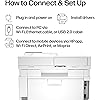
HP Color LaserJet Pro MFP 4301fdw Wireless All-in-One Color Laser Printer, Scanner, Copier, Fax, Best-for-Office

  • Based on 665 reviews
Condition: New
Checking for the best price...
$659.00 Why this price?
Save $200.00 was $859.00

Buy Now, Pay Later


As low as / mo
  • – Up to 36-month term if approved
  • – No impact on credit to apply
  • – Instant approval decision
  • – Secure and straightforward checkout

Ready to go? Add this product to your cart and select a plan during checkout.

Payment plans are offered through our trusted finance partners Klarna, Affirm, Afterpay, Zip, Apple Pay, and Google Pay. No-credit-needed leasing options through Acima may also be available at checkout.

Learn more about financing & leasing here.

Selected Option

Free shipping on this product

30-day refund/replacement

To qualify for a full refund, items must be returned in their original, unused condition. If an item is returned in a used, damaged, or materially different state, you may be granted a partial refund.

To initiate a return, please visit our Returns Center.

View our full returns policy here.


Availability: In Stock.
Fulfilled by Amazon

Arrives Aug 30 – Aug 31
Order within 19 hours and 19 minutes
Available payment plans shown during checkout

Protection Plan Protect Your Purchase
Checking for protection plans...

Model name: Color Laserjet Pro MFP 4301fdw


Features

  • EVERYTHING SMALL TEAMS NEED Print, scan and copy professional-quality color documents and reports plus fax. Auto 2-sided printing and auto document feeder for fast scan/copy. Perfect for up to 10 people
  • BLAZING FAST COLOR Up to 35 color pages per minute, with sharp details and incredible color
  • STAYS CONNECTED Intelligent Wi-Fi looks for the best connection to stay online and ready to print
  • PROTECTS YOUR DATA Includes HP Wolf Pro Security with customizable settings so your printer and information are always secure
  • PRINT FROM ANY DEVICE Wireless printing from any mobile device, PC or tablet. Ethernet and Bluetooth included. Works with Microsoft, Mac, AirPrint, Android, Chromebook and more
  • This printer is intended to work only with cartridges with original HP chips or circuitry and will block cartridges using non-HP chips or circuitry. Periodic firmware updates will maintain the effectiveness of these measures.
  • PRE-INSTALLED INTRODUCTORY CARTRIDGES - Printer includes starter cartridges with yields of 1,200 pages (black) and 1,000 pages (CMY).
  • REPLACEMENT CARTRIDGES available with yields of 2,000 pages (black) and 1,800 pages (color), or higher yields of 7,500 pages (black) and 5,500 pages (color).

Description

HP Color LaserJet Pro MFP 4301fdw Wireless Printer, Print, scan, copy, fax, Fast speeds, Easy setup, Mobile printing, Advanced security, Best-for-small teams, white, 16.6 x 17.1 x 15.1 in

Brand: HP


Connectivity Technology: Ethernet, USB


Printing Technology: Laser


Special Feature: All in One


Color: white


Model Name: Color Laserjet Pro MFP 4301fdw


Printer Output: Color


Maximum Print Speed (Color): 33


Max Printspeed Monochrome: 35


Item Weight: 45 pounds


Printer Type: Laser


Other Special Features of the Product: All in One


Printer Output Type: Color


Item Weight: 45 pounds


Item Dimensions D x W x H: 16.6"D x 23.5"W x 15.1"H


Controller Type: Android


Print media: Envelopes, Glossy photo paper, Paper (plain)


Scanner Type: Sheetfed


Maximum Copy Speed Black and White: 35 pages_per_minute


Compatible Devices: Laptops, PC, Smartphones


Warranty Type: limited warranty


Ink Color: White


Additional Printer Functions: All In One, Copy, Scan


Control Method: App


Number of Trays: 2


Processor Count: 1


Display Type: LED


Resolution: 600 x 600


Maximum Media Size: 8.5 x 14 inch


Maximum Sheet Capacity: 300


Paper Size: 6 x 5 to 8.5 x 14


Maximum print Resolution Color: 607 x 600 dots_per_inch


Maximum Print Resolution Black and White: 607 x 600


Power Consumption: 585 watts


Wattage: 585 watts


Maximum Copy Resolution Color: 600 x 600


Maximum Copy Resolution Black and White: 600 x 600


Brand: HP


Model Name: Color Laserjet Pro MFP 4301fdw


Model Number: 4301fdw


Built-In Media: Printer, toner cartridges (black and introductory cyan, magenta, yellow), docs (reference guide, setup card), power cord


Series Number: 4300


Model Series: Color LaserJet Pro MFP


Specific Uses For Product: Small office, Team environments


UPC: 196068323134


Unit Count: 1 Count


Item Type Name: Color Laser Printer


Manufacturer: HP


Warranty Description: One Year Limited Hard


Color Pages per Minute: 33


B&W Pages per Minute: 35


Color: white


Color Depth: 30


Printer Connectivity Type: Ethernet, USB


Hardware Interface: Ethernet


Number of Ethernet Ports: 1


Total Usb Ports: 1


Duplex: Automatic


Frequently asked questions

If you place your order now, the estimated arrival date for this product is: Aug 30 – Aug 31

Yes, absolutely! You may return this product for a full refund within 30 days of receiving it.

To initiate a return, please visit our Returns Center.

View our full returns policy here.

  • Klarna Financing
  • Affirm Pay in 4
  • Affirm Financing
  • Afterpay Financing
  • Zip Pay in 4
  • Financing through Apple Pay
  • Financing through Google Pay
Leasing options through Acima may also be available during checkout.

Learn more about financing & leasing here.

Top Amazon Reviews


  • Simple setup. Fast output. Crisp and vibrant images.
Model name: Color Laserjet Pro MFP 4301fdw
I am extremely happy with the HP Color Laserjet Pro MFP 4301fdw. I had a previous generation of HP page array inkjet printer, which I'd used for about seven years. Unfortunately, it failed, so I needed a quick replacement. I have an earlier generation of LaserJet in another home, and it has served me really well. For that reason, I was inclined towards HP. After researching the manufacturers and checking the costs of supplies, I became interested in this HP model. The reviews and unboxing/start-up videos on YouTube encouraged me to look further. Unboxing was straightforward, although it helps to have a second person to help. My only struggle was entering a wifi password; this was simply because I have a very long password. Once I got that entered correctly, which took a few attempts, the firmware automatically upgraded, the printer calibrated, and it was ready to use. My Mac immediately recognized the Printer, and I had my first output within a few seconds of sending a document to print. It is the fastest LaserJet I've used so far. The printed text is crisp and very clear. It is easy to read. Color images also look great. All things considered, the out-of-the-box experience was excellent, and it feels like this is going to be a great workhorse in my office setup. I will update this if my experiences change over time. At $579, it was not cheap. However, initial experiences suggest it was worth the splurge. ... show more
Reviewed in the United States on January 26, 2024 by JJD

  • Updated Review: Printer Absolute Garbage
Model name: Color Laserjet Pro MFP 4301fdw
Final updated Review (10-1-24). The printer has once again given us the "paper jam" error code when there is in fact no paper jam. After a little over a year of barely using the printer, It is going in the garbage. We are not wasting anymore time on this printer and we are just going to replace it. Another updated Review. I will keep coming back to update this review each time I have an issue with the printer. I have had this printer for slightly over a year and I 100% have buyers remorse. There is a known issue with an electrical part and the only way to fix it is to have HP send you a refurb or have a tech come out and replace it with a refurb part. The tech that replaced the broken part used an old and dirty replacement part that now leaves all of my printing pages with giant streaks that we cannot figure out how to get rid of. In addition, today it has started making this god awful screeching noise when it prints. I purchased this printer when it was still at full price it has been the worse purchase of my life. Updated Review: DO NOT BUY THIS PRINTER. This printer is absolute garbage. In the 40 years I have lived on this Earth, this purchase has been one of my biggest regrets. And that's saying something because I've made a lot of stupid financial mistakes in my life. I have had the printer for less then a year and now it is unusable. I had a paper jam in the printer so I cleared everything. The printer is stuck thinking it has a paper jam when there is not. An HP tech came out to inspect and the tech informed me there is a part that is known to fail in these printers and the only solution is to replace it with a refurb. I got the refurb in and I made two copies on it. By the 3rd copy the paper jammed and guess what....it no longer works. I will have to start the entire warranty claim all over again and wait to get another tech out to have it swapped with another refurb. At this point we are just SOL in getting any sort of refund for the printer or the toner we just purchased. I repeat. DO NOT BUY THIS PRINTER. Old Review: The printer itself is a vast improvement from my old printer in terms of quality and performance. It runs smooth, quiet, and its pretty damn fast. The software however makes me want to launch this thing into the sun. It more or less does what it wants regardless of what settings you have in place. Does it print double sided? Absolutely. Does it print double sided when you ask it to? Who knows, maybe it will, maybe it won't. Does it scan front and back? You bet it does! However it will only scan front and back in document mode and it cuts off half the page. And I know what you are thinking "oh that's an easy fix, just change the settings!" Guess again because changing the settings don't matter. If you have the patience of a saint, this printer will do the job. If you aren't tech savvy or if you have the little to no patience, you might want to try another model. Or get someone in IT to set it up for you....maybe a priest. TLDR: Do not buy this printer. Has known issues that are reoccurring. Buy something else. ... show more
Reviewed in the United States on August 21, 2023 by Jacob

  • All-in-one delivers.
Model name: Color Laserjet Pro MFP 4301fdw
This all-in-one printer, scanner, copier, fax combo truly delivers. It's user friendly, quiet and effeceint, and small enough to be placed on your desk. Makes scanning and printing all my documents a breeze. HP has come through once again with a quality combo for a reasonable price.
Reviewed in the United States on June 10, 2026 by Ladell S. Holland

  • Solid MFP
Model name: Color Laserjet Pro MFP 4301fdw
This is a steep purchase price for me but decided to make the crossover to a laser printer. That said it was relatively easy to get on network and working. There was a short firmware system update but wasn't unbearable and managed its self. all the PC's and android devices were the easiest to connect and set up. The Mac OS set up wasn't at all hard but a little more involved to be sure (some App Store downloads and setup). All told the Mac's were the most involved and still not terrible to set up, rather just a bit time consuming (15=25min). Print quality is much better than expected. print speed also better than expected. I will say the spooling time is significantly shorter than I'm used too (big win). It's a bit on the loud side if you have a home office like me, but not so much so that it wrecks my day. on that note the quiet mode in the settings did help with that. ... show more
Reviewed in the United States on November 26, 2023 by Alan317

  • **Printer nightmare**
Model name: Color Laserjet Pro MFP 4301fdw
I bought two identical printers of this model for two different locations. I had the same horrible experience with each of them. Initially, everything went fine. Setup was easy and for the first 10 print jobs or so, they both worked great. Then suddenly, out of the blue, they started printing out every other page. I called tech support to troubleshoot. After about 2 hours on the phone (30 minutes waiting on hold + 90+ minutes of letting the tech take over control of my laptop for remote troubleshooting), they got them working again. But then inexplicably, about 10-20 print jobs later, they started to malfunction again – either by only printing every other page or not printing anything at all. Once again, I called tech support line and went through the same laborious process of waiting on hold, and then waiting 90+ minutes for the tech to troubleshoot the problem. Once again, the tech got the printer working again. But then, the exam exact same thing happened – after another 10-20 jobs, the printer suddenly stopped printing. I went through this cycle 3 times for one printer, and 4 times for the other one, racking up more than 10 hours on the phone on hold or speaking with tech support.. Finally, I asked tech support to escalate my case so that a tech could come to my house and fix the problems in person. The request was approved, so they sent out a guy who called himself the "printer whispered” to come to my house. As soon as this guy walked into my office and saw the printers, he start to chuckle and rolled his eyes. He said that particular model is a lemon and he gets more complaints about it than any other model. He said he would try to fix the problem, but honestly, in my shoes, he would just buy a new printer from another company. He said unlike the older HP printers, which were excellent, the new ones are "garbage" (his word) that use substandard parts and have endless software problems. I asked if HP would at least refund my money since this model was known to be a lemon. He said no, in his experience they never did that, they would just keeping on sending me back to tech support until my one-year warranty ran out. ***Again, just to be clear, the guy saying all of this was the technician HP sent out to fix their own printer.*** He said that even if he got it working again, these problems would probably keep cropping up. After an hour or so, he did get the printer working again. But then sure enough, about five weeks later, it stopped printing in the middle of a job. I reached out to the "printer whisperer" again but he refused to come back out. So finally - after having wasted about $1400 on two printers (one of which was still under warranty) and a spare set of cartridges, and 10+ hours of my time – recycled these worthless pieces of junk and bought a Canon. I have certainly had my share of frustrating experiences with shoddy consumer products sold by unethical companies. But given how much money AND TIME I wasted on these pieces of garbage, I think this one takes the cake. I will never buy another HP printer again as long as I live. ... show more
Reviewed in the United States on July 9, 2025 by Daniela W.

  • Great printer
Model name: Color Laserjet Pro MFP 4301fdw
Wanted a laser as I’m sick of trying to get my epson inkjet nozzles clear every time I need to print. It printed beautiful photos, but was a pain. This printer works every time. Is really fast (about 10 sec to output from a cold start) and has excellent print results. The photos are not quite inkjet good, but are close enough. I bought the HP pro premium paper for the photos. But, just on the white HP paper, pictures look excellent. You can’t expect perfect with only 3 colors. I actually bought a brother laser first. The photos were washed out and unacceptable. I returned it. Really happy with this HP. Now when my kids need to print their homework last minute they can. ... show more
Reviewed in the United States on September 7, 2024 by Erik

  • Excellent printer, expensive replacement cartridges -- Duplex printing setup can be a challenge.
Model name: Color Laserjet Pro MFP 4301fdw
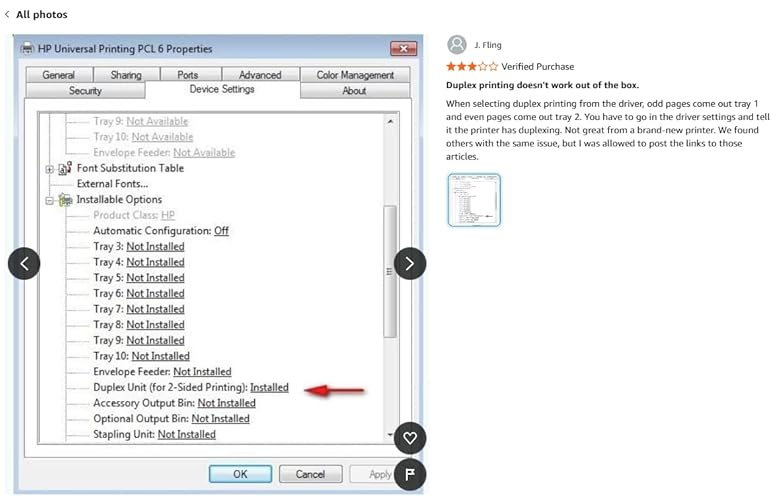
Purchased new 4301 FDW in Aug 2024 for $505 including tax. Well packaged, easy to setup with one irritating exception. Unclear whether a Windows 10 or HP software issue, but Duplex printing did not work until I changed (after a couple hours of searching online for solution) Duplex setting in Universal Printer properties. See pic courtesy of J. Fling. My third HP color laser over the last 20 years, expensive up front but thus far proved their worth over time. Print quality, duplex printing, copying, scanning all work as advertised. Of course, the cost of toner is what keeps HP stockholders happy and execs making millions. The color starter cartridges lasted about 1,000 pages (2 reams). I used third party toner the last few years on my last HP printer, but given the HUGE price increase to over $750 in just over a year, I opted to pay more than my first used car for genuine HP high capacity cartridges (used Amazon's offer of zero interest over 12 months to spread out the cost). My printing needs are less than in years past, so maybe the color will last a couple of years? Had first paper jam a few days ago on a label inserted into the manual feed -- as always its easy when you know how to fix ... 20 min video to locate a button that lowers paper feeder under manual tray (after removing the lower paper tray). Well, I did not plan to write a novel. Excellent printer, yet at $750 plus similar amounts for replacement cartridges it's def an investment! ... show more
Reviewed in the United States on November 9, 2025 by Art M.

  • Laser is great but expensive
Model name: Color Laserjet Pro MFP 4301fdw
Laser is the way to go. The toner is $1,000 from HP and knock off brands don’t work well. HP says the toner lasts for a very long time. Well, we will see. This is expensive, but the print quality is good.
Reviewed in the United States on May 26, 2026 by Dick Miller

Can't find a product?

Find it on Amazon first, then paste the link below.
Checking for best price...