Search  for anything...

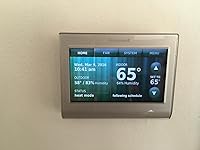
Honeywell RTH9580WF1005/W1 Smart Wi-Fi 7 Day Programmable Color Touch Thermostat, Works with Amazon Alexa

  • Based on 3,397 reviews
Condition: New
Checking for the best price...
$299.99 Why this price?

Buy Now, Pay Later


As low as $50.00 / mo
  • – 6-month term
  • – No impact on credit
  • – Instant approval decision
  • – Secure and straightforward checkout

Ready to go? Add this product to your cart and select a plan during checkout.

Payment plans are offered through our trusted finance partners Klarna, Affirm, Afterpay, Apple Pay, and PayTomorrow. No-credit-needed leasing options through Acima may also be available at checkout.

Learn more about financing & leasing here.

Free shipping on this product

Returnable until Jan 31, 2026

To qualify for a full refund, items must be returned in their original, unused condition. If an item is returned in a used, damaged, or materially different state, you may be granted a partial refund.

To initiate a return, please visit our Returns Center.

View our full returns policy here.


Availability: Only 3 left in stock, order soon!
Fulfilled by OutCrate

Arrives Jan 8 – Jan 12
Order within 7 hours and 54 minutes
Available payment plans shown during checkout

Protection Plan Protect Your Purchase
Checking for protection plans...

Features

  • Works with Alexa for voice control (Alexa device sold separately).
  • Customize the screen color to match any decor, Control from anywhere with iOS and Android devices, Simple setup with smart programmable features for home or business
  • Energy Savings: Choose programmable mode to save on annual heating and cooling costs. C-wire needed for proper installation.
  • Locking Touchscreen: Advanced locking features and password options provide smart security and convenience
  • Allows remote access to the thermostat through a computer, tablet, or smart phone with Honeywell's Total Connect Comfort Service

Description

Honeywell Wi-Fi Smart Thermostat, Control from anywhere, via iPhone, iPad, Android and computer.The extreme flexibility of the Honeywell Wi-Fi smart thermostat allows you to uniquely program your device as either a home or business thermostat and then offers scheduling features specific to your home or business.For a business, simply select the temperature that you prefer when the building is occupied, and you won't have to worry about cold mornings or hot afternoons.You can also select the temperature that you prefer when your business is unoccupied, so you won't have to worry about wasting energy.Tell your Wi-Fi smart thermostat what temperature you prefer when you wake, and you'll never have to endure another cold morning. Smart Response Technology for 24-7 ComfortThis smart thermostat even learns your heating and cooling cycle times to deliver just the right temperature, right when you want it.The Honeywell Wi-Fi smart thermostat learns the exact amount of time necessary to reach your perfect temperature and acts accordingly, so energy isn't wasted and your comfort isn't compromised.otal Connect Comfort AppHoneywell's reliable and highly-rated app allows you to program your thermostat from your computer, tablet, and smartphone, whether you're across the room or around the world. This allows the user to remotely monitor and manage home's comfort and energy usage anytime, anywhereThis highly rated app is backed by Honeywell's reliable network, for dependable access and peace of mind. Available for iOS and Android devices. Auto AlertsExtreme temperature alerts and filter change reminders are sent to connected network devices and displayed on Honeywell Wi- Fi smart thermostat. Wi-Fi Smart Thermostat from HoneywellSmart features, customizable touchscreen, and simple setup, plus Wi-Fi remote access. • Control from anywhere with iOS and Android devices • Simple setup with smart programmable features for home or business • Easy-to-read customizable color touchscreen • Smart Response temperature timing • Advanced fan/comfort control and indoor humidity sensor Compatible with thermostats with 110V or higher and systems containing a c-wire (see chart below to determine compatibility)Smart Programmable FeaturesSmart, Flexible SchedulingThe extreme flexibility of the Honeywell Wi-Fi smart thermostat allows you to uniquely program your device as either a home or business thermostat and then offers scheduling features specific to your home or business. For a business, simply select the temperature that you prefer when the building is occupied, and you won't have to worry about cold mornings or hot afternoons.You can also select the temperature that you prefer when your business is unoccupied, so you won't have to worry about wasting energy.Tell your Wi-Fi smart thermostat what temperature you prefer when you wake, and you'll never have to endure another cold morning.Smart Response Technology for 24-7 ComfortThis smart thermostat even learns your heating and cooling cycle times to deliver just the right temperature, right when you want it.The Honeywell Wi-Fi smart thermostat learns the exact amount of time necessary to reach your perfect temperature and acts accordingly, so energy isn't wasted and your comfort isn't compromised. Reliable Wi Fi Operation and ControlTotal Connect Comfort AppHoneywell's reliable and highly-rated app allows you to program your thermostat from your computer, tablet, and smartphone, whether you're across the room or around the world. This allows the user to remotely monitor and manage home's comfort and energy usage anytime, anywhereThis highly rated app is backed by Honeywell's reliable network, for dependable access and peace of mind. Available for iOS and Android devices.Auto AlertsExtreme temperature alerts and filter change reminders are sent to connected network devices and displayed on Honeywell Wi-Fi smart thermostat. Advanced Comfort and Control FeaturesCustomizable Color TouchscreenEasily change the high-definition display to any color you choose. The bright, easy- to-read touchscreen can be color customized to fit your mood, match your paint, or support your favorite team!Locking TouchscreenAdvanced locking features and password options provide smart security and convenience. Optional password protection allows only designated users to access the security settings and locking options. A 30-second lockout affords you the opportunity to clean the thermostat, so you don't have to live with fingerprints on your touchscreen device.On-screen Comfort InformationSee indoor and outdoor temperature and humidity information right on the home screen.Indoor Humidity SensorIndoor humidity displayed below temparture on touchscreenAdvanced Fan/Control ComfortImproves air circulation and helps regulate the temperature throughout your homeSimple ProgrammingTool-free wiring, manual-free install and setupEnergy SavingsChoose programmable mode to save on annual heating and cooling costsHome CompatibilityCompatible with heating, cooling and heat pumps.Does not work with heat pumps with electric baseboard heat (120-240 volts)In order to power your Honeywell Wi-Fi smart thermostat (RTH9580WF), your system must contain a c-wire. Use the chart below to confirm that your system meets the compatibility requirements. This chart will determine compatibility with most systems, but as wiring systems vary from home to home, there may be some exceptions.Does your current thermostat have 110V or higher written on it? If yes this system is compatible — continue to next question.Do you have thick wires that are connected using wire nuts? If yes — your system is not compatible. If no — continue to the next question.Do you have a wire connected to terminal labeled "C"? If yes — your system is compatible. If no move the next question.Do you have an extra wire that is not connected to any terminal on the thermostat wall plate? Or — if no — do you have a wire connected to terminal labeled "G"? If yes to either of these questions, this thermostat may be compatible with your system.To help you know for sure if your system will work with the Wi-Fi thermostat, please send us a picture of your current thermostat wiring. Take a picture of your current wall plate with wires connected to the lettered terminals.

Brand: Honeywell


Model Name: RTH9580WF1005/U1


Special Feature: Programmable


Color: Silver


Brand: ‎Honeywell


Model Name: ‎RTH9580WF1005/U1


Special Feature: ‎Programmable


Color: ‎Silver


Specific Uses For Product: ‎Furnace


Temperature Control Type: ‎Heating and Cooling


Connectivity Technology: ‎Wi-Fi


Included Components: ‎Thermostat, Mounting Hardware, User Manual


Power Source: ‎Hardwire


Item Weight: ‎1.2 Pounds


Voltage: ‎30 Volts


Shape: ‎Rectangular


Display Type: ‎Digital


Screen Size: ‎3.5 Inches


Control Type: ‎Touch


Control Method: ‎Voice


Connectivity Protocol: ‎Wi-Fi


Mounting Type: ‎Embedded


Style: ‎Smart,Touch


Backlight: ‎Yes


Specification Met: ‎Energy Saving Thermostat


UPC: ‎085267815321 085267890762


Global Trade Identification Number: ‎21, 62


Manufacturer: ‎Honeywell


Part Number: ‎RTH9580WF1005/W1


Item Weight: ‎1.2 pounds


Product Dimensions: ‎4.5 x 0.88 x 3.5 inches


Item model number: ‎RTH9580WF1005/W1


Is Discontinued By Manufacturer: ‎No


Size: ‎8.06 sq inch


Installation Method: ‎Wall-Mounted


Item Package Quantity: ‎1


Special Features: ‎Programmable


Batteries Included?: ‎No


Batteries Required?: ‎No


Date First Available: June 19, 2013


Frequently asked questions

If you place your order now, the estimated arrival date for this product is: Jan 8 – Jan 12

Yes, absolutely! You may return this product for a full refund within 30 days of receiving it.

To initiate a return, please visit our Returns Center.

View our full returns policy here.

  • Klarna Financing
  • Affirm Pay in 4
  • Affirm Financing
  • Afterpay Financing
  • PayTomorrow Financing
  • Financing through Apple Pay
Leasing options through Acima may also be available during checkout.

Learn more about financing & leasing here.

Top Amazon Reviews


  • Easy to install and program, not having issues others have had **UPDATED with Operational Tips**
Wow, I spent a lot of time reviewing thermostats, and basically each and every one I could find has quite a number of reviews that say that the thermostat (no matter which one you research) is terrible. So, I went with a Honeywell, to replace the programmable Honeywell I bought 15 years ago and have loved, but that got fried when my furnace shorted out. I also didn't need a thermostat to track my comings and goings, or use machine learning or a motion sensor to figure out when to turn on, because even when I am working from home I don't need the entire house heated or cooled. For my purposes, the "intelligent" thermostats are a bit of an overkill, but other people certainly will have other needs and those might work well for them. The Honeywell can be programmed and provide status updates remotely. It also has air filter and humidifier pad replacement notifications, which I like. That is a step up from my old one. I also like not having to change batteries every few months, because all too often I had to reprogram everything if I couldn't swap out the batteries fast enough. A few things about unit I received, to provide a counterpoint to a lot of the reviews and comments I have read which are either inaccurate, or outdated (perhaps due to device/software updates), based on my experience. First off - this is a RT model, meaning Retail. Not sure what was being shipped a couple of years ago but this is what I got this month. It has a one year warranty, and Amazon offers extended warranties. Second, it does get updates for outside temp and humidity, which seems to have been an issue with older devices/software. I found installation to be a snap. I did need to add a "C" wire, but with a new furnace, I just took an unused wire in the existing thermostat wiring harness and connected it on both ends as shown in the excellent videos. I also labeled it with the included wiring tags (another nice touch) since I couldn't use the industry standard Blue wire for "C". It helps to make sure the stripped wire ends are: a) long enough and b) straight. Don't try to straighten out the existing bent and stripped ends unless you absolutely don't have enough wire to cut and strip clean ends. They just won't make good contact and that can lead to all sorts of issues. I don't have a 2 stage furnace, but the wiring seems to support that, as does the programming. There are also specific settings and wiring diagrams for Heat Pumps that must be observed. I connected to my wifi easily, and on the first attempt. I have a long wifi password (everyone should) and while entering it, I did wish for a Caps Lock key, because otherwise, each time you want to type a capital letter, you need to re-tap the Shift key, and then you type the letter and the keyboard goes back to lowercase. That made typing multiple capital letters in a row a bit of a pain, but fortunately something you may never do more than once. Otherwise, the touchscreen works well and I prefer it to the "turn the dial", or "scroll the alphabet" with Up/Down button, text entry methods of some other wifi thermostats. The screen is customizable, so my wife and I made it match the background wall paint, just for laughs. It is quite an amazing color match, and you have a lot of control over the color palette. Note that when customizing the background color, the brightness there is for the color brightness/depth, not the screen brightness. I read a review where someone complained that the screen brightness was useless, and I suspect they were not adjusting the right setting. You do not use the Color Theme menu for this. You can make the screen completely dark, but only when it goes idle, by changing the Backlight Settings under Preferences. (I wasn't sure about using this thermostat in a bedroom until I found that setting, but now it seems like it's a good option.) I also think, based on my experience with computer screens for many years, that dimming or turning off the backlight will reduce the heat emitted by the screen, thus giving a more accurate temperature reading. That one tip might help a lot of people with their temperature accuracy issues. ** UPDATED ** I thought I would test out my hypothesis about the higher backlight levels generating more heat. So, I changed the backlight from the default, down to level 1, and after a few hours measured the screen temperature with a very accurate Infrared meter. At a room temp pf 78 degrees, the screen temp was 84 degrees (F). Then, I set the backlight to the max - level 10 - and waited a few hours. Same room temp, but the screen temp was 90 degrees (F). So, I believe that it's quite possible high backlight levels can cause erroneous temperature readings, although perhaps someone from Honeywell can chime in to confirm. But, the screen is still readable at backlight level 1, with the light color scheme I chose, so there is no harm in dimming it. Tapping the screen turns the backlight back to normal viewing levels. You can always tap a dimmed screen to wake it up and see the current temperature and settings, or do this from your computer or phone. I really like this thermostat's option of running the fan in Circulate mode, where it runs 35% of the time. You can schedule it so the fan does not circulate at night, or during any scheduled heating/cooling window. This effectively moves cooler air from my basement to the upper floors without running the compressor. If the AC coils are still cool, it will also act as a short-term dehumidifier. (I'm not sure how many other thermostats have this feature.) I would say that I don't think people with air handlers in an attic or un-insulated crawlspace should do this without checking to see if the air that is circulated isn't being heated or cooled by the ambient air surrounding the air handler. From prior testing, I know that my attic unit would just heat the air if the A/C compressor isn't running, so I wouldn't want to circulate air there. Scheduling online is a breeze. I really like the ability to set each day individually, or to set a group of days, such as the workdays, all the same. I set my Monday-Friday the same, and then the weekends on a different schedule. Then I tweaked the Friday night schedule to reflect the later bedtime. My only gripe about the online scheduler is that once you set your schedule, it's not very intuitive as to how to get back to it and change it. I think Honeywell should add a Schedule button to the main page to make it easier to navigate. A couple of other things to note - the thermostat seems to predict when it should turn on or off to meet the next scheduling window. This is to ensure the house is at the desired temperature at the start of the next scheduled period. That's great when you arrive home at 5:30 and the house is already cool, not just starting to get cool. The thermostat also learns how long it takes to change the temperature, so it does this efficiently and you don't have to set the house to be cool at 5:00 just so it's ready at 5:30. But, I found the opposite to be true - if you set your Leave time to 8:00AM, and set the cooling temperature to rise to 83 degrees at that time, the thermostat actually starts to let the temperature rise a few minutes beforehand, so it is at 83 degrees at 8:00 AM. I would characterize this as a software flaw, because you really want the house to stay at the cooler temp _until_ you leave. The workaround is simple though - just add a few minutes (like 10 or 15) to your Leave start time, and you will be all set. I hope Honeywell addresses this, perhaps by making it a configurable option such as: "Hold Temp Until Leave Time Starts." ... show more
Reviewed in the United States on June 21, 2016 by homeuser

  • Nest thermostat vs. this Honeywell thermostat
I'm giving a head-to-head review. I've had both a Nest 3rd Generation thermostat and this Honeywell touchscreen thermostat. I like both a lot, actually. It depends on what you're looking for in terms of deciding which is better for you specifically. I love the simplicity of the Honeywell's touchscreen. And I like that it tells you the outside temps and humidity, the date, and time all on the home-screen, all at once. Nests have much less info on the screen and you need to turn the dial and find everything, like weather, etc. On the Honeywell, to navigate to settings and schedules, there are touchscreen tabs at the top of the screen. Pretty intuitive. Wiring: The Honeywell absolutely requires a "C" wire to work. If you don't have one, you will need to run one for the Honeywell for it to work. I originally did not have one, but I had one added for $100 by an electrician. If you don't want to go through the expense or hassle, you may want to go for the Nest instead, because while the system works best with a C wire, it can work without one. But it depends on how much power it can pull from the other wires. Not having a C wire can make its Wi-Fi connectivity spotty/intermittent. And that means sometimes you can't interact with it via the mobile App and delays in it knowing what the external weather is. Apps: Nest has its merits, for sure, like their App that gives a lot of insights as to how you're doing with efficiency (like showing that for the past week, Monday, the heater only ran for 15 minutes; and Tuesday, it didn't come on at all... that kind of thing). I will say, however, Honeywell and Nest keep improving their Apps continuously, so as soon as I comment on App features, they change and have new functions... so that's a positive for both products. Who can be upset with constant improvements? Aesthetics: Both the Honeywell and Nest are very slick/modern looking. With this Honeywell, having the ability to choose your screen color to work with your décor or style is something that's pretty neat. Or you can change it up when you're bored. The Nest, however, does not have a function to change its color. It is always black. On the other hand, the Nest itself with its circular face is just pretty cool looking on its own. I'll leave you to decide what is more pleasing, as it's a matter of opinion. Some notes about programming your schedule: Nests, are all about "learning" about you. So, in default/factory setting mode they are set in "auto" schedule program mode, which means you go about your daily routines and "train" it, so it learns your preferred home temps and schedule. If you're letting it "learn you", it goes something like this... You to wake up, change the temp, leave the house and adjust the temp before doing so, come home and ... You get where I'm going. Finally, after a few days of that, it pretty much understands your patterns (unless you're really unpredictable/erratic). That learning feature can be awesome for some, since some folks want to let it do the work. But some people are more control freaks (like myself) and want to tell it what temps at what times to come on and off from the get-go. So, if you find the learning feature takes too long to learn your schedule, simply read the directions and turn off the auto learn function, and then program your schedule to however you want. The Honeywell does not learn and has you set your desired temps and schedule from the first moment you install it by default. But it gives you quick-set recommendations, which make setting up the schedule super-fast. Bottom line: Both are absolutely great thermostats. I love them both for different reasons. Maybe the biggest difference for some would be the "C" wire requirement for Honeywell (if you don't have a C wire in your wall already and if you don't want to have to have that wire added). I always read reviews before purchasing and find some quite helpful, so I hope you find this review helpful! ... show more
Reviewed in the United States on April 7, 2016 by Michelle R. Michelle R.

Can't find a product?

Find it on Amazon first, then paste the link below.
Checking for best price...