Search  for anything...

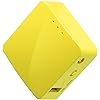
GL.iNet GL-MT300N-V2 (Mango) Portable Mini Travel Wireless Pocket VPN WiFi Router - 2X Ethernet Ports | USB 2.0 | OpenWrt | OpenVPN/Wireguard for Public & Hotel Wi-Fi | Easy to Set up via Admin Panel

  • Based on 12,346 reviews
Condition: New
Checking for the best price...
$29.99 Why this price?
Save $9.90 was $39.89

Buy Now, Pay Later


As low as $7 / mo
  • – 4-month term
  • – No impact on credit to apply
  • – Instant approval decision
  • – Secure and straightforward checkout

Ready to go? Add this product to your cart and select a plan during checkout.

Payment plans are offered through our trusted finance partners Klarna, Affirm, Afterpay, Apple Pay, and PayTomorrow. No-credit-needed leasing options through Acima may also be available at checkout.

Learn more about financing & leasing here.

Free shipping on this product

FREE 30-day refund/replacement

To qualify for a full refund, items must be returned in their original, unused condition. If an item is returned in a used, damaged, or materially different state, you may be granted a partial refund.

To initiate a return, please visit our Returns Center.

View our full returns policy here.


Availability: In Stock.
Fulfilled by Amazon

Arrives Thursday, Apr 30
Order within 2 hours and 37 minutes
Available payment plans shown during checkout

Protection Plan Protect Your Purchase
Checking for protection plans...

Features

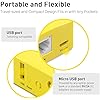
  • WIRELESS MOBILE MINI TRAVEL ROUTER Convert a public network (wired or wireless) to a private Wi-Fi for secure surfing. Tethering. Powered by any laptop USB, power banks or 5V/2A DC adapters (sold separately). 39g (1.41 Oz) only, portable and pocket friendly. 2.4GHz ONLY
  • OPEN SOURCE & PROGRAMMABLE OpenWrt pre-installed, USB disk extendable.
  • LARGER STORAGE & EXTENDABILITY 128MB RAM, 16MB Flash ROM, dual Ethernet ports, UART and GPIOs available for hardware DIY.
  • OPENVPN CLIENT OpenVPN client pre-installed, compatible with 30+ VPN service providers.
  • PACKAGE CONTENTS GL-MT300N-V2 (Mango) mini router (2-year Warranty), USB cable, Ethernet cable, User Manual. Please update to the latest firmware.
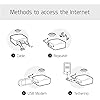
  • Easy SetupGet started quickly by connecting Mango via an Ethernet cable or Wi-Fi. Effortlessly configure Mango using our intuitive mobile app or the user-friendly web Admin Panel, enabling you to personalize your network settings in just a few easy steps.

Brand: GL.iNet


Model Name: GL-MT300N-V2


Special Feature: Access Point Mode, Internet Security


Frequency Band Class: Single-Band


Wireless Communication Standard: 802.11bgn


Compatible Devices: Personal Computer, Smartphone, Tablet, Gaming Console, Smart Television, Printer, Security Camera


Recommended Uses For Product: Business


Included Components: GL-MT300N-V2 (Mango) mini router (2-year Warranty), USB cable, Ethernet cable, User Manual.


Connectivity Technology: Ethernet, USB, Wi-Fi


Color: Blue, Grey, Black


Other Special Features of the Product: Access Point Mode, Internet Security


Frequency Band Class: Single-Band


Wireless Compability: 802.11bgn


Compatible Devices: Personal Computer, Smartphone, Tablet, Gaming Console, Smart Television, Printer, Security Camera


Antenna Location: Business


Connectivity Technology: Ethernet, USB, Wi-Fi


Antenna Type: Internal


Operating System: OpenWrt


Security Protocol: WPA2-PSK


Number of Ports: 2


Control Method: App


Data Transfer Rate: 300 Megabits Per Second


LAN Port Bandwidth: 100 megabits_per_second


Voltage: 5 Volts


Maximum Upstream Data Transfer Rate: 300 Megabits Per Second


RAM Memory Installed: 128 MB


Router Firewall Security Level: High


Wi-Fi Generation: Wi-Fi 4


Has Internet Connectivity: Yes


Router Network Type: multi-mode


Is Modem Compatible: Yes


Connectivity Protocol: Ethernet, Wi-Fi


Coverage: Personal use and travel


Controller Type: App Control


Is Electric: Yes


Frequency: 2.4 GHz


Brand: GL.iNet


Model Name: GL-MT300N-V2


Built-In Media: GL-MT300N-V2 (Mango) mini router (2-year Warranty), USB cable, Ethernet cable, User Manual.


Model Number: GL-MT300N-V2


Manufacturer: GL Technologies


Mfr Part Number: GL-MT300N-V2_SML


Unit Count: 1 Count


Warranty Description: 2 Years


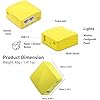
Item Weight: 40 Grams


Item Dimensions L x W x H: 2.28"L x 2.28"W x 0.98"H


Color: Blue, Grey, Black


EU Spare Part Availability Duration: 2 Years


Has Security Updates: Yes


Frequently asked questions

If you place your order now, the estimated arrival date for this product is: Thursday, Apr 30

Yes, absolutely! You may return this product for a full refund within 30 days of receiving it.

To initiate a return, please visit our Returns Center.

View our full returns policy here.

  • Klarna Financing
  • Affirm Pay in 4
  • Affirm Financing
  • Afterpay Financing
  • PayTomorrow Financing
  • Financing through Apple Pay
Leasing options through Acima may also be available during checkout.

Learn more about financing & leasing here.

Top Amazon Reviews


  • A tiny device that's easy to configure and use. Simple VPN setup with on/off toggle switch.
This is the best travel modem out there. It's tiny. It's light. It's full featured and incredibly configurable through a simple administrative panel that's easy and intuitive to use. It uses open source OpenWrt firmware but the Admin Panel tames all the complexity. It's just so darn useful. The main function is the repeater mode where you can login to a public Wi-Fi connection, and the device creates another Wi-Fi connection you or your entire party can login to. It's also easy to add a VPN (OpenVPN or Wireguard) to the connection and has a little toggle switch to enable and disable the VPN as you want. It can get Internet from any Wi-Fi source or through tethering from your smartphone or from a cellular data dongle if you have one of those. It also has an ethernet WAN port if your Internet connection is wired and an Internet LAN port if you want to connect your computer wired to the router. They thought of everything. The configuration panel makes all these various setups easy to select and configure. It's a really good device and so small and easy to travel with. Whatever your situation, this little device works and works well. It's 2 Ghz only but has 300 mbps throughput. No power supply is included, just the USB power cord and a short flat Ethernet cable are included. Since it supports OpenWrt, you can install custom firmware if you want and use this for something else. It has a built in system to install factory firmware from scratch if you have to. The GL.iNet people have done a great job with this little thing. ... show more
Reviewed in the United States on April 5, 2025 by David S.

  • Nice travel router
2025 Update: Took the rating from 3 stars to 5. First: Mainline OpenWRT now supports the device chipset which means I can use official downloads instead of ones made by the company that did not provide source code. Second: While the Ad-hoc/IBSS mode is not supported by the chipset, 802.11s mesh point mode *is* supported. This is a better long-term solution, and works great. I wanted to do B.A.T.M.A.N with some Pi Zero units (which can only do Ad-hoc, station, and AP modes), but that project fizzled out. Combining these with my home router also setup with 802.11s gave a very reliable mesh network (these provided extended wifi out on the patio). Original review: First, let me say that I did not purchase these (I bought two) to use in their intended purpose as a travel router. I was more interested in them as a cost-efficient learning platform for building a batman-adv mesh network. Unfortunately, the chipset in this little device is a MediaTek MT7628AN v1 which doesn't seem to have mainline OpenWRT support. The manufacturer does maintain several firmware images and an opkg repository, but I do not see any source code posted for their customized OpenWRT images (GPL violation?). The good: * Small and travel friendly. * Sufficient wifi signal * Easy to set up and use its basic functionality out of the box. Easily sets up as a wifi repeater. * Has a custom web UI that simplifies the most frequent, basic configurations. For more advanced options, LuCI is also available. The bad: * The wireless chipset doesn't support ad-hoc / IBSS mode which means they're useless as-intended for my batman-adv mesh project. * Can't even query the capabilities of the wireless chipset. "iw phy" returns nothing, and all of the radio interfaces seem to be "hardwired" into pre-defined modes (ra0 = iface used for AP mode, apcli0 = iface used in STA mode, wds0-3 for WDS). * I honestly don't trust this device not to send every secret that flows through it to Beijing, and the next thing I do will be a WireShark analysis. Assuming the silicon itself isn't compromised, I was hoping to simply reflash a vanilla OpenWRT image and build on that, but the architecture is not supported in mainline, and the chipset of the device was not published in the product description. Before giving up on these, I'm going to look into setting up a build environment for the chipset and compile my own image. * The OpenVPN client is garbage. It periodically disconnects and refuses to reconnect without several reboots. Clients lose internet access completely. Internet is otherwise solid with VPN disabled. Working on setting up WireGuard to see if it is any better. This is pretty much a core advertised feature of the product, so this is pretty unforgivable. * Chipset isn't supported in mainline OpenWRT. While the manufacturer's opkg repo does provide packages for that architecture, and that repo has so-far covered my needs, it makes me solely rely on the manufacturer. I suppose I could mirror their repo locally, but community support would be much preferred. * 3rd party OpenWRT packages are pretty much off the table. As with OpenWRT itself on this device, I'm looking into compiling the packages from source myself to bypass this limitation. ... show more
Reviewed in the United States on June 20, 2019 by Amazonian

  • Updated - Works well once you get past setup (otherwise would be 5 star).
Update: I'm leaving this at 4 stars due to setup and restart issues but this device is definitely worthwhile owning. I used it on a month long cruise as a repeater for a single device captive login and after learning how to configure it, it was flawless in operation and permitted multiple devices to easily connect. The primary setup difficulties have to do with using an IPhone as the interface (I don't know if Android phones will experience the same issues). With the IPhone, I found it necessary to turn off the DNS attack protection feature. Then, when restarting the router using my IPhone, it was necessary to turn off my phone WiFi, turn it back on and select the router (enter router password if necessary) to get the captive (Cruise ship) login to pop up. Once the captive login credentials were entered, my other devices were able to connect to the router. Note - using my MacBookPro to connect, it wasn't necessary to turn off WiFi for the captive login to pop up automatically. I haven't tested using the MacBook with the device's DNS option in its default state though. (Original Review) Gave this only 4 stars because of setup issues. I initialized the GL-MT300N-V2-ed1 mini router per instructions and personalized the admin password and SSID. I set it up as a repeater for my 2.4G Xfinity home router, however the mini router kept saying “internet not connected”. I also set the “remember” button when I selected the Xfinity router. Thinking I might have done something wrong, I reset the mini router (reset button 10+ seconds) and reinitialized/set up the same way (did not need the defaults “goodlife” admin pw after first reset). I repeated the admin reinitialization and (repeater) wifi setup with the same negative internet warning. Also checked my Xfinity router admin page and saw that the mini router was connected but still not passing data. Tried moving away from Xfinity router, incase the Xfinity signal was swamping the mini router signal, without success. I then shut down the mini router for a while and after about 10 minutes, I powered the mini router up again. With my IPhone connected to the mini router SSID (cellular data off), I logged back into mini router admin using the previously personalized pw and was astonished to see it was connected to Xfinity router and passing data (the wireless led was blinking). I tried browsing several different sites and was initially rebuffed by an Xfinity “device paused” warning page. After several attempts accessing different sites, I tried ignoring the Xfinity warning and discovered that reloading immediately brought up the desired site. After that, I was able to power down (disconnect) and automatically reconnect to the remembered wifi connection on power up without any login password. Some other notes: online help pages mention a green power led and a red wireless connection led - however, all the leds are white. The power led comes on quickly once the mini router has power, but it takes about a minute for the wireless led to light up. Also, the slide switch next to the reset button is apparently a programmable function switch that by default has no function. I've only tested this with a 2.4G wifi signal but the online literature suggests that it is also capable of 5G with a different wireless channel selection. Overall, once I got past the initial hiccups, the mini router works like a charm and I’m looking forward to using it with multiple devices on an upcoming cruise (cruise wifi only permits a single device connection). ... show more
Reviewed in the United States on February 14, 2020 by Jack

Can't find a product?

Find it on Amazon first, then paste the link below.
Checking for best price...